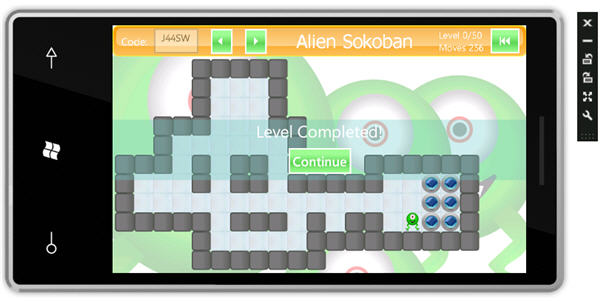
I have created a video of the game.
Please note that, in the video, when I say "click", it applies to using the mouse within the emulator, and it is analogous to pressing the screen on a real device.
Contents
Introduction
This article is a bit of an excursion for me, and it will be somewhat lighter than my usual articles. The tech that you are reading about in this article was only published last week, so I hope I can be forgiven for not going into depth for each and every feature. We will be taking a first look at Windows Phone 7, and creating a puzzle game using Silverlight and features of the XNA framework audio API.
Background
Last week at MIX10, Microsoft announced the release of the developer tools for the new Windows Phone 7. Like many developers, I was pretty happy about this. The MIX10 Developer conference 2010, which began at Las Vegas Monday last week, saw Microsoft focus specifically on its Microsoft Windows 7 phone and developer tools for the same. I spent all of last weekend putting this game together, and playing around with the new WP7 goodness. The verdict? I really like it. It's a familiar environment, Silverlight and XNA, and I believe it will have a big impact on the mobile phone landscape. Like many developers, I have felt a little jealous of the iPhone devs, making their fun little apps. Seemingly making wads of cash from apps as absurd as the iFart. It's mostly hype I believe, with the market place being highly competitive these days. But still, I would have liked to have gotten a taste of that scene, but alas had neither the time nor inclination to jump into the Apple world with Objective-c. Yes, Novell has its iPhone Touch, and I had contemplated taking it for a ride. But still, I believe I would end up feeling like I was trying to push a square block through a round hole.
Enter WP7. Now Microsoft has hit the ball out of the park, seriously. Yes yes, I know I sound like a bit of a fanboy, but I'm pleased that this stuff has hit the scene. In 2008, with version 1.1 of Silverlight (the first version that used .NET), I predicted that Silverlight would be huge. Ok, that was an easy call, but it's clear now that Windows Phone is set to make a massive impact. We have the familiar development environment of Visual Studio, a technology that is terrific for building flexible and dynamic interfaces, Silverlight, and finally the market place. All the ingredients for a perfect storm!
So in order to try out WP7, I've brought back my Mike Wazowski lookalike character for another incarnation of Alien Sokoban! I wrote much of the game logic for this game a couple of years ago for another article in Silverlight. Back then Silverlight for .NET had yet to have a proper release, it was version 1.1 and we didn't even have a baked in textbox; we had to roll our own. My, how times have changed. Now with the latest version of Silverlight, we have a cavalcade of new features. Web Cam, VSM, Com Interop, Multicast streaming, the list goes on and on. (but alas, still no baked in menu control yet!).
Windows Phone 7 uses Silverlight 3. The developer tools include an emulator, which is in fact a virtual machine. This is great, because it's like having the phone, without having the phone, which is helpful because I don't have the phone. There is full developer integration in Visual Studio; we have a debugger, and we can hover over variables in the code editor, etc., just like in Silverlight.
Getting Started
If you are new to Silverlight, I recommend that you get up to speed with that first. There are plenty of excellent beginner Silverlight articles here on CodeProject, which will help you get started.
Installation of the WP7 Tools
Install the Windows Phone developer tools CTP, and don't forget to read the release notes. Note that if you have Visual Studio 2010 RC, (note that you need the RC or later, and you can't have a beta installed on the same machine), then the tools will be integrated into the existing Visual Studio installation, otherwise Visual Studio 2010 Express will be installed.

Figure: Installing the Windows Phone 7 Developer Tools CTP
The setup program will automatically download and install the required components.
If you wish to use Expression Blend 4 for WP7 development, although you won't need it for this article, download and install the Expression Blend 4 add-on for Windows Phone from Christian Schormann’s blog.
Once the installation process has completed, restart and launch Visual Studio 2010.
Figure: On installation, new project types exist for Window Phone.
Then, you're good to go!
Game GUI
The main user interface is presented from a PhoneApplicationPage. This is the default host control when one creates a new Windows Phone Application.
Figure: Windows Phone assemblies after installation of the Developer Tools CTP.
Figure: Visual Studio design environment.
Developers will feel completely at home within Visual Studio 2010, when working with Windows Phones apps. Here, we see that we are able to work directly with the designer, with a visual representation of the workable phone area to guide us.
PageOrientation
One of the most obvious implications of hosting an application in a Windows Phone application is how to contend with layout orientation, and in particular detecting when orientation changes, and whether we deem our UI compatible with particular orientations. The PhoneApplicationPage has a settable property named SupportedOrientations. This enum value may be either Landscape, Portrait, or PortraitOrLandscape. By assigning it a value, either in XAML or in code, we are able to restrict how an application can be viewed. For Alien Sokoban, I went with PortraitOrLandscape, because I wished to provide the user with the ability to rotate the game grid depending on its dimensions. One thing of note is that setting the orientation from user code is not possible, as it is marked as SecurityCritical. We can see this in Reflector when we browse to the Page.Orientation property.
Figure: Page.Orientation property is SecurityCritical
SecurityCritical is a familiar attribute to most Silverlight developers. It means that an exception will ensue if we attempt to call it, and thus it's off limits. You can find more about Silverlight's code security model here.
Please note that this is Silverlight security, and is not specific to Windows Phone. It just goes to show that Windows Phone uses the full version of Silverlight, and not Silverlight Light.
From reflector, we can observe that Page.Orientation is not a dependency property, (nor does it raise a PropertyChanged event), and nor are any of its other properties for that matter. Therefore, binding to a PhoneApplicationPage property won't get us anywhere.
OrientationToVisibilityConverter
The way to detect and update page elements is not immediately possible without some extra work in the code beside. I wanted to hide the 'Alien Sokoban' title depending on the orientation, because it's too wide to present when the orientation is portrait. I could have simply set the Visibility in the OrientationChanged event handler, but I instead created a new dependency property on the MainPage which is updated when the OrientationChanged event handler is called. In order to convert the orientation value, I created an IValueConverter, and consume it from XAML. When the Page.Orientation property changes, the binding for the Visibility of the title TextBlock changes.
<TextBlock Visibility="{Binding ElementName=Page, Path=PageOrientation,
    Converter={StaticResource OrientationToVisibilityConverter},
				ConverterParameter= Landscape}" .../>
A ConverterParameter "Landscape" is used to specify that we wish to show the TextBlock only when the Page.Orientation property is of a landscape kind, which includes the values Landscape, LandscapeLeft, or LandscapeRight. The following is an excerpt from the OrientationToVisibilityConverter, which shows how the converter changes a PageOrientation value to a Visibility value:
public object Convert(object value, Type targetType,
		object parameter, CultureInfo culture)
{
	var orientation = (PageOrientation)value;

	string showWhenOrientation = parameter.ToString().ToLower();
	bool show = false;
	switch (orientation)
	{
		case PageOrientation.Portrait:
		case PageOrientation.PortraitDown:
		case PageOrientation.PortraitUp:
			show = showWhenOrientation == "vertical";
			break;
		case PageOrientation.Landscape:
		case PageOrientation.LandscapeLeft:
		case PageOrientation.LandscapeRight:
			show = showWhenOrientation == "landscape";
			break;
	}

	return show ? Visibility.Visible : Visibility.Collapsed;
}
Using the XNA Framework Audio API
I was pleasantly surprised just how easy it is easy to use the XNA framework to play sound effects. It is good for short samples, where instant playback is required. Be warned however that it is fussy about the format. I found that only PCM format wav files were supported. I used GoldWave to save all audio to a PCM format. For longer clips, it makes more sense to use a more space efficient format, such as mp3, but for this you'll need to use the MediaElement control.
All sound effects are defined in the MainPage.xaml.cs code beside as the following excerpt demonstrates:
readonly SoundEffect footStepSoundEffect =
	SoundEffect.FromStream(TitleContainer.OpenStream("Audio/Footstep.wav"));
We are then able to play the sound effect like so:
footStepSoundEffect.Play();
Be aware that the Build Action of all audio files, which are intended to be played by the XNA framework, needs to be set as Content.
Figure: Audio file Build Action must be set to Content.
When using the MediaPlayer element in Silverlight in the past, I've noticed there can be a short delay when queuing media. Using the XNA framework, playback is instantaneous; a critical requirement for sound effects.
MainPage Bindings
During instantiation, the MainPage has a Game instance assigned as its DataContext. Mostly all of its activities are controlled by data binding and Game property changes. The MainPage is provided here in its entirety:
<phoneNavigation:PhoneApplicationPage
x:Class="DanielVaughan.Sokoban.UI.MainPage"
x:Name="Page"
xmlns="http://schemas.microsoft.com/winfx/2006/xaml/presentation"
xmlns:x="http://schemas.microsoft.com/winfx/2006/xaml"
xmlns:phoneNavigation="clr-namespace:Microsoft.Phone.Controls;
assembly=Microsoft.Phone.Controls.Navigation"
xmlns:d="http://schemas.microsoft.com/expression/blend/2008"
xmlns:mc="http://schemas.openxmlformats.org/markup-compatibility/2006"
xmlns:controls="clr-namespace:DanielVaughan.Sokoban.UI"
mc:Ignorable="d" d:DesignWidth="480" d:DesignHeight="800"
SupportedOrientations="PortraitOrLandscape"
FontFamily="{StaticResource PhoneFontFamilyNormal}"
FontSize="{StaticResource PhoneFontSizeNormal}"
Foreground="{StaticResource PhoneForegroundBrush}" Orientation="Landscape">
<phoneNavigation:PhoneApplicationPage.Resources>
<controls:OrientationToVisibilityConverter
x:Key="OrientationToVisibilityConverter" />
<Style x:Key="CenterLabels" TargetType="TextBlock">
<Setter Property="Foreground" Value="White"/>
<Setter Property="FontSize" Value="18"/>
<Setter Property="VerticalAlignment" Value="Center"/>
</Style>
<Style x:Key="ToolBarWebdings" TargetType="Button">
<Setter Property="Background">
<Setter.Value>
<LinearGradientBrush EndPoint="0,1" StartPoint="0,0">
<GradientStop Color="#FF9AFF95" Offset="0.21"/>
<GradientStop Color="#FF5DD757" Offset="0.589"/>
<GradientStop Color="#FF99FF93" Offset="1"/>
</LinearGradientBrush>
</Setter.Value>
</Setter>
<Setter Property="FontFamily" Value="Webdings"/>
<Setter Property="Foreground" Value="White"/>
<Setter Property="Padding" Value="5 "/>
</Style>
<Style x:Key="OrdinaryButton" TargetType="Button">
<Setter Property="Background">
<Setter.Value>
<LinearGradientBrush EndPoint="0,1" StartPoint="0,0">
<GradientStop Color="#FF9AFF95" Offset="0.21"/>
<GradientStop Color="#FF5DD757" Offset="0.589"/>
<GradientStop Color="#FF99FF93" Offset="1"/>
</LinearGradientBrush>
</Setter.Value>
</Setter>
<Setter Property="Foreground" Value="White"/>
<Setter Property="Padding" Value="5 "/>
</Style>
</phoneNavigation:PhoneApplicationPage.Resources>
<Grid x:Name="LayoutRoot" Background="White">
<Grid.RowDefinitions>
<RowDefinition Height="Auto"/>
<RowDefinition Height="*"/>
</Grid.RowDefinitions>
<controls:BackgroundControl Opacity=".3" />
<Border VerticalAlignment="Top" Grid.Row="0" Height="60"
BorderBrush="#FFFFE63E" CornerRadius="10,10,10,10"
BorderThickness="2,2,2,2" Margin="0,0,0,0">
<Border.Background>
<LinearGradientBrush EndPoint="0.5,-1.389"
StartPoint="0.5,2.389" SpreadMethod="Pad">
<GradientStop Color="#FFFF9900" Offset="1"/>
<GradientStop Color="#FFFF9900" Offset="0.58"/>
<GradientStop Color="#FFFFFFFF" Offset="0"/>
</LinearGradientBrush>
</Border.Background>
<Grid>
<Rectangle Stroke="{x:Null}" Margin="5,3,5,18"
RadiusX="10" RadiusY="10" Opacity="0.41">
<Rectangle.Fill>
<LinearGradientBrush EndPoint="0.5,1" StartPoint="0.5,0">
<GradientStop Color="#FFECECEC" Offset="0"/>
<GradientStop Color="#FFFFFFFF" Offset="1"/>
</LinearGradientBrush>
</Rectangle.Fill>
</Rectangle>
<StackPanel Height="50" x:Name="stackPanel1" Margin="15,0,5,0"
VerticalAlignment="Center" HorizontalAlignment="Stretch"
Width="Auto" Orientation="Horizontal">
<TextBlock VerticalAlignment="Center"
Foreground="White" Text="Code:" TextWrapping="Wrap"/>
<TextBox Text="{Binding Path=LevelCode, Mode=OneWay}"
x:Name="textBox_LevelCode" MaxLength="5"
Opacity="0.4" Width="110" TextAlignment="Center"
VerticalAlignment="Center"
HorizontalContentAlignment="Center"
GotFocus="TextBox_LevelCode_GotFocus"
LostFocus="TextBox_LevelCode_LostFocus"
KeyUp="TextBox_LevelCode_KeyUp"
Background="White" />
<Button Style="{StaticResource ToolBarWebdings}"
Margin="0,-10,0,0" Height="10" Content=""
Click="Button_Undo_Click"/>
<Button Style="{StaticResource ToolBarWebdings}"
Margin="0,-10,0,0" Height="10" Content=""
Click="Button_Redo_Click"/>
<TextBlock Visibility="{Binding ElementName=Page,
Path=PageOrientation,
Converter={StaticResource OrientationToVisibilityConverter},
ConverterParameter=Landscape}"
VerticalAlignment="Center" HorizontalAlignment="Center"
TextAlignment="Center" Foreground="White"
Text="Alien Sokoban"
FontFamily="Tahoma" FontSize="36" Margin="45,0,0,0"/>
</StackPanel>
<Grid HorizontalAlignment="Right">
<StackPanel Orientation="Horizontal">
<StackPanel VerticalAlignment="Center">
<StackPanel Orientation="Horizontal">
<TextBlock Style="{StaticResource CenterLabels}"
Text="Level "/>
<TextBlock x:Name="label_LevelNumber"
Style="{StaticResource CenterLabels}"
Text="{Binding Path=Level.LevelNumber}"/>
<TextBlock Style=
"{StaticResource CenterLabels}" Text="/"/>
<TextBlock Style="{StaticResource CenterLabels}"
Text="{Binding Path=LevelCount}"/>
</StackPanel>
<StackPanel Orientation="Horizontal">
<TextBlock Style="{StaticResource CenterLabels}"
Text="Moves "/>
<TextBlock x:Name="label_Moves"
Style="{StaticResource CenterLabels}"
Text="{Binding Path=Level.Actor.MoveCount}"/>
</StackPanel>
</StackPanel>
<Button Style="{StaticResource ToolBarWebdings}"
Margin="0,-8,0,0"
Height="10" x:Name="button_RestartLevel" Width="80"
Click="Button_RestartLevel_Click"
IsTabStop="False" Content=""
HorizontalAlignment="Right" >
<ToolTipService.ToolTip>
<ToolTip Content="Restart"></ToolTip>
</ToolTipService.ToolTip>
</Button>
</StackPanel>
</Grid>
</Grid>
</Border>
<Border Grid.Row="1" Padding="5" BorderBrush="#919292" CornerRadius="12"
BorderThickness="0" Background="Transparent">
<Grid x:Name="grid_Game" />
</Border>
<Grid x:Name="textBlock_PressAnyKey"
Background="#006DCAC1"
HorizontalAlignment="Stretch" VerticalAlignment="Stretch" Grid.RowSpan="2">
<StackPanel VerticalAlignment="Center" HorizontalAlignment="Stretch"
Background="#556DCAC1">
<TextBlock x:Name="feedbackControl"
VerticalAlignment="Center"
HorizontalAlignment="Center" Text="TextBlock" FontSize="32"/>
<Button Style="{StaticResource OrdinaryButton}" Content="Continue"
VerticalAlignment="Center" HorizontalAlignment="Center"
Click="Button_Continue_Click"/>
</StackPanel>
</Grid>
</Grid>
</phoneNavigation:PhoneApplicationPage>
Each cell in the game grid is populated with a CellControl. This occurs in the InitializeLevel method of the MainPage:
void InitialiseLevel()
{
cellControls.Clear();
commandManager.Clear();
grid_Game.Children.Clear();
grid_Game.RowDefinitions.Clear();
grid_Game.ColumnDefinitions.Clear();
for (int i = 0; i < Game.Level.RowCount; i++)
{
grid_Game.RowDefinitions.Add(new RowDefinition());
}
for (int i = 0; i < Game.Level.ColumnCount; i++)
{
grid_Game.ColumnDefinitions.Add(new ColumnDefinition());
}
var cellSize = CalculateCellSize();
for (int row = 0; row < Game.Level.RowCount; row++)
{
for (int column = 0; column < Game.Level.ColumnCount; column++)
{
Cell cell = Game.Level[row, column];
cell.PropertyChanged += cell_PropertyChanged;
CellControl cellControl = new CellControl(cell);
cellControl.MaxHeight = cellControl.MaxWidth = cellSize;
cellControl.Click += Cell_Click;
Grid.SetColumn(cellControl, column);
Grid.SetRow(cellControl, row);
grid_Game.Children.Add(cellControl);
cellControls.Add(cellControl);
}
}
PlayAudioClip(introSoundEffect);
RefreshGameGrid();
}
Ordinarily, I wouldn't recommend placing this kind of UI logic code in the code beside, as I prefer using a MVVM approach. However, in the interests of expediency, I went with this approach.
The CellControl is assigned a Game cell, and changes its visual depending on the cell's state. If it is deemed a wall, it shows a grey square, etc.
Game Play
Please see the video of the game for an overview of how to play the game. The game logic has also been documented here and here.
Phone On-Screen Keyboard
Windows Phone 7 allow the developer to specify the type of data that a user is able to enter via the on-screen keyboard. It is also context sensitive, and will zoom into a TextBox when the TextBox gains focus. To change the keyboard to something that is more applicable to the data that is being entered, an InputScope is used.
Figure: Enter level code using On Screen Display
For example, to specify a variation to the default on-screen keyboard (as shown above), apply an InputScope element to the TextBox.
<TextBox>
  <TextBox.InputScope>
    <InputScope>
      <InputScope.Names>
        <InputScopeName NameValue="EmailNameOrAddress"/>
      </InputScope.Names>
    </InputScope>
  </TextBox.InputScope>
</TextBox>
By using the EmailNameOrAddress NameValue the keyboard presented includes the QWERTY characters as well as .com and the @ symbol.
The following is a list of valid input scope values:
| SIP layout | XAML or enumeration value | SIP description |
| Default | Default, and other standard input scope values | Standard QWERTY keyboard |
| Text | Text | Standard text with features such as autocorrect and text suggestion |
| Web | Url | User types a URL |
| E-mail address | EmailSmtpAddress | User types an e-mail address |
| E-mail name or address | EmailNameOrAddress | User types an e-mail name or address |
| Maps | Maps | User types a location to search for on a map |
| Phone number | TelephoneNumber | User types a telephone number |
| Search | Search | User types a search query |
| SMS contact | NameOrPhoneNumber | User types in the SMS To field |
| Chat | Chat | Text input that uses intelligent features such as abbreviations |
Source: Don's Expression Blend Blog
Conclusion
In this article, we have seen how to create a Windows Phone puzzle game using Silverlight 3. We have looked at PageOrientation and how it applies to control layout. We examined the on-screen keyboard, and how different keyboards can be selected based on context, and we also briefly looked at the XNA Framework audio API, and how it can be used to play sound effects.
I'm very excited about the future of this platform. After spending only a brief amount of time with it, I feel at home already. I hope you find this project useful. If so, then I'd appreciate it if you would rate it and/or leave feedback below. This will help me to make my next article better.
History
- March 2010
- July 2010
- Updated for Windows Phone 7 Beta


 General
  News
News  Suggestion
  Question
  Bug
Bug  Answer
  Joke
Joke  Praise
  Rant
Rant  Admin
Admin 


 Submit an article or tip


 I am new to Silverlight and Windows Phone,thanks for sharing this excellent article.
![Rose | [Rose]](https://codeproject.global.ssl.fastly.net/script/Forums/Images/rose.gif)
