The latest version can be found
here (ACF
homepage).
Abstract
This article provides an introduction to ACF, a C++ framework which brings the
.NET framework to standard C++. Knowledge of C++ and the .NET Framework is assumed.
Contents
- What is ACF
- Why ACF
- Getting started
- Basic type system
- Exceptions
- Arrays and collections
- Delegates and events
- Strings and text
- I/O
- Threading
- History
- Contact
What is ACF
ACF (Another C++ Framework), is a C++ framework designed to bring the power and
RAD of the .NET framework to standard C++. ACF does this by implementing the features
and APIs of the .NET framework in standard C++, and at the same time takes advantage
of C++ unique features such as templates.
Why ACF
The .NET framework is definitely the future development platform of Microsoft,
and C# is the best programming language for that platform. However, today there
are thousands of existing C++ projects and developers. These projects are not likely
to be totally rewritten for .NET, and the developers are facing the headache choice
between the RAD and benefits of C# and the .NET framework, and the performance and
control of C++. Apparently, the C++ community need a bridge now before moving to
.NET in the future.
The solution from Microsoft is Managed C++. MC++ tries to bring C++ to .NET,
the result is that C++ code can be compiled to IL, and managed code can easily interop
with native code. However, MC++ may not be a good choice for many projects and developers.
First, C++ is almost the symbol of performance and control, but JIT and GC are very
slow, and the runtime is also too huge for many applications. Second, C++ is already
very complex and hard to learn and use, MC++ adds to it.
ACF tries to solve this problem from another side - bring .NET to C++. By implementing
the .NET framework in standard C++, ACF helps existing C++ projects and developers:
- ACF can be used in existing or new C++ projects (ACF works seamlessly with
MFC/ATL/STL, etc), and everything compiles to machine code.
- Developers can use existing C++ skills, and at the same time use concepts
and APIs that are very close to the .NET framework. Their new skills are reusable
across C#, C++ and MC++ (for example, they always use
String::Format
to build formatted strings). - ACF also helps when porting code between C++ and C#.
Getting started
Currently, ACF is developed under Visual C++ 2003, you'd better get it before
we move on (if you are still using Visual C++ 6.0, throw it away since it is not
very standards conformant and its template support is very limited). The first step
will be to build ACF if not done before. For example, to build the Corlib,
open Corlib.sln (under "{...}\Acf\src\Corlib", where {...} is the directory which
contains ACF) with Visual Studio and build it. Like using other C++ libraries, you
need to setup the include and library directories in your development environment
before using ACF in your applications. The include directory for Corlib is "{...}\Acf\src\Corlib",
library directory is "{...}\Acf\lib".
The "hello world" program can be written as follows:
#include <AcfCorlib.h>
int main() {
    Acf::Console::WriteLine(L"hello, world");
}
To compile this program, you need to turn on "treat wchar_t as built-in type"
and "enable runtime type info" compiler options, and link to the multithreaded CRT.
This is required for all ACF projects.
ACF is organized into a number of namespaces, following the design of the .NET
framework. The Acf namespace corresponds to the System
namespace in the .NET framework. AcfCorlib.h is the header file for the Corlib.
Before we can write more useful applications, let's look into the type system of
ACF.
Basic type system
There are some significant differences between the C++ type system and the C#/CLI
type system, this affects how ACF type system is implemented.
C++ does not have a unified type system. Primitive types are "magic"; types are
not required to inherit from a common root; and MI is allowed. C++ also has a very
flexible memory model, the developers control how and when to allocate/free memory.
C#/CLI has an unified type system. All types directly or indirectly inherit from
System.Object; MI is not allowed, but a type can implement multiple
interfaces. Types can be value types or reference types. Instances of value types
directly contain data; instances of reference types are allocated on the GC heap
and are automatically reclaimed. The translation between value types and reference
types is called boxing/unboxing, which is handled by the compiler and the runtime.
ACF tries to emulate the C#/CLI type system on C++ and at the same time retain
performance. The result is a hybrid type system. In ACF, types include reference
types and other types. Reference types are allocated on the heap, and managed using
reference count (like COM). Reference types are required to inherit from a single
root - Acf::Object. MI is only used to implement interfaces, and all
reference interfaces are required to inherit from Acf::InterfaceBase.
Other types include the primitive types (e.g. int, float),
enum types and other C++ structures and classes. The following diagram
shows the basic object model (green classes are value types, blue classes are reference
types):
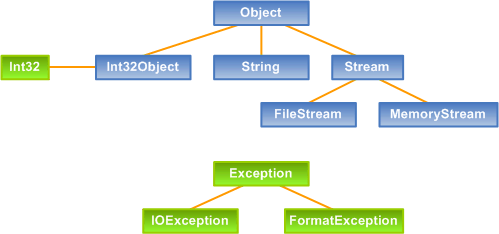
In ACF, there is no automatically boxing/unboxing since it requires compiler
and runtime support. Developers have to define the value class and reference class
separately and handle the boxing/unboxing requests (in C#/CLI, there is only one
type, and boxing/unboxing are automatically handled). For example, Int32
is a value type and does not have a base. It has an instance int field
and provides methods for parsing and formatting. The Int32Object reference
type has an instance Int32 field and inherits from Acf::Object
and implements interfaces such as IFormattable. (ACF uses X
and XObject naming conversion to distinguish value types and their corresponding
reference types, another example is Acf::Guid and Acf::GuidObject.)
The example:
int main() {
int i = 123;
ObjectPtr o = box(i); int j = unbox<int>(o); }
shows how boxing and unboxing are used. The box and unbox<T>
functions are template functions under Acf namespace. The default implementation
of box returns an instance of Acf::Boxed<T> which inherits
from Acf::Object and acts as an object box. The box and
unbox<T> functions should be overloaded for user-defined types that
have separate value class and reference class definitions (for example, Int32
and Int32Object).
In ACF, all reference types are allocated on the heap via operator new.
The new operator is overloaded so that it throws Acf::OutOfMemoryException
when memory allocation fails. On successful allocation, the returned memory is cleared
so there are no random bits. As stated, ACF uses reference count to manage object
lifetime (all interfaces share the same reference count with their owner objects).
When holding an object or an interface, you should call AddRef; when
you are done, you should call Release. An object has an initial reference
count 0 and is freed when its reference count goes back to 0. A smart pointer class,
RefPtr<T>, is designed to do the AddRef/Release jobs automatically.
As a common design philosophy, RefPtr<T> is treated as strong reference,
and raw C++ pointer is treated as weak reference. We need to distinguish strong
reference and weak reference because the reference count approach has problem dealing
with cyclic reference. For example, if object A has a strong reference to object
B, and object B has a strong reference back to object A, then these two objects
form a cyclic reference and both will never be freed. This problem can be solved
by letting B hold a weak reference to A (or reverse, depending on the scenario).
The following example shows how to define and use reference types:
#include <AcfCorlib.h>
using namespace Acf;

class Person : public Object {
public:
    StringPtr Name;
    int Age;

    Person() {
    }

protected:
    virtual ~Person() {
    }
};

int main() {
    StringPtr name = new String(L"Foo");

    RefPtr<Person> person = new Person();
    person->Name = name;
    person->Age = 25;

    Console::WriteLine(L"Name: {0}, Age: {1}",
       person->Name, str(person->Age));
}
The class Person is a reference type and inherits from Acf::Object.
It has two instance fields, Name (string) and Age
(int). StringPtr is a typedef of RefPtr<String>.
The destructor is protected so this type cannot be allocated on stack (reference
types shall always be allocated on the heap).
In the main function, the first statement defines and allocates a new string
instance. Next, a new Person instance is allocated and its fields are
changed. Then, Console::WriteLine is used to format and print the person's
name and age (the format string is defined by the .NET framework).
Exceptions
ACF uses exceptional handling as its basic error raising and handling mechanism.
In the .NET framework, exceptions are also reference types and collected by GC.
In ACF, exceptions are value types. This is because in C++, the preferred way to
throw and catch exceptions is throw MyException() and
catch (const
MyException& e)
.
Acf::Exception is the base class for all exceptions.
Common exception classes include
ArgumentNullException,
IOException,
FormatException, etc.
Arrays and collections
Arrays and collections in ACF are different from the .NET framework ones, because
C++ provides good template and template specialization support (especially partial
specialization).
Array<T> is the array class in ACF (currently multidimensional arrays
are not supported). The actual class declaration is Array<T, Tr>, where
Tr is the collection traits class (there are default implementations
for most classes). The collection traits control how to pass parameters, how to
clear elements, how to compare two elements, and how to generate hash code. This
technique is used by all ACF collection classes and interfaces.
Here are two array examples:
RefPtr<Array<int> > array1 = Array<int>::Build(3, 1, 2, 5, 4);
Array<int>::Sort(array1);

RefPtr<Array<StringPtr> > array2 = new Array<StringPtr>(2);
array2->Item[0] = str(L"hello");
array2->Item[1] = str(L"world");
The first example builds an int array with 5 elements and sorts
it. The second example creates a string array with two elements and sets the elements.
The Item[0] syntax is a Visual C++ language extension which represents
an indexed property. It is translated into array1->set_Item(0, str(L"hello"))
at compile time.
The other collection classes and interfaces in ACF (under namespace Acf::Collections)
are just like the .NET framework ones, except they are template based. Here are
some examples:
RefPtr<List<int> > list = new List<int>();
list->Add(10);
list->Add(20);

RefPtr<Dictionary<StringPtr, int> > map = new Dictionary<StringPtr, int>();
map->Item[str(L"s1")] = 1;
map->Item[str(L"s2")] = 10;
C# has a foreach statement to enumerate over arrays and
collections and many developers like it very much. ACF defines a FOREACH
macro to emulate this feature. For example, given an array which stores int,
we can enumerate the array as follows:
FOREACH (int, n, array) {
    Console::WriteLine(n);
}
Delegates and events
Delegates and events are so attractive features of C# and the .NET framework
that ACF definitely cannot miss them.
The delegate definition in ACF is quite different from C#/CLI. For example, the
EventHandler delegate definition in C# is as follows:
delegate void EventHandler(object sender, EventArgs e);
In ACF it is like:
typedef Delegate2<void, Object*, EventArgs*> EventHandler;
Here DelegateN<R, P1, P2, ..., Pn> is the delegate class in ACF,
where N is the number of the function parameters and R
is the function return type. To invoke a delegate, call the instance method
Invoke with the function parameters.
In C#, it is very easy to define and consume events, but in ACF, it's a little
complex since there is no compiler support. To define an event, use the ACF_DECLARE_EVENT
macro.
Here is an example on how to use delegates and events in ACF:
typedef Delegate2<void, Object*, EventArgs*>   EventHandler;
typedef RefPtr<EventHandler>   EventHandlerPtr;

class Button : public Object {
public:
    ACF_DECLARE_EVENT(EventHandler, Click)

protected:
    void OnClick(EventArgs* e) {
        if (Click != null)
            Click->Invoke(this, e);
    }
};

class Form1 : public Object {
private:
    RefPtr<Button> _button;

public:
    Form1() {
        this->_button = new Button();

        EventHandlerPtr h1 = new EventHandler(this, Form1::ButtonClickHandler);
        this->_button->add_Click(h1);

        EventHandlerPtr h2 = new EventHandler(Form1::StaticButtonClickHandler);
        this->_button->add_Click(h2);
    }

private:
    void ButtonClickHandler(Object* sender, EventArgs* e) {
        std::cout << "Button clicked!" << std::endl;
    }

    static void StaticButtonClickHandler(Object* sender, EventArgs* e) {
        std::cout << "Static: Button clicked!" << std::endl;
    }
};
The ACF_DECLARE_EVENT macro actually generates the following code:
class Button : public Object {
private:
    RefPtr<EventHandler> Click;

public:
    void add_Click(EventHandler* h) {
        LOCK (this)
            this->Click = EventHandler::Combine(this->Click, h);
    }
    void remove_Click(EventHandler* h) {
        LOCK (this)
            this->Click = EventHandler::Remove(this->Click, h);
    }
};
In Form1's constructor, two delegates are created, one attaches
to a static method and another attaches to an instance method. For the instance
method, the delegate also needs a reference to the object (here it is Form1).
Since Form1 has a strong reference to Button, and
Button has a strong reference to Click, so, if Click
has a strong reference to Form1, then a cyclic reference is formed.
However, in other cases, the delegates may really need strong references to the
objects. So, the constructors of the delegate classes are overloaded for both
T* and RefPtr<T>. If you pass a T* when constructing
a delegate (typically using the this pointer), the delegate will hold
a weak reference to the object. Otherwise, it'll hold a strong reference.
Strings and text
The String and StringBuilder classes provide basic
string manipulations. The Acf::Text namespace also provides classes
for encoding and decoding text, as the .NET framework. Here is a simple example:
StringPtr s = String::Format(L"Text: {0} {1}", s1, obj);

EncodingPtr enc = Encoding::get_Default();
RefPtr<Array<byte> > bytes = enc->GetBytes(s);
The str function converts numerical values and C-style strings to
String.
int a = 10;
float b = 15.2;
const char* c = "hello";

StringPtr s = String::Format(L"{0}{1}{2}", str(a), str(b), str(c));
I/O
The Acf::IO namespace contains classes for reading and writing streams
and files (currently ACF does not support asynchronous file I/O).
For example, to read text from a file, you can write code as follows:
StringPtr path = new String(L"C:\in.txt");
StreamReaderPtr reader = new StreamReader(path);
StringPtr text = reader->ReadToEnd();
ACF supports basic streams including FileStream and MemoryStream,
and readers/writers including BinaryReader/BinaryWriter, TextReader/TextWriter,
StreamReader/StreamWriter and StringReader/StringWriter.
ACF also supports simple file system management via Path,
File
and
Directory classes.
Threading
ACF provides basic support for writing multithreaded applications. The following
code shows how to create and start worker threads:
static void WorkerThreadProc() {
    ...
}

class MyObject : public Object {
public:
    void WorkerThreadProc() {
        ...
    }
};

int main()
{
    ThreadPtr thread1 = new Thread(WorkerThreadProc);
    thread1->Start();

    RefPtr<MyObject> obj = new MyObject();

    ThreadStartPtr start = new ThreadStart(obj, MyObject::WorkerThreadProc);
    ThreadPtr thread2 = new Thread(start);
    thread2->Start();

    ...
}
To synchronize data access, use the LOCK macro or the Interlocked,
Monitor, AutoResetEvent, ManualResetEvent
or Mutex classes.
History
- 5/25/2004, version 0.2.
- 4/25/2004, version 0.1.
Contact
Your feedback and suggestions are key factors to make this framework better,
please feel free to send them to Yingle Jia (yljia@msn.com).
You can also visit his weblog at http://blogs.wwwcoder.com/yljia/.



 General
  News
News  Suggestion
  Question
  Bug
Bug  Answer
  Joke
Joke  Praise
  Rant
Rant  Admin
Admin 


 Submit an article or tip


 Robert Fuchs
![Rose | [Rose]](https://codeproject.global.ssl.fastly.net/script/Forums/Images/rose.gif)