Introduction
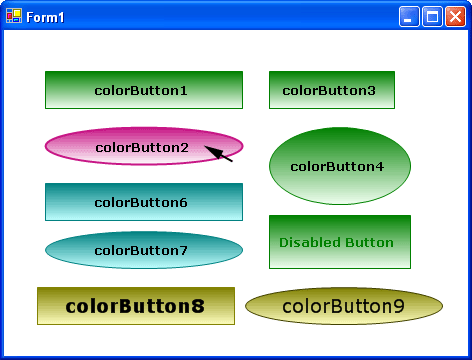
This is my first C# custom control. Please download the demo program and have a click.
Features
Users are able to define the:
- Color
- Border color
- Normal color A
- Normal color B
- Hover color A
- Hover color B
- GradientStyle
- Horizontal
- Vertical
- ForwardDiagonal
- BackwardDiagonal
- ButtonStyle
- SmoothingQuality
- None(crispy)
- HighSpeed
- AntiAlias
- HighQuality
You can actually feel the clicks with its flat style!
Key Techniques Used in OnPaint()
SmoothingMode
switch (_SmoothingQuality)
{
case SmoothingQualities.None:
e.Graphics.SmoothingMode = SmoothingMode.Default;
break;
case SmoothingQualities.HighSpeed:
e.Graphics.SmoothingMode = SmoothingMode.HighSpeed;
break;
case SmoothingQualities.AntiAlias:
e.Graphics.SmoothingMode = SmoothingMode.AntiAlias;
break;
case SmoothingQualities.HighQuality:
e.Graphics.SmoothingMode = SmoothingMode.HighQuality;
break;
}
LinearGradientMode
LinearGradientMode mode;
switch (_GradientStyle)
{
case GradientStyles.Horizontal:
mode = LinearGradientMode.Horizontal;
break;
case GradientStyles.Vertical:
mode = LinearGradientMode.Vertical;
break;
case GradientStyles.ForwardDiagonal:
mode = LinearGradientMode.ForwardDiagonal;
break;
case GradientStyles.BackwardDiagonal:
mode = LinearGradientMode.BackwardDiagonal;
break;
default:
mode = LinearGradientMode.Vertical;
break;
}
LinearGradientBrush
LinearGradientBrush brush;
switch (_State)
{
    case _States.Normal:
        brush = new LinearGradientBrush(newRect,
                _NormalColorA, _NormalColorB, mode);
        switch (_ButtonStyle)
        {
            case ButtonStyles.Rectangle:
                e.Graphics.FillRectangle(brush, newRect);
                e.Graphics.DrawRectangle(new
                    Pen(_NormalBorderColor, 1), newRect);
                break;
            case ButtonStyles.Ellipse:
                e.Graphics.FillEllipse(brush, newRect);
                e.Graphics.DrawEllipse(new
                  Pen(_NormalBorderColor, 1), newRect);
                break;

        }
        e.Graphics.DrawString(this.Text, base.Font,
           new SolidBrush(base.ForeColor), textX, textY);
        break;

    case _States.MouseOver:
        brush = new LinearGradientBrush(newRect,
              _HoverColorA, _HoverColorB, mode);
        switch (_ButtonStyle)
        {
            case ButtonStyles.Rectangle:
                e.Graphics.FillRectangle(brush, newRect);
                e.Graphics.DrawRectangle(new
                     Pen(_HoverBorderColor, 1), newRect);
                break;
            case ButtonStyles.Ellipse:
                e.Graphics.FillEllipse(brush, newRect);
                e.Graphics.DrawEllipse(new
                   Pen(_HoverBorderColor, 1), newRect);
                break;

        }
        e.Graphics.DrawString(this.Text, base.Font,
          new SolidBrush(base.ForeColor), textX, textY);
        break;

    case _States.Clicked:
        brush = new LinearGradientBrush(newRect,
              _HoverColorA, _HoverColorB, mode);
        switch (_ButtonStyle)
        {
            case ButtonStyles.Rectangle:
                e.Graphics.FillRectangle(brush, newRect);
                e.Graphics.DrawRectangle(new
                     Pen(_HoverBorderColor, 2), newRect);
                break;
            case ButtonStyles.Ellipse:
                e.Graphics.FillEllipse(brush, newRect);
                e.Graphics.DrawEllipse(new
                   Pen(_HoverBorderColor, 2), newRect);
                break;

        }
        e.Graphics.DrawString(this.Text, base.Font,
          new SolidBrush(base.ForeColor),
          textX + 1, textY + 1);
        break;
}
My Other Control Project
Feedbacks
Please vote for this article.
And email me or leave your messages if you have:
- bug reports
- code improvements
- any comments or suggestions.
Hi, my name is Alan Zhao. I live in Glens Falls, NY. Say hi to me if you see me one day.
also visit me at www.LinkGone.com - Make your long URLs easy to read, remember and reuse.



 General
  News
News  Suggestion
  Question
  Bug
Bug  Answer
  Joke
Joke  Praise
  Rant
Rant  Admin
Admin 


 Submit an article or tip


