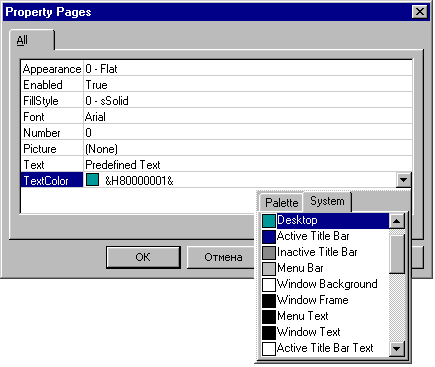
Developing ActiveX Controls I always was unhappy to spend a fair amount of
time to monotonous GUI work designing and implementing a property pages.
Eventually I wrote this class that works in most cases as a universal property
page for any ATL-based ActiveX Control. The prototype for this class is property
browser window known for to any Visual Basic developers.
How it works:
Generally, this class uses IPropertyPage::SetObjects and queries the control's IDispatch::GetTypeInfo to enumerate properties.
Currently, this template class can handle the following kinds of properties:
Simple types such as long, short, text(BSTR), ect. Font (IFontDisp) OLE_COLOR
Picture (IPictureDisp) enums boolean (VARIANT_BOOL)
Current implementation don't display properties that has [hidden]
or [nonbrowsable] attributes as well as indexed properties and
properties of custom types (IFoo* or similar). The control's
default interface should be dual and derived from IDispatch. If
you use enumerated properties, the control must support IPerPropertyBrowsing::GetPredefinedStrings
and IPerPropertyBrowsing::GetPredefinedValue (look at the
demo project for a sample) The main template class CPropertyBrowserPage
is derived from both IPropertyPageImpl and CDialogImpl and uses
some other helper classes that is briefly described below:
- CPropBrowseWnd class is a owner-drawn listbox that
displays properties grid and handles property selections, start/stop editing,
ect. It is a main GUI window and CPropertyBrowserPage creates it in
OnInitDialog.
- CPBProperty is a simple class for storage properties
attributes like name, type, current value and "dirty" status.
- CPBPropertyHolder helper class is just a very simple
container (array) of CPBProperty objects.
- CPBColorPicker class is popup color picker window that
allow user to choose color either from palette or from system's colors set.
- CPBDropListBox class works together with in-place edit
window to resemble combo-box like interface
- PBDib class generally wasn't developed by me, this class
encapsulates DIB manipulations API
How to use:
- Copy following files to your project's directory:
- PropertyBrowserPage.h
- PropertyBrowserPage.cpp
- PBDib.h
- PBDib.cpp
and add *.cpp files to the project. - Select "New ATL Object" from the
Insert menu. Select "Property Page" and fill
all fields Wizard requires. (For example, assume you
choose "CDemoCtrlPage" as the name of
your page's class)
- Go to CDemoCtrlPage class declaration and
modify base classes list as following
class ATL_NO_VTABLE CDemoCtrlPage :
public CComObjectRootEx<CComSingleThreadModel>,
public CComCoClass<CDemoCtrlPage, &CLSID_DemoCtrlPage>,
public CPropertyBrowserPage<CDemoCtrlPage>
next, change message map chain macro as following:
BEGIN_MSG_MAP(CDemoCtrlPage)
CHAIN_MSG_MAP(CPropertyBrowserPage<CDemoCtrlPage>)
END_MSG_MAP()
and remove Wizard-generated CDemoCtrlPage::Apply() method and finaly don't
forget to include PropertyBrowserPage.h
- Add following macro in your control's class property map
PROP_PAGE(CLSID_DemoCtrlPage)
- Go to Wizard-generated page's dialog template and remove all child controls.
- Please note that this class uses some C RTL
code that makes
_ATL_MIN_CRT directive impossible so you have to
remove it.
This member has not yet provided a Biography. Assume it's interesting and varied, and probably something to do with programming.



 General
  News
News  Suggestion
  Question
  Bug
Bug  Answer
  Joke
Joke  Praise
  Rant
Rant  Admin
Admin 


 Submit an article or tip


 Register the ActiveX Control first.