Click here to Skip to main content

Parsing strong name signatures generated with sn.exe

By , 4 May 2004
 

Introduction

This application shows how to parse Assembly "strong name keyfiles" generated with sn.exe.

Background

System.Security.Cryptography provides functions to work with RSA keypairs. These functions are wrappers on the Win32 Crypto API. However, the methods provided in the 1.1 Framework do not easily parse SNK keyfiles created by sn.exe. The reason is that none of the methods will accept a PRIVATEKEYBLOB or PUBLICKEYBLOB structure directly. Therefore, it is necessary to write some extra code to parse those structures. Furthermore, there are additional (some would say obscure) tweaks on CpParameters required to get an SNK keyfile to import correctly.

Using the code

You can make a new assembly keypair by running sn.exe which is available from the Framework SDK. To make a new keypair run "sn.exe -k keypair.snk". To export just the public key from your keypair, use "sn.exe -p keypair.snk pubkey.pub".

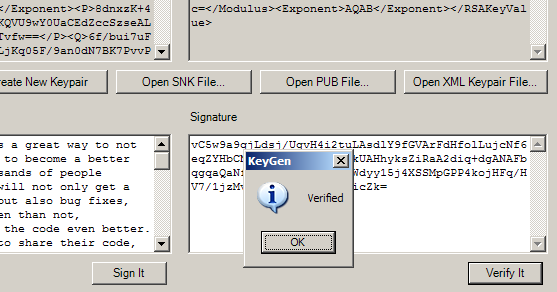
The app I wrote works pretty much as you would expect. You can create new keys, or open an SNK/PUB keypair files by pressing the buttons. If you are using a public key file, the "sign it" button will be disabled. You can also open an XML file with an encoded RSA keypair.

After your keypair is loaded, type some text on the left, hit "sign it", and then hit "verify it". Test that the signature verification really works by twiddling one character in the signature or in the original plaintext, then hitting "verify it" again - it should fail.

The guts of the app lie in RSA1024Util.cs. I hardcoded the class to use 1024 bit encryption because currently sn.exe only generates 1024 bit keyfiles. (As an aside, I wonder why 2048 bits aren't supported for assembly keys? Cryptographers have lately been warning about the eventual fall of 1024 bit keys..)

Here is the function that converts the SNK byte buffer to RSAParameters. If the buffer is "public length" - 160 bytes - then it will only fill in the public key fields, "exponent" and "modulus". Otherwise it will read the rest of the private key fields.

The byte offsets were discovered by digging around the Win32 CryptoAPI documentation and helpful articles by Dr. Michel I. Gallant, of http://jensign.com . Note that each byte array must be reversed due to a big endian vs. little endian ordering issue.

public const int _magic_priv_idx = 0x08; 
public const int _magic_pub_idx = 0x14; 
public const int _magic_size = 4; 

public static RSAParameters FigureParams(
byte[] keypair)
{
    RSAParameters ret = new RSAParameters(); 

    if ((keypair == null) || (keypair.Length < 1)) 
        return ret; 

    bool pubonly = SnkBufIsPubLength(keypair); 

    if ((pubonly) && (!CheckRSA1(keypair)))
        return ret; 

    if ((!pubonly) && (!CheckRSA2(keypair)))
        return ret; 

    int magic_idx = pubonly ? _magic_pub_idx : _magic_priv_idx;


    // Bitlen is stored here, but note this 
    // class is only set up for 1024 bit length keys 
    int bitlen_idx = magic_idx + _magic_size; 
    int bitlen_size = 4; // DWORD

    // Exponent 
    // In read file, will usually be { 1, 0, 1, 0 } or 65537
    int exp_idx = bitlen_idx + bitlen_size; 
    int exp_size = 4; 


    //BYTE modulus[rsapubkey.bitlen/8]; == MOD; Size 128 
    int mod_idx = exp_idx + exp_size;
    int mod_size = 128; 

    //BYTE prime1[rsapubkey.bitlen/16]; == P; Size 64 
    int p_idx = mod_idx + mod_size; 
    int p_size = 64; 

    //BYTE prime2[rsapubkey.bitlen/16]; == Q; Size 64 
    int q_idx = p_idx + p_size; 
    int q_size = 64; 

    //BYTE exponent1[rsapubkey.bitlen/16]; == DP; Size 64
    int dp_idx = q_idx + q_size; 
    int dp_size = 64; 

    //BYTE exponent2[rsapubkey.bitlen/16]; == DQ; Size 64 
    int dq_idx = dp_idx + dp_size; 
    int dq_size = 64; 

    //BYTE coefficient[rsapubkey.bitlen/16]; == InverseQ; Size 64
    int invq_idx = dq_idx + dq_size; 
    int invq_size = 64; 

    //BYTE privateExponent[rsapubkey.bitlen/8]; == D; Size 128 
    int d_idx = invq_idx + invq_size; 
    int d_size = 128; 


    // Figure public params 
    // Must reverse order (little vs. big endian issue)
    ret.Exponent = BlockCopy(keypair, exp_idx, exp_size); 
    Array.Reverse(ret.Exponent); 
    ret.Modulus = BlockCopy(keypair, mod_idx, mod_size); 
    Array.Reverse(ret.Modulus); 

    if (pubonly) return ret; 

    // Figure private params 
    // Must reverse order (little vs. big endian issue)
    ret.P = BlockCopy(keypair, p_idx, p_size); 
    Array.Reverse(ret.P); 

    ret.Q = BlockCopy(keypair, q_idx, q_size); 
    Array.Reverse(ret.Q); 

    ret.DP = BlockCopy(keypair, dp_idx, dp_size); 
    Array.Reverse(ret.DP); 

    ret.DQ = BlockCopy(keypair, dq_idx, dq_size); 
    Array.Reverse(ret.DQ); 

    ret.InverseQ = BlockCopy(keypair, invq_idx, invq_size); 
    Array.Reverse(ret.InverseQ); 

    ret.D = BlockCopy(keypair, d_idx, d_size); 
    Array.Reverse(ret.D); 

    return ret; 
}

There is one other not-well-documented switch that needs to be thrown in order to get the SNK file to be imported correctly. Keys generated by sn.exe have the KeyNumber set to 2, which is "AT_SIGNATURE". For more information see http://www.jensign.com/JavaScience/dotnet/keyinfo/.

protected void CtorFromSnkBuf(byte[] snkbuf)
{
    if ((snkbuf == null) || (snkbuf.Length < 1))
    {
        CtorFromXml(null);
        return; 
    }

    RSAParameters param = FigureParams(snkbuf); 

    // Must set KeyNumber to AT_SIGNATURE for strong 
    // name keypair to correctly be imported. 
    CspParameters cp = new CspParameters(); 
    cp.KeyNumber = 2; // AT_SIGNATURE 

    _rsa = new RSACryptoServiceProvider(1024, cp); 
    _rsa.ImportParameters(param); 

}

Why did the Framework authors make it inconvenient to work with SNK files generated by sn.exe? I don't know, but in any case there's the code to work around that issue.

License

This article has no explicit license attached to it but may contain usage terms in the article text or the download files themselves. If in doubt please contact the author via the discussion board below.

A list of licenses authors might use can be found here

About the Author

Per R. Anderson
Web Developer
United States United States
Member
Per Anderson is the founder of Sunfrog Technologies LLC, http://sunfrog-tech.com .

Sign Up to vote   Poor Excellent
Add a reason or comment to your vote: x
Votes of 3 or less require a comment

Comments and Discussions

 
You must Sign In to use this message board.
Search this forum  
    Spacing  Noise  Layout  Per page   
Questionnot workingmemberMember 78618094 Apr '12 - 23:08 
The program is good ,
 
but the source code not working when I used a a button sign it after open a [snk] file
 
the error message : keys not found
 
any suggestions ?
 
thanks
AnswerRe: not workingmemberPowerbauer12 Apr '12 - 23:17 
I have the same problem. Is there any solution?
GeneralThank you!memberbarrd2 Jun '11 - 18:24 
This article was very helpful!
 
Daniel
General"Keyset does not exist " at running time on .net 2.0memberLambuz17 May '11 - 3:59 
I've converted the solution on VS2008 and when I import an SNK file I've got the error on subject any time I try to sign something.
 
any solution ?
 
thanks
GeneralExcellent Work!memberDweeb2318 Sep '08 - 1:08 
Your work and kindness in posting this make all the difference. Thank you very much.
GeneralRe: Excellent Work!memberPer R. Anderson7 Jan '10 - 15:16 
Thanks, glad it is still helpful.
GeneralCoolsussAnonymous17 Aug '05 - 13:51 
Handy
GeneralRe: CoolmemberSunshineAUS4 Mar '08 - 12:09 
its really cool
GeneralThanks. Here is an update.memberstaceyw10 Nov '04 - 6:37 
Thanks for the code. I needed this today. I stripped out a lot stuff I did not need to simply return an RSA object from snk file using one static method.
The code is below:
 
// Usage example:
RSACryptoServiceProvider rsa = SnkUtil.GetRSAFromSnkFile(@"c:\mykey.snk");
Console.WriteLine("Pub Key: "+rsa.ToXmlString(false));
Console.WriteLine("\nPriv Key: "+rsa.ToXmlString(true));
 
// Updated Class:
using System;
using System.IO;
using System.Text;
using System.Xml;
using System.Reflection;
using System.Security.Cryptography;
using System.Collections;
 
namespace YourNamespace
{
///
/// One static method to get an RSACryptoServiceProvider from a *.snk file.
/// NOTE: These methods assume 1024 bit keys, the same as exported from sn.exe.
/// See also: CryptExportKey() Win32 API.
///

public sealed class SnkUtil
{
private const int magic_priv_idx = 0x08;
private const int magic_pub_idx = 0x14;
private const int magic_size = 4;
 
private SnkUtil()
{
}
 
///
/// Returns RSA object from *.snk key file.
///

/// Path to snk file.
/// RSACryptoServiceProvider
public static RSACryptoServiceProvider GetRSAFromSnkFile(string path)
{
if ( path == null )
throw new ArgumentNullException("path");
 
byte[] snkBytes = GetFileBytes(path);
if ( snkBytes == null )
throw new Exception("Invalid SNK file.");
 
RSACryptoServiceProvider rsa = GetRSAFromSnkBytes(snkBytes);
return rsa;
}
 
private static byte[] GetFileBytes(string path)
{
using ( FileStream fs = new FileStream(path, FileMode.Open, FileAccess.Read) )
using ( BinaryReader br = new BinaryReader(fs) )
{
byte[] bytes = br.ReadBytes((int)fs.Length);
return bytes;
}
}
 
private static RSACryptoServiceProvider GetRSAFromSnkBytes(byte[] snkBytes)
{
if ( snkBytes == null )
throw new ArgumentNullException("snkBytes");
 
RSAParameters param = FigureParams(snkBytes);
 
// Must set KeyNumber to AT_SIGNATURE for strong
// name keypair to be correctly imported.
CspParameters cp = new CspParameters();
cp.KeyNumber = 2; // AT_SIGNATURE
 
RSACryptoServiceProvider rsa = new RSACryptoServiceProvider(1024, cp);
rsa.ImportParameters(param);
return rsa;
}

private static byte[] BlockCopy(byte[] source, int idx, int size)
{
if ( (source == null) || (source.Length < (idx + size)) )
return null;
 
byte[] ret = new byte[size];
Buffer.BlockCopy(source, idx, ret, 0, size);
return ret;
}
 
///
/// Returns true if buffer length is public key size.
///

///
///
private static bool SnkBufIsPubLength(byte[] keypair)
{
if ( keypair == null )
return false;
return (keypair.Length == 160);
}
 
///
/// Check that RSA1 is in header (public key only).
///

///
///
private static bool CheckRSA1(byte[] pubkey)
{
// Check that RSA1 is in header.
// R S A 1
byte[] check = new byte[] { 0x52, 0x53, 0x41, 0x31 };
return CheckMagic(pubkey, check, magic_pub_idx);
}
 
///
/// Check that RSA2 is in header (public and private key).
///

///
///
private static bool CheckRSA2(byte[] pubkey)
{
// Check that RSA2 is in header.
// R S A 2
byte[] check = new byte[] { 0x52, 0x53, 0x41, 0x32 };
return CheckMagic(pubkey, check, magic_priv_idx);
}
 
private static bool CheckMagic(byte[] keypair, byte[] check, int idx)
{
byte[] magic = BlockCopy(keypair, idx, magic_size);
if ( magic == null )
return false;
 
for (int i = 0; i < magic_size; i++)
{
if ( check[i] != magic[i] )
return false;
}
 
return true;
}
 
///
/// Returns RSAParameters from byte[].
///

///
///
private static RSAParameters FigureParams(byte[] keypair)
{
RSAParameters ret = new RSAParameters();
 
if ((keypair == null) || (keypair.Length < 1))
return ret;

bool pubonly = SnkBufIsPubLength(keypair);
 
if ((pubonly) && (!CheckRSA1(keypair)))
return ret;

if ((!pubonly) && (!CheckRSA2(keypair)))
return ret;

int magic_idx = pubonly ? magic_pub_idx : magic_priv_idx;

// Bitlen is stored here, but note this
// class is only set up for 1024 bit length keys
int bitlen_idx = magic_idx + magic_size;
int bitlen_size = 4; // DWORD
 
// Exponent
// In read file, will usually be { 1, 0, 1, 0 } or 65537
int exp_idx = bitlen_idx + bitlen_size;
int exp_size = 4;
 

//BYTE modulus[rsapubkey.bitlen/8]; == MOD; Size 128
int mod_idx = exp_idx + exp_size;
int mod_size = 128;
 
//BYTE prime1[rsapubkey.bitlen/16]; == P; Size 64
int p_idx = mod_idx + mod_size;
int p_size = 64;
 
//BYTE prime2[rsapubkey.bitlen/16]; == Q; Size 64
int q_idx = p_idx + p_size;
int q_size = 64;
 
//BYTE exponent1[rsapubkey.bitlen/16]; == DP; Size 64
int dp_idx = q_idx + q_size;
int dp_size = 64;
 
//BYTE exponent2[rsapubkey.bitlen/16]; == DQ; Size 64
int dq_idx = dp_idx + dp_size;
int dq_size = 64;
 
//BYTE coefficient[rsapubkey.bitlen/16]; == InverseQ; Size 64
int invq_idx = dq_idx + dq_size;
int invq_size = 64;
 
//BYTE privateExponent[rsapubkey.bitlen/8]; == D; Size 128
int d_idx = invq_idx + invq_size;
int d_size = 128;

 
// Figure public params
// Must reverse order (little vs. big endian issue)
ret.Exponent = BlockCopy(keypair, exp_idx, exp_size);
Array.Reverse(ret.Exponent);
ret.Modulus = BlockCopy(keypair, mod_idx, mod_size);
Array.Reverse(ret.Modulus);

if (pubonly) return ret;
 
// Figure private params
// Must reverse order (little vs. big endian issue)
ret.P = BlockCopy(keypair, p_idx, p_size);
Array.Reverse(ret.P);
 
ret.Q = BlockCopy(keypair, q_idx, q_size);
Array.Reverse(ret.Q);
 
ret.DP = BlockCopy(keypair, dp_idx, dp_size);
Array.Reverse(ret.DP);
 
ret.DQ = BlockCopy(keypair, dq_idx, dq_size);
Array.Reverse(ret.DQ);
 
ret.InverseQ = BlockCopy(keypair, invq_idx, invq_size);
Array.Reverse(ret.InverseQ);
 
ret.D = BlockCopy(keypair, d_idx, d_size);
Array.Reverse(ret.D);

return ret;
}
}
}

 
--
William Stacey, MVP
http://mvp.support.microsoft.com
GeneralRe: Thanks. Here is an update.memberPer R. Anderson30 Nov '04 - 10:19 
Great, also check out
http://www.jensign.com
for more generalized code that will handle 2048 bit keys, etc.
GeneralCool stuffmemberlbargaoanu10 Sep '04 - 3:24 
Thanks a lot.
Didn't bother much to look inside.
IJW - it just works Smile | :)
GeneralExcellent!memberjaxterama20 Aug '04 - 8:46 
Great work! Nice Job!
 
I have a question....
 
What I would like to do is extract the public key from the current assembly to compare against the public key extracted by using your code.
 
Do you have any idea how to do this?
 
Here's some code I started with:
 
byte[] pubkey =
System.Reflection.Assembly.GetExecutingAssembly().GetName().GetPublicKey();
RSAParameters p = new RSAParameters();
p.Modulus = pubkey;
//p.Exponent = ???
 

Thanks!
GeneralRe: Excellent!memberjaxterama20 Aug '04 - 9:02 
You rock! your code works with retrieving the public key directly from the assembly too. Sweet!
 
I found the answer by reading your article a little closer...
 
byte[] pubkey = System.Reflection.Assembly.GetExecutingAssembly().GetName().GetPublicKey();
 
RSAParameters p = Bullfrog.Compress.RSA.RSA1024Util.FigureParams(pubkey);
GeneralRe: Excellent!memberPer R. Anderson30 Nov '04 - 10:05 
Cool, glad you found it useful. The guts of it was designed to work easily w/ assemblies (since that functionality was missing in the Framework SDK for some reason).
Questionis possible to sign a binary file?memberfreedeveloper10 Aug '04 - 14:41 
I tested the algoritm with plain text and it do the thing pretty good, but I can not make to work with a binary file. Is that possible?
 
Freedeveloper
AnswerRe: is possible to sign a binary file?memberPer R. Anderson30 Nov '04 - 10:03 
Starting from this project, it shouldn't be too hard to make a command line utility to sign a binary file.
You can use these functions:
signer.cs: byte[] SignToBytes(byte[] orig)
keygen.cs: byte[] GetFileBytes()
 

Generalcreating desired key pairmemberStanimir_Stoyanov2 Jul '04 - 9:05 
my question is: is it possible to generate key pair based on specific public key, for example, or something like this.
 
thanks in advance
GeneralRe: creating desired key pairmemberstaceyw11 Nov '04 - 8:28 
If you could gen the private key from the public key, PKI would be no good as anyone could gen your private key from a public key. Public keys are meant to be distributed. Your private key must be kept...well, private.
 
--
William Stacey, MVP
http://mvp.support.microsoft.com
GeneralQuestion about this tool and VerisignmemberiLuvCSharp2 Jul '04 - 7:33 
First of all Per, I want to thank you for this is an excellent article. Its a very handy tool to generate asymmetric keys. To recall this tool allows one to generate public and private key and also sign it.
Appears what you have written is a Certificate Authority (CA) tool.
I am planning to set this up on the server.
 
The question is how to embed my own messages(example : login and password) in this certificate and further secure it.
 
Do you know how much more time is required to achieve this. I want to develop something like what Verisign provides. I really cannot afford Verisign to be installed on each web site I am planning to run. Its pretty expensive. It costs USD 400 or something like that. I will appreciate if you can reply to this message and also provide me directions. May be you can point me to some important links.
 

By the way I am wondering as to how Yahoo provides verisign authentication when a user signs in using secure. I am amazed as to how Yahoo is able to afford a certificate for each user. Isn't that expensive.

Regards,
M

GeneralRe: Question about this tool and VerisignmemberPer R. Anderson30 Nov '04 - 10:13 
If you don't care about users having to click a "trust this website?" type dialog box, then you won't have to pay for certificates. The whole CA business is a scam in my opinion. By now there is probably a trusted CA that is known by Microsoft IE, and will generate free certificates. If not, there should be. The only issue is whether or not the CA is known by MSIE by default.
GeneralRe: Question about this tool and VerisignsussAnonymous30 Nov '04 - 13:28 
That is what I thought when I explored this whole asymmetric thing and then found how easy it is with your article.
 
But then "Majority isn't fool, ain't it Smile | :) "
General34343sussAnonymous2 Jul '04 - 7:16 
334
GeneralNice workmemberWillemM10 May '04 - 22:41 
This one is handy Smile | :)
 
Greetings.... Smile | :)


GeneralRe: Nice workmemberPer R. Anderson12 May '04 - 7:16 
Thanks

General General    News News    Suggestion Suggestion    Question Question    Bug Bug    Answer Answer    Joke Joke    Rant Rant    Admin Admin   

Permalink | Advertise | Privacy | Mobile
Web01 | 2.6.130516.1 | Last Updated 5 May 2004
Article Copyright 2004 by Per R. Anderson
Everything else Copyright © CodeProject, 1999-2013
Terms of Use
Layout: fixed | fluid
