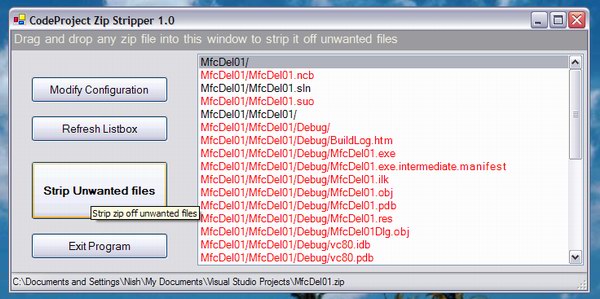
Fig. 1 - The red colored files will get stripped
Introduction
The CPZipStripper is a simple tool I've been using when editing and
submitting articles on CP, and all it does is to remove unwanted files from the
zips - like debug and obj folder files, suo files, pdb files, aps files etc. to
name a few. It's a one-click tool - so you don't have to waste time opening the
zip in WinZip or some such tool and then manually deleting unwanted files.
It would be very nice if article authors would use this tool on their zips
before sending it to us, so that the size of the mails received by the editors
will be considerably lesser.
Installation
Unzip the three files in release.zip to any permanent folder of your choice
:-
- CPZipStripper.exe - This is the main executable (.NET IL exe targetted at FW
1.1)
- CPZipStripperCfg.xml - Configuration file
- ICSharpCode.SharpZipLib.dll - the DLL that I use for accessing the zip files
(SharpZipLib)
Now just run CPZipStripper.exe once and exit. That's all.
Using the tool
You can either drag/drop a zip into the program window or right click a zip
file and choose the "Open with ZipStrip" option, but for the context menu item
to get added, you'll need to run the program at least once - as it does not have
a separate installer.

Fig. 2 - Context menu item for zip files in Explorer
The buttons
- Modify Config - This will open the config XML file in your windows
XML editor - if you don't have one, it will report an error. If so, manually
open the XML file in Notepad and make your changes.
- The extensions node lists all extensions that need to be deleted
- The paths node lists all paths that you want to be deleted (thus if you have
debug in there, any file whose extract path contains debug is deleted)
- The files node lists any specific filenames that you want deleted
- Refresh Listbox - If the zip file has changed or you have made
modifications to the XML config file, please hit the "Refresh Listbox" button
- Strip Unwanted files - This will remove all the unwanted files (shown
in red in the listbox) and will replace the zip with a clean file, but also
backs up the old file.
- Exit Program - Use this one with case, as it closes the program ;-)
Interesting points
Here are some odd things I learned :-)
Handling drag/drop was really easier than I expected it to be. First you need
to set the Form's AllowDrop property
to true. Then just handle the DragEnter and DragDrop events.
private void MainForm_DragDrop(object sender,
System.Windows.Forms.DragEventArgs e)
{
Array arr = (Array)e.Data.GetData(DataFormats.FileDrop);
if(arr != null)
{
BeginInvoke(new DroppedFileHandler(FilterZip),
new object[] {arr.GetValue(0).ToString()});
}
}
private void MainForm_DragEnter(object sender,
System.Windows.Forms.DragEventArgs e)
{
e.Effect = e.Data.GetDataPresent(DataFormats.FileDrop) ?
DragDropEffects.Copy : DragDropEffects.None;
}
If you are interested in a generic function that will let you add a context
menu item for a specific file type :-
See my blog entry : A simple C# function to add context menu items in Explorer and
here's the function.
private bool AddContextMenuItem(string Extension,
 string MenuName, string MenuDescription,
 string MenuCommand)
{
  bool ret = false;
  RegistryKey rkey = Registry.ClassesRoot.OpenSubKey(
    Extension);
  if(rkey != null)
  {
    string extstring = rkey.GetValue("").ToString();
    rkey.Close();
    if( extstring != null )
    {
      if( extstring.Length > 0 )
      {
        rkey = Registry.ClassesRoot.OpenSubKey(extstring,true);
        if(rkey != null)
        {
          string strkey = "shell\\" + MenuName + "\\command";
          RegistryKey subky = rkey.CreateSubKey(strkey);
          if(subky != null)
          {
            subky.SetValue("",MenuCommand);
            subky.Close();
            subky = rkey.OpenSubKey("shell\\" + MenuName, true);
            if(subky != null)
            {
              subky.SetValue("",MenuDescription);
              subky.Close();
            }
            ret = true;
          }
          rkey.Close();
        }
      }
    }
  }
  return ret;
}
Conclusion
The UI is not much to look at, but the tool's worked for me. Let me know if
anyone has any suggestions/feedback through the article forum.
Post-Conclusion (dan g's tool)
While my tool is meant for stripping unwanted files from zip files,
dan g has an excellent article here on CP, describing a 3-in-1 tool that can
be used to package VC++ and .NET project files. I strongly urge people to take a
look at that one :-
After all, prevention is better than cure, eh?
Nish Nishant is a technology enthusiast from Columbus, Ohio. He has over 20 years of software industry experience in various roles including Chief Technology Officer, Senior Solution Architect, Lead Software Architect, Principal Software Engineer, and Engineering/Architecture Team Leader. Nish is a 14-time recipient of the Microsoft Visual C++ MVP Award.
Nish authored C++/CLI in Action for Manning Publications in 2005, and co-authored Extending MFC Applications with the .NET Framework for Addison Wesley in 2003. In addition, he has over 140 published technology articles on CodeProject.com and another 250+ blog articles on his WordPress blog. Nish is experienced in technology leadership, solution architecture, software architecture, cloud development (AWS and Azure), REST services, software engineering best practices, CI/CD, mentoring, and directing all stages of software development.
Nish's Technology Blog :
voidnish.wordpress.com



 General
  News
News  Suggestion
  Question
  Bug
Bug  Answer
  Joke
Joke  Praise
  Rant
Rant  Admin
Admin 


 Submit an article or tip


 Nice code, congratulations!
 I gotta improve my listbox custom drawing skills I guess.
  Now that explains the rating, doesn't it?
 ![Rose | [Rose]](https://www.codeproject.com/script/Forums/Images/rose.gif)

