Click here to Skip to main content
Licence 
First Posted 20 Jun 2004
Views 235,064
Downloads 2,205
Bookmarked 53 times

Numeric TextBox : Allow your users to enter numeric data the easy way

By | 20 Jun 2004 | Article
A TextBox control for numeric input, with the ability to set precision, scale (when focused or not)

Introduction

Numeric input has always been one of the key-features in many applications (CRM, Accounting,...). Although MS provides a masked edit control, many developers find it to have some limitations.

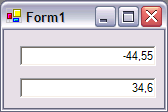
The Numeric TextBox tries to provide some features to allow the user to input numeric data in a natural way. Let's have a look at some of the key features.

  1. Allow/Disallow negative input.
  2. Specify the maximum precision and scale.
  3. Specify a different scale when the control hasn't got the focus.
  4. Allow/Disallow zero as a valid input.
  5. The control displays grouping characters.
  6. The control adapts the regional settings (grouping char, decimal char).

Using the code

To use the control simply reference the Shorty.Windows.Forms assembly in your project. Create (or drag and drop on the form) a NumericTextBox and set the properties. The properties can be set trough code or via the property pane (Numeric settings section). See below for an example.

// 
// numericTextBox1
// 
Shorty.Windows.Forms.NumericTextBox() numericTextBox1 = 
  new Shorty.Windows.Forms.NumericTextBox();

this.numericTextBox1.AllowNegative = true;
this.numericTextBox1.DataBindings.Add(
  new System.Windows.Forms.Binding("NumericValue", 
  this, "Table1.test"));
this.numericTextBox1.NumericPrecision = 8;
this.numericTextBox1.NumericScaleOnFocus = 5;
this.numericTextBox1.NumericScaleOnLostFocus = 3;
this.numericTextBox1.NumericValue = 0;
this.numericTextBox1.ZeroIsValid = false;

The control automatically checks if the combination NumericPrecision NumericScaleOn(Lost)Focus is valid. As you can see in the above sample to retrieve the numeric value displayed in the NumericTextBox you should use the NumericValue property. The control is also capable of databinding it's NumericValue property. (See above code sample).

History

  • Initial release version 0.1.0.0 (20/06/2004)

License

This article has no explicit license attached to it but may contain usage terms in the article text or the download files themselves. If in doubt please contact the author via the discussion board below.

A list of licenses authors might use can be found here

About the Author

Hannes Decorte

Web Developer

Belgium Belgium

Member

3 years ago I started out with VB 6 and ASP. After seeing .Net in Beta in 2001 I haven't done anything else. I moved from VB6 over VB.Net to C#.
In 2004 I earned my MCAD. Currently I am employed as a Analyst/Developer and I'm working towards my MCDBA (1 exam to go Smile | :) ).
 
You can follow me at my blog http://radio.weblogs.com/0132279/

Sign Up to vote   Poor Excellent
Add a reason or comment to your vote: x
Votes of 3 or less require a comment

Comments and Discussions

 
You must Sign In to use this message board. (secure sign-in)
 
Search this forum  
 FAQ
    Noise  Layout  Per page   
  Refresh
BugI can't place it on a form... help PinmemberIApple23:29 15 Sep '11  
GeneralRe: I can't place it on a form... help PinmemberMember 825996520:34 1 Oct '11  
GeneralRe: I can't place it on a form... help PinmemberTassosK5:19 19 Oct '11  
GeneralThanx PinmemberBeni Sec7:18 10 Nov '10  
QuestionPlease help... Pinmemberdynaduo12:45 16 Sep '10  
GeneralBUG PinmemberLimitedAtonement7:11 2 Nov '09  
Generalfailed to create component Pinmembersari5sundar3:02 15 May '09  
GeneralThis methods work too Pinmembersyedmasroorahmed19:27 29 Apr '09  
GeneralFailed to create component... PinmemberJulius9114:40 25 Mar '09  
GeneralRe: Failed to create component... PinmemberJulius9116:12 27 Mar '09  
GeneralHorizontal Alignment Pinmembersalblomo8:20 4 Mar '09  
GeneralRe: Horizontal Alignment Pinmemberrgustin19:42 8 Jul '09  
GeneralGood control Pinmemberdungxpt12:48 29 Sep '08  
GeneralVery good control PinmemberBoogier0:19 26 Mar '08  
QuestionHow to Use It ? Pinmemberfreddie20005:41 23 Nov '07  
AnswerRe: How to Use It ? Pinmemberfreddie20005:50 23 Nov '07  
QuestionGreat Control, Can you modify it to add Range, Min and Max values it allows ? PinmemberVivek Krishnamurthy5:54 5 Sep '07  
GeneralDrop Control on to form PinmemberNeil Squires7:01 19 Jul '07  
AnswerRe: Drop Control on to form Pinmemberhellspawnfr22:28 1 Feb '08  
GeneralRe: Drop Control on to form PinmemberMahmood Dehghan23:08 28 Mar '08  
GeneralException Pinmembernaalexander3:12 27 Jul '06  
GeneralRe: Exception PinmemberCarlo Bos8:11 11 Jan '07  
GeneralRe: Exception Pinmemberrichm12234513234121:49 28 Apr '07  
GeneralThanks, very helpful . Pinmember-=777=-0:54 23 Jul '06  
GeneralWhat's about Cut, Copy and Paste Pinmembercarloqueirolo7:28 22 Jul '06  

General General    News News    Suggestion Suggestion    Question Question    Bug Bug    Answer Answer    Joke Joke    Rant Rant    Admin Admin   

Use Ctrl+Left/Right to switch messages, Ctrl+Up/Down to switch threads, Ctrl+Shift+Left/Right to switch pages.

Permalink | Advertise | Privacy | Mobile
Web01 | 2.5.120517.1 | Last Updated 21 Jun 2004
Article Copyright 2004 by Hannes Decorte
Everything else Copyright © CodeProject, 1999-2012
Terms of Use
Layout: fixed | fluid
