Click here to Skip to main content

WPF: Showing you how to use PRISM in a very unlike PRISM way

By , 22 Apr 2010
 

Introduction

It has been a while since I wrote anything about frameworks, and the MVVM pattern in particular. I have found myself yearning to get back into do a sizable project; as such, I am just about to embark on updating my Cinch MVVM framework to bring it in line with the forthcoming .NET 4.0 / VS2010 release. However, just before I started work on that, I wanted to show just how easy it is to extend Cinch, to include certain areas of PRISM/CAL, in particular PRISM/CALs region support, as this is one area that PRISM/CAL has that Cinch does not.

PRISM Smorgasbord (Never Thought I Would Find a Need for That Word)

Now, I do not know how many of you have used PRISM/CAL, or have worked with similar code such as the Smart Client Software Factory, which although quite different to PRISM/CAL, still has some similarities.

Anyway, that is by the by; let's concentrate on what PRISM/CAL can do for us.

PRISM/CAL is billed as being "Composite WPF and Silverlight". So as such, it offers developers the ability to create composite UIs which get constructed into one UI application. So how does PRISM/CAL do this? Well, it does have a fairly good set of arsenal that aids in this, such as:

Shell

There is typically a single Window which acts as the application shell. This is actually a pretty common approach to doing WPF apps, and has been for quite some time. Some of the best WPF apps are all single Window applications; just look at Expression Blend:
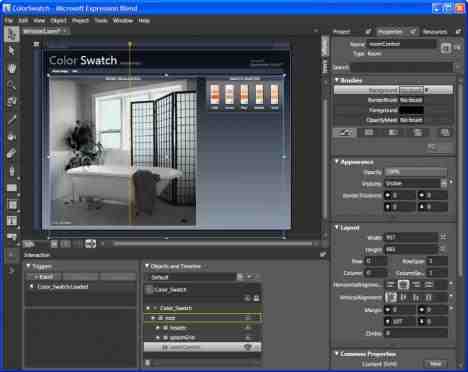
That is a single Window application. Anyway, within PRISM/CAL, the shell is only really responsible for creating regions.

BootStrapper

The bootstrapper is responsible for loading up all the disparate (and seemingly unconnected) modules such that they can be used within a single shell Window. This typically also creates the shell window and runs it.

Modules

PRISM/CAL offers things called modules to aid in the well, er, modularity of building a composite system. Each module can have various classes, such as perhaps a View (typically UserControl), and maybe a ViewModel. These modules are understood as units of code that the PRISM/CAL core code knows what to do with in order to get them to be compiled such that they can be used within the main application shell.

Event Aggregator

Is a disconnected messaging system that uses WeakReference objects such that the sender/receiver are free to be GCd. The Event Aggregator also offers the ability to have sent messages to be invoked on the UI thread. You can think of this as a communication channel where the sender and receiver do not know about each other but rather go through some middle man. This is conceptually very similar to using the Mediator pattern, which is what my own Cinch MVVM framework uses.

Dependency Injection

PRISM/CAL makes very heavy use of DI/IOC, and it does this by using the Unity application block, which is Microsoft's own IOC container. It works quite like most other IOC containers more or less; OK, there are some that have less syntax to get to grips with, but conceptually, they all work roughly the same, they are all able to store Types and resolve Type dependencies by injecting the required Types in at constructor/property level, and they can all manage object instance lifecycles (singleton, new instance, etc.).

Basically, all we really care about is that PRISM/CAL is using DI/IOC to resolve various Types.

Region Support

The last piece in the PRISM/CAL puzzle is region support. Some of you may know what this is while others may not; well, put simply, regions are a control or area of the screen which will accept content to be added to them. PRISM/CAL comes with a very handy way of working with regions; all that you are required to do is use an attached property on one of the supported region controls, which are the following controls as far as I know:

  • ContentControl
  • Grid
  • StackPanel
  • TabControl

There may be more that I have missed off, apologies.

Here is an example of how to setup a region on a control that is part of the shell's XAML:

<TabControl cal:RegionManager.RegionName="MainRegion"/>

Now you are able to dynamically add new content into the TabControl using a very easy to use syntax; you can do something like this:

View1 view = new View1();
regionManager.RegisterViewWithRegion("Someregion", () => view);
regionManager.Regions["Someregion"].Activate(view);

RegionAdaptors

Going slightly off subject here, but just for your information, if your UI requirements warrant slightly more complex controls that you want to use as regions, then do not worry, you can also do that by the use of a custom RegionAdaptor.

You can find examples of this at various places, but all you really have to do is inherit from RegionAdapterBase<T> and override the Adapt() and CreateRegion() methods, and override the ConfigureRegionAdapterMappings() method in the bootStrapper class.

John Papa has a good example of how to create a custom RegionAdaptor, which you can find at this URL: Fill My region Please, or for a slightly more adventurous RegionAdaptor, have a look at this one: WindowRegionAdapter for CompositeWPF.

Take What You Want

Now, some of you may be thinking, yeah so what Sacha, you have not told me much, or even shown any code yet. Well, this is a very small article, but I did not want to get into any code until I could quickly go into PRISM/CAL a bit so at least those that have not used it would get a very, very quick run down on how it works.

I have to say, I am not a massive fan of PRISM/CAL, but I really, really like the region support. I do not know how many of you have read my Cinch MVVM framework articles; heck, some of you may even be using my Cinch MVVM framework I guess. Well, over the past months (since I let the framework out there, I have been contacted by various people talking about PRISM/CAL's excellent region support, and I tell you what, I agree, I love PRISM/CAL's region stuff, it is just that I am not that keen on the rest; don't get me wrong, the P&P folks are smart hombres, it is just a bit too constraining for me at times; you have to do things a certain way. Or do you?).

Well, actually, no, you don't. You see, the other great thing about PRISM/CAL is that you can just use the bits you want to use and leave the rest. I like regions and do not care much for the rest, so the rest of this article will be dedicated to showing you how to use PRISM/CAL with another MVVM framework. Naturally, I will be using my own Cinch MVVM framework, but where it's appropriate, I will state an alternative way of doing something if you do not wish to use my Cinch MVVM framework.

OK, so enough banging on about it; let's continue to see how I have made my Cinch MVVM framework be able to work with RISM/CAL's excellent region support.

So How Can We Use Regions in Another MVVM Framework

It is actually not that hard to get region support to work outside PRISM/CAL. At least, it was not that hard for me to get it to work with my Cinch MVVM framework. All I had to do was follows these easy steps:

Step 1: Make sure I had all the required references in place

I simply had to make sure that the attached demo project had the correct assembly references, which for me equated to this:

As I say, the demo app is written for use with my Cinch MVVM framework, so if you are not using that, you will not have to add any references for the assemblies in the Cinch folder.

Step 2 : Project Structure

As I stated above, PRISM/CAL uses a bootStrapper and also normally works with modules. The bootStrapper is not optional, as it sets up the Unity IOC container. However, modules are actually optional; we do not have to use modules at all, but we do have to override the GetModuleCatalog() method to state that there will, in fact, be no modules to load into the shell.

One thing I should mention is that the demo app included with this article obviously assumes that all files are part of the same project. The project structure for the attached demo project looks like this:

If your project requires things a little different from this, such as ViewModels in a separate assembly, just make sure that all your own projects have the correct references, as outlined in the previous subsection.

Step 3: The BootStrapper

As I stated earlier on, PRISM/CAL uses a bootstrapper file to ensure various things such as the shell are setup. We too must do that if we wish to use any of the PRISM/CAL bits and pieces in our own apps. Here is the complete code for the modified bootStrapper file:

using System.Windows;
using Microsoft.Practices.Composite.Modularity;
using Microsoft.Practices.Composite.UnityExtensions;
using Microsoft.Practices.Composite.Regions;
using Microsoft.Practices.Unity;

namespace CinchAndPrismRegions
{
    class Bootstrapper : UnityBootstrapper
    {
        protected override DependencyObject CreateShell()
        {
            #region Setup Cinch with PRISM/CAL supporting service

            //********************************************************************
            //METHOD 1 : 
            //
            //Add ViewManager to Cinch directly, to allow it to use 
            //PRISM/CAL regions. This is prefferred method
            //********************************************************************
            IRegionManager regionManager = base.Container.Resolve<IRegionManager>();
            Cinch.ViewModelBase.ServiceProvider.Add(typeof(IViewManager),
                new ViewManager(regionManager));


            //********************************************************************
            //METHOD 2 : 
            //
            //Add ViewManager to Cinch via Unity, to allow it to use 
            //PRISM/CAL regions. This is strictly not really required, as all it does
            //is make the Unity IOC container aware of the IViewManager service. However
            //any interaction with the IViewManager and Cinch will be via the 
            //Cinch ViewModelBase.ServiceProvider and Cinch ViewModelBase.Resolve<T>() 
            //methods.
            //
            //I just thought it good practice to add it to Unity, on the off chance
            //that it may be used elsewhere. Though as I say with Cinch this is very 
            //unlikely
            //********************************************************************
            
            //base.Container.RegisterType<IViewManager,ViewManager>(
            //     new InjectionConstructor(base.Container.Resolve<IRegionManager>())); 

            //var viewManager = base.Container.Resolve<IViewManager>();
            //Cinch.ViewModelBase.ServiceProvider.Add(typeof(IViewManager), viewManager);

            #endregion

            //Create CAL shell
            //NOTE : Shell is without modules, as I want it to be a 
            //bulk standard MVVM app just with added
            //regionManager support)
            Shell shell = new Shell();
            shell.Show();
            return shell;
        }

        protected override IModuleCatalog GetModuleCatalog()
        {
            ModuleCatalog catalog = new ModuleCatalog();
            return catalog;
        }
    }
}

From this code, there are really only two important things to observe, which are:

  1. That we are creating (or creating and storing within the Unity IOC container, in case the IViewManager service is needed elsewhere, strictly, this is not required, but I just thought I would show you how to add services to the Unity IOC container) an instance of the IViewManager (which is a service for working with the regions that I have written). This IViewManager expects a IRegionManager as a constructor parameter. The IRegionManager service is a PRISM/CAL Type, which is available from the Unity IOC container, so you can see in the code above that IRegionManager is being injected into the IViewManager, by obtaining an instance of the IRegionManager service from Unity. You will also note that the IViewManager service is then stored within the Cinch ViewModelBase ServiceProvider instance. This allows all Cinch ViewModels to make use of the IViewManager service. This step is specific to Cinch. So if you not using Cinch, you could simply store the IViewManager service in a singleton somewhere, or even on a property within a base ViewModel class, basically just somewhere from where you can use it easily.
  2. The next step is to tell PRISM/CAL that we do not really want to work with modules. We do this by overriding the GetModuleCatalog() method.

Step 4: Creating a Region Supporting UI Service

So if we want to work with regions, we should really be looking to create a reusable object that we can use all over the place. This is the job of services typically. So I went about creating a simple Region supporting service which I have called ViewManager, which simply looks like this:

Service Definition
/// <summary>
/// A simple region service contract
/// that works with PRISM/CALs regions
/// </summary>
using System;
using System.Collections.Generic;
using System.Linq;
using System.Text;

namespace CinchAndPrismRegions
{
    public interface IViewManager
    {
        void CreateAndShowViewInRegion(String regionName, Type viewType);
        void ShowViewInRegion(String regionName, Object viewInstance);
    }
}
Service Implementation

And here is a minimal service that works with PRISM/CAL regions:

using System;
using System.Collections.Generic;
using System.Linq;
using System.Text;
using Microsoft.Practices.Composite.Regions;
using Microsoft.Practices.Unity;

namespace CinchAndPrismRegions
{
    /// <summary>
    /// A simple region supporting UI service
    /// that works with PRISM/CALs regions
    /// </summary>
    public sealed class ViewManager : IViewManager
    {
        private IRegionManager regionManager;


        public ViewManager(IRegionManager regionManager)
        {
            this.regionManager = regionManager;
        }

        /// <summary>
        /// Creates and shows a view in the region specified by the regionName
        /// input parameter
        /// </summary>
        /// <param name="regionName">The region name to put view in</param>
        /// <param name="viewType">The type of the view to create</param>
        public void CreateAndShowViewInRegion(String regionName, Type viewType)
        {
            var content = Activator.CreateInstance(viewType);
            regionManager.RegisterViewWithRegion(regionName, () => content);
            regionManager.Regions[regionName].Activate(content);
        }

        /// <summary>
        /// Shows the view instance in the region specified by the regionName
        /// input parameter
        /// </summary>
        /// <param name="regionName">The region name to put view in</param>
        /// <param name="viewInstance">The instance of the view to create</param>
        public void ShowViewInRegion(String regionName, Object viewInstance)
        {
            regionManager.RegisterViewWithRegion(regionName, () => viewInstance);
            regionManager.Regions[regionName].Activate(viewInstance);
        }

    }
}

And that is about all you have to know to use PRISM/CAL with your own MVVM framework; obvioulsy, I used Cinch, which already supported UI services, so that is the only thing you will have to watch if you are using your own MVVM framework.

So How About A Small Demo Then?

What use is some code without a small demo? To this end, I have created a small demo app that allows the following:

  • There is a single main Window (the shell) which hosts one of the standard PRISM/CAL region enabled controls, a TabControl. The shell Window makes use of a small ViewModel called ShellViewModel.
  • That there are two very simple Views that are shown in the shells region. The showing of these views in the shell is done by code in the ShellViewModel.

Here is all the XAML code for the Shell Window:

<Window x:Class="CinchAndPrismRegions.Shell"
    xmlns="http://schemas.microsoft.com/winfx/2006/xaml/presentation"
    xmlns:x="http://schemas.microsoft.com/winfx/2006/xaml"
    xmlns:cal="http://www.codeplex.com/CompositeWPF"
    Title="Hello World" Height="300" Width="300">
    
    
    <Window.Resources>
        <Style TargetType="{x:Type TabItem}" x:Key="TabItemRegionStyle">
            <Setter Property="Header" 
                    Value="{Binding RelativeSource={RelativeSource Self}, 
                Path=Content.DataContext.HeaderText}" />
        </Style>
    </Window.Resources>
    
    <Grid>
        <Grid.RowDefinitions>
            <RowDefinition Height="30"/>
            <RowDefinition Height="*"/>
        </Grid.RowDefinitions>
        <StackPanel Orientation="Horizontal" Grid.Row="0">
            <Button  Margin="2" HorizontalAlignment="Stretch" VerticalAlignment="Stretch"
                Content="Show View1" Command="{Binding ShowView1InRegionCommand}"/>
            <Button Margin="2" HorizontalAlignment="Stretch" VerticalAlignment="Stretch"
                Content="Show View2" Command="{Binding ShowView2InRegionCommand}"/>
        </StackPanel>
        <TabControl Grid.Row="1" Name="MainRegion" cal:RegionManager.RegionName="MainRegion"
                    ItemContainerStyle="{StaticResource TabItemRegionStyle}"/>
    </Grid>
</Window>

There are two things to not here:

  1. The attached RegionManager property, which means the TabControl that uses this attached property can now be used with PRISM/CAL's regions.
  2. That the TabControl uses a ItemContainerStyle. This ItemContainerStyle simply shows a piece of text which is the current View name which is fetched from the active View's ViewModel.

OK, so that is the shell's XAML; what about the ViewModel that makes use of the regions? Well, here it is in its entirety:

using System;
using System.Collections.Generic;
using System.Linq;
using System.Text;

using Cinch;

namespace CinchAndPrismRegions
{
    public class ShellViewModel : Cinch.ViewModelBase
    {
        private SimpleCommand showView1InRegionCommand;
        private SimpleCommand showView2InRegionCommand;

        public ShellViewModel()
        {
            showView1InRegionCommand = new SimpleCommand
            {
                CanExecuteDelegate = x => true,
                ExecuteDelegate = x => ExecuteShowView1InRegionCommand()
            };

            showView2InRegionCommand = new SimpleCommand
            {
                CanExecuteDelegate = x => true,
                ExecuteDelegate = x => ExecuteShowView2InRegionCommand()
            };
        }


        public SimpleCommand ShowView1InRegionCommand
        {
            get { return showView1InRegionCommand; }
        }

        public SimpleCommand ShowView2InRegionCommand
        {
            get { return showView2InRegionCommand; }
        }


        private void ExecuteShowView1InRegionCommand()
        {
            this.Resolve<IViewManager>().CreateAndShowViewInRegion(
                "MainRegion", typeof(View1));
        }

        private void ExecuteShowView2InRegionCommand()
        {
            this.Resolve<IViewManager>().ShowViewInRegion(
                "MainRegion", new View2());
        }
    }
}

And just for completeness, here is the code for one of the ViewModels:

using System;
using System.Collections.Generic;
using System.Linq;
using System.Text;

using Cinch;
using System.ComponentModel;

namespace CinchAndPrismRegions
{
    public class View1ViewModel : Cinch.ViewModelBase
    {
        private String headerText = String.Empty;

        public View1ViewModel()
        {
            HeaderText = "View1";
        }

        /// <summary>
        /// Bound Type for search
        /// </summary>
        static PropertyChangedEventArgs headerTextChangeArgs =
            ObservableHelper.CreateArgs<View1ViewModel>(x => x.HeaderText);

        public String HeaderText
        {
            get { return headerText; }
            set
            {
                headerText = value;
                NotifyPropertyChanged(headerTextChangeArgs);
            }
        }
    }
}

And here is the end result; we can click one of the buttons (which will call the ICommands in the ShellViewModel), and a new View will be shown in the Shell Window's "mainRegion", which if you recall was the TabControl.

That's It

Anyway, that is all I wanted to say for now; but as I eluded to in the introduction, I am just about to embark on some big updates to my Cinch MVVM framework to bring it in line with the forthcoming .NET 4.0 / VS2010 release.


License

This article, along with any associated source code and files, is licensed under The Code Project Open License (CPOL)

About the Author

Sacha Barber
Software Developer (Senior)
United Kingdom United Kingdom
Member
I currently hold the following qualifications (amongst others, I also studied Music Technology and Electronics, for my sins)
 
- MSc (Passed with distinctions), in Information Technology for E-Commerce
- BSc Hons (1st class) in Computer Science & Artificial Intelligence
 
Both of these at Sussex University UK.
 
Award(s)

I am lucky enough to have won a few awards for Zany Crazy code articles over the years

  • Microsoft C# MVP 2013
  • Codeproject MVP 2013
  • Microsoft C# MVP 2012
  • Codeproject MVP 2012
  • Microsoft C# MVP 2011
  • Codeproject MVP 2011
  • Microsoft C# MVP 2010
  • Codeproject MVP 2010
  • Microsoft C# MVP 2009
  • Codeproject MVP 2009
  • Microsoft C# MVP 2008
  • Codeproject MVP 2008
  • And numerous codeproject awards which you can see over at my blog

Sign Up to vote   Poor Excellent
Add a reason or comment to your vote: x
Votes of 3 or less require a comment

Comments and Discussions

 
You must Sign In to use this message board.
Search this forum  
    Spacing  Noise  Layout  Per page   
QuestionSimple and ImpressivememberKhaled Kokah25 Apr '13 - 4:05 
Simple and elegant coding style, was very helpful for me to understand the nature of Prism after several hours of searching.
My vote of 5 Smile | :)
GeneralMy vote of 5memberprasad0219 Dec '10 - 21:51 
Great Article 5/5
GeneralCinch V2 or/and Prism v4membermrcyprom9 Dec '10 - 3:24 
Hi Sacha,
 
First of all, I would like to congratulate you for this article and the last version of Cinch Framework V2.
 
I am currently working on a V2 of my application too Smile | :) and I wonder which framework i am going to use.
 
To be more clear here is some information :
- WPF application
- MVVM/VM communication/...
- need modularity
- V1 of the application alreary uses Cinch V1
 
Recently the V4 of Prism has been released by Microsoft Practices team and I have seen many similarities with Cinch V2 since the two are now based (or just extended for Prism) on MEF.
 
In Cinch all the requirements for developing a great MVVM based application are here. In Prism it is more basic. You can't manage Design/Runtime VM for example.
 
In Prism the modularity is really easy to manage. Thanks to MEF you just need to declare with attributs that your view needs to go the xx region and it is done. I like the way to declare your region directly in xaml file with only attached property. And if you want to manage new types of region it is easy to create your own adapter. With Cinch it is a bit more complicated because you have to inherite your view from IWorkSpaceAware, create WorkspaceData and via MVVM link your Views with the itemscontrol in the xaml (I am speaking about TabControlEx).
 
My modularity requirements for my V2 are basics. I will have only a few fixed regions which will be populated via external dll (MEF).
 
One thing is sure : I will develop my V2 with Cinch V2 but for the modularity part I am wondering if Prism v4 is a good idea I don't need to take anything else from this framework. Maybe with Cinch V2 I can do the same with some services and attached properties...
 
Thank you in advance for your advice.
GeneralRe: Cinch V2 or/and Prism v4mvpSacha Barber9 Dec '10 - 4:18 
Yeah I have to say I am quite jealous of PRISM region support I like that a lot. But I doubt it supports View 1st, as its all done from the ViewModel, so I am not sure how much design time data it supports. And if you like modules, PRISM is cool for that.
 
Too be honest I have not used PRISM in earnest (as I wrote my own MVVM framework as you know) but know what it does, and I think best bet would be to just give is a small try.
 
Glad you like Cinch though.
Sacha Barber
  • Microsoft Visual C# MVP 2008-2010
  • Codeproject MVP 2008-2010
Your best friend is you.
I'm my best friend too. We share the same views, and hardly ever argue
 
My Blog : sachabarber.net

GeneralRe: Cinch V2 or/and Prism v4membermrcyprom21 Dec '10 - 6:44 
Hi Sacha,
 
I have tested Cinch/Prism together and it works perfect.
I have the benefits of Cinch for MVVM part and PRISM for the regions management.
 
As the two are based on MEF Framework there is no conflit in boostrapper. So designTime/runtime services are available and my team can work at the same time on Views and Models.
 
The worst part is that design time "issues" are not easy to fixed since there is not any exception thrown (or just a few).
Moreover I can't find a way to databind with ImageSource in designTime. At runtime the images are displayed but not in Blend even I am using the same code for the two services (Design and Runtime).
I have tested with string, Uri, ImageSource type for the ViewModel property but nothing works in designTime.
 
Have you already face this problem ?
 
Thank you for your help...
 
Romain
GeneralRe: Cinch V2 or/and Prism v4membermrcyprom21 Dec '10 - 8:46 
Hi Sacha,
 
I resolved the problem I was facing.
In fact it was only a problem with the Pack Uri. The resources are not located at the same place at designTime and after building.
 
Nevertheless, I have another question : Is it possible to declare a service only for design purpose ?
To be honest, I have tried it and it does not seem to work. The VM which imports (via importingconstructor attribute) the service is not resolved, the constructor is not called at runtime.
 
Is there a way to do that or do I have to declare another "fake" runtime service which is not really clean?
 
Thank you in advance.
 
Romain.
GeneralRe: Cinch V2 or/and Prism v4mvpSacha Barber21 Dec '10 - 10:21 
Yeah CInchV2 does not support design time only services. Sorry about that.
Sacha Barber
  • Microsoft Visual C# MVP 2008-2010
  • Codeproject MVP 2008-2010
Your best friend is you.
I'm my best friend too. We share the same views, and hardly ever argue
 
My Blog : sachabarber.net

GeneralRe: Cinch V2 or/and Prism v4mvpSacha Barber22 Dec '10 - 0:51 
Romain
 
Did you see my reply below. As I said I would be really grateful if you could send me a small Cinch/PRISM regions mixed demo. That would be ace. My email is in previous post.
 
But as it's a gmail account you will have to rename any .ZIP etension file (exe, TAR, 7Zip etc etc) to .zip.doc or something like that, that fools gmail into thinking file is not zip file
Sacha Barber
  • Microsoft Visual C# MVP 2008-2010
  • Codeproject MVP 2008-2010
Your best friend is you.
I'm my best friend too. We share the same views, and hardly ever argue
 
My Blog : sachabarber.net

GeneralRe: Cinch V2 or/and Prism v4membermrcyprom22 Dec '10 - 0:55 
Hi Sacha,
 
I am currently writing the email with the source code in attachment Smile | :)
 
Best regards.
 
Romain
GeneralRe: Cinch V2 or/and Prism v4mvpSacha Barber22 Dec '10 - 1:30 
Thanks Romain, really appreciate it.
 
Hey just one thing. the IWorkspaceAware interface in CInch, is more about allowing contextual data to be passed to a nweed up view which can then be transferred to the newed up Views MEF created ViewModel.
 
This is something that PRISMs regions don't allow for as far as I can tell.
 
Sure you can open a view in a region, but I want to support View 1st, and I also want my ViewModels in seperate Dlls. And as far as I can tell PRISM region support (though it may have gotten a lot better now, since its now MEF based) did not allow a way to pass some sort of context data to a view to open in a region. Say I wanted to view a EditOrderView for OrderId = 354, how would you do that with regions and PRISM where I pass 354 to the View being opened in the region I specified. Ultimately this 354 number should also be used in the views (the new one being added to the region) ViewModel. As the logic for the View is the ViewModel after all.
 
That is what CInchs IWorkspaceAware interface was all about. If you look at the WPF demo (MainWindowViewModel, and ImageLoaderView/IMageLoaderViewModel) you will see what I mean, where I am passing a directory location as the contextual information from MainWindowViewModel via a workspace data which creates a new View (via DataTemplate) and then the new views ViewModel is created it listens to Views.Loaded at which point it asks view for its contextual data, thus allowing new ViewModel to get data from original ViewModel and still allowing view to be created 1st.
Sacha Barber
  • Microsoft Visual C# MVP 2008-2010
  • Codeproject MVP 2008-2010
Your best friend is you.
I'm my best friend too. We share the same views, and hardly ever argue
 
My Blog : sachabarber.net

GeneralRe: Cinch V2 or/and Prism v4mvpSacha Barber22 Dec '10 - 1:31 
Could you add one more forum entry here after you sent email, so I know if it failed to arrive or not. Many thanks
Sacha Barber
  • Microsoft Visual C# MVP 2008-2010
  • Codeproject MVP 2008-2010
Your best friend is you.
I'm my best friend too. We share the same views, and hardly ever argue
 
My Blog : sachabarber.net

GeneralRe: Cinch V2 or/and Prism v4mvpSacha Barber22 Dec '10 - 2:38 
Great demo you sent me. Thanks so much. Just a shame I could not answer you question Re:Model. Perhaps I just did not get what you meant
Sacha Barber
  • Microsoft Visual C# MVP 2008-2010
  • Codeproject MVP 2008-2010
Your best friend is you.
I'm my best friend too. We share the same views, and hardly ever argue
 
My Blog : sachabarber.net

GeneralRe: Cinch V2 or/and Prism v4mvpSacha Barber21 Dec '10 - 10:23 
mrcyprom wrote:
I have tested Cinch/Prism together and it works perfect.

 
excellent
 
mrcyprom wrote:
I have the benefits of Cinch for MVVM part and PRISM for the regions management.

 
I am going to try and think about regions again soon. I have it clear in my head now. For Cinch V2 for WPF I obviously offer something like regions using Workspaces/DataTemplates which support view 1st, and for Silverlight someone wrote this : Convert a Silverlight Navigation Application to use MVVM using Cinch V2 but just lately I have been thinking how suited regions would be for CinchV2 approach as it's view 1st all the way really. And then View picks up ViewModel from attached prop. Most suited really


Could I ask one thing/favour, if you have CinchV2 and PRISM regions working together, could you maybe send me a small example of that just with like 2 ViewModels being shoved in 2 regions.
 
I would love to see that. My email is Sacha[DOT]barber[AT]gmail[DOT]com
 
I would be really grateful to see that and would add it to my blog and also SilverlightCream and Cinch website and would thank you on all 3 places. Could you do that one thing for me. Would be nice to see that since you have my nice free MVVM framework, hint hint.
Sacha Barber
  • Microsoft Visual C# MVP 2008-2010
  • Codeproject MVP 2008-2010
Your best friend is you.
I'm my best friend too. We share the same views, and hardly ever argue
 
My Blog : sachabarber.net

GeneralDamn!memberJammer6 May '10 - 1:55 
Hey Sacha,
 
Nice ...
 
I've been writing a small framework that is essentially a standalone implementation of this region idea. I really like this feature of Prism so much that it has loads of uses away from a fully modular application.
 
Cheers,

GeneralRe: Damn!mvpSacha Barber6 May '10 - 2:17 
Cool let me know when its available
Sacha Barber
  • Microsoft Visual C# MVP 2008-2010
  • Codeproject MVP 2008-2010
Your best friend is you.
I'm my best friend too. We share the same views, and hardly ever argue
 
My Blog : sachabarber.net

GeneralRe: Damn!memberJammer6 May '10 - 3:06 
Sheesh, have you just become a dad? Congrats man!! I have one daughter, Erin. Kids rock!!

GeneralRe: Damn!mvpSacha Barber6 May '10 - 3:57 
Yes mate, little boy. Hes ace
Sacha Barber
  • Microsoft Visual C# MVP 2008-2010
  • Codeproject MVP 2008-2010
Your best friend is you.
I'm my best friend too. We share the same views, and hardly ever argue
 
My Blog : sachabarber.net

GeneralWhy do we need Cinch ? [modified]memberMember 456543323 Apr '10 - 9:56 
Hello
 
I've been using Prism for well over a year now, great framework
 
Recently been looking into Rob Eisenbergs "roll your own MVVM", very nice.
 
http://devlicio.us/blogs/rob_eisenberg/archive/2010/03/16/build-your-own-mvvm-framework-is-online.aspx[^]
 
Not quite sure what Cinch has to offer me, along with all the other MVVM frameworks.
I'm assuming your next release of Cinch is going to be a "world beater".
What's in store for us ?
 
I'm not sure about "mixing" frameworks as this article implies.
 
Prism just does it as is, and there's a massive resource available on the web.
 
An interesting article from an academic point of view, but not from a real-world engineering perspective .

modified on Friday, April 23, 2010 4:06 PM

GeneralRe: Why do we need Cinch ?mvpSacha Barber23 Apr '10 - 10:44 
Member 4565433 wrote:
Not quite sure what Cinch has to offer me

 
You can read more about that here WPF : If Carlsberg did MVVM Frameworks Part 2 of n[^]
 
As far as
Member 4565433 wrote:
"world beater".
, that sounded pretty sarky. But Cinch offers quite a lot, as you can see from this set of points:
 
Allows view to communicate LifeCycle events to a ViewModel without any hard reference links being maintained, and no IView interface requirements. There is no link at all between the View and the ViewModel.
Has several attached behaviours for common tasks such as:
Numeric text entry
Run an ICommand in a ViewModel based on a RoutedEvent from an XAML FrameworkElement
Have a group of such ICommand/RoutedEvent Events for a single XAML FrameworkElement
Allows the ViewModel to determine if a Models data should be editable, the UI simply updates via bindings, based on the ViewModel driven editability state. This is available at individual Model field level, so it's very flexible.
Delegate validation rules which allows validation rules to be as granular as necessary
Native IDataErrorInfo support using the Delegate rules approach
IEditableObject usage to store/restore object state on edit / cancel edit
Weak event creation, to allow the creation of WeakEvents
Weak event subscription, which also allows auto unsubscriptions
Mediator messaging with WeakReference support out of the box
DI/IOC using Unity DI Container, to allow alternative Test/actual app service implementations
Service implementations which include (where Cinch has defaults for WPF/UnitTest for most of these, with the exception of the Popup window service which will be covered in a subsequent article and shall still be available within the attached demo code at any rate)
Event logger service
MessageBox service (which can be 100% emulated within unit tests, as if the user actually clicked a MessageBox button), thus enabling the ViewModel code to be traversed down the correct path
Open file service (which can be 100% emulated within unit tests, as if the user actually chose a file to open in the model OpenFileDialog), thus enabling the ViewModel code to be traversed down the correct path
Save file service (which can be 100% emulated within unit tests, as if the user actually chose a file to save in the model SaveFileDialog), thus enabling the ViewModel code to be traversed down the correct path
Popup window service, to control the showing/hiding and setup of Popup Window in WPF (which is a nightmare)
Threading helpers
Dispatcher extension methods to allow quick marshalling of a Action<T> to the correct UI Dispatcher
Application.DoEvents
Application.DoEvents (for a certain Dispatcher Priority)
BackgroundTaskManager with callback to alert waiting Unit tests of completion, to allow test to complete or timeout
ObservableCollection, which notifies CollectionChanged on correct Dispatcher thread
ObservableCollection, which allows a range of items to be added
MenuItem ICommand ViewModel implementation made easy
Closeable ViewModels (when working in Tabbed UI environment, which is what one should really be doing with MVVM)
 
But you do not have to use Cinch at all as I stated in the article. I am just showing you how to use PRISM regions without the rest of PRISM. Regions are nice, but many frameworks including Caliburn have most of the other features already.
 

Member 4565433 wrote:
I'm not sure about "mixing" frameworks as this article implies.

 
I have no problem using PRISM like this as that is how it was intended to be used.
 
Member 4565433 wrote:
An interesting article from an academic point of view, but not from a real-world engineering perspective .

 
NO I disagree, some people would not know that you could just use regions or modules from PRISM, some would think you have to use PRISM as a whole which is clearly not true. So I could not agree with you less.
 
But you are of course entitled to your opinion.
Sacha Barber
  • Microsoft Visual C# MVP 2008-2010
  • Codeproject MVP 2008-2010
Your best friend is you.
I'm my best friend too. We share the same views, and hardly ever argue
 
My Blog : sachabarber.net

GeneralRe: Why do we need Cinch ?memberMember 456543323 Apr '10 - 22:43 
Hi again
 
We did look at cinch back in Nov 09, but due to the "bugs" in it decided not to go with it.
 
I hope with your next release you, test, test and then test once again before release.
As it does have great protential.
 
Perhaps you also need more examples and howtos, if you want this framework to succeed.
Perhaps each of the topics that you outlined, should have it's own small example provided, just a thought.
 
Good luck
GeneralRe: Why do we need Cinch ?mvpSacha Barber23 Apr '10 - 22:58 
There are a great number of people using Cinch from what I can gather, and we too use a variation of it at work and have not had any real issues I would be curious to know exactly what bugs you found. And if they are not reported they do not get fixed.
 
I felt that the tests that went with it were enough to test the things I presented.
 
And as far as examples go, I think outside of Caliburn/PRISM I have done loads of documentation here at codeproject, there is like 6-7 massive articles, which do describe ALL the things I listed.
 
I am changing quite a lot for the .NET 4/VS2010 upcoming release, but I have a full time job as well, and at the end of the day if you feel this framework is not for you that is fine, but I have loads more people tell me it does work for them, then doesn't.
 
I do of course take BUGS (not necessarily new requests) very seriously, and try my best to fix all of them.
Sacha Barber
  • Microsoft Visual C# MVP 2008-2010
  • Codeproject MVP 2008-2010
Your best friend is you.
I'm my best friend too. We share the same views, and hardly ever argue
 
My Blog : sachabarber.net

GeneralRe: Why do we need Cinch ?memberMember 456543323 Apr '10 - 23:18 
You seem a bit offended, don't take it so personal
I look forward to your new release....honest
GeneralRe: Why do we need Cinch ?mvpSacha Barber23 Apr '10 - 23:48 
Yeah to be honest I was offended a bit actually, I did not think it was buggy, and I do think I put enough tests in place, and I also think there was enough documentation etc etc.
 
Oh well never mind, Ill get over it.
 
Member 4565433 wrote:
I look forward to your new release....honest

 
Thats good at least
Sacha Barber
  • Microsoft Visual C# MVP 2008-2010
  • Codeproject MVP 2008-2010
Your best friend is you.
I'm my best friend too. We share the same views, and hardly ever argue
 
My Blog : sachabarber.net

GeneralGreat!!!memberCreF22 Apr '10 - 22:29 
Hi Sacha,
every day I check Code Project searching one of you articles.
I know that your articles are always high level.
But, anyway, every time I read your new article I'm astonished, because you're always able to surprise me.
 
Great, Sacha. My vote of 5.
the CreF

GeneralRe: Great!!!mvpSacha Barber22 Apr '10 - 23:08 
Thanks. If you like this one, have a look at these 2
 
WPF : A TimeLineControl[^]
 
and WPF : A Nice View BreadCrumb Manager[^]
Sacha Barber
  • Microsoft Visual C# MVP 2008-2010
  • Codeproject MVP 2008-2010
Your best friend is you.
I'm my best friend too. We share the same views, and hardly ever argue
 
My Blog : sachabarber.net

General General    News News    Suggestion Suggestion    Question Question    Bug Bug    Answer Answer    Joke Joke    Rant Rant    Admin Admin   

Permalink | Advertise | Privacy | Mobile
Web02 | 2.6.130523.1 | Last Updated 22 Apr 2010
Article Copyright 2010 by Sacha Barber
Everything else Copyright © CodeProject, 1999-2013
Terms of Use
Layout: fixed | fluid