Click here to Skip to main content

Silverlight View Model Style Popup

By , 1 Sep 2010
 

A Silverlight View Model Style Popup

Live example: http://silverlight.adefwebserver.com/mvvmpopup/default.aspx

How to Unit Test the PopUp: SMVVMUnitTest.aspx

Note: Also see this newer version that is easier to use: Silverlight : Simple PopUp Behavior for VM, MVVM

See this version that is fully MVVM: HisowaModPopUpBehavior

The View Model pattern allows a programmer to create an application that has absolutely no UI (user interface). The programmer only creates a ViewModel and a Model. A designer with no programming ability at all, is then able to start with a blank page and completely create the View (UI) in Microsoft Expression Blend 4 (or higher). If you are new to View Model it is suggested that you read Silverlight View Model: An (Overly) Simplified Explanation for an introduction.

This article demonstrates how you can easily implement a Modal popup. It also demonstrates the implementation of a Value Converter. We will use graphics from Alan Beasley’s 10 Cool Buttons for Download in Expression Blend & Silverlight.

The Basic Popup

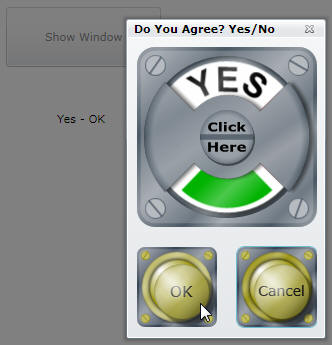
You click the Show Window button and the modal popup appears. You select Yes or No and click OK or Cancel.

The results of the Combo Box selection, and the button clicked, will show up on the main page.

The Popup Meets the Designer

We use View Model because, we want to allow a Designer, to easily change the design of an application, without requiring any code changes.

When the Designer opens the project up in Microsoft Expression Blend, they will see the MainPage.xaml file and the PopUpWindow.xaml file. The Designer knows that they can alter any file with a .xaml extension to re-design the application.

When the Designer opens the PopUpViewModel.xaml file, and they also open the Data window, they see that there is a Data Context associated with this control. The arrows in the graphic above, indicate what is currently bound to what.

The Re-Design

The Designer deletes the existing items and replaces them with a new design (the graphics are from Alan Beasley’s 10 Cool Buttons for Download in Expression Blend & Silverlight. I was also able to get Alan Beasley to do the actual layout of the popup).

Hooking the new OK and Cancel buttons is easy, The Designer simply drops a InvokeCommandAction behavior on each button.

In the Properties for each button, Click is selected for EventName, and the DataBind button is clicked next to Command.

The button is then bound to the appropriate ICommand in the associated View Model.

Dude We Need A Value Converter!

One of the reasons we use View Model, is that it allows a "separation of concerns". A Designer can completely change a design without the Developer needing to change any code.

However, in this case, the original design had a Combo Box bound to a String value (SelectedPopUpValueProperty), in the View Model. In the new design, the Designer wants to use a Toggle Button control that uses a boolean (IsChecked). Expression Blend will not allow the Designer to bind IsChecked to SelectedPopUpValueProperty.

So the Designer calls the Developer up, who is vacationing in Aruba after turning in his View Model (after unit testing it to assure he met the requirements), and explains the problem. The Developer responds:

"Dude are you serious? If I had any idea a Toggle Button was going to be in the design I would have simply made a boolean property for you to bind to in the View Model, and that property would have set the SelectedPopUpValueProperty that the main page is using."

"The problem is, the View Model is now being worked on by the New York office and you don't want to deal with those guys. We have to fix this without changing the View Model at all. I will whip up a Value Converter and you can just use that."

"When you check-in your .xaml page into source control, you will also check-in the file I give you. The guys in New York will not have to change what they are doing at all, it will just work."

The Value Converter

The Designer drops the Value Converter file (BoolToStringConverter.cs), into the project and hits the F5 key to build the project (so the file will be built and it can be used). The Designer then uses the following steps to create the binding:

  • Clicks the Use a custom path expression box
  • Enters the name of the property to bind to (SelectedPopUpValueProperty) in the box
  • Selects the BoolToStringConverter in the Value converter drop down.
  • Clicks OK

The application is complete!

The Code - Making a Popup

When you create a new Silverlight Child Window control...

It creates a control with a code behind and OK and Cancel buttons with event handlers.

Remove the event handlers from the buttons and clear out all the methods in the code behind.

Create a class file (PopUpViewModel.cs) that will serve as the View Model for the Popup:

    public class PopUpViewModel : INotifyPropertyChanged
    {
        private ChildWindow PopUP;
 
        public PopUpViewModel()
        {
            // Set the command property
            SetPopUpCommand = new DelegateCommand(SetPopUp, CanSetPopUp);
            OKButtonCommand = new DelegateCommand(OKButton, CanOKButton);
            CancelButtonCommand = new DelegateCommand(CancelButton, CanCancelButton);
 
            SelectedPopUpValueProperty = "Yes";
        }
 
        // Commands
 
        #region SetPopUpCommand
        public ICommand SetPopUpCommand { get; set; }
        public void SetPopUp(object param)
        {
            PopUP = (ChildWindow)param;
        }
 
        private bool CanSetPopUp(object param)
        {
            return true;
        }
        #endregion
 
        #region OKButtonCommand
        public ICommand OKButtonCommand { get; set; }
        public void OKButton(object param)
        {
            PopUP.DialogResult = true;
        }
 
        private bool CanOKButton(object param)
        {
            return true;
        }
        #endregion
 
        #region CancelButtonCommand
        public ICommand CancelButtonCommand { get; set; }
        public void CancelButton(object param)
        {
            PopUP.DialogResult = false;
        }
 
        private bool CanCancelButton(object param)
        {
            return true;
        }
        #endregion
 
        // Properties
 
        #region SelectedPopUpValueProperty
        private string _SelectedPopUpValueProperty;
        public string SelectedPopUpValueProperty
        {
            get
            {
                return this._SelectedPopUpValueProperty;
            }
            set
            {
                this._SelectedPopUpValueProperty = value;
                this.NotifyPropertyChanged("SelectedPopUpValueProperty");
            }
        }
        #endregion
 
        // Utility
           
        #region INotifyPropertyChanged
        public event PropertyChangedEventHandler PropertyChanged;
 
        private void NotifyPropertyChanged(String info)
        {
            if (PropertyChanged != null)
            {
                PropertyChanged(this, new PropertyChangedEventArgs(info));
            }
        }
        #endregion        
    }

This class does the following:

  • Implements INotifyPropertyChanged so that the UI is automatically updated when values in the View Model are updated
  • Creates a property for the Selected PopUp Value (SelectedPopUpValueProperty)
  • Creates ICommands for the OK and Cancel buttons
  • Creates an ICommand that allows an instance of the PopUp UI to be set (SetPopUpCommand)

Databind The Popup UI to the View Model

The Popup is simple because we are basically passing an instance of the entire Popup UI to the View Model. The View Model then has access to all the functionality of the Popup. Programming the Popup is as easy as if it were done using normal code behind, however, it's still View Model, so the Designer has full control over the UI.

In Blend, in the Objects and Timeline window, you drop a InvokeCommandAction behavior on childWindow.

In the Properties for the InvokeCommandAction behavior, you set the EventName to Loaded, and Data bind the Command to SetPopUpCommand.

You then bind the CommandParameter to the PopUpWindow.

Calling The PopUp From The Main View

Calling the Popup from the View Model of the main View (MainViewModel.xaml) is easy:

Drop a InvokeCommandAction behavior on the button, and configure it to call the ShowPopUPCommand method in the View Model.

Here is the complete code for the View Model:

    public class MainViewModel : INotifyPropertyChanged
    {
        private ChildWindow PopUP;
 
        public MainViewModel()
        {
            // Create popup(s)
            PopUP = new PopUpWindow();
 
            // Set the command property
            PopUP.Closed += new EventHandler(PopUP_Closed);
            ShowPopUPCommand = new DelegateCommand(ShowPopUP, CanShowPopUP);
        }
 
        // Commands
 
        #region ShowPopUPCommand
        public ICommand ShowPopUPCommand { get; set; }
        public void ShowPopUP(object param)
        {
            // Show PopUP
            PopUP.Show();
        }
 
        private bool CanShowPopUP(object param)
        {
            return true;
        }
        #endregion
 
        // Properties
 
        #region SelectedPopUpValueProperty
        private string _SelectedPopUpValueProperty;
        public string SelectedPopUpValueProperty
        {
            get
            {
                return this._SelectedPopUpValueProperty;
            }
            set
            {
                this._SelectedPopUpValueProperty = value;
                this.NotifyPropertyChanged("SelectedPopUpValueProperty");
            }
        }
        #endregion
 
        // Events
 
        #region PopUP_Closed
        void PopUP_Closed(object sender, EventArgs e)
        {
            // Was there a response at all?
            if (PopUP.DialogResult != null)
            {
                // Set the selected value
                bool boolDialogResult = (PopUP.DialogResult != null) ?
                    Convert.ToBoolean(PopUP.DialogResult) : false;
                PopUpViewModel objPopUpViewModel = (PopUpViewModel)PopUP.DataContext;
 
                SelectedPopUpValueProperty = String.Format("{0} - {1}",
                    objPopUpViewModel.SelectedPopUpValueProperty,
                    (boolDialogResult) ? "OK" : "Cancel");
            }
        }
        #endregion
 
        // Utility
           
        #region INotifyPropertyChanged
        public event PropertyChangedEventHandler PropertyChanged;
 
        private void NotifyPropertyChanged(String info)
        {
            if (PropertyChanged != null)
            {
                PropertyChanged(this, new PropertyChangedEventArgs(info));
            }
        }
        #endregion        
    }

The Type Converter

Oh yes, that file that the Developer whipped up in Aruba, here it is:

    public class BoolToStringConverter : IValueConverter
    {
        #region IValueConverter Members
 
        public object Convert(object value, Type targetType, object parameter, System.Globalization.CultureInfo culture)
        {
            if ((string)value == "No")
            {
                return true;
            }
            else
            {
                return false;
            }
        }
 
        public object ConvertBack(object value, Type targetType, object parameter, System.Globalization.CultureInfo culture)
        {
            if ((bool)value == true)
            {
                return "No";
            }
            else
            {
                return "Yes";
            }
        }
 
        #endregion
    }

This Seems Too Easy...

Some would argue that creating Popups like this, is tying your View Model to the Popup, and that is wrong because the Popup is a UI element. However, the Popup is a function that the View Model is performing, not the View (the View only requested the PopUp to be shown). It is displayed in front of the View and it sends values back to the View thru bindings, but it belongs to the View Model. So, it is perfectly fine for the View Model to directly instantiate a Popup class just as it would another class such as a web service.

Hey We Added Code!

We care about View Model, because we want to allow the Designer the freedom to design the application without code changes, and this example achieves that. Ok perhaps a Value Converter may need to be added is some situations, but, even in this case, the View Model did not need to be changed.

If the Developer is wearing both hats, and is also the Designer, it may be easier to just alter the View Model if a property type needs to be added or changed, however, you have options. A Value Converter allows you to bind UI elements to the View Model when the View Model is faced with an unexpected change.

How Do I Get Started With Silverlight?

To learn how to use Expression Blend, all you have to do is go to:

http://www.microsoft.com/design/toolbox/

License

This article, along with any associated source code and files, is licensed under The Microsoft Public License (Ms-PL)

About the Author

defwebserver
Software Developer (Senior) http://ADefWebserver.com
United States United States
Member
Michael Washington is a Microsoft Silverlight MVP. He is a Silverlight developer and an ASP.NET, C#, and Visual Basic programmer.
 
He is a DotNetNuke Core member and has been involved with DotNetNuke for over 4 years. He is the Co-Author of Building Websites with DotNetNuke (4 and 5).
 
He is one of the founding members of The Open Light Group (http://openlightgroup.net).
 
He is the founder of http://LightSwitchHelpWebsite.com
 
He has a son, Zachary and resides in Los Angeles with his wife Valerie.

Sign Up to vote   Poor Excellent
Add a reason or comment to your vote: x
Votes of 3 or less require a comment

Comments and Discussions

 
You must Sign In to use this message board.
Search this forum  
    Spacing  Noise  Layout  Per page   
Question[My vote of 1] MisinformationmemberAustin Harris25 Jul '12 - 12:24 
A significant portion of your article uses terms from the MVVM pattern. However you do not adhere to the MVVM pattern. This is very misleading. Using the terms View, Model and ViewModel implies MVVM, and often people search for information about MVVM by asking how to do something in the ViewModel, and they are referring to the ViewModel from the MVVM pattern.
 
Please do not spread this misinformation
AnswerRe: [My vote of 1] Misinformationmemberdefwebserver25 Jul '12 - 12:49 
It says View Model not MVVM. I don't understand your point.
GeneralRe: [My vote of 1] MisinformationmemberAustin Harris30 Jul '12 - 10:34 
My point is that if you do a search for 'view model', you will find articles about MVVM. This article is not about MVVM, so therefore it should not use the term 'View Model'.
 
Anytime your 'View Model' references a UI component, it is no longer a View Model.
 
That is why I say your article is misleading, and teaching behavior is that not inline with best practices for View Models.
GeneralRe: [My vote of 1] Misinformationmemberdefwebserver30 Jul '12 - 11:39 
So now I am responsible for what happens in a search engine?
 
This is NOT the spirit of this site. The purpose of this site to to have a free exchange of of ideas.
 
I DISAGREE with your OPINION. Period.
 
I hope you find better things to do with your time rather than trying to control what other peple do.
 
How about spending you time writing an article on Code Project?
QuestionNeed right guidelinemembersumantamca30 Nov '10 - 18:22 
Hi,
 
I am new to Silverlight using MVVM. I want to do the same functionality to show the employee details in a modal window.
 
I read this article and comments. You are complementing each other but on one specified what is the better approach, what should be the right MVVM style code.
 
So, I request all of you to elaborate the modified code for doing the same thing without violating the true MVVM style.
 
A sample code will be better helping for me as well as others new MVVM beginners.
(Please do not include prism or other advanced/custom framework).
 

Special thanks to Sacha Barber, EisenbergEffect, defwebserver.
 
Thanks & Regards
 
Mr. Sumanta Chatterjee

Software Engineer
Basware Corporation (India Branch)
www.basware.com
Sumanta Chatterjee

AnswerRe: Need right guidelinememberdefwebserver30 Nov '10 - 18:39 
see:
http://openlightgroup.net/Blog/tabid/58/EntryId/123/Silverlight-Behavior-HisowaModPopUpBehavior.aspx
GeneralRe: Need right guidelinemembersumantamca1 Dec '10 - 16:49 
Thank you for your quick reply. Smile | :)
 
Thumbs Up | :thumbsup:
Sumanta Chatterjee

GeneralRocking Examplemembersaranyan.y@gmail.com6 Jul '10 - 0:07 
Rocking Example, Thank you
GeneralRe: Rocking Examplememberdefwebserver6 Jul '10 - 2:56 
Thanks for the feedback. This works for me, so I just wanted to share it with others.
GeneralYou've Made a Classic MistakememberEisenbergEffect1 May '10 - 2:20 
Neither of your ViewModels are ViewModels at all. The PopupViewModel is a Supervising Controller and your MainViewModel is nothing more than Autonomous View (an anti-pattern) masquerading as a VM by not living in the code-behind file.
 
First off, PopupViewModel references it's view directly. It uses this reference to *manually* synchronize state (Popup.DialogResult). Any time you do something like this, you should know that you are no longer using MVVM because VMs do not do manual state synchronization; they use databinding exclusively. A Supervising Controller generally uses a combination of databinding *and* explicit synchronization. This is one of the main differences between MVVM (and PM) vs. SC. It's important that you realize this, because demonstrating one pattern under the name of another creates confusion within the community and we have a lot of that right now. Unfortunately, this is not a very good demonstration of SC either because your PopupViewModel does not interact with the view through an interface. Try unit testing that. Doing so will force you to instantiate an actual view. Any time you have to do that in a test, you are not using separated presentation correctly. In some cases, trying to test something like this won't even be possible. For example, if this were WPF, you wouldn't be able to set the DialogResult without first showing the Window; that's an illegal operation and the runtime will throw an exception. But, you can't go showing dialogs in the middle of a unit test either. I haven't tested this with Silverlight, but you should be aware of this problem in general, even if you don't care about testability (one of the key benefits of MVVM among others).
 
Second, your MainViewModel is implemented using an anti-pattern. Notice that it instantiates a View directly in it's constructor and wires to its events! Later on it calls Show() directly on that View and finally goes about directly accessing it's properties in the event handler. Your VM looks an awful lot like a code-behind file and for all intents and purposes it is. Yes, it uses databinding. But, it also uses explicit synchronization directly against an instance of the view and even shows the dialog! You cannot test this class. It's impossible in its current state. This is a fine example of what developers should not be doing.
 
Please remember that just because you use databinding or commands, doesn't mean you are doing MVVM. There are lots or separated presentation patterns out there, many of which are very useful and good (like SC), but some of them are anti-patterns too. Most importantly, you need to understand the differences. Calling different things by the same name creates great confusion.
GeneralRe: You've Made a Classic Mistake [modified]memberEisenbergEffect1 May '10 - 2:26 
Just to be clear, there's nothing wrong with Supervising Controller or other presentation patterns. In fact SC is a perfect example of a pattern that works really well for modal dialogs. There are other way to handle it, but SC is a solid solution. The problem here is that SC is used with a poor implementation and then called MVVM.

modified on Saturday, May 1, 2010 8:34 AM

GeneralRe: You've Made a Classic Mistakememberdefwebserver1 May '10 - 3:09 
EisenbergEffect wrote:
The problem here is that SC is used with a poor implementation and then called MVVM.

 
Is their a "Church" that dictates what MVVM is? I'm sorry that you object to the use of the letters "MVVM" but this is MVVM. The web is full of MANY interpretations of MVVM. They are ALL MVVM, I have only removed some layers in my version. It is insulting that you call my code poor.
 
I would hope that you will find it in your heart to simply allow another programmer to present his ideas without attacking him on trivial ideological issues. The argument over "What is MVVM?" is like the argument over "who is the true God?". The argument cannot be won.
GeneralRe: You've Made a Classic Mistakememberdefwebserver1 May '10 - 2:41 
If my code does not work, please point it out and I will fix it. Otherwise I would hope that a leader in the community such as you would not spend time criticizing other programmers on an ideological point because they are using the term "MVVM".
 
This code works, it is MVVM.
GeneralRe: You've Made a Classic MistakememberEisenbergEffect1 May '10 - 3:54 
This is an issue of education. The primary problem is that you are presenting multiple different patterns under the same name and one of these patterns is an anti-pattern as well. That confuses people. It's why people keep coming to me confused about the difference between SC and MVVM. They read an article like this and it confuses them.
GeneralRe: You've Made a Classic MistakememberEisenbergEffect1 May '10 - 3:56 
Since both myself andd Sacha Barber have criticised this article. It would seam reasonable to at least take the criticism seriouly, rather than blowing it off as a matter of interpreation, etc.
GeneralRe: You've Made a Classic MistakememberEisenbergEffect1 May '10 - 4:23 
I apologize if my comments have come off rude. My intent was only to point out that there is a distinction between MVVM, SC, etc. It doesn't facilliate any sort of intelligent converstation to disregard the unique aspects of different patterns and to call them all by the same name. A rose is a rose, but a rose is not a petunia.
GeneralRe: You've Made a Classic Mistakememberdefwebserver1 May '10 - 6:04 
EisenbergEffect wrote:
I apologize if my comments have come off rude. My intent was only to point out that there is a distinction between MVVM, SC, etc. It doesn't facilitate any sort of intelligent conversation to disregard the unique aspects of different patterns and to call them all by the same name. A rose is a rose, but a rose is not a petunia.

 
Please forgive me. I do get it. For years you guys put a lot of effort to design what you feel is the best most robust pattern that over time has proved to be valid.
 
It's really annoying if someone comes in and uses the name (MVVM) that represents something you have worked so hard to create and violates what you feel are it's basic principals.
 
In acknowledgement of that, I will use the term "Simplified MVVM" moving forward. I hope you will allow me the "MVVM" in the name because having a View and a View Model and also a Model ARE important to what I am demonstrating. A bit like C vs C++. The "C" in "C++" is acknowledging what came before.
GeneralRe: You've Made a Classic MistakememberRobert Kozak4 May '10 - 1:24 
In acknowledgement of that, I will use the term "Simplified MVVM" moving forward. I hope you will allow me the "MVVM" in the name because having a View and a View Model and also a Model ARE important to what I am demonstrating. A bit like C vs C++. The "C" in "C++" is acknowledging what came before
 

Both Sacha Barber and Rob Eisenberg have tried to explain to you what the difference in what you are showing and MVVM. MVVM is not just classes named Model, ViewModel and View but they actually represent a specific development pattern. Like Rob said what you have is closer to a Supervising Controller.
 
This is not a religious debate or a debate on naming conventions and not even close to the difference between C and C++. MVVM is a pattern with has basis in MVC (Model-View-Controller) and MVP (Model-View-Presenter), and is a specialization of the Presentation Model introduced by Martin Fowler http://martinfowler.com/eaaDev/PresentationModel.html[^]
 
No one is criticizing your code but rather your definition of MVVM. MVVM is a very specialized pattern and one should learn it before trying to teach or deomonstrate it because it causes confusion in the development community for newcomers trying to get acturate information on the pattern in order to implement it properly.
 
You can take a Volkswagon Bettle and call it a Porche 911 but it won't make it true neither does calling it a "Simplified Porche".
GeneralRe: You've Made a Classic Mistakememberdefwebserver4 May '10 - 16:30 
Robert Kozak wrote:
No one is criticizing your code but rather your definition of MVVM. MVVM is a very specialized pattern and one should learn it before trying to teach or deomonstrate it because it causes confusion in the development community for newcomers trying to get acturate information on the pattern in order to implement it properly.

 
Don't worry, I give up. I will be switching from using the 4 MVVM letters any more. This code is solid, it's testable. I don't want to discuss further what I'm not doing.
 
So this is NOT MVVM.I will get around to removing MVVM from all my articles in the next few weeks.
 
Now if the code has a bug, please let me know, thanks.
GeneralNice Articlememberlinuxjr30 Apr '10 - 13:00 
Thank you for sharing your work with us.
GeneralRe: Nice Articlememberdefwebserver30 Apr '10 - 14:02 
Thank you for taking time to leave a comment, it really is appreciated Smile | :)
GeneralWhilst I like what you do generally I do not like this approach for the following reasons [modified]mvpSacha Barber30 Apr '10 - 6:00 
You are relying on there being a ChildWindow in your ViewModel, this is bad, as in your Tests (you are testing your ViewModels right?, of course you are.) there will no ChildWindow, I think you should use Services, IPopupOpener or something, which knows how to show a ChildWindow, and then inject a SL version into the ViewModel, and in the testcase use a ITestPopupOpener or something and inject that in the ViewModel from Unit test projects.
 
I do not think your VM should know anything about the ChildWindow at all, it should all be done through a set of actual services that could easily be swapped out for test ones. Imagine this was talking to a web service instead of just showing a popup, and the web service was not your own, and the owner of the web service took it down for maintenance, your code would break. So you need some interface (services) in the middle which you can mock in unit testing. There are better ways.
 
You can read more about this approach right here at my own MVVM article series : WPF : If Carlsberg did MVVM Frameworks Part 3 of n[^]
Sacha Barber
  • Microsoft Visual C# MVP 2008-2010
  • Codeproject MVP 2008-2010
Your best friend is you.
I'm my best friend too. We share the same views, and hardly ever argue
 
My Blog : sachabarber.net
modified on Friday, April 30, 2010 12:26 PM

GeneralRe: Whilst I like what you do generally I do not like this approach for the following reasonsmemberdefwebserver30 Apr '10 - 6:45 
Sacha, Thanks for the feedback. I don't disagree with any of your statements, just wanted to perhaps point out WHY I do it differently.
 

Sacha Barber wrote:
I do not think your VM should know anything about the ChildWindow at all, it should all be done through a set of actual services that could easily be swapped out for test ones.

 
If a person does not need to perform this test they can save them self from implementing code that is actually difficult for a number of developers to understand.
 
The code does work and they get the benefits of MVVM. Perhaps not ALL the "testing benefits" but you can still test the ViewModel and because the Popup is instantiated in the ViewModel it will return the Popup if the Command is called.
GeneralRe: Whilst I like what you do generally I do not like this approach for the following reasonsmvpSacha Barber30 Apr '10 - 22:39 
defwebserver wrote:
If a person does not need to perform this test they can save them self from implementing code that is actually difficult for a number of developers to understand.

 
Not testing something and not implementing something as it may tax some developers sounds like you need better developers to me, or educate the devs you have got, so they do understand the code, and just how testable one could make it if they used dependency injection or MEF or something like that.
 
Im not sure I agree with not testing at all actually, to my mind one of the main benefits of MVVM is testability, and of course separation of concerns, and for me this code provides neither. As I say I like what you do, its just I cant agree with this approach, as
 
a) its not testable, in my opinion, the childWindow is modal, are you saying your test will execute the command, and actually try and open this modal window in a test? really?
b) this is a bad separation of concerns in my opinion, the pattern is Model-View-ViewModel, but this is blurring the View/ViewModel to much for me. I believe strongly that the ViewModel should be View Agnostic. For example it would be impossible for this ViewModel to be used in a WPF app, as CHildWindow does not mean a damn thing in WPF land. But through a service all of that UI specific stuff would be nicely abstracted, and therefor the ViewModel could be shared in WPF/SL lands, and also be 100% testable.
 
Like I say I do not mean you any disrespect, but I just have a passion for MVVM is all.
Sacha Barber
  • Microsoft Visual C# MVP 2008-2010
  • Codeproject MVP 2008-2010
Your best friend is you.
I'm my best friend too. We share the same views, and hardly ever argue
 
My Blog : sachabarber.net

GeneralRe: Whilst I like what you do generally I do not like this approach for the following reasonsmemberdefwebserver1 May '10 - 3:00 
The View Model is still a class exposes interfaces so it can be tested. Perhaps not with your chosen methods.
 
Sacha Barber wrote:
Like I say I do not mean you any disrespect, but I just have a passion for MVVM is all.

 
I have a passion too. When others make their own MVVM framework that does things differently, should the other guy tell the first guy that he is "not MVVM"? The first step in ideology is to tell the other guy that he "is not" something.
 
I work hard to create good code that works. If my code has a bug, I will fix it. Otherwise I strongly believe that this is good, and correct and it is MVVM.
GeneralRe: Whilst I like what you do generally I do not like this approach for the following reasonsmvpSacha Barber1 May '10 - 20:15 
You seem to be offended by what I have said, it was not my intentions to upset you.
 
I also want to clear something up, I never said your code had a bug. All I said was that this code is untestable. I could concede that if the ChildWindow was simply being used to show a error of something that the user did not have to interact with, and that was it, the developer would not have to test it. But more often than not, the ChildWindow will have some user interaction required that affects the state of either the current ViewModel or some other state that is important to the application as a whole, that WILL need testing.
 
Using this approach you can not test that sort of thing, you will need services or something that does not require you to create a Window in a testcase.
 
Its just that people will look at this, and may use it, and they may use it in the scenario I describe above and it will not work out for them.
 
Like I say I like your work and have marked some of your other articles with 5 votes (more if I could have), but I just feel this one needs to be tweaked.
 
I can see that you are upset, so I will leave it alone now. Sorry for any bad feelings.
Sacha Barber
  • Microsoft Visual C# MVP 2008-2010
  • Codeproject MVP 2008-2010
Your best friend is you.
I'm my best friend too. We share the same views, and hardly ever argue
 
My Blog : sachabarber.net

GeneralRe: Whilst I like what you do generally I do not like this approach for the following reasonsmemberdefwebserver2 May '10 - 18:11 
Sacha Barber wrote:
Sorry for any bad feelings.

 
No bad feelings. I apologize for getting more excited than the situation warranted because I was having a simultaneous Twitter argument
 
(a situation that has now been resolved and required me to admit that I put insensitive comments out there for weeks and was only getting a small taste of it back)
 
So yeah I was upset, but it was not your fault.
 
Also, I was able to Unit Test the Popup:
Unit Testing A Silverlight 'Simplified MVVM' Modal Popup[^]
 
I doubt that it is exactly what you mean, for example if you needed a mock, I have a method, but you may not find it acceptable.
GeneralRe: Whilst I like what you do generally I do not like this approach for the following reasonsmvpSacha Barber2 May '10 - 21:43 
defwebserver wrote:
No bad feelings. I apologize for getting more excited than the situation warranted because I was having a simultaneous Twitter argument

 
No worries, like I say I was not trying to piss you off, just trying to point out a few things is all.
 
I know what its like, having written about 95 articles now, when one gets abuse it does upset you. Not my intention though
Sacha Barber
  • Microsoft Visual C# MVP 2008-2010
  • Codeproject MVP 2008-2010
Your best friend is you.
I'm my best friend too. We share the same views, and hardly ever argue
 
My Blog : sachabarber.net

GeneralOhhh, A bun fight, can I play? :-) [modified]memberAlan Beasley30 Apr '10 - 8:02 
I want to see an unfair fight to the death! Grab your jam doughnuts & let’s get it on!!! Big Grin | :-D
 
Firstly, Mr (Second place for best March article), I think it is disgraceful to stoop to the level of a Baboons arse, to plug your own article in someone else's article. It's brilliant, I can't wait to get a red bum doing it as well!!! Laugh | :laugh: Laugh | :laugh: Laugh | :laugh:
 
Secondly, in Michael's defence, he did mention to me that he was doing a simplistic version that most people could understand, but it had its drawbacks (He lost me at that point... Poke tongue | ;-P ) Maybe the fault, is that this is not addressed in the article...
 
Thirdly, I'm only here because I'm an antagonistic git who loves a good bun fight, even if I've absolutely no idea what the hell is going on!!! WTF | :WTF:
 
Bring on the custard tarts!!! Cool | :cool:

modified on Friday, April 30, 2010 2:37 PM

GeneralRe: Ohhh, A bun fight, can I play? :-)memberdefwebserver30 Apr '10 - 8:15 
Alan Beasley wrote:
I'm only here because I'm an antagonistic git who loves a good bun fight

 
Bun? Hot dog buns? We have REALLY big hot dog buns "on this side of the pond". I'm feeling lucky...
 
(most likely something was seriously lost in the translation...)
GeneralRe: Ohhh, A bun fight, can I play? :-)memberAlan Beasley30 Apr '10 - 8:36 
defwebserver wrote:
most likely something was seriously lost in the translation

 
Currant buns & iced buns my man!!! Smile | :)
Sweet pastry on this side of the pond...
GeneralRe: Ohhh, A bun fight, can I play? :-)memberDewey30 Apr '10 - 22:02 
Hey, could somebody pass me whatever Beasley is smoking?
 
Buns, Jam, Baboon Arses???
 
Yeah, I think I've seen all of them in my View Model(lol).
GeneralRe: Ohhh, A bun fight, can I play? :-)mvpSacha Barber30 Apr '10 - 22:44 
Baboon this : http://www.bloggerheads.com/images/mandrill_chicks.jpg[^]
Sacha Barber
  • Microsoft Visual C# MVP 2008-2010
  • Codeproject MVP 2008-2010
Your best friend is you.
I'm my best friend too. We share the same views, and hardly ever argue
 
My Blog : sachabarber.net

GeneralRe: Ohhh, A bun fight, can I play? :-)memberAlan Beasley1 May '10 - 0:51 
How did you know I was in a coffee bar in Amsterdam??? Smokin!!![^] Laugh | :laugh:
 
Have you not seen the excellent Baboon Framework : A revolutionary WPF framework that will save you time and effort[^]
 
It's fully testable (honest!) Big Grin | :-D
GeneralRe: Ohhh, A bun fight, can I play? :-)mvpSacha Barber30 Apr '10 - 22:41 
Alan Beasley wrote:
I think it is disgraceful to stoop to the level of a Baboons arse, to plug your own article in someone else's article

 
Ah but that code is testable and UI agnostic, so stick it hippie. Custard tart that.
Sacha Barber
  • Microsoft Visual C# MVP 2008-2010
  • Codeproject MVP 2008-2010
Your best friend is you.
I'm my best friend too. We share the same views, and hardly ever argue
 
My Blog : sachabarber.net

GeneralRe: Ohhh, A bun fight, can I play? :-)memberAlan Beasley1 May '10 - 1:00 
Sacha Barber wrote:
Ah but that code is testable and UI agnostic, so stick it hippie. Custard tart that.

 
All true & I believe you (Not that I have a clue!) Big Grin | :-D
 
And I'm only a Hippie because I can't find a decent "Barber" (Still can't!) So slice that custard! Mr Jam rolypoly[^] Poke tongue | ;-P
GeneralRe: Ohhh, A bun fight, can I play? :-)mvpSacha Barber1 May '10 - 2:51 
Thanks for the nice piccie of a Jam rolypoly, nice one.
Sacha Barber
  • Microsoft Visual C# MVP 2008-2010
  • Codeproject MVP 2008-2010
Your best friend is you.
I'm my best friend too. We share the same views, and hardly ever argue
 
My Blog : sachabarber.net

GeneralIt's MVVM tastic!!!memberAlan Beasley29 Apr '10 - 23:30 
Your just pumping out these MVVM tutorials - Microsoft must be paying you!!! Laugh | :laugh: Laugh | :laugh: Laugh | :laugh:
 
And it's so easy, even I could do it!!!
(Let me guess, I'm the designer with no programming ability???) Big Grin | :-D
 
Thanks for all these great articles, to show designers have nothing to fear from that nasty stuff called code!
 
Alan
GeneralRe: It's MVVM tastic!!!memberdefwebserver30 Apr '10 - 2:22 
Alan Beasley wrote:
(Let me guess, I'm the designer with no programming ability???)

 
No You're the Designer who doesn't WANT TO program Smile | :) I'm the guy in Aruba...
 

Alan Beasley wrote:
Thanks for all these great articles, to show designers have nothing to fear from that nasty stuff called code!

 
Thank you again for all your help on this article!
 
Your buttons are great!
GeneralRe: It's MVVM tastic!!!memberAlan Beasley30 Apr '10 - 2:41 
defwebserver wrote:
No You're the Designer who doesn't WANT TO program

 
No, I assure you, I was right the first time! Big Grin | :-D #
 

defwebserver wrote:
Thank you again for all your help on this article! Your buttons are great!

 
I did very little other than generate the Yes/No, to replace the Engaged/Vacant.
It's all your work, & the buttons are free to all...
GeneralYou've gone MVVM Crazy...memberDewey29 Apr '10 - 20:14 
and that's a good thing!!!
 
I'm loving your series of MVVM articles!
GeneralRe: You've gone MVVM Crazy...memberdefwebserver30 Apr '10 - 2:24 
Thank you for your feedback, it is really appreciated. I hope these articles are working for you. MVVM is fun and for larger projects, it actually takes LESS code than if you did not use it.

General General    News News    Suggestion Suggestion    Question Question    Bug Bug    Answer Answer    Joke Joke    Rant Rant    Admin Admin   

Permalink | Advertise | Privacy | Mobile
Web02 | 2.6.130516.1 | Last Updated 1 Sep 2010
Article Copyright 2010 by defwebserver
Everything else Copyright © CodeProject, 1999-2013
Terms of Use
Layout: fixed | fluid
