Introduction
Microsoft introduced the concept of Active Directory with Windows 2000. Information about various resources like people, machines, printers, groups etc. are stored in Active Directory. It provides a single point of management for Windows-based user accounts, clients, servers, and applications, and facilitates network administrators and users to have an integrated view of a network.
This simple example uses System.DirectoryServices namespace to interact with Active Directory. This namespace contains two classes DirectoryEntry and DirectorySearcher to connect to and to retrieve data from an Active Directory source. These classes can be used with any of the four AD service providers, LDAP, IIS, NDS, and WinNT. I have used LDAP as it's a text based, easy to use, and platform independent protocol.
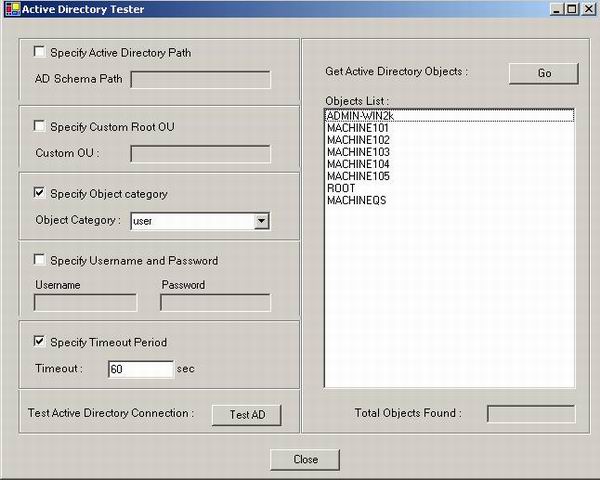
User can specify a specific AD source path or otherwise default AD would be queried. Different Filters can be applied to list the directory objects like object categories (users, computers, groups etc.) and Organizational units (OUs).
In order to interact with an active directory, you have to first call directory entry constructor which takes an LDAP string (in this case) as a parameter. This LDAP string can contain the name of domain controllers and Organizational units like: ldap://OU=IT,DC=12,DC=test,DC=com/.
DirectoryEntry entry = null;
entry = new DirectoryEntry(strPath);
where strPath contains the LDAP string path.
To retrieve directory objects from an Active Directory, you have to create an object of DirectorySearcher class and pass DirectoryEntry's objects as a parameter in its constructor.
DirectorySearcher mySearcher = new DirectorySearcher(entry);
DirectorySearcher provides different properties to perform a customized search. You can create a custom filter to perform a filtered search like:
mySearcher.Filter = "(ObjectCategory=user");
Finally, it has a function FindAll() which searches the directory for desired results and returns a collection of nodes from Active Directory of type SearchResultCollection. You can iterate through the collection to get individual results.
foreach(SearchResult result in mySearcher.FindAll())
{
strName = result.GetDirectoryEntry().Name;
}
I have written a function GetLDAPPath() which returns a formatted LDAP string based on the input user has specified.
Hope you will enjoy this small sample!
This member has not yet provided a Biography. Assume it's interesting and varied, and probably something to do with programming.



 General
  News
News  Suggestion
  Question
  Bug
Bug  Answer
  Joke
Joke  Praise
  Rant
Rant  Admin
Admin 


 Submit an article or tip


