Click here to Skip to main content

Writing Your Own GPS Applications: Part I

By , 7 Aug 2008
 

“I am continually amazed by how little code is required to use atomic clocks in satellites 11,000 miles above my head.”
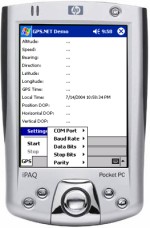
Sample Image - WritingGPSApplications1.jpg

Introduction

What is it that GPS applications need to be good enough to use in a commercial environment, such as in-car navigation? Also, how does the process of interpreting GPS data actually work? In this three-part series, I will cover both topics and give you the skills you need to write a commercial-grade GPS application that works with a majority of GPS devices in the industry today.

One Powerful Sentence

This first part in the series will explore the task of interpreting raw GPS data. Fortunately, the task is simplified thanks to the National Marine Electronics Association which introduced a standard for the industry, now in use by a vast majority of GPS devices. To give developers a head start, I chose to use some Visual Studio .NET source code from my “GPS.NET Global Positioning SDK” component. (The code is stripped of features like multithreading and error handling for brevity.)

NMEA data is sent as comma-delimited “sentences” which contain information based on the first word of the sentence. There are over fifty kinds of sentences, yet an interpreter really only needs to handle a few to get the job done. The most common NMEA sentence of all is the “Recommended Minimum” sentence, which begins with “$GPRMC”. Here is an example:

$GPRMC,040302.663,A,3939.7,N,10506.6,W,0.27,358.86,200804,,*1A

This one sentence contains nearly everything a GPS application needs: latitude, longitude, speed, bearing, satellite-derived time, fix status and magnetic variation.

The Core of An Interpreter

The first step in making an NMEA interpreter is writing a method which does two things: separating each sentence into its individual words and examining the first word to figure out what information is available to extract. Listing 1-1 shows the start of the interpreter class.

(Listing 1-1: The core of an NMEA interpreter is a function which divides NMEA sentences into individual words.)
'*******************************************************

'**  Listing 1-1.  The core of an NMEA interpreter

'*******************************************************

Public Class NmeaInterpreter
  ' Processes information from the GPS receiver
  Public Function Parse(ByVal sentence As String) As Boolean
    ' Divide the sentence into words
    Dim Words() As String = GetWords(sentence)
    ' Look at the first word to decide where to go next
    Select Case Words(0)
      Case "$GPRMC"      ' A "Recommended Minimum" sentence was found!
        ' Indicate that the sentence was recognized
        Return True
      Case Else
        ' Indicate that the sentence was not recognized
        Return False
    End Select
  End Function
  ' Divides a sentence into individual words
  Public Function GetWords(ByVal sentence As String) As String()
    Return sentence.Split(","c)
  End Function
End Class

The next step is to perform actual extraction of information, starting with latitude and longitude. Latitude and longitude are stored in the form “DDD°MM’SS.S”, where D represents hours (also called “degrees”), M represents minutes, and S represents seconds. Coordinates can be displayed in shorthand, such as “DD°MM.M’” or even “DD°”. The fourth word in the sentence, “3939.7”, shows the current latitude as hours and minutes (39°39.7’), except the numbers are squished together. The first two characters (39) represent hours and the remainder of the word (39.7) represents minutes. Longitude is structured the same way, except that the first three characters represent hours (105°06.6’). Words five and seven indicate the “hemisphere”, where “N” means “North”, “W” means “West” etc. The hemisphere is appended to the end of the numeric portion to make a complete measurement. I've found that NMEA interpreters are much easier to work with as they are event-driven. This is because data arrives in no particular order. An event-driven class gives the interpreter the most flexibility and responsiveness to an application. So, I'll design the interpreter to report information using events. The first event, PositionReceived, will be raised whenever the current latitude and longitude are received. Listing 1-2 expands the interpreter to report the current position.

(Listing 1-2: The interpreter can now report the current latitude and longitude.)
'*******************************************************

'**  Listing 1-2.  Extracting information from a sentence

'*******************************************************

Public Class NmeaInterpreter
  ' Raised when the current location has changed
  Public Event PositionReceived(ByVal latitude As String, _
                                ByVal longitude As String)
  ' Processes information from the GPS receiver
  Public Function Parse(ByVal sentence As String) As Boolean
    ' Look at the first word to decide where to go next
    Select Case GetWords(sentence)(0)
      Case "$GPRMC"      ' A "Recommended Minimum" sentence was found!
        Return ParseGPRMC(sentence)
      Case Else
        ' Indicate that the sentence was not recognized
        Return False
    End Select
  End Function
  ' Divides a sentence into individual words
  Public Function GetWords(ByVal sentence As String) As String()
    Return sentence.Split(","c)
  End Function
  ' Interprets a $GPRMC message
  Public Function ParseGPRMC(ByVal sentence As String) As Boolean
    ' Divide the sentence into words
    Dim Words() As String = GetWords(sentence)
    ' Do we have enough values to describe our location?
    If Words(3) <> "" And Words(4) <> "" And Words(5) <> "" And _
                                Words(6) <> "" Then
      ' Yes. Extract latitude and longitude
      Dim Latitude As String = Words(3).Substring(0, 2) & "°" ' Append hours
      Latitude = Latitude & Words(3).Substring(2) & """"      ' Append minutes
      Latitude = Latitude & Words(4)     ' Append the hemisphere
      Dim Longitude As String = Words(5).Substring(0, 3) & "°" ' Append hours
      Longitude = Longitude & Words(5).Substring(3) & """"     ' Append minutes
      Longitude = Longitude & Words(6)     ' Append the hemisphere
      ' Notify the calling application of the change
      RaiseEvent PositionReceived(Latitude, Longitude)
    End If
    ' Indicate that the sentence was recognized
    Return True
  End Function
End Class

One thing to watch out for here is that some GPS devices will report blank values when no information is known. Therefore, it’s a good idea to test each word for a value before parsing. If you need to type the degree symbol (°), hold down the Alt key and type “0176” on the numeric keypad.

Taking Out the Garbage

A checksum is calculated as the XOR of bytes between (but not including) the dollar sign and asterisk. This checksum is then compared with the checksum from the sentence. If the checksums do not match, the sentence is typically discarded. This is okay to do because the GPS devices tend to repeat the same information every few seconds. With the ability to compare checksums, the interpreter is able to throw out any sentence with an invalid checksum. Listing 1-3 expands the interpreter to do this.

(Listing 1-3: The interpreter can now detect errors and parse only error-free NMEA data.)
'*******************************************************

'**  Listing 1-3.  Detecting and handling NMEA errors

'*******************************************************

Public Class NmeaInterpreter
  ' Raised when the current location has changed
  Public Event PositionReceived(ByVal latitude As String, _
                                ByVal longitude As String)
  ' Processes information from the GPS receiver
  Public Function Parse(ByVal sentence As String) As Boolean
    ' Discard the sentence if its checksum does not match our calculated
    'checksum
    If Not IsValid(sentence) Then Return False
    ' Look at the first word to decide where to go next
    Select Case GetWords(sentence)(0)
      Case "$GPRMC"      ' A "Recommended Minimum" sentence was found!
        Return ParseGPRMC(sentence)
      Case Else
        ' Indicate that the sentence was not recognized
        Return False
    End Select
  End Function
  ' Divides a sentence into individual words
  Public Function GetWords(ByVal sentence As String) As String()
    Return sentence.Split(","c)
  End Function
  ' Interprets a $GPRMC message
  Public Function ParseGPRMC(ByVal sentence As String) As Boolean
    ' Divide the sentence into words
    Dim Words() As String = GetWords(sentence)
    ' Do we have enough values to describe our location?
    If Words(3) <> "" And Words(4) <> "" And Words(5) <> "" And _
                                Words(6) <> "" Then
      ' Yes. Extract latitude and longitude
      Dim Latitude As String = Words(3).Substring(0, 2) & "°" ' Append hours
      Latitude = Latitude & Words(3).Substring(2) & """"      ' Append minutes
      Latitude = Latitude & Words(4)     ' Append the hemisphere
      Dim Longitude As String = Words(5).Substring(0, 3) & "°" ' Append hours
      Longitude = Longitude & Words(5).Substring(3) & """"     ' Append minutes
      Longitude = Longitude & Words(6)     ' Append the hemisphere
      ' Notify the calling application of the change
      RaiseEvent PositionReceived(Latitude, Longitude)
    End If
    ' Indicate that the sentence was recognized
    Return True
  End Function
  ' Returns True if a sentence's checksum matches the calculated checksum
  Public Function IsValid(ByVal sentence As String) As Boolean
    ' Compare the characters after the asterisk to the calculation
    Return sentence.Substring(sentence.IndexOf("*") + 1) = GetChecksum(sentence)
  End Function
  ' Calculates the checksum for a sentence
  Public Function GetChecksum(ByVal sentence As String) As String
    ' Loop through all chars to get a checksum
    Dim Character As Char
    Dim Checksum As Integer
    For Each Character In sentence
      Select Case Character
        Case "$"c
          ' Ignore the dollar sign
        Case "*"c
          ' Stop processing before the asterisk
          Exit For
        Case Else
          ' Is this the first value for the checksum?
          If Checksum = 0 Then
            ' Yes. Set the checksum to the value
            Checksum = Convert.ToByte(Character)
          Else
            ' No. XOR the checksum with this character's value
            Checksum = Checksum Xor Convert.ToByte(Character)
          End If
      End Select
    Next
    ' Return the checksum formatted as a two-character hexadecimal
    Return Checksum.ToString("X2")
  End Function
End Class

Wireless Atomic Time

Time is the cornerstone of GPS technology because distances are measured at the speed of light. Each GPS satellite contains four atomic clocks which it uses to time its radio transmissions within a few nanoseconds. One fascinating feature is that with just a few lines of code, these atomic clocks can be used to synchronize a computer’s clock with millisecond accuracy. The second word of the $GPRMC sentence, “040302.663”, contains satellite-derived time in a compressed format. The first two characters represent hours, the next two represent minutes, the next two represent seconds, and everything after the decimal place is milliseconds. So, the time is 4:03:02.663 AM. However, satellites report time in universal time (GMT+0), so the time must be adjusted to the local time zone. Listing 1-4 adds support for satellite-derived time and uses the DateTime.ToLocalTime method to convert satellite time to the local time zone.

(Listing 1-4: This class can now use atomic clocks to synchronize your computer’s clock wirelessly.)
'********************************************************

'**  Listing 1-4.  Add support for satellite-derived time

'********************************************************

Public Class NmeaInterpreter
  ' Raised when the current location has changed
  Public Event PositionReceived(ByVal latitude As String, _
                                ByVal longitude As String)
  Public Event DateTimeChanged(ByVal dateTime As DateTime)
  ' Processes information from the GPS receiver
  Public Function Parse(ByVal sentence As String) As Boolean
    ' Discard the sentence if its checksum does not match our
    ' calculated checksum
    If Not IsValid(sentence) Then Return False
    ' Look at the first word to decide where to go next
    Select Case GetWords(sentence)(0)
      Case "$GPRMC"      ' A "Recommended Minimum" sentence was found!
        Return ParseGPRMC(sentence)
      Case Else
        ' Indicate that the sentence was not recognized
        Return False
    End Select
  End Function
  ' Divides a sentence into individual words
  Public Function GetWords(ByVal sentence As String) As String()
    Return sentence.Split(","c)
  End Function
  ' Interprets a $GPRMC message
  Public Function ParseGPRMC(ByVal sentence As String) As Boolean
    ' Divide the sentence into words
    Dim Words() As String = GetWords(sentence)
    ' Do we have enough values to describe our location?
    If Words(3) <> "" And Words(4) <> "" And Words(5) <> "" And _
                                Words(6) <> "" Then
      ' Yes. Extract latitude and longitude
      Dim Latitude As String = Words(3).Substring(0, 2) & "°" ' Append hours
      Latitude = Latitude & Words(3).Substring(2) & """"    ' Append minutes
      Latitude = Latitude & Words(4)     ' Append the hemisphere
      Dim Longitude As String = Words(5).Substring(0, 3) & "°" ' Append hours
      Longitude = Longitude & Words(5).Substring(3) & """"    ' Append minutes
      Longitude = Longitude & Words(6)     ' Append the hemisphere
      ' Notify the calling application of the change
      RaiseEvent PositionReceived(Latitude, Longitude)
    End If
    ' Do we have enough values to parse satellite-derived time?
    If Words(1) <> "" Then
      ' Yes. Extract hours, minutes, seconds and milliseconds
      Dim UtcHours As Integer = CType(Words(1).Substring(0, 2), Integer)
      Dim UtcMinutes As Integer = CType(Words(1).Substring(2, 2), Integer)
      Dim UtcSeconds As Integer = CType(Words(1).Substring(4, 2), Integer)
      Dim UtcMilliseconds As Integer
      ' Extract milliseconds if it is available
      If Words(1).Length > 7 Then
          UtcMilliseconds = CType(Single.Parse(Words(1).Substring(6), _
              CultureInfo.InvariantCulture) * 1000, Integer)
      End If
      ' Now build a DateTime object with all values
      Dim Today As DateTime = System.DateTime.Now.ToUniversalTime
      Dim SatelliteTime As New System.DateTime(Today.Year, Today.Month, _
        Today.Day, UtcHours, UtcMinutes, UtcSeconds, UtcMilliseconds)
      ' Notify of the new time, adjusted to the local time zone
      RaiseEvent DateTimeChanged(SatelliteTime.ToLocalTime)
    End If
    ' Indicate that the sentence was recognized
    Return True
  End Function
  ' Returns True if a sentence's checksum matches the calculated checksum
  Public Function IsValid(ByVal sentence As String) As Boolean
    ' Compare the characters after the asterisk to the calculation
    Return sentence.Substring(sentence.IndexOf("*") + 1) = _
                                       GetChecksum(sentence)
  End Function
  ' Calculates the checksum for a sentence
  Public Function GetChecksum(ByVal sentence As String) As String
    ' Loop through all chars to get a checksum
    Dim Character As Char
    Dim Checksum As Integer
    For Each Character In sentence
      Select Case Character
        Case "$"c
          ' Ignore the dollar sign
        Case "*"c
          ' Stop processing before the asterisk
          Exit For
        Case Else
          ' Is this the first value for the checksum?
          If Checksum = 0 Then
            ' Yes. Set the checksum to the value
            Checksum = Convert.ToByte(Character)
          Else
            ' No. XOR the checksum with this character's value
            Checksum = Checksum Xor Convert.ToByte(Character)
          End If
      End Select
    Next
    ' Return the checksum formatted as a two-character hexadecimal
    Return Checksum.ToString("X2")
  End Function
End Class

Direction & Speed Alerts

GPS devices analyze your position over time to calculate speed and bearing. The $GPRMC sentence at the beginning of this article also includes these readings. Speed is always reported in knots, and bearing is reported as an “azimuth”, a measurement around the horizon measured clockwise from 0° to 360° where 0° represents north, 90° means east, and so on. A little math is applied to convert knots into miles per hour. The power of GPS is again demonstrated with one line of code in listing 1-5 which figures out if a car is over the speed limit.

(Listing 1-5: This class can now tell you which direction you're going and help prevent a speeding ticket.)
'*******************************************************

'**  Listing 1-5.  Extracting speed and bearing

'*******************************************************

Public Class NmeaInterpreter
  ' Raised when the current location has changed
  Public Event PositionReceived(ByVal latitude As String, _
                                ByVal longitude As String)
  Public Event DateTimeChanged(ByVal dateTime As DateTime)
  Public Event BearingReceived(ByVal bearing As Double)
  Public Event SpeedReceived(ByVal speed As Double)
  Public Event SpeedLimitReached()
  ' Processes information from the GPS receiver
  Public Function Parse(ByVal sentence As String) As Boolean
    ' Discard the sentence if its checksum does not match our calculated
    ' checksum
    If Not IsValid(sentence) Then Return False
    ' Look at the first word to decide where to go next
    Select Case GetWords(sentence)(0)
      Case "$GPRMC"      ' A "Recommended Minimum" sentence was found!
        Return ParseGPRMC(sentence)
      Case Else
        ' Indicate that the sentence was not recognized
        Return False
    End Select
  End Function
  ' Divides a sentence into individual words
  Public Function GetWords(ByVal sentence As String) As String()
    Return sentence.Split(","c)
  End Function
 ' Interprets a $GPRMC message
 Public Function ParseGPRMC(ByVal sentence As String) As Boolean
    ' Divide the sentence into words
    Dim Words() As String = GetWords(sentence)
    ' Do we have enough values to describe our location?
    If Words(3) <> "" And Words(4) <> "" And Words(5) <> "" And _
                                Words(6) <> "" Then
      ' Yes. Extract latitude and longitude
      Dim Latitude As String = Words(3).Substring(0, 2) & "°" ' Append hours
      Latitude = Latitude & Words(3).Substring(2) & """"    ' Append minutes
      Latitude = Latitude & Words(4)     ' Append the hemisphere
      Dim Longitude As String = Words(5).Substring(0, 3) & "°" ' Append hours
      Longitude = Longitude & Words(5).Substring(3) & """"    ' Append minutes
      Longitude = Longitude & Words(6)     ' Append the hemisphere
      ' Notify the calling application of the change
      RaiseEvent PositionReceived(Latitude, Longitude)
    End If
    ' Do we have enough values to parse satellite-derived time?
    If Words(1) <> "" Then
      ' Yes. Extract hours, minutes, seconds and milliseconds
      Dim UtcHours As Integer = CType(Words(1).Substring(0, 2), Integer)
      Dim UtcMinutes As Integer = CType(Words(1).Substring(2, 2), Integer)
      Dim UtcSeconds As Integer = CType(Words(1).Substring(4, 2), Integer)
      Dim UtcMilliseconds As Integer
      ' Extract milliseconds if it is available
      If Words(1).Length > 7 Then UtcMilliseconds = _
           CType(Single.Parse(Words(1).Substring(6), _
                CultureInfo.InvariantCulture) * 1000, Integer)
      ' Now build a DateTime object with all values
      Dim Today As DateTime = System.DateTime.Now.ToUniversalTime
      Dim SatelliteTime As New System.DateTime(Today.Year, Today.Month, _
        Today.Day, UtcHours, UtcMinutes, UtcSeconds, UtcMilliseconds)
      ' Notify of the new time, adjusted to the local time zone
      RaiseEvent DateTimeChanged(SatelliteTime.ToLocalTime)
    End If
    ' Do we have enough information to extract the current speed?
    If Words(7) <> "" Then
      ' Yes.  Convert it into MPH
      Dim Speed As Double = CType(Words(7), Double) * 1.150779
      ' If we're over 55MPH then trigger a speed alarm!
      If Speed > 55 Then RaiseEvent SpeedLimitReached()
      ' Notify of the new speed
      RaiseEvent SpeedReceived(Speed)
    End If
    ' Do we have enough information to extract bearing?
    If Words(8) <> "" Then
      ' Indicate that the sentence was recognized
      Dim Bearing As Double = CType(Words(8), Double)
      RaiseEvent BearingReceived(Bearing)
    End If
    ' Indicate that the sentence was recognized
    Return True
  End Function
  ' Returns True if a sentence's checksum matches the calculated checksum
  Public Function IsValid(ByVal sentence As String) As Boolean
    ' Compare the characters after the asterisk to the calculation
    Return sentence.Substring(sentence.IndexOf("*") + 1) = _
                                        GetChecksum(sentence)
  End Function
  ' Calculates the checksum for a sentence
  Public Function GetChecksum(ByVal sentence As String) As String
    ' Loop through all chars to get a checksum
    Dim Character As Char
    Dim Checksum As Integer
    For Each Character In sentence
      Select Case Character
        Case "$"c
          ' Ignore the dollar sign
        Case "*"c
          ' Stop processing before the asterisk
          Exit For
        Case Else
          ' Is this the first value for the checksum?
          If Checksum = 0 Then
            ' Yes. Set the checksum to the value
            Checksum = Convert.ToByte(Character)
          Else
            ' No. XOR the checksum with this character's value
            Checksum = Checksum Xor Convert.ToByte(Character)
          End If
      End Select
    Next
    ' Return the checksum formatted as a two-character hexadecimal
    Return Checksum.ToString("X2")
  End Function
End Class

Are We Fixed Yet?

The $GPRMC sentence includes a value which indicates whether or not a “fix” has been obtained. A fix is possible when the signal strength of at least three satellites is strong enough to be involved in calculating your location. If at least four satellites are involved, altitude also becomes known. The third word of the $GPRMC sentence is one of two letters: “A” for “active”, where a fix is obtained, or “V” for “invalid” where no fix is present. Listing 1-6 includes code to examine this character and report on fix status.

(Listing 1-6: The interpreter now knows when the device has obtained a fix.)
'*******************************************************

'**  Listing 1-6.  Extracting satellite fix status

'*******************************************************

Public Class NmeaInterpreter

  ' Raised when the current location has changed
  Public Event PositionReceived(ByVal latitude As String, _
                                ByVal longitude As String)
  Public Event DateTimeChanged(ByVal dateTime As DateTime)
  Public Event BearingReceived(ByVal bearing As Double)
  Public Event SpeedReceived(ByVal speed As Double)
  Public Event SpeedLimitReached()
  Public Event FixObtained()
  Public Event FixLost()
  ' Processes information from the GPS receiver
  Public Function Parse(ByVal sentence As String) As Boolean
    ' Discard the sentence if its checksum does not match our calculated
    ' checksum
    If Not IsValid(sentence) Then Return False
    ' Look at the first word to decide where to go next
    Select Case GetWords(sentence)(0)
      Case "$GPRMC"      ' A "Recommended Minimum" sentence was found!
        Return ParseGPRMC(sentence)
      Case Else
        ' Indicate that the sentence was not recognized
        Return False
    End Select
  End Function
  ' Divides a sentence into individual words
  Public Function GetWords(ByVal sentence As String) As String()
    Return sentence.Split(","c)
  End Function
 ' Interprets a $GPRMC message
 Public Function ParseGPRMC(ByVal sentence As String) As Boolean
    ' Divide the sentence into words
    Dim Words() As String = GetWords(sentence)
    ' Do we have enough values to describe our location?
    If Words(3) <> "" And Words(4) <> "" And Words(5) <> "" And _
                                Words(6) <> "" Then
      ' Yes. Extract latitude and longitude
      Dim Latitude As String = Words(3).Substring(0, 2) & "°"  ' Append hours
      Latitude = Latitude & Words(3).Substring(2) & """"    ' Append minutes
      Latitude = Latitude & Words(4)     ' Append the hemisphere
      Dim Longitude As String = Words(5).Substring(0, 3) & "°"  ' Append hours
      Longitude = Longitude & Words(5).Substring(3) & """"    ' Append minutes
      Longitude = Longitude & Words(6)     ' Append the hemisphere
      ' Notify the calling application of the change
      RaiseEvent PositionReceived(Latitude, Longitude)
    End If
    ' Do we have enough values to parse satellite-derived time?
    If Words(1) <> "" Then
      ' Yes. Extract hours, minutes, seconds and milliseconds
      Dim UtcHours As Integer = CType(Words(1).Substring(0, 2), Integer)
      Dim UtcMinutes As Integer = CType(Words(1).Substring(2, 2), Integer)
      Dim UtcSeconds As Integer = CType(Words(1).Substring(4, 2), Integer)
      Dim UtcMilliseconds As Integer
      ' Extract milliseconds if it is available
      If Words(1).Length > 7 Then UtcMilliseconds = _
                CType(Single.Parse(Words(1).Substring(6), _
                     CultureInfo.InvariantCulture) * 1000, Integer)
      ' Now build a DateTime object with all values
      Dim Today As DateTime = System.DateTime.Now.ToUniversalTime
      Dim SatelliteTime As New System.DateTime(Today.Year, Today.Month, _
        Today.Day, UtcHours, UtcMinutes, UtcSeconds, UtcMilliseconds)
      ' Notify of the new time, adjusted to the local time zone
      RaiseEvent DateTimeChanged(SatelliteTime.ToLocalTime)
    End If
    ' Do we have enough information to extract the current speed?
    If Words(7) <> "" Then
      ' Yes.  Convert it into MPH
      Dim Speed As Double = CType(Words(7), Double) * 1.150779
      ' If we're over 55MPH then trigger a speed alarm!
      If Speed > 55 Then RaiseEvent SpeedLimitReached()
      ' Notify of the new speed
      RaiseEvent SpeedReceived(Speed)
    End If
    ' Do we have enough information to extract bearing?
    If Words(8) <> "" Then
      ' Indicate that the sentence was recognized
      Dim Bearing As Double = CType(Words(8), Double)
      RaiseEvent BearingReceived(Bearing)
    End If
    ' Does the device currently have a satellite fix?
    If Words(2) <> "" Then
      Select Case Words(2)
        Case "A"
          RaiseEvent FixObtained()
        Case "V"
          RaiseEvent FixLost()
      End Select
    End If
    ' Indicate that the sentence was recognized
    Return True
  End Function
  ' Returns True if a sentence's checksum matches the calculated checksum
  Public Function IsValid(ByVal sentence As String) As Boolean
    ' Compare the characters after the asterisk to the calculation
    Return sentence.Substring(sentence.IndexOf("*") + 1) = GetChecksum(sentence)
  End Function
  ' Calculates the checksum for a sentence
  Public Function GetChecksum(ByVal sentence As String) As String
    ' Loop through all chars to get a checksum
    Dim Character As Char
    Dim Checksum As Integer
    For Each Character In sentence
      Select Case Character
        Case "$"c
          ' Ignore the dollar sign
        Case "*"c
          ' Stop processing before the asterisk
          Exit For
        Case Else
          ' Is this the first value for the checksum?
          If Checksum = 0 Then
            ' Yes. Set the checksum to the value
            Checksum = Convert.ToByte(Character)
          Else
            ' No. XOR the checksum with this character's value
            Checksum = Checksum Xor Convert.ToByte(Character)
          End If
      End Select
    Next
    ' Return the checksum formatted as a two-character hexadecimal
    Return Checksum.ToString("X2")
  End Function
End Class

As you can see, a whole lot of information is packed into a single NMEA sentence. Now that the $GPRMC sentence has been fully interpreted, the interpreter can be expanded to support a second sentence: $GPGSV. This sentence describes the configuration of satellites overhead, in real-time.

Real-Time Satellite Tracking

Knowing the location of satellites is important when determining how precise readings are and how stable a GPS fix is. Since GPS precision will be covered in detail in Part 2 of this series, this section will focus on interpreting satellite location and signal strength. There are twenty-four operational satellites in orbit. Satellites are spaced in orbit so that at any time a minimum of six satellites will be in view to users anywhere in the world. Satellites are constantly in motion, which is good because it prevents the existence of “blind spots” in the world with little or no satellite visibility. Just like finding stars in the sky, satellite locations are described as the combination of an azimuth and an elevation. As mentioned above, azimuth measures a direction around the horizon. Elevation measures a degree value up from the horizon between 0° and 90°, where 0° represents the horizon and 90° represents “zenith”, directly overhead. So, if the device says a satellite’s azimuth is 45° and its elevation is 45°, the satellite is located halfway up from the horizon towards the northeast. In addition to location, devices report each satellite’s “Pseudo-Random Code” (or PRC) which is a number used to uniquely identify one satellite from another. Here’s an example of a $GPGSV sentence:

$GPGSV,3,1,10,24,82,023,40,05,62,285,32,01,62,123,00,17,59,229,28*70

Each sentence contains up to four blocks of satellite information, comprised of four words. For example, the first block is “24,82,023,40” and the second block is “05,62,285,32” and so on. The first word of each block gives the satellite’s PRC. The second word gives each satellite’s elevation, followed by azimuth and signal strength. If this satellite information were to be shown graphically, it would look like figure 1-1.
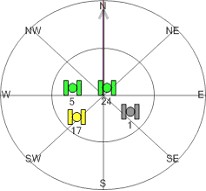
(Figure 1-1: Graphical representation of a $GPGSV sentence, where the center of the circle marks the current position and the edge of the circle marks the horizon.)

Perhaps, the most important number in this sentence is the “signal-to-noise ratio” (or SNR for short). This number indicates how strongly a satellite’s radio signal is being received. Remember, satellites transmit signals at the same strength, but things like trees and walls can obscure a signal beyond recognition. Typical SNR values are between zero and fifty, where fifty means an excellent signal. (SNR can be as high as ninety-nine, but I've never seen readings above fifty even in wide open sky.) In Figure 1-1, the green satellites indicate a strong signal, whereas the yellow satellite signifies a moderate signal (in Part 2, I will provide a way to classify signal strengths). Satellite #1’s signal is completely obscured. Listing 1-7 shows the interpreter after it is expanded to read satellite info.

(Listing 1-7: The interpreter is improved to interpret the location of GPS satellites currently in view.)
'*******************************************************

'**  Listing 1-7.  Extracting satellite information

'*******************************************************

Public Class NmeaInterpreter

  ' Raised when the current location has changed

  Public Event PositionReceived(ByVal latitude As String, _
                                ByVal longitude As String)
  Public Event DateTimeChanged(ByVal dateTime As DateTime)
  Public Event BearingReceived(ByVal bearing As Double)
  Public Event SpeedReceived(ByVal speed As Double)
  Public Event SpeedLimitReached()
  Public Event FixObtained()
  Public Event FixLost()
  Public Event SatelliteReceived(ByVal pseudoRandomCode As Integer, _
    ByVal azimuth As Integer, _
    ByVal elevation As Integer, _
    ByVal signalToNoiseRatio As Integer)
  ' Processes information from the GPS receiver
  Public Function Parse(ByVal sentence As String) As Boolean
    ' Discard the sentence if its checksum does not match our calculated
    ' checksum
    If Not IsValid(sentence) Then Return False
    ' Look at the first word to decide where to go next
    Select Case GetWords(sentence)(0)
      Case "$GPRMC"      ' A "Recommended Minimum" sentence was found!
        Return ParseGPRMC(sentence)
      Case "$GPGSV"      ' A "Satellites in View" message was found
        Return ParseGPGSV(sentence)
      Case Else
        ' Indicate that the sentence was not recognized
        Return False
    End Select
  End Function
  ' Divides a sentence into individual words
  Public Function GetWords(ByVal sentence As String) As String()
    Return sentence.Split(","c)
  End Function
 ' Interprets a $GPRMC message
 Public Function ParseGPRMC(ByVal sentence As String) As Boolean
    ' Divide the sentence into words
    Dim Words() As String = GetWords(sentence)
    ' Do we have enough values to describe our location?
    If Words(3) <> "" And Words(4) <> "" And Words(5) <> "" And _
                                Words(6) <> "" Then
      ' Yes. Extract latitude and longitude
      Dim Latitude As String = Words(3).Substring(0, 2) & "°"  ' Append hours
      Latitude = Latitude & Words(3).Substring(2) & """"    ' Append minutes
      Latitude = Latitude & Words(4)     ' Append the hemisphere
      Dim Longitude As String = Words(5).Substring(0, 3) & "°" ' Append hours
      Longitude = Longitude & Words(5).Substring(3) & """"    ' Append minutes
      Longitude = Longitude & Words(6)     ' Append the hemisphere
      ' Notify the calling application of the change
      RaiseEvent PositionReceived(Latitude, Longitude)
    End If
    ' Do we have enough values to parse satellite-derived time?
    If Words(1) <> "" Then
      ' Yes. Extract hours, minutes, seconds and milliseconds
      Dim UtcHours As Integer = CType(Words(1).Substring(0, 2), Integer)
      Dim UtcMinutes As Integer = CType(Words(1).Substring(2, 2), Integer)
      Dim UtcSeconds As Integer = CType(Words(1).Substring(4, 2), Integer)
      Dim UtcMilliseconds As Integer
      ' Extract milliseconds if it is available
      If Words(1).Length > 7 Then UtcMilliseconds = _
                CType(Single.Parse(Words(1).Substring(6), _
                     CultureInfo.InvariantCulture) * 1000, Integer)
      ' Now build a DateTime object with all values
      Dim Today As DateTime = System.DateTime.Now.ToUniversalTime
      Dim SatelliteTime As New System.DateTime(Today.Year, Today.Month, _
        Today.Day, UtcHours, UtcMinutes, UtcSeconds, UtcMilliseconds)
      ' Notify of the new time, adjusted to the local time zone
      RaiseEvent DateTimeChanged(SatelliteTime.ToLocalTime)
    End If
    ' Do we have enough information to extract the current speed?
    If Words(7) <> "" Then
      ' Yes.  Convert it into MPH
      Dim Speed As Double = CType(Words(7), Double) * 1.150779
      ' If we're over 55MPH then trigger a speed alarm!
      If Speed > 55 Then RaiseEvent SpeedLimitReached()
      ' Notify of the new speed
      RaiseEvent SpeedReceived(Speed)
    End If
    ' Do we have enough information to extract bearing?
    If Words(8) <> "" Then
      ' Indicate that the sentence was recognized
      Dim Bearing As Double = CType(Words(8), Double)
      RaiseEvent BearingReceived(Bearing)
    End If
    ' Does the device currently have a satellite fix?
    If Words(2) <> "" Then
      Select Case Words(2)
        Case "A"
          RaiseEvent FixObtained()
        Case "V"
          RaiseEvent FixLost()
      End Select
    End If
    ' Indicate that the sentence was recognized
    Return True
  End Function
  ' Interprets a "Satellites in View" NMEA sentence
  Public Function ParseGPGSV(ByVal sentence As String) As Boolean
    Dim PseudoRandomCode As Integer
    Dim Azimuth As Integer
    Dim Elevation As Integer
    Dim SignalToNoiseRatio As Integer
    ' Divide the sentence into words
    Dim Words() As String = GetWords(sentence)
    ' Each sentence contains four blocks of satellite information.
    ' Read each block and report each satellite's information
    Dim Count As Integer
    For Count = 1 To 4
      ' Does the sentence have enough words to analyze?
      If (Words.Length - 1) >= (Count * 4 + 3) Then
        ' Yes.  Proceed with analyzing the block.  Does it contain any
        ' information?
        If Words(Count * 4) <> "" And Words(Count * 4 + 1) <> "" _
        And Words(Count * 4 + 2) <> "" And Words(Count * 4 + 3) <> "" Then
          ' Yes. Extract satellite information and report it
          PseudoRandomCode = CType(Words(Count * 4), Integer)
          Elevation = CType(Words(Count * 4 + 1), Integer)
          Azimuth = CType(Words(Count * 4 + 2), Integer)
          SignalToNoiseRatio = CType(Words(Count * 4 + 2), Integer)
          ' Notify of this satellite's information
          RaiseEvent SatelliteReceived(PseudoRandomCode, Azimuth, Elevation, _
            SignalToNoiseRatio)
        End If
      End If
    Next
    ' Indicate that the sentence was recognized
    Return True
  End Function
  ' Returns True if a sentence's checksum matches the calculated checksum
  Public Function IsValid(ByVal sentence As String) As Boolean
    ' Compare the characters after the asterisk to the calculation
    Return sentence.Substring(sentence.IndexOf("*") + 1) = GetChecksum(sentence)
  End Function
  ' Calculates the checksum for a sentence
  Public Function GetChecksum(ByVal sentence As String) As String
    ' Loop through all chars to get a checksum
    Dim Character As Char
    Dim Checksum As Integer
    For Each Character In sentence
      Select Case Character
        Case "$"c
          ' Ignore the dollar sign
        Case "*"c
          ' Stop processing before the asterisk
          Exit For
        Case Else
          ' Is this the first value for the checksum?
          If Checksum = 0 Then
            ' Yes. Set the checksum to the value
            Checksum = Convert.ToByte(Character)
          Else
            ' No. XOR the checksum with this character's value
            Checksum = Checksum Xor Convert.ToByte(Character)
          End If
      End Select
    Next
    ' Return the checksum formatted as a two-character hexadecimal
    Return Checksum.ToString("X2")
  End Function
End Class

A World-Class Interpreter

International readers may have spotted a subtle problem early on that was not handled in the listings – numbers were being reported in the numeric format used in the United States! Countries like Belgium and Switzerland which use different formats for numbers, require adjustments to the interpreter in order to work at all. Fortunately, the .NET Framework includes built-in support for converting numbers between different cultures, so the changes to the interpreter required are straightforward. In the interpreter, the only fractional value is speed, so only one change is necessary. The NmeaCultureInfo variable represents the culture used for numbers within NMEA sentences. The Double.Parse method is then used with this variable to convert speed into the machine’s local culture. Listing 1-8 shows the completed interpreter, now ready for use internationally.

(Listing 1-8: The completed interpreter, suitable for use anywhere in the world.)
'*************************************************************

'**  Listing 1-8.  Adding support for international cultures

'*************************************************************

Imports System.Globalization
Public Class NmeaInterpreter

  ' Represents the EN-US culture, used for numbers in NMEA sentences
  Private NmeaCultureInfo As New CultureInfo("en-US")
  ' Used to convert knots into miles per hour
  Private MPHPerKnot As Double = Double.Parse("1.150779", NmeaCultureInfo)
  ' Raised when the current location has changed
  Public Event PositionReceived(ByVal latitude As String,_
                                ByVal longitude As String)
  Public Event DateTimeChanged(ByVal dateTime As DateTime)
  Public Event BearingReceived(ByVal bearing As Double)
  Public Event SpeedReceived(ByVal speed As Double)
  Public Event SpeedLimitReached()
  Public Event FixObtained()
  Public Event FixLost()
  Public Event SatelliteReceived(ByVal pseudoRandomCode As Integer, _
    ByVal azimuth As Integer, _
    ByVal elevation As Integer, _
    ByVal signalToNoiseRatio As Integer)
  ' Processes information from the GPS receiver
  Public Function Parse(ByVal sentence As String) As Boolean
    ' Discard the sentence if its checksum does not match our calculated
    ' checksum
    If Not IsValid(sentence) Then Return False
    ' Look at the first word to decide where to go next
    Select Case GetWords(sentence)(0)
      Case "$GPRMC"      ' A "Recommended Minimum" sentence was found!
        Return ParseGPRMC(sentence)
      Case "$GPGSV"
        Return ParseGPGSV(sentence)
      Case Else
        ' Indicate that the sentence was not recognized
        Return False
    End Select
  End Function
  ' Divides a sentence into individual words
  Public Function GetWords(ByVal sentence As String) As String()
    Return sentence.Split(","c)
  End Function
  ' Interprets a $GPRMC message
  Public Function ParseGPRMC(ByVal sentence As String) As Boolean
    ' Divide the sentence into words
    Dim Words() As String = GetWords(sentence)
    ' Do we have enough values to describe our location?
    If Words(3) <> "" And Words(4) <> "" _
    And Words(5) <> "" And Words(6) <> "" Then
      ' Yes. Extract latitude and longitude
      Dim Latitude As String = Words(3).Substring(0, 2) & "°"  ' Append hours
      Latitude = Latitude & Words(3).Substring(2) & """"    ' Append minutes
      Latitude = Latitude & Words(4)     ' Append the hemisphere
      Dim Longitude As String = Words(5).Substring(0, 3) & "°" ' Append hours
      Longitude = Longitude & Words(5).Substring(3) & """"    ' Append minutes
      Longitude = Longitude & Words(6)     ' Append the hemisphere
      ' Notify the calling application of the change
      RaiseEvent PositionReceived(Latitude, Longitude)
    End If
    ' Do we have enough values to parse satellite-derived time?
    If Words(1) <> "" Then
      ' Yes. Extract hours, minutes, seconds and milliseconds
      Dim UtcHours As Integer = CType(Words(1).Substring(0, 2), Integer)
      Dim UtcMinutes As Integer = CType(Words(1).Substring(2, 2), Integer)
      Dim UtcSeconds As Integer = CType(Words(1).Substring(4, 2), Integer)
      Dim UtcMilliseconds As Integer
      ' Extract milliseconds if it is available
      If Words(1).Length > 7 Then
        UtcMilliseconds = CType(Single.Parse(Words(1).Substring(6), _
                      CultureInfo.InvariantCulture) * 1000, Integer)
      End If
      ' Now build a DateTime object with all values
      Dim Today As DateTime = System.DateTime.Now.ToUniversalTime
      Dim SatelliteTime As New System.DateTime(Today.Year, Today.Month, _
        Today.Day, UtcHours, UtcMinutes, UtcSeconds, UtcMilliseconds)
      ' Notify of the new time, adjusted to the local time zone
      RaiseEvent DateTimeChanged(SatelliteTime.ToLocalTime)
    End If
    ' Do we have enough information to extract the current speed?
    If Words(7) <> "" Then
      ' Yes.  Parse the speed and convert it to MPH
      Dim Speed As Double = Double.Parse(Words(7), NmeaCultureInfo) _
                          * MPHPerKnot
      ' Notify of the new speed
      RaiseEvent SpeedReceived(Speed)
      ' Are we over the highway speed limit?
      If Speed > 55 Then RaiseEvent SpeedLimitReached()
    End If
    ' Do we have enough information to extract bearing?
    If Words(8) <> "" Then
      ' Indicate that the sentence was recognized
      Dim Bearing As Double = CType(Words(8), Double)
      RaiseEvent BearingReceived(Bearing)
    End If
    ' Does the device currently have a satellite fix?
    If Words(2) <> "" Then
      Select Case Words(2)
        Case "A"
          RaiseEvent FixObtained()
        Case "V"
          RaiseEvent FixLost()
      End Select
    End If
    ' Indicate that the sentence was recognized
    Return True
  End Function
  ' Interprets a "Satellites in View" NMEA sentence
  Public Function ParseGPGSV(ByVal sentence As String) As Boolean
    Dim PseudoRandomCode As Integer
    Dim Azimuth As Integer
    Dim Elevation As Integer
    Dim SignalToNoiseRatio As Integer
    ' Divide the sentence into words
    Dim Words() As String = GetWords(sentence)
    ' Each sentence contains four blocks of satellite information.
    ' Read each block
    ' and report each satellite's information
    Dim Count As Integer
    For Count = 1 To 4
      ' Does the sentence have enough words to analyze?
      If (Words.Length - 1) >= (Count * 4 + 3) Then
        ' Yes. Proceed with analyzing the block. Does it contain any information?
        If Words(Count * 4) <> "" And Words(Count * 4 + 1) <> "" _
        And Words(Count * 4 + 2) <> "" And Words(Count * 4 + 3) <> "" Then
          ' Yes. Extract satellite information and report it
          PseudoRandomCode = CType(Words(Count * 4), Integer)
          Elevation = CType(Words(Count * 4 + 1), Integer)
          Azimuth = CType(Words(Count * 4 + 2), Integer)
          SignalToNoiseRatio = CType(Words(Count * 4 + 2), Integer)
          ' Notify of this satellite's information
          RaiseEvent SatelliteReceived(PseudoRandomCode, Azimuth, Elevation, _
            SignalToNoiseRatio)
        End If
      End If
    Next
    ' Indicate that the sentence was recognized
    Return True
  End Function
  ' Returns True if a sentence's checksum matches the calculated checksum
  Public Function IsValid(ByVal sentence As String) As Boolean
    ' Compare the characters after the asterisk to the calculation
    Return sentence.Substring(sentence.IndexOf("*") + 1) = GetChecksum(sentence)
  End Function
  ' Calculates the checksum for a sentence
  Public Function GetChecksum(ByVal sentence As String) As String
    ' Loop through all chars to get a checksum
    Dim Character As Char
    Dim Checksum As Integer
    For Each Character In sentence
      Select Case Character
        Case "$"c
          ' Ignore the dollar sign
        Case "*"c
          ' Stop processing before the asterisk
          Exit For
        Case Else
          ' Is this the first value for the checksum?
          If Checksum = 0 Then
            ' Yes. Set the checksum to the value
            Checksum = Convert.ToByte(Character)
          Else
            ' No. XOR the checksum with this character's value
            Checksum = Checksum Xor Convert.ToByte(Character)
          End If
      End Select
    Next
    ' Return the checksum formatted as a two-character hexadecimal
    Return Checksum.ToString("X2")
  End Function
End Class

Final Thoughts

You should now have a good understanding that an NMEA interpreter is all about extracting words from sentences. You can harness the power of satellites to determine your location, synchronize your computer clock, find your direction, watch your speed, and point to a satellite in the sky on a cloudy day. This interpreter will also work with the .NET Compact Framework without any modifications. If sentences were also stored in a file, the interpreter can be used to play back an entire road trip. These are all great features, especially considering the small size of the class, but is this interpreter ready to drive your car and pilot an airplane? Not quite yet. There is one important topic remaining which is required to make GPS applications safe for the real world: precision. GPS devices are designed to report any information they find, even if the information is inaccurate. In fact, information about the current location can be off as much as half a football field, even when devices are equipped with the latest DGPS and WAAS correction technologies! Unfortunately, several developers are not aware of this problem. There are some third-party components out there which are not suitable for commercial applications that require enforcing a minimum level of precision. Keep this article handy, however, because in Part 2 of this series, I will explain precision enforcement in detail and take the interpreter even further to make it suitable for professional, high-precision applications!


License

This article, along with any associated source code and files, is licensed under The Code Project Open License (CPOL)

About the Author

Jon Person
Software Developer (Senior) McGraw-Hill
United States United States
Member
Hi there! From 2004 to 2009 I ran a company called "GeoFrameworks," publishing two components called GPS.NET and GIS.NET which helped developers quickly write location-based services. Now, I've released the source code for GPS.NET to CodePlex for you to use as you see fit.
 
GPS.NET 2.0 on CodePlex
GPS.NET 3.0 on CodePlex
 
... I've also released the source code of a library called the "GeoFramework," a collection of commonly used classes such as Latitude, Longitude, Distance, Speed, and Position:
 
GeoFramework 1.0 on CodePlex
GeoFramework 2.0 on CodePlex
 
I'm now taking a break from programming, but I really appreciate the positive feedback from readers!

Sign Up to vote   Poor Excellent
Add a reason or comment to your vote: x
Votes of 3 or less require a comment

Comments and Discussions

 
You must Sign In to use this message board.
Search this forum  
    Spacing  Noise  Layout  Per page   
QuestionC# source codememberlushii9030 Mar '13 - 23:01 
how can i get the c# source code??
the download only contains the vb source code
 
thanks ^.^
Questionemergency framememberchouu4 Dec '12 - 11:04 
hi! how can i modify the code so the frame GPRMC would contain also a sign of emergency sent by the client .The server will understand the alerte: I hope that i have well explained what i want to say because am not exellent in englesh Frown | :(
and i want also exemple of frames sent by a person and he is moving
AnswerRe: emergency framemembernormanS12 Dec '12 - 12:50 
chouu wrote:
how can i modify the code so the frame GPRMC would contain also a sign of
emergency sent by the client

The GPRMC sentence is defined in NMEA standard 183, so if you modify the contents it is not a valid GPRMC sentence anymore.
GeneralRe: emergency framememberchouu22 Dec '12 - 8:47 
yes, and i have made research and i think ther is a frame that sends the emergency signs, i think it's GPCC or GPLCC am not sure
I have another question, i have to do a code for chat (with sockets) for my GPS application and am veru stupid in sockets Frown | :( could someone help me please?? Cry | :((
GeneralRe: emergency framemembernormanS23 Dec '12 - 14:48 
I had a quick look at NMEA 0183 Version 3.01 - maybe sentence ALR (alarm) could be used?
 
The first two letters in the sentence name ("GP", etc) just identify the type of sender - "GP" for GPS, etc. If you have some system which sends distress signals, it probably isn't a GPS, so the sender identifier "GP" is probably not appropriate (but I don't have a list of valid senders.)
GeneralGreat Article for beginnersmembervbizsol14 Nov '11 - 20:39 
Great Article for beginners
GeneralMy vote of 5memberHennryG15 Mar '11 - 6:47 
Very Good. Thanks
GeneralMy vote of 5memberW.S.A24 Sep '10 - 8:54 
Helpfull info. Thanks.
QuestionExactly how do I make this work on a Pocket PC?memberkafrow31 Mar '10 - 12:01 
The article says, "This interpreter will also work with the .NET Compact Framework without any modifications." Can someone please tell me what I need to do to use the code?
 
I have downloaded the code, but when I try to open in Visual Studio 2005, it says it must first be converted. I go through the wizard, and the conversion report says AssemblyInfo.vb not converted.
 
I don't know where to go from here. Any help would be greatly appreciated.
 
Karla
GeneralCouple of issues found in .NET 2.0 version [modified]memberabwd16 Sep '09 - 20:49 
Hi Jon,
 
Fantastic library! It is a real shame that GeoFramework is to be no more (long live GeoFramework!)
 
A few things I've noticed in the .NET 2.0 version (haven't had a chance to check out the 3.5 version to see if it is fixed there but some of them seem to right at the core of some of the components?!
 
In GPS.NET\interpreter.cs:
Line 1266: having _VerticalDOP default to Invalid in Initialize was causing the kalman filter to throw an exception. This isn't really the cause of the problem but setting the default to maximum fixes it. My guess is the cause would be somewhere near where the kalman filter gets initialised (when it should have been, given that the data hasn't been populated)
 
Line 1617: Updating the IsFixed property in existing was never populating through to the _Satellites data structure (and this in turn was causing neither the satellite signal bar or satellite viewer to show any valid satellites). Fix would be to either make Satellite a class rather than a struct and operate on _Satellites directly or update the instance of the Satellite required. I did the latter.
existing.IsFixed = isFixed;
_Satellites[index] = existing;
 
In GPS.NET\controls\polargraphics.cs:
Line 184: PointF(PolarCoordinate) appears to be recursive
 
In GPS.NET\controls\satelliteviewer.cs:
Line 1257: for loops index modifier is incrementing 'index' and not 'iconIndex' resulting in problems displaying the satellites.
 

Otherwise fantastic Smile | :)
 
modified on Thursday, September 17, 2009 2:58 AM

GeneralRe: Couple of issues found in .NET 2.0 versionmemberJon Person20 Sep '09 - 3:52 
Thanks for the kind words and also for your detailed feedback! GPS.NET 2.0 and 3.0 are now available as open-source projects up on CodePlex. If you like, you are welcome to message me via CodePlex and I'll make you a developer on the project. You'll be able to make the edits you've suggested.
 
GPS.NET 3.0 on CodePlex
GeneralGreat InsightmemberCraig Gilchrist22 Aug '09 - 10:33 
This is a great article with insight into an otherwise terrifying topic for most!
 
Clean code is a beautiful thing.
Yorkshire Software Development

Generalc# GPS Applicationmembertarekpda19 Aug '09 - 4:45 
Hallo,
i m tarrying since tow weeks to programme with c# a good GPS application, i have a little problem , that my GPS Pocket PC send always a GPS coordinate that always changed, my caution is when can i said that the coordinate what the GPS is give , is good to take it ,i mean with a height accuracy !
 
thanks
tarek
Generalthankmemberistcam11 Aug '09 - 10:31 
Well, since earth is rotating a little slower than one day in 86,400 seconds we had a number of leap seconds in recent years. However, GPS didn't adapt to them. Big Grin | :-D
 

General..memberwuppi201 Jul '09 - 7:44 
thank you... Smile | :)
 

Generalvery goodmemberwuppi2022 Jun '09 - 2:02 
Because of the lack of good free Ribbon controls on the web, I decided to write one myself. I've analyzed previous work on ribbon-controls, including those on CodeProject. Unfortunately, most existent controls are merely bad tries. Why? well, some lack nice rendering, some lack resizing features, some lack almost everything. Of course, well developed Ribbon controls are available at a price. This ribbon is free.
 

QuestionC#memberMaurice Heneghan25 May '09 - 11:44 
Thanks for an excellent tutorial, is there a C# version of the code in Part 1 available?
General: [modified]memberdesirejoy14 May '09 - 8:35 
good blog thanks succes!
 
modified on Thursday, May 21, 2009 5:33 PM

GeneralOther NMEA stringsmemberJello Virus4 May '09 - 19:03 
I know you posted this article years ago, but...
 
What about other nmea strings? You only included RCM (or RMC, whichever) but I think the more commonly used nmea strings for GPS are GGA and GLL, which your software doesn't seem to handle. If you plan to update your code I can provide you with the format for these, and several other, nmea strings. Or maybe we could just build a generic nmea string handler class which handles the most commonly used nmea strings (gga, gll, zda, hdt, etc).
 
Let me know if you think this is a good idea.
GeneralRe: Other NMEA stringsmembercarpintero487 Jan '13 - 3:30 
Try use my NMEA 0183 2.0 Sentence parser/builder as it supports ALL nmea Talkers (not only GP/GN/GL) and ALL nmea standart sentences and some proprietary sentences. I use different way to build sentences parser. May be it will be useful. (NMEA 0183 2.0 Sentence parser/builder[^])
 
PS For author: this really well executed piece of .NET code. My vote of 5!
QuestionHow to talk to AGPS?memberjrods17 Mar '09 - 4:00 
I think I read, at least the subject of all the posts of part 1 and 2 of this article and did not find any reference to Assisted GPS, and I have a question about how to use this type of GPS.
My phone has a GPS that is asssisted by my cell phone service carrier to get a faster GPS fix by getting satellite location information obtained by their GPSs that are located at ther cell towers and then transferring it to the GPS in the phone via a data communication. At least that is the way I understand it.
Everything is ok up to here; it is even great as fixes are said to be obtained in 10 seconds or less. The problem is that it only works with their navigation software (verizon is my carrier but I understand some other carriers do the same). I tried Google Maps and it does not work. I searched and searched and everything points that the carriers are “locking” the access to the AGPS. Some of them are “unlocking” the access to the GPS that are in some of our phones. The question is that if we really need the carrier to get the access to the APGS unlocked or is it matter of getting the API to access their AGPS? A second question: Would the APIs supplied by Microsoft access AGPSs? FYI, my cell phone is a Samsung Omnia.
QuestionJ2ME Location based App.(LBS) on JSR 179 specmembersyed auqib18 Feb '09 - 18:22 
Hi. i want to develop a location based application for a fixed campus.. where i can show the street map and landmarks and paths between two places.. can anyone help me it. it..
 
do i really need a GPS based mobile... or cant i connect thru GPRS or cant i store all info on my mobile phone.. coz the area i'm talking about is not so large....and thinking of using JSR-179 spec.
plz help
QuestionRequest the NMEA sentences directly from internal GPS?memberVANDAWAA12 Jan '09 - 3:55 
Dear experts,
 
I'm newbie in this forum,
 
I want to ask the example source code using JavaME about how to request the NMEA sentences directly from HP which enabled internal GPS (built-in GPS)?
 
Thanks before.
Regards. Wink | ;)
GeneralMy vote of 1memberkhansameer5 Dec '08 - 22:55 
hi
GeneralHelp me,, I'm confuse,,,memberVANDAWAA22 Nov '08 - 22:15 
dear master,,,
 
I plan to make GPS application in Hand Phone (SE C702) using J2ME,,,
until know, I still confuse about step by step to build this application,,,,
 
I hope anyone can help to save me from this problem,,,
Cry | :((
 
thanks,,,,
GeneralRe: Help me,, I'm confuse,,,memberDaniel Stoinski7 Jan '09 - 22:24 
1. Learn about programing with J2ME, WTK (Sun Java Wireless Toolkit). There is really a lot of documentation and good books on the net/market.
2. You can either use the Location API for JavaME (JSR179) or read the serial port directly.
3. The most disadvantage of both solutions is: they don't work on every phone. No idea, what about SE C702. JSR179 is a quite new feature, mostly implemented on more expensive devices. Check the system property microedition.comports, if reading serial ports directly is supported on your device. If you can read serial ports, the most hints in this article regarding NMEA sentences will be also valid for your JavaME application. On the other hand JSR179 is really a nice and easy to use API, so use it preferably, if it is available on your device.
4. Even it is is possible to use JSR179 or COM ports on your phone, it can be necessary to obtain a valid certificate from an expensive certificate authority (CA), else your midlet won't be trusted and will either refuse to access serial ports at all or will interactively ask you for permissions each time you'll open the port. The fingers really pain after 100x pressing the OK button ...
 
In other words: start with 1 before you dive into the propertiary and chaotic world of JavaME applications.
Daniel Stoinski
GeneralRe: Help me,, I'm confuse,,,memberVANDAWAA8 Jan '09 - 2:51 
Thank you for your suggestion,
I will try study it former.
 
But, woul'd you mind to help me if I get some problem later?
Because I new in J2ME, and I hope you can lead and teach me.
 
I'm sorry for my english
I'm from Bali - Indonesia
Regards
 
thank you
Smile | :)
General[Message Removed]memberKatekortez25 Oct '08 - 8:11 
Spam message removed
GeneralGreat jobmemberJosemaproject1 Oct '08 - 20:25 
Thanks a lot for the great job.
Kind Regards.
tutoriales photoshop
QuestionHow to get a complete NMEA sentence from continuous NMEA stream...? Realtime?memberRichard@CP15 Sep '08 - 2:36 
Really good article. Thanks a lot.
 
Two questions, though:
 
As you know, the NMEA stream is continuously spitting out via communication port (say COM Port), in other words, initially you don't know where the sentence starts. So how do I get a complete NMEA sentence (e.g., $GPRMC..., or $GPGGA...)? say in .NET suite.
 
Also, is the parsing realtime? By which I mean it can complete parsing the sentence ALMOST right before the next sentence with minimum delay?
 
Your feedback is highly appreciated.
Richard
AnswerRe: How to get a complete NMEA sentence from continuous NMEA stream...? Realtime?memberjavasleepless21 Sep '08 - 18:05 
System.IO.Ports.SerialPort serialPort = new System.IO.Ports.SerialPort("COM1", 4800, System.IO.Ports.Parity.None, 8, System.IO.Ports.StopBits.One)
{Handshake = System.IO.Ports.Handshake.None};
serialPort.DataReceived += new System.IO.Ports.SerialDataReceivedEventHandler(this.serialPort_DataReceived);
serialPort.Open();

private void serialPort_DataReceived(object sender, System.IO.Ports.SerialDataReceivedEventArgs e)
{
parse(serialPort.ReadLine());
}
AnswerRe: How to get a complete NMEA sentence from continuous NMEA stream...? Realtime?memberPaul Noblet7 Jan '09 - 2:50 
At startup, discard any code until a chr(13) is recieved,
then copy chars to a buffer until chr(13) recieved again. If the first char is chr(10) (linefeed) discard it. Otherwisce, copy the char to a buffer. Process the buffer.
 
Then continue looping through buffering until another chr(13) is detected.

AnswerRe: How to get a complete NMEA sentence from continuous NMEA stream...? Realtime?memberDaniel Stoinski7 Jan '09 - 22:05 
Please take a look a my simple application at
http://stoyac.privat.t-online.de
especially at the classes Serial and SerialGPS.
Serial reads data up to CR or LF and calls a defined callback (delegate) for the whole line read.
Daniel
GeneralEmpty stringsmemberMorten on GIS28 Aug '08 - 15:38 
NEVER use (myString == "") to check if a string is empty. It's horribly inefficient.
Instead use string.IsNullOrEmpty(myString) or if you are sure the string is not null (like in most cases in your sample) use (myString.Length==0).
 
DD° is like hours? haha that's a first. Smile | :)
GeneralRe: Empty stringsmemberJon Person28 Aug '08 - 20:34 
Morten on GIS wrote:
NEVER use (myString == "")

 
Yup, there are several ways people could optimize this code.
GeneralRe: Empty stringsmemberJon3 Jun '09 - 3:54 
Optimising code for performance is all about identifying areas of code that are slow and speeding them up, replacing a line of code for a very marginal speed increase isn't going to make any difference (in general).
 
Jon
GeneralGPS time is not UTC!membervirtuPIC11 Aug '08 - 20:31 
Well, since earth is rotating a little slower than one day in 86,400 seconds we had a number of leap seconds in recent years. However, GPS didn't adapt to them.
 
The result now is that currently we have a difference of some 13 seconds or so between GPS time and UTC - increasing almost every year by another second. Sorry, I haven't followed the leaps so I can't tell the exact difference. Maybe you can?
 
virtuPIC
 
Airspace V - international hangar flying!
http://www.airspace-v.com/ggadgets for tools & toys

GeneralRe: GPS time is not UTC!memberjavasleepless21 Sep '08 - 18:08 
Thank you for this importance information.
GeneralRe: GPS time is not UTC!memberPaul Noblet7 Jan '09 - 2:45 
The NMEA sentence returns UTC.
The satellite sends the difference between GPS time and UTC to the reciever which adds the difference to get UTC
GeneralGetting NMEA stringsmemberUltronX10 Aug '08 - 15:07 
I'm sorry if my question is not related in this article but I really need help on this.
 
How to get those NMEA strings from my bluetooth GPS receiver? Is there anyone would share codings (VB.NET preferred) on receiving strings from COM port or serial port?
 
It's for my final year project. I appreciate any help.
QuestionUnable to convert projectmemberMicha Brans17 Jun '08 - 21:14 
Hi,
 
The article really looks verry interesting and almost exactly what I was searching for, thanks.
 
You wrote in the comment that the source code was made in VS2005.
I've downloaded the code and my VS2005 tels me "The solution or project you are opening was created in a previous version of Visual Studio..."
After converting it, the conversion report tels me that the file AssemblyInfo.vb is missing.
-----
Conversion Issues - AssemblyInfo.vb:
File not found. Unable to determine whether the file requires upgrade.
Failed to backup file as D:\NAVTEQProjects\GPSTest\WritingGPSApplications1_src\Backup\AssemblyInfo.vb
-----
 
I also get a lot of errors in the Error List but that can be related to the missing file.
 
Can someone please tel me what I'm doing wrong?
 
Thank you.
Micha
AnswerRe: Unable to convert projectmemberMikel A. Rodriguez17 Jun '08 - 21:54 
The source code was made in VS2003
GeneralRe: Unable to convert projectmemberMicha Brans17 Jun '08 - 22:02 
Hi,
 
Thanks for the quick reply but I still have the same problem.
 
First, I see the line "I program in VB.NET 2005 for windows mobile 5.0 with SDK..."
 
Second, it it is made in 2003, how can I convert it to 2005 without errors?
 
Thanks again.
Micha
GeneralRe: Unable to convert projectmemberMikel A. Rodriguez17 Jun '08 - 22:31 
If you still have problems try to create a new project in VS2005 and then add the items of the 2003 program that you need.
GeneralRe: Unable to convert projectmemberngocdt315 Jul '08 - 20:42 
sorry,i'm using AVR to connect GPS and Walki talki,so who knows/works about/on please tell me how to transform GPS data into walki talki to transmit,and how to receive it on the server walki talki?i meant we've got the GPS data at the AVR,so we need to transmit it by the walki talki at VHF/UHF of the walki talki,so we need to convert the data into analog at the frequency of walki talki to transmit them.So i need helps.thx.
GeneralRe: Unable to convert projectmemberngocdt325 Jul '08 - 17:48 
I'm going to transmit data from GPS via PTT of walki talki,becuz i've seen the data socket on A-Market version,there's no E-Market on my country so.
Can I do it?in it's board i've seen the PPT port is Serial,so i'm just thinking of this.
Can you help me the solution?
I will pay.ngocdt3@gmail.com
General[Message Removed]memberMurderDolls30 May '08 - 8:55 
Spam message removed
GeneralUTC Timememberpwasser2 Apr '08 - 19:49 
I have found your GPS articles well written and informative.
 
Just a small point though.
 
You say "The second word of the $GPRMC sentence, “040302.663”, contains satellite-derived time in a compressed format. The first two characters represent hours, the next two represent minutes, the next two represent seconds, and everything after the decimal place is milliseconds"
 
This does not agree with the NMEA 0183 documentation which says the UTC format is hhmmss.sss.
 
This would mean "110757.50" is not 11:07:57 + 50 milliseconds but is 11:07:57 + 500 milliseconds.
 
Peter Wasser

GeneralRe: UTC TimememberJon Person4 Apr '08 - 3:59 
Hi Peter, thanks very much for taking the time to report this error! You are correct and the listing is indeed off. I'll get a fix integrated into the article.
QuestionRe: UTC Timememberkd7vbs2 Sep '08 - 14:55 
I recall hearing from my astronomer buddy that the GPS time is 13 seconds from actual time. This is because while the world injects leap seconds every so often, the GPS system does not. Please confirm. This should be easy to do with a GPS and an HF receiver tuned to WWV.
Thanks,
-Scott

General General    News News    Suggestion Suggestion    Question Question    Bug Bug    Answer Answer    Joke Joke    Rant Rant    Admin Admin   

Permalink | Advertise | Privacy | Mobile
Web02 | 2.6.130516.1 | Last Updated 8 Aug 2008
Article Copyright 2004 by Jon Person
Everything else Copyright © CodeProject, 1999-2013
Terms of Use
Layout: fixed | fluid