Update (2004-December-21):
- In
SmartGraph, there was a problem in labeling X and Y axes, now it has been solved.
- Selection problem in demo project solved.
- Name of output file changed to
SmartGraph rather than Graph.
Introduction
In my recent projects, I needed to show some data in a 2D graph. This graph must have capability of zoom in, zoom out, and colorization. At first, I wrote some code directly in my VC project and the result was satisfactory, but I had to do it for any new project and it was time consuming. So, I thought of doing it as an ATL component so that it does all the things I need. This SmartGraph is what I want.
SmartGraph is written in VC++ .NET 2003 using ATL and has several good methods, events and properties that makes it something easy to use.
This SmartGraph is an ActiveX, so it can be used in any visual language that supports ActiveX, such as Visual C++, Visual Basic, C#, Delphi, ... It can resample its data more quickly by using SetData(.,.,.,true). It also can be viewed as Regular graph, Dot graph, or Bar graph by using SetPlotType(.).

How to use SmartGraph?
To use SmartGraph, you must do these steps:
- Register
SmartGraph using this command at command prompt: "regsvr32 <PATH>\Graph.dll", or only compile "Graph.sln".
Note: if you don’t have VC++ .NET, you can’t register Graph.dll unless you copy "msvcr71.dll" to your Windows directory. (This file is attached to this article.)
- In your project, press right-click on your ToolBox and then "Add/Remove Item", then select "SmartGraph" from "COM Components" tab, now it must appear in your toolbox.
- Now, only click on it and drag it to your dialog, now create a variable and use it:
m_Graph.SetParentWnd(this->m_hWnd);
m_Graph.SetPlotType(0);
m_Graph.put_xLable("Time");
m_Graph.put_yLable("Amplitude");
m_Graph.put_Title("Graph Test");
and when your data is ready, use:
m_Graph.SetData(xdata,ydata,nLen,true);
m_Graph.UpdateGraph();
SmartGraph Properties:
Back Color: use it to change background color of the graph (put_BackColor and get_BackColor).
BorderColor
ForeColor
Title: title of graph.
Columns and Rows: number of columns and rows to be drawn if grid is on (ShowGrid(true)).
xLable and yLable: Labels appearing in X and Y axes.
MarginTop, MarginLeft, MarginRight, MarginBottom: Margins for labels, title and …
SmartGraph Methods:
SetData and SetData2: use SetData if you don’t want to set maximum and minimum of X and Y axis. Use SetData2 if you want to specify max and min of data.
ShowGrid
UpdateGraph
SetPlotType: 0 - Regular, 1 - Dot Graph, 2 - Bar Graph.
ZoomIn, ZoomInByPercent: Zoom in (x axes) from sample/percent "FromSample"/"FromPercent" to sample/percent "ToSample"/"ToPercent".
ZoomOut: returns graph to previous view.
Reset: returns graph to original view.
GetDisplayedRange: returns range of samples that already are shown.
SetLegendText
SmartGraph Events:
LButtonDown
LButtonUp
MouseMove
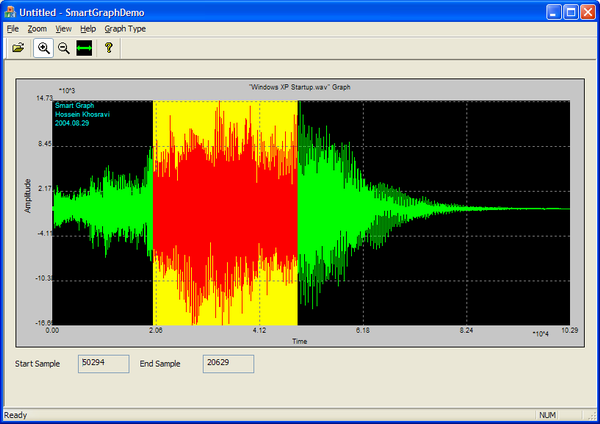
Sample application provided is a good demonstration of this SmartGraph.
Use, enjoy and guide me for future improvements.



 General
  News
News  Suggestion
  Question
  Bug
Bug  Answer
  Joke
Joke  Praise
  Rant
Rant  Admin
Admin 


 Submit an article or tip


 (graph.dll is version 1.2.1.1)