Introduction
I came back from my holidays, with tons of photos taken with my new digital camera. Normally, I prefer to take pictures using the best quality and resolution, and this - of course - implies having bigger files to manage.
Often, at a good resolution, a single photo in JPG format takes more than 1 Mb, and this is not so comfortable if you want to send your pictures to your friends via email, or to put them on a web site. You have to reduce the quality of your pictures, resampling them at a lower resolution.
I had this need of resizing pictures and - even if the world is full of image processing software capable of doing that - I decided to write my little piece of code to do it in VB.NET.
How the utility works
The utility I wrote is very simple: given an "input" folder, it looks for JPG pictures in that folder and - one by one - it takes them, reduces their sizes by a specified factor, and save them in a given "output" folder.
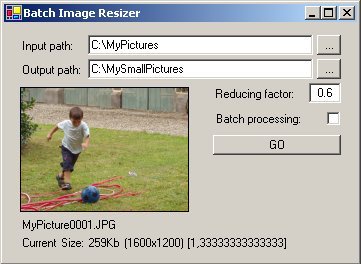
In the "normal mode", when you press the "GO" button, the input folder is scanned, each single picture found is shown in the preview box and you are asked about the conversion of that specific picture. Under the preview box you can find the filename and the size of the image (size on disk, dimensions X and Y, aspect ratio).
The conversion can be done also in "batch mode" (that is: without human intervention, converting all the pictures found in the input folder) if you check the "Batch processing" checkbox before pressing the "GO" button. To stop the batch processing while running, just uncheck the option to revert to "normal mode".
Something about the code
The core reducing functionality is inside the Reduce() subroutine, specifically in this line of code:
img = New Bitmap(img, New Size(img.Size.Width * factor,
  img.Size.Height * factor))
Notice that the reducing factor is applied to both picture dimensions (to preserve the aspect ratio); so, if the original picture's size is [x,y] and the reducing factor is F, the resulting image is sized [x*F,y*F] (hence its area is reduced by F*F).
It's easy to modify this formula to obtain different resizing behaviors. For example, if the set of the original pictures is not homogeneous in the sizes, you could want to reduce them not by a fixed factor, but to a specified size (regardless the original size).
The Reduce() subroutine also contains some lines of code used to compute the file size of the resulting JPG picture. This computation is simply done looking at the size of a MemoryStream on which the image is saved in JPG format:
Dim SizeKb As String
Dim ms As New MemoryStream()
img.Save(ms, Imaging.ImageFormat.Jpeg)
SizeKb = (ms.Length \ 1024).ToString() & "Kb "
A last thing to notice in the Image Batch Resizer utility is the persistence of the configuration settings between working sessions, accomplished by the use of the ConfigOpt class (described in a previous article of mine).
I was born in 1970.
My first computer experience dates back to early 80s, with a Sinclair ZX81.
From that time on, as many "friends" say, my IT-illness has increased year by year.
I graduated in Electronic Engineering and earned the following Microsoft certifications:
MCP, MCT, MCDBA, MCSD, MCAD, MCSD for .NET (early achiever).
I worked in IT as a developer, a teacher, a consultant, a technical writer, a technical leader.
IT knowledge applied to real life is my primary interest and focus.



 General
  News
News  Suggestion
  Question
  Bug
Bug  Answer
  Joke
Joke  Praise
  Rant
Rant  Admin
Admin 


 Submit an article or tip


