Introduction
We have been thinking of working on Exception handling in 3-Tier Architecture using Enterprise Library since ages but never got time or got into the situation where it should have become a requirement. Finally, we got a chance to work on it.
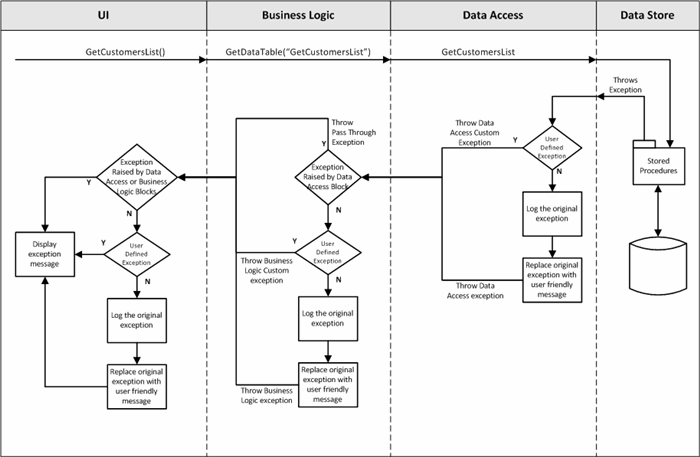
Our main objective was to handle exceptions seamlessly in three tiered architecture. We checked internet but couldn’t find appropriate code sample doing stuff that we wanted. Therefore, we decided to write a re-useable code to help ourselves and others. Below is what we think, exception handling should do:
| Scenario | Description | Expected Result |
| 1 | Application called a stored procedure. | Happy path; everything should work fine. |
| 2 | Exception Raised by Database Management System such as Primary Key violated or Object does not exist, etc. | System should log the thrown exception in a sink (Text File). Replace the Exception with a User friendly Message and propagate it to UI passing through the Business Logic Layer. |
| 3 | Based upon some certain validation check / business rule a Custom Error is raised from Stored Procedure. | Thrown Custom Error message should be propagated to UI without Logging assuming these error messages will be some kind of alternative flows instead of real exception. |
| 4 | While processing the request, an error occurred in Business Logic such as Divide-by-zero, Object not set, Null reference exception, etc. | System should log the thrown exception in a sink (Text File). Replace the Exception with a User friendly Message and should propagate that to UI. |
| 5 | Based upon some certain business validation check, a custom exception was thrown from Business Logic Layer. | Thrown Custom Error message should be propagated to UI without Logging assuming these error messages will be some kind of alternative flows instead of real exception. |
| 6 | While processing the request an error occurred in UI. For example, Null reference exception, etc. | System should log the thrown exception in a sink (Text File). Replace the Exception with a User friendly Message and should propagate that to UI. |
Using the Code
What things do you need to use/run this code?
- Microsoft.NET Framework 3.5
- Microsoft Visual Studio 2008
- Enterprise Library 5.0
- SQL Server (Server, Desktop or SQL Express Edition - Adjust connection string accordingly.)
Let us explain how this application is broken down into pieces:
- User Interface: Web Application using ASP.NET and C# as code behind
- Business Logic: We have created separate folder inside the Web Application for Business Logic purpose. However, it can easily be moved into a separate Class Library project.
- Helpers: Windows Class Library using C#. We created this project to combine below functionality:
- Data Access Helper Class which is using Enterprise Library to interact with Database. This way we can enjoy Enterprise Library’s power to work with any type of database management system such as SQL and Oracle.
- Exception handling which is also using Enterprise Library to log, replace and propagate exception using different policies.
To handle scenarios described above, following Exception Type classes are being created:
BaseException: It is a base class inherited from System.Exception class. All other classes in this project will be inherited from this class.
using System;
using System.Linq;
using System.Text;
using System.Collections.Generic;
using System.Runtime.Serialization;
namespace Common.Helpers.ExceptionHandling
{
public class BaseException : System.Exception, ISerializable
{
public BaseException()
: base()
{
}
public BaseException(string message)
: base(message)
{
}
public BaseException(string message, System.Exception inner)
: base(message, inner)
{
}
protected BaseException(SerializationInfo info, StreamingContext context)
: base(info, context)
{
}
}
}
DataAccessException: This is used by the Exception handling Block to replace the original exception with a User Friendly message such as “An unknown error has occurred at database level while processing your request. Please contact Technical Help Desk with this identifier XXXXXXXXXXXXXX”.
using System;
using System.Linq;
using System.Text;
using System.Collections.Generic;
using System.Runtime.Serialization;
namespace Common.Helpers.ExceptionHandling
{
public class DataAccessException : BaseException, ISerializable
{
public DataAccessException()
: base()
{
}
public DataAccessException(string message)
: base(message)
{
}
public DataAccessException(string message, System.Exception inner)
: base(message, inner)
{
}
protected DataAccessException(SerializationInfo info, StreamingContext context)
: base(info, context)
{
}
}
}
DataAccessCustomException: This is used by the Exception Handling block to send raised Custom Error message towards UI.
PassThroughException: This is used to replace DataAccessException and DataAccessCustomException types with this type at Business Logic level. Otherwise, Business Logic will also handle the exception as Data access is being called from Business Logic.
BusinessLogicException: This is used by the Exception Handling block to replace the original exception with a user friendly message such as “An unknown error has occurred in Business Logic Layer while processing your request. Please contact Technical Help Desk with this identifier XXXXXXXXXXXXXX”.
BusinessLogicCustomException: This is used by the Exception Handling block to send raised Custom Error message towards UI.
UserInterfaceException: This is used by the Exception Handling block to replace the original exception with a user friendly message such as “An unknown error has occurred at User Interface while processing your request. Please contact Technical Help Desk with this identifier XXXXXXXXXXXXXX”
The following polices are created to support design:
DataAccessPolicy: This policy will log the original exception in defined sink will replace the original exception with DataAccessException type.
<add name="DataAccessPolicy">
   <exceptionTypes>
      <add name="All Exceptions" type="System.Exception, mscorlib,
   Version=2.0.0.0, Culture=neutral, PublicKeyToken=b77a5c561934e089"
         postHandlingAction="ThrowNewException">
         <exceptionHandlers>
            <add name="DataAccessLoggingHandler"
       type="Microsoft.Practices.EnterpriseLibrary.ExceptionHandling.
       Logging.LoggingExceptionHandler,
       Microsoft.Practices.EnterpriseLibrary.ExceptionHandling.Logging,
       Version=5.0.414.0, Culture=neutral, PublicKeyToken=31bf3856ad364e35"
               logCategory="General" eventId="100" severity="Error"
       title="Enterprise Library Exception Handling"
               formatterType="Microsoft.Practices.EnterpriseLibrary.
       ExceptionHandling.TextExceptionFormatter,
       Microsoft.Practices.EnterpriseLibrary.ExceptionHandling"
               priority="0" />
            <add name="DataAccessReplaceHandler"
       type="Microsoft.Practices.EnterpriseLibrary.ExceptionHandling.
       ReplaceHandler, Microsoft.Practices.EnterpriseLibrary.ExceptionHandling,
       Version=5.0.414.0, Culture=neutral, PublicKeyToken=31bf3856ad364e35"
               exceptionMessage="An unknown error has occurred in Data Access Layer
       while processing your request. Please contract Help Desk Support at
           X-XXX-XXX-XXXX with Error Token ID {handlingInstanceID}."
               replaceExceptionType=
       "Common.Helpers.ExceptionHandling.DataAccessException, Helpers,
       Version=1.0.0.0, Culture=neutral, PublicKeyToken=null" />
         </exceptionHandlers>
      </add>
   </exceptionTypes>
</add>
DataAccessCustomPolicy: This policy will only replace the original exception with DataAccessCustomException type.
<add name="DataAccessCustomPolicy">
   <exceptionTypes>
      <add name="All Exceptions" type="System.Exception, mscorlib,
	Version=2.0.0.0, Culture=neutral, PublicKeyToken=b77a5c561934e089"
         postHandlingAction="NotifyRethrow">
         <exceptionHandlers>
            <add name="Replace Handler" type="Microsoft.Practices.EnterpriseLibrary.
		ExceptionHandling.ReplaceHandler,
		Microsoft.Practices.EnterpriseLibrary.ExceptionHandling,
		Version=5.0.414.0, Culture=neutral, PublicKeyToken=31bf3856ad364e35"
               replaceExceptionType="Common.Helpers.ExceptionHandling.
		DataAccessCustomException, Helpers, Version=1.0.0.0,
		Culture=neutral, PublicKeyToken=null" />
         </exceptionHandlers>
      </add>
   </exceptionTypes>
</add>
PassThroughPolicy: This policy will replace the original exceptions of type DataAccessException or DataAccessCustomException with PassThroughException type.
<add name="PassThroughPolicy">
   <exceptionTypes>
      <add name="All Exceptions" type="System.Exception, mscorlib,
	Version=2.0.0.0, Culture=neutral, PublicKeyToken=b77a5c561934e089"
         postHandlingAction="NotifyRethrow">
         <exceptionHandlers>
            <add name="PassThroughReplaceHandler"
		type="Microsoft.Practices.EnterpriseLibrary.ExceptionHandling.
		ReplaceHandler, Microsoft.Practices.EnterpriseLibrary.ExceptionHandling,
		 Version=5.0.414.0, Culture=neutral, PublicKeyToken=31bf3856ad364e35"
               replaceExceptionType="Common.Helpers.ExceptionHandling.PassThroughException,
		 Helpers, Version=1.0.0.0, Culture=neutral, PublicKeyToken=null" />
         </exceptionHandlers>
      </add>
   </exceptionTypes>
</add>
BusinessLogicPolicy: This policy will log the original exception in defined sink will replace the original exception with BusinessLogicException type.
<add name="BusinessLogicPolicy">
   <exceptionTypes>
      <add name="All Exceptions" type="System.Exception,
	mscorlib, Version=2.0.0.0, Culture=neutral, PublicKeyToken=b77a5c561934e089"
         postHandlingAction="ThrowNewException">
         <exceptionHandlers>
            <add name="BusinessLogicLoggingHandler"
		type="Microsoft.Practices.EnterpriseLibrary.ExceptionHandling.
		Logging.LoggingExceptionHandler,
		Microsoft.Practices.EnterpriseLibrary.ExceptionHandling.Logging,
		Version=5.0.414.0, Culture=neutral, PublicKeyToken=31bf3856ad364e35"
               logCategory="General" eventId="100" severity="Error"
		title="Enterprise Library Exception Handling"
               formatterType="Microsoft.Practices.EnterpriseLibrary.
		ExceptionHandling.TextExceptionFormatter,
		Microsoft.Practices.EnterpriseLibrary.ExceptionHandling"
               priority="0" />
            <add name="BusinessLogicReplaceHandler"
		type="Microsoft.Practices.EnterpriseLibrary.ExceptionHandling.
		ReplaceHandler, Microsoft.Practices.EnterpriseLibrary.ExceptionHandling,
		 Version=5.0.414.0, Culture=neutral, PublicKeyToken=31bf3856ad364e35"
               exceptionMessage="An unknown error has occurred in Business Logic
		Layer while processing your request. Please contract Help Desk Support
		at X-XXX-XXX-XXXX with Error Token ID {handlingInstanceID}."
               replaceExceptionType="Common.Helpers.ExceptionHandling.
		BusinessLogicException, Helpers, Version=1.0.0.0,
		Culture=neutral, PublicKeyToken=null" />
         </exceptionHandlers>
      </add>
   </exceptionTypes>
</add>
BusinessLogicCustomPolicy: This policy will only replace the original exception with BusinessLogicCustomException type.
<add name="BusinessLogicCustomPolicy">
   <exceptionTypes>
      <add name="All Exceptions" type="System.Exception,
	mscorlib, Version=2.0.0.0, Culture=neutral, PublicKeyToken=b77a5c561934e089"
         postHandlingAction="NotifyRethrow">
         <exceptionHandlers>
            <add name="Replace Handler"
		type="Microsoft.Practices.EnterpriseLibrary.ExceptionHandling.
		ReplaceHandler, Microsoft.Practices.EnterpriseLibrary.ExceptionHandling,
		 Version=5.0.414.0, Culture=neutral, PublicKeyToken=31bf3856ad364e35"
               replaceExceptionType="Common.Helpers.ExceptionHandling.
		BusinessLogicCustomException, Helpers, Version=1.0.0.0,
		Culture=neutral, PublicKeyToken=null" />
         </exceptionHandlers>
      </add>
   </exceptionTypes>
</add>
UserInterfacePolicy: This policy will log the original exception in defined sink will replace the original exception with UserInterfaceException type.
<add name="UserInterfacePolicy">
   <exceptionTypes>
      <add name="All Exceptions" type="System.Exception, mscorlib,
	Version=2.0.0.0, Culture=neutral, PublicKeyToken=b77a5c561934e089"
         postHandlingAction="ThrowNewException">
         <exceptionHandlers>
            <add name="UserInterfaceReplaceHandler"
		type="Microsoft.Practices.EnterpriseLibrary.ExceptionHandling.
		Logging.LoggingExceptionHandler,
		Microsoft.Practices.EnterpriseLibrary.ExceptionHandling.Logging,
		Version=5.0.414.0, Culture=neutral, PublicKeyToken=31bf3856ad364e35"
               logCategory="General" eventId="100" severity="Error"
		title="Enterprise Library Exception Handling"
               formatterType="Microsoft.Practices.EnterpriseLibrary.
		ExceptionHandling.TextExceptionFormatter,
		Microsoft.Practices.EnterpriseLibrary.ExceptionHandling"
               priority="0" />
            <add name="Replace Handler" type="Microsoft.Practices.
		EnterpriseLibrary.ExceptionHandling.ReplaceHandler,
		Microsoft.Practices.EnterpriseLibrary.ExceptionHandling,
		Version=5.0.414.0, Culture=neutral, PublicKeyToken=31bf3856ad364e35"
               exceptionMessage="An error occord at front end. please check."
               replaceExceptionType="Common.Helpers.ExceptionHandling.
		UserInterfaceException, Helpers, Version=1.0.0.0, Culture=neutral,
		PublicKeyToken=null" />
         </exceptionHandlers>
      </add>
   </exceptionTypes>
</add>
Following exception handlers are being created to manage exception logging, replacement and propagating:
DataAccessExceptionHandler: This handler will take care of "DataAccessException" and "DataAccessCustomException" exception types. Based upon the type of the exception, this handler will decide which policy should work. Below is the code calling different policy:
using System;
using System.Linq;
using System.Text;
using System.Data.Common;
using System.Collections.Generic;
using System.Data.SqlClient;
using Microsoft.Practices.EnterpriseLibrary.ExceptionHandling;

namespace Common.Helpers.ExceptionHandling
{
   public static class DataAccessExceptionHandler
   {
      public static bool HandleException(ref System.Exception ex)
      {
         bool rethrow = false;
         if ((ex is SqlException))
         {
            SqlException dbExp = (SqlException)ex;
            if (dbExp.Number >= 50000)
            {
               rethrow = ExceptionPolicy.HandleException(ex, "DataAccessCustomPolicy");
               ex = new DataAccessCustomException(ex.Message);
            }
            else
            {
               rethrow = ExceptionPolicy.HandleException(ex, "DataAccessPolicy");
               if (rethrow)
               {
                  throw ex;
               }
            }
         }
         else if (ex is System.Exception)
         {
            rethrow = ExceptionPolicy.HandleException(ex, "DataAccessPolicy");
            if (rethrow)
            {
               throw ex;
            }
         }
         return rethrow;
      }
   }
}
BusinessLogicExceptionHandler: This handler will take care of “PassThroughException”, “BusinessLogicException” and “BusinessLogicCustomException” exception types. Based upon the type of the exception, this handler will decide which policy should work. Below is the code calling different policy:
using System;
using System.Linq;
using System.Text;
using System.Collections.Generic;
using Microsoft.Practices.EnterpriseLibrary.ExceptionHandling;
using Common.Helpers.ExceptionHandling;

namespace Common.Helpers.ExceptionHandling
{
   public static class BusinessLogicExceptionHandler
   {
      public static bool HandleExcetion(ref System.Exception ex)
      {
         bool rethrow = false;
         if ((ex is DataAccessException) || (ex is DataAccessCustomException))
         {
            rethrow = ExceptionPolicy.HandleException(ex, "PassThroughPolicy");
            ex = new PassThroughException(ex.Message);
         }
         else if (ex is BusinessLogicCustomException)
         {
            rethrow = ExceptionPolicy.HandleException(ex, "BusinessLogicCustomPolicy");
         }
         else
         {
            rethrow = ExceptionPolicy.HandleException(ex, "BusinessLogicPolicy");
         }
         if (rethrow)
         {
            throw ex;
         }
         return rethrow;
      }
   }
}
If you examine the above code, you will see that in case of DataAccessException or DataAccessCustomException, this handler is using PassThroughExceptionPolicy. Means, exception has already been logged it needs to be propagated towards caller. Afterwards, the system is checking whether exception is raised intentionally by the Business Logic Layer or it is a uncontrolled exception. Based upon type handler is calling appropriate Exception Handling Policy.
UserInterfaceExceptionHandler: This handler will take care of “UserInterfaceException” exception type. Based upon the type of the exception, this handler will decide which policy should work. Below is the code calling different policy:
using System;
using System.Linq;
using System.Text;
using System.Collections.Generic;
using Microsoft.Practices.EnterpriseLibrary.ExceptionHandling;
namespace Common.Helpers.ExceptionHandling
{
public static class UserInterfaceExceptionHandler
{
public static bool HandleExcetion(ref System.Exception ex)
{
bool rethrow = false;
try
{
if (ex is BaseException)
{
}
else
{
rethrow = ExceptionPolicy.HandleException(ex, "UserInterfacePolicy");
}
}
catch (Exception exp)
{
ex = exp;
}
return rethrow;
}
}
}
That's it. Download the code and enjoy and do leave your feedback.
Thanks!
Sohail Maroof Naushahi, Farrukh Hashmi
This member has not yet provided a Biography. Assume it's interesting and varied, and probably something to do with programming.
This member has not yet provided a Biography. Assume it's interesting and varied, and probably something to do with programming.



 General
  News
News  Suggestion
  Question
  Bug
Bug  Answer
  Joke
Joke  Praise
  Rant
Rant  Admin
Admin 


 Submit an article or tip


