|
 | good  |  | Anonymous | 20:46 6 Jul '05 |
|
|
 |
|
 |
Hi i'm using CAutoEdit to manage my Edit Control, i would use decimal number separed by points. I put the '.' in the list but when i press it within a Edito control i get the same effects of TAB pressure.
Anyone can helpme to findo solutions?
Thanks!
Matteo
|
|
|
|
 |
|
 |
m_nExitChar is a symbol to exit = TAB when you type m_nExitChar then it is move to some where, you can redefine this character in AutoEdit.cpp
Endless Love
|
|
|
|
 |
|
 |
Hi i'm using CAutoEdit to manage my Edit Control, i would use decimal number separed by points. I put the '.' in the list but when i press it within a Edito control i get the same effects of TAB pressure.
Anyone can helpme to findo solutions?
Thanks!
Matteo
|
|
|
|
 |
|
 |
I don't know if it's just me, but when I created a dialog with 20 CAutoEdit controls
it would take a few seconds to come up. I traced it down to the m_pInfoWnd->Create()
method in CAutoEdit::PreSubclassWindow(). Is there any way of speeding this up?
BTW: Using a 2.4GHz XP machine, VC6
|
|
|
|
 |
|
 |
Hello ...
I set the ValidChars to "+-1234567890." for double ...
in the edit i type in a german ä (a with double point) ... it would be accepted as an non displayable character !
Same problem with "ö", "ü", "ß", "§", "²", "³", "€", "°", "â", "ú" etc ...
I think you want to catch with "non displayable character" control characters ... could be a solution, to accept only characters under ASCII-value 32 ???
lutz
|
|
|
|
 |
|
 |
Instead "_istprint(nChar)" i check for "nChar<32" ...
it still works ... *ggg*
Lutz
|
|
|
|
 |
|
 |
I'm a bit of a newbie at Windows programming, so bear with me if this is a simple problem. I have added your autoedit class to my project and it works great. However, I want my parent dialog to be notified when the user enters something so that it can read the new contents after it has been validated. I replaced "ON_CONTROL_REFLECT" with "ON_CONTROL_REFLECT_EX" which is supposed to pass the notification on to the parent after the child is done (if the child handler returns TRUE). The handler in the subclass is called, but the parent's handler is not called. The parent dialog has the following in the message map:
ON_EN_KILLFOCUS(IDC_IM2_VALUE, OnKillfocusIm2Value)
and the associated function OnKillfocusIm2Value(). What am I doing wrong?
Thanks for your help
Chris
|
|
|
|
 |
|
 |
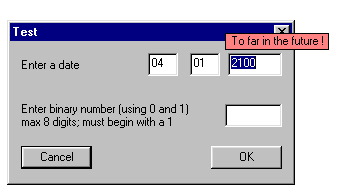
Nice work but the demo program freezes for a few seconds then crashes if the dialog is closed while the date field has a invalid year. By 'closed' I mean the pressing of the Esc key or the close button in the dialog's title bar.
I have a similar problem with my code. (I was hoping your's would give a solution.) The problem in my code is that when closing a dialog OnClose is called before OnKillFocus. This results in the window being closed before you are able to check for a valid range. (When the Ok button is pressed OnKillFocus is called before OnOk.)
John
|
|
|
|
 |
 | Bug  |  | S. Ganapathi Raman | 3:29 6 Mar '02 |
|
 |
Hi,
Your class is top class!! I am using it. Thanks. Especially I liked the way you have provided the Validate interface, allowing us to customise it.
It gives pleasure to find bug in some one's code!!
Bug1:
In your test, in the edit-field where I can type binaries, I am not able to type any alphabet. Fine. But I am able to paste any text. Hence eventually I am able to get a non binary number over there!!
Workaround:
Right now as a work around, inside OnKillFocus() before asking the validater to validate, I am checking each charecter in the edit field -> "Whether every charecter present in the edit-field is a permissable charecter, if the answer is 'no' then like you did, I select all the text and pop up the window".
I do not like this work-around, what I would prefer is, when the user tries to paste it, as the text in the clipboard has non valid charecter, user should hear a BEEP and text should not be pasted. As I am just one month old to MFC, I do not know how to intersept clip-board events.
Bug2: ??
I have 3 AutoEdit instances in a dialog and one instance of a Validater. All the 3 AutoEdits has reference to the same Validater. All my validater does is, returns the string "Empty!" if the input string is empty. To start with all the edit fields are empty. By clicking mouse, I place cursor in one edit-field. Without filling anything, I pressed the tab-key. I see "Empty!" window exactly over two(not 3) edits. Now I am able to edit these two edits simultaneously. By making them empty, from the second edit-field, if I press tab-key again, I see the third "Empty!" window. Now I can edit any one of these 3 edit fields. (Ofcourse, I am not able to Click on OK button.)
Note: in the above, ' "Empty!" window ' I mean, your red-window with the content "Empty!". (window is not empty).
If all the 3 edits have popuped with the red windows I will be able to tell my Boss it is the feature. How to get rid off this bug? (I am using Window2K).
I will be happy if these two bugs are removed. Waiting for your reply eagerly.
with warm regards
sg raman.
|
|
|
|
 |
|
 |
Hi.
A while back, you posted a question on the CAutoEdit example from CodeProject - how to intercept a Clipboard text so that invalid text would not be pasted into a CEdit control with validation.
Did you get a solution?
Here is what I'm thinking. Process the CEdit::OnCommand(WPARAM, LPARAM) messages and then look at the case when wParam is WM_PASTE -- here is an example based upon a CodeProject example entitled MenuEdit (Context Menus)
BEGIN_MESSAGE_MAP(CMenuEdit, CEdit)
//{{AFX_MSG_MAP(CMenuEdit)
ON_WM_CONTEXTMENU()
//}}AFX_MSG_MAP
END_MESSAGE_MAP()
BOOL CMenuEdit::OnCommand(WPARAM wParam, LPARAM lParam)
{
CEntitySummaryDlg* pEntitySummaryDlg;
switch (LOWORD(wParam))
{
// Windows general menu items start here.
case EM_UNDO:
case WM_CUT:
case WM_COPY:
case WM_CLEAR:
case WM_PASTE:
return SendMessage(LOWORD(wParam));
case ME_SELECTALL:
return SendMessage (EM_SETSEL, 0, -1);
// MAnTSS specific menu items start here.
case ME_ENTITYDB:
MessageBox("Display Entity Database here.","MenuEdit",MB_OK);
return TRUE;
case ME_ENTITYMAP:
pEntitySummaryDlg = new CEntitySummaryDlg("Entity Map Info");
pEntitySummaryDlg->DoModal();
return TRUE;
default:
return CEdit::OnCommand(wParam, lParam);
}
}
Good luck.
Johnny
|
|
|
|
 |
 | loop  |  | Robert M. Bouwens | 21:28 24 Mar '01 |
|
 |
Daniel sits right next to me.
So it's a bit overkill to post a small bugfix here.
But for all those using the class here's a small fix
for setValidChar().
In case one of the chars is equal to 'm_nExitChar'
it's not possible to leave the field. So I reset
the exit char to the tab key.
void SetValidChar(char* pChar) // Set the array with valid characters
{
if (m_nValidChar) delete [] m_nValidChar;
int len = _tcsclen(pChar);
m_nValidChar = new char[len + 1];
_tcscpy(m_nValidChar,pChar);
// simple sanity check
char *ptr = pChar;
do
{
if ( *ptr == m_nExitChar )
{
m_nExitChar = '\t';
break;
}
ptr++;
} while ( *ptr );
};
The function is in the header declaration of the class - just
in case you wonder about the last char.
Robert
|
|
|
|
 |
 | Bug?  |  | Joaquín M. López Muñoz | 21:38 8 Feb '01 |
|
 |
I tried your sample executable on Win95 and seems to me there's a bug in it:
After entering a binary digit not beginning with 1 and pressing TAB
to cause the tooltip to appear, just hit ENTER: The tooltip
text dissapears and the thing seems to go mad.
|
|
|
|
 |
|
 |
Everything goes mad ? As a programmer I would expect that you are a little bit more specific
Regards Daniel
|
|
|
|
 |
|
 |
Take it easy, man. Didn't mean to be offensive, if that has been
your impression. As a programmer *that hasn't taken a look at
the code* I cannot be much more specific: the application
gets unresponsive and finally I got to kill it via CTRL+ALT+SUPR.
Try it yourself to see what I mean.
Regards, Joaquín
|
|
|
|
 |
|
 |
By no means I was offended, I just can't reproduce the problem and 'gos mad' didn't help me much .
That it hangs, is much more specific.
Guess I'll have to try it on different configurations.
Regards Daniel
|
|
|
|
 |
|
 |
It's an interesting idea, but I'm not sure if I'd recommend it, at least not the way it's implemented here.
Firstly, an edit box is just that -- it's an area that allows you to edit an entry of information. While you're editing the data, you know that it won't necessarily be valid. So, to have it popping up with text telling you it's invalid during edit might become annoying. I prefer Microsoft's approach in Word where incorrect spellings are underlined when you LEAVE the area (or press space, in that case).
Secondly, modal is old-hat. I hate modal! When you're editing, if you get it wrong, it doesn't let you leave the edit box until you get it right. Regardless of whether you want to go and do something else and come back to it later, it stops you! Arrghh! That's probably the most annoying feature. Instead, it should work with you -- not against you. It should kindly remind you that it's invalid by turning it red, or underlining it (perhaps), and then popup the tooltip only when you mouse over it or return focus to the area.
Thirdly, tooltips like this one obscure other regions of the entry box -- and you can't get rid of it. Again, it would be better if it would only popup when you mouse over...
Perhaps someone would like to product a squiggly underline implementation instead?
-- John
|
|
|
|
 |
|
 |
I think both implementations are useful for different applications. Whether you misspell something in Word does not have any effect on world peace. Then a notification of possible errors is more than sufficient. When, on the other hand, you enter important data that cannot be wrong, there must be a mechanism to handle
this. Then the covering of other parts of the dialog is unimportant compared to ensuring correct data input.
|
|
|
|
 |
|
 |
Hi John,
I agree to a certain extend. The chosen solution of the spell checker in WinWord is very convenient. But then again it does not mark errors, it just marks possible errors ! The user might still decide that the spelling is correct.
Edit fields often contain different kind of information, e.g. it must be a number between 1 and 100, it must be a string of at least 8 characters, it must start with a capital letter etc. The validation is set, if not the approach described in my edit control is the wrong solution for that particular information.
You hate modal... lets have a look at the alternative : You enter all fields, you make the one or other mistake. But there is one point in time, where the entered information must be checked, e.g. when you leave the dialog. At this time you have to inform the user about his/her mistake(s) and ask for corrections. How do you solve that ? Showing a message box giving the user information about the error ? The user clicks it away and searches for the field in question (Oh, what was the message again?), corrects it and tries to leave the dialog again. Now you show the next error...
You can always leave the dialog using the cancel button or the ESC key, even if the current field is in error, just like the normal behaviour or a dialog.
The ToolTip should not obscure any important region of your screen, you can tell the infownd where to show up.
Personally I do like it, when I get a information about my errors right then and there, I correct them and continue. Rather than have to go through a number of fields again later because the data can not be accepted by the application.
Regards Daniel
|
|
|
|
 |
|
 |
The time when the data is checked should be when you click OK. That's what the OK button is for: "The form is OK now and I'm ready to send it". At this point it should be validated, and any errors should stop the form from closing and should display the error in a status bar beside the buttons -- momentarily flashing it red to alert the user, for example. Focus should then be set to the first field in error. If then want to abort the process, they click cancel. At least, this is the way we've been doing it in our products for the past 10 years.
If you could combine this with underlining the fields that are in error, and have a tooltip appear displaying the actual error when you mouse over the textbox, then I think that would be an improvement.
Regards, John.
|
|
|
|
 |
|
 |
>> The time when the data is checked should be when you click OK.
Kinda reminds of how we use to program those ol' dumb terminals, back about 15 or 20 years ago.;)
Your point though is quite valid and should be followed where ever it makes sense. But I have come up against situations where it does not make sense. For instance, consider a heads-down, high speed data entry operation where data is being transcribed from paper to dialogs. Usually, the person entering the data is wanting to be alarmed of the very first wrong key that they have typed and so 'immediate editting', (my own term!) can be extremely useful and can enhance an operators ability to perform efficiently.
Just my 2¢.
Chris
|
|
|
|
 |
|
 |
That's quite a specific type of application. I'm still not convinced of your argument though. If they are entering tons of data very fast then -- ok -- maybe they need to be told as soon as they make an error. Well, to be honest I don't think so. Most people in that category type while staring at the keyboard, not the screen. If they make an error in a field then they'll happily be continuing to type along the rest of the data -- except in this instance they won't realize that their keystrokes are a waste of time because they're modally stuck in the field in which the error occurred.
What I'm suggesting is that it BEEPS as soon as they leave the field in error, and underlines the erroneous data. Or even paints its background red. That way when they finish the line they're entering in, they get an indication, they go back to the field in which the error occurred, correct it and carry on as before.
When I'm entering data, I just type everything as fast as possible. I forget about errors. Then, when I finish, I go back and correct all the errors. That way I get things done far more quickly, because I know that most of the time I will get the entry correct. If I have to switch between entry to validation to correction mode over and over again then it becomes a huge distraction and I cannot work as fast.
I still stick by my opinion!
Thanks,
John
|
|
|
|
 |
|
 |
Check out http://www.codeproject.com/editctrl/FilterEdit.asp
Cheers
Ben
|
|
|
|
 |
|
 |
seriously, this is something you could've patented. though i'm glad you didn't
|
|
|
|
 |
|
 |
Hi there,
Seriously I did think about it... but patent something like that will kill it. And thats really not the idea. It would be nice if things like this become standard.
Personally I strongly object that it is possible to patent simple ideas, which did not need any investment like large amount of capital or time to develop.
Of course if MS or Linus want to contribute some Millions, I will gladly tell then my account number
Regards Daniel
|
|
|
|
 |