Introduction
When it comes to mobility, location based services and applications take precedence today as the business world is rushing towards mobility to gain the associated business gains. On the technology front, Microsoft has already made its presence very strongly on all these technology areas.
For Location Based Applications, the new MapPoint SDK 3.5 provides an XML Web Service to allow us to build location based services. This SDK helps us to get very high quality maps, identify a specific location like pizza shops, hospitals etc., and also provides a route map to reach the desired destination. You can download the SDK here.
On Mobility front, Microsoft already has a obtained a strong space with its Microsoft SmartPhones and PPCs. Read more on mobility here.
In this two part article, we would leverage on MapPoint SDK using C# and build some simple applications. In this first part of the article, we shall render a map for the given address on a Microsoft SmartPhone.
Let's start with MapPoint.
MapPoint exposes four web-services:
- Find Service – Helps us to locate address, retrieve geocode (Latitudes, Longitudes), geographic entities.
- Render Service – This service allows us to render maps for the given address, and set the size of the rendered map and the desired view of the map. Also, we can place pushpins which would serve as the visual cue for the viewers.
- Route Service – This service allows us to generate routes, calculate distances between routes, and provide driving directions.
- Common Service – Serves as a utility service, which is common for the three webservices listed above. Provides services like CountryRegion Information and Map datasource information.
In order to use MapPoint webservices, you need to obtain a developer account. Check Microsoft to signup. You can signup and receive an evaluation account, or if you are a MSDN subscriber, you can receive a 1 year free subscription.
Fine, let’s get into the code now.
I shall dissect the code of our application. But I would strongly encourage to read the basics at MapPoint SDK. Explaining the same here would just be a duplication, and would not add any value.
Download and open the project solution. Now, open the MapPointWrapper.cs and replace your MapPoint developer username, password for the _mapPointUserName, and _mapPointPassword const strings.
The Form1.cs contains a Menu object, and would get the address details for the map to be rendered.
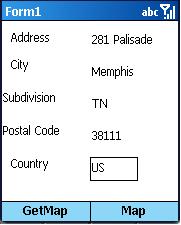
On click of the “Get Map” menu, an address object is created, and DataSource is set to “MapPoint.NA”. Following are the data sources available.
MapPoint.EU – Europe
MapPoint.NA – North America
MapPoint.BR – Brazil
MapPoint.World – World
MapPoint.Moon - Lunar Map
The following code would retrieve the location details based on the given address, using the FindServiceSoap Webservice. The webservice must be authenticated with the MapPoint developer account. We need to supply the data source name and the address.
public static void GetAddress(Address address, string DataSourceName,
         out indResults Location, out ViewByHeightWidth[] Views)
{
  try
  {
    FindServiceSoap locationService = new FindServiceSoap();
    locationService.Credentials = new
               System.Net.NetworkCredential(_mapPointUserName,
               _mapPointPassword);

    locationService.PreAuthenticate = true;

    FindAddressSpecification locationData = new FindAddressSpecification();
    locationData.DataSourceName = DataSourceName;
    locationData.InputAddress = address;

    Location = locationService.FindAddress(locationData);

    Views = new ViewByHeightWidth[1];
    Views[0] = Location.Results[0].FoundLocation.BestMapView.ByHeightWidth;
  }
  catch(Exception ex)
  {
    throw new Exception(ex.Message,ex);
  }
}
After obtaining the location details, this data is further sent to GetMap method. This method uses the “RenderServiceSoap” Web Service. This service again needs authentication details. MapPoint provides Pushpins, a visual cue to pinpoint the address on the map. You can choose from the default set of icons and give an appropriate name. Additionally, a MapSpecification object is created which would hold the view, pushpins, image format etc. RenderService’s GetMap is invoked to retrieve the appropriate image, this is retrieved as a stream and shown as a bitmap.
public static Bitmap GetMap(FindResults Location,
         ViewByHeightWidth[] Views,string DataSourceName,
         Point MapDimensions)
{
  try
  {
    RenderServiceSoap renderService = new RenderServiceSoap();
    Pushpin[] pushpins = new Pushpin[1];
    MapSpecification mapSpec = new MapSpecification();
    renderService.Credentials = new
          System.Net.NetworkCredential(_mapPointUserName,
          _mapPointPassword);
    renderService.PreAuthenticate = true;

    pushpins[0] = new Pushpin();
    pushpins[0].IconDataSource = "MapPoint.Icons";
    pushpins[0].IconName = "0";
    pushpins[0].Label = Location.Results[0].FoundLocation.Entity.Name;
    pushpins[0].LatLong = Views[0].CenterPoint;
    pushpins[0].ReturnsHotArea = true;

    mapSpec.DataSourceName = DataSourceName;
    mapSpec.Views = Views;
    mapSpec.Pushpins = pushpins;
    mapSpec.Options = new MapOptions();
    mapSpec.Options.Format = new ImageFormat();
    mapSpec.Options.Format.Width = MapDimensions.X;
    mapSpec.Options.Format.Height = MapDimensions.Y;
    MapImage[] mapImages = renderService.GetMap(mapSpec);

    System.IO.Stream streamImage = new
           System.IO.MemoryStream(mapImages[0].MimeData.Bits);
    Bitmap bitmap = new Bitmap(streamImage);
    return bitmap;
  }
    catch(Exception ex)
  {
    throw new Exception(ex.Message,ex);
  }
}
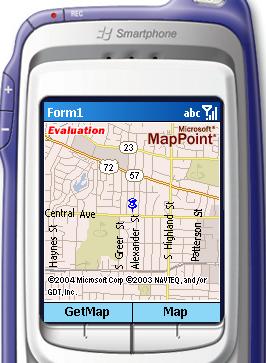
That's all... we are done ... here is the rendered map. Also, note the pushpin in the map to identify the exact location.
This member has not yet provided a Biography. Assume it's interesting and varied, and probably something to do with programming.



 General
  News
News  Suggestion
  Question
  Bug
Bug  Answer
  Joke
Joke  Praise
  Rant
Rant  Admin
Admin 


 Submit an article or tip


