
Introduction
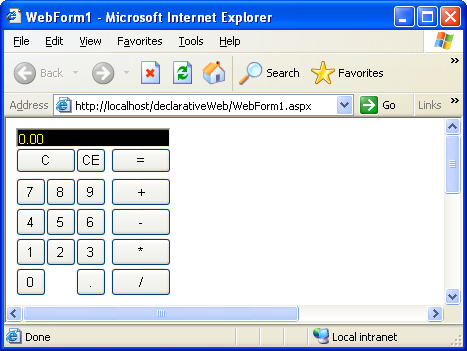
This is a concept piece that is intended to whet your appetite for declarative programming and the idea that maybe, just maybe, it is possible to unify development for System.Windows.Forms and System.Web.UI.WebControls namespaces, at least for simple applications.
Now, granted, "real" web pages have lots of JavaScript to reduce post-backs, go through a lot of optimization at the server, need to deal with real world issues like traffic, etc. And a calculator example, where each button click is a post-back, is definitely not the best example!
Click here for an online demo.
How Does It Work?
Very simple. Given a MyXaml markup file that defines the UI in the System.Windows.Forms namespace, a very simple XSLT, written by Justin, converts the markup to one that can live in the System.Web.UI.WebControls namespace. So, one markup file drives both Form and Web UI's, and the event handler code is identical as well except for one line.
The Markup
The source markup is very simple. No styles, no sub-forms, etc. Simple is better when trying to pull this off.
="1.0"="utf-8"
<wf:MyXaml
xmlns:wf="System.Windows.Forms"
xmlns:def="Definitions">
<wf:Panel Name="Calc" Location="10, 10" Size="600, 400">
<Controls>
<wf:TextBox def:Name="display" Location="0, 0" Size="155, 20"
BackColor="Black" ForeColor="Yellow" Text="0.00"/>
<wf:Button Text="C" Location="0, 20" Size="60, 25"
Click="OnClear" FlatStyle="System"/>
<wf:Button Text="CE" Location="60, 20" Size="30, 25"
Click="OnClearEntry" FlatStyle="System"/>
<wf:Button Text="=" Location="95, 20" Size="60, 25"
Click="OnEqual" FlatStyle="System"/>
<wf:Button Text="7" Location="0, 50" Size="30, 28"
Click="OnDigit" FlatStyle="System"/>
<wf:Button Text="8" Location="30, 50" Size="30, 28"
Click="OnDigit" FlatStyle="System"/>
<wf:Button Text="9" Location="60, 50" Size="30, 28"
Click="OnDigit" FlatStyle="System"/>
<wf:Button Text="4" Location="0, 80" Size="30, 28"
Click="OnDigit" FlatStyle="System"/>
<wf:Button Text="5" Location="30, 80" Size="30, 28"
Click="OnDigit" FlatStyle="System"/>
<wf:Button Text="6" Location="60, 80" Size="30, 28"
Click="OnDigit" FlatStyle="System"/>
<wf:Button Text="1" Location="0, 110" Size="30, 28"
Click="OnDigit" FlatStyle="System"/>
<wf:Button Text="2" Location="30, 110" Size="30, 28"
Click="OnDigit" FlatStyle="System"/>
<wf:Button Text="3" Location="60, 110" Size="30, 28"
Click="OnDigit" FlatStyle="System"/>
<wf:Button Text="0" Location="0, 140" Size="30, 28"
Click="OnDigit" FlatStyle="System"/>
<wf:Button Text="." Location="60, 140" Size="30, 28"
Click="OnDigit" FlatStyle="System"/>
<wf:Button Text="+" Location="95, 50" Size="60, 28"
Click="OnAdd" FlatStyle="System"/>
<wf:Button Text="-" Location="95, 80" Size="60, 28"
Click="OnSubtract" FlatStyle="System"/>
<wf:Button Text="*" Location="95, 110" Size="60, 28"
Click="OnMultiply" FlatStyle="System"/>
<wf:Button Text="/" Location="95, 140" Size="60, 28"
Click="OnDivide" FlatStyle="System"/>
</Controls>
</wf:Panel>
</wf:MyXaml>
What Gets Generated?
The XSLT translates this to:
<wf:MyXaml
  xmlns:wf="System.Web.UI.WebControls, System.Web, Version=1.0.5000.0,
            Culture=neutral, PublicKeyToken=b03f5f7f11d50a3a"
  xmlns:def="Definitions">
  <wf:Panel Name="Calc" CssStyle="position:absolute; left:10px;
            top:10px; width:600px; height:400px;">
    <Controls>
      <wf:TextBox def:Name="display" BackColor="Black" ForeColor="Yellow"
                  Text="0.00" CssStyle="position:absolute; left:0px; top:0px;
                  width:155px; height:20px;"></wf:TextBox>

      <wf:Button Text="C" Click="OnClear" FlatStyle="System"
          CssStyle="position:absolute; left:0px; top:20px; width:60px;
          height:25px;"></wf:Button>
      <wf:Button Text="CE" Click="OnClearEntry" FlatStyle="System"
          CssStyle="position:absolute; left:60px; top:20px; width:30px;
          height:25px;"></wf:Button>
      <wf:Button Text="=" Click="OnEqual" FlatStyle="System"
          CssStyle="position:absolute; left:95px; top:20px; width:60px;
          height:25px;"></wf:Button>

      <wf:Button Text="7" Click="OnDigit" FlatStyle="System"
          CssStyle="position:absolute; left:0px; top:50px; width:30px;
          height:28px;"></wf:Button>
      <wf:Button Text="8" Click="OnDigit" FlatStyle="System"
          CssStyle="position:absolute; left:30px; top:50px; width:30px;
          height:28px;"></wf:Button>
      <wf:Button Text="9" Click="OnDigit" FlatStyle="System"
          CssStyle="position:absolute; left:60px; top:50px; width:30px;
          height:28px;"></wf:Button>
      <wf:Button Text="4" Click="OnDigit" FlatStyle="System"
          CssStyle="position:absolute; left:0px; top:80px; width:30px;
          height:28px;"></wf:Button>
      <wf:Button Text="5" Click="OnDigit" FlatStyle="System"
          CssStyle="position:absolute; left:30px; top:80px; width:30px;
          height:28px;"></wf:Button>
      <wf:Button Text="6" Click="OnDigit" FlatStyle="System"
          CssStyle="position:absolute; left:60px; top:80px; width:30px;
          height:28px;"></wf:Button>
      <wf:Button Text="1" Click="OnDigit" FlatStyle="System"
          CssStyle="position:absolute; left:0px; top:110px; width:30px;
          height:28px;"></wf:Button>
      <wf:Button Text="2" Click="OnDigit" FlatStyle="System"
          CssStyle="position:absolute; left:30px; top:110px; width:30px;
          height:28px;"></wf:Button>
      <wf:Button Text="3" Click="OnDigit" FlatStyle="System"
          CssStyle="position:absolute; left:60px; top:110px; width:30px;
          height:28px;"></wf:Button>
      <wf:Button Text="0" Click="OnDigit" FlatStyle="System"
          CssStyle="position:absolute; left:0px; top:140px; width:30px;
          height:28px;"></wf:Button>
      <wf:Button Text="." Click="OnDigit" FlatStyle="System"
          CssStyle="position:absolute; left:60px; top:140px; width:30px;
          height:28px;"></wf:Button>

      <wf:Button Text="+" Click="OnAdd" FlatStyle="System"
          CssStyle="position:absolute; left:95px; top:50px; width:60px;
          height:28px;"></wf:Button>
      <wf:Button Text="-" Click="OnSubtract" FlatStyle="System"
          CssStyle="position:absolute; left:95px; top:80px; width:60px;
          height:28px;"></wf:Button>
      <wf:Button Text="*" Click="OnMultiply" FlatStyle="System"
          CssStyle="position:absolute; left:95px; top:110px; width:60px;
          height:28px;"></wf:Button>
      <wf:Button Text="/" Click="OnDivide" FlatStyle="System"
          CssStyle="position:absolute; left:95px; top:140px; width:60px;
          height:28px;"></wf:Button>
    </Controls>
  </wf:Panel>
</wf:MyXaml>
What Does The XSLT Look Like?
The XSLT is straightforward enough:
="1.0"="UTF-8"
<xsl:stylesheet version="1.0" xmlns:xsl="http://www.w3.org/1999/XSL/Transform">
<xsl:output method="xml"/>
<xsl:template match="*">
<xsl:choose>
<xsl:when test="namespace-uri(.) = 'System.Windows.Forms'">
<xsl:element name="{name(.)}" namespace="System.Web.UI.WebControls,
System.Web, Version=1.0.5000.0, Culture=neutral,
PublicKeyToken=b03f5f7f11d50a3a">
<xsl:copy-of select="namespace::*[not(.='System.Windows.Forms')]"/>
<xsl:copy-of select="@*[not(name()='Location') and not(name()='Size')]"/>
<xsl:if test="@Location or @Size">
<xsl:attribute name="CssStyle">
<xsl:if test="@Location">position:absolute; left:<xsl:value-of
select="normalize-space(substring-before(@Location,','))"/>px;
top:<xsl:value-of
select="normalize-space(substring-after(@Location,','))"/>px;
</xsl:if>
<xsl:if test="@Size">width:<xsl:value-of
select="normalize-space(substring-before(@Size,','))"/>px;
height:<xsl:value-of
select="normalize-space(substring-after(@Size,','))"/>px;
</xsl:if>
</xsl:attribute>
</xsl:if>
<xsl:apply-templates></xsl:apply-templates>
</xsl:element>
</xsl:when>
<xsl:otherwise>
<xsl:element name="{name(.)}" namespace="{namespace-uri(.)}">
<xsl:copy-of select="namespace::*[not(.='System.Windows.Forms')]"/>
<xsl:copy-of select="@*[not(name()='Location') and not(name()='Size')]"/>
<xsl:if test="@Location or @Size">
<xsl:attribute name="CssStyle">
<xsl:if test="@Location">position:absolute; left:<xsl:value-of
select="normalize-space(substring-before(@Location,','))"/>px;
top:<xsl:value-of
select="normalize-space(substring-after(@Location,','))"/>px;
</xsl:if>
<xsl:if test="@Size">width:<xsl:value-of
select="normalize-space(substring-before(@Size,','))"/>px;
height:<xsl:value-of
select="normalize-space(substring-after(@Size,','))"/>px;
</xsl:if>
</xsl:attribute>
</xsl:if>
<xsl:apply-templates></xsl:apply-templates>
</xsl:element>
</xsl:otherwise>
</xsl:choose>
</xsl:template>
</xsl:stylesheet>
The Loaders
To make all this magic work, the markup has to be parsed, which is done by MyXaml. The parsing is done in the application startup. For the Form version, this is done when Main() is called. In the Web version, it's done in Page_Load event handler.
The Form Loader
The Form version has a very simple loader:
using System;
using System.Drawing;
using System.Collections;
using System.ComponentModel;
using System.Windows.Forms;
using System.Data;

using MyXaml;

namespace declarativeForm
{
  public class App
  {
    [STAThread]
    static void Main()
    {
      new App();
    }

    public App()
    {
      Parser p=new Parser();
      SimpleCalc sc=new SimpleCalc();
      Panel panel=(Panel)p.LoadObject("calcForm.xml", "Calc", sc, null);
      Form form=new Form();
      form.Controls.Add(panel);
      Application.Run(form);
    }
  }
}
The Web Loader
The Web loader is more complicated because there is no concept of session state. Therefore, the class that manages the state of the calculator (concatenating digits, remembering the last operator, etc.) has to be preserved in the Session container. Also, for every post-back, the UI has to be regenerated.
using System;
using System.Collections;
using System.ComponentModel;
using System.Data;
using System.Diagnostics;
using System.Drawing;
using System.IO;
using System.Text;
using System.Web;
using System.Web.SessionState;
using System.Web.UI;
using System.Web.UI.WebControls;
using System.Web.UI.HtmlControls;
using System.Xml;
using System.Xml.Xsl;

using MyXaml;

namespace declarativeWeb
{
  public class WebForm1 : System.Web.UI.Page
  {
    protected System.Web.UI.WebControls.Panel formPanel;

    private void Page_Load(object sender, System.EventArgs e)
    {
      if (!IsPostBack)
      {
        SimpleCalc sc=new SimpleCalc();
        XmlDocument doc=LoadDocument();

        if (doc != null)
        {
          Parser parser=new Parser();
          Panel panel=(Panel)parser.LoadObject(doc, "Calc", sc, null);
          if (panel != null)
          {
            formPanel.Controls.Add(panel);
          }
        }

        Session["SimpleCalc"]=sc;
      }
      else
      {
        SimpleCalc sc=(SimpleCalc)Session["SimpleCalc"];
        XmlDocument doc=LoadDocument();

        if (doc != null)
        {
          Parser parser=new Parser();
          Panel panel=(Panel)parser.LoadObject(doc, "Calc", sc, null);
          if (panel != null)
          {
            formPanel.Controls.Add(panel);
          }
        }
      }
    }

    override protected void OnInit(EventArgs e)
    {
      InitializeComponent();
      base.OnInit(e);
    }

    private void InitializeComponent()
    {
      this.Load += new System.EventHandler(this.Page_Load);
    }

    private XmlDocument LoadDocument()
    {
      XmlDocument doc=null;
      string path=MapPath("");

      try
      {
        doc=new XmlDataDocument();
        doc.PreserveWhitespace=true;
        doc.Load(path+"\\calcForm.xml");
        XslTransform xt=new XslTransform();
        xt.Load(path+"\\form2web.xslt");
        StringBuilder sb=new StringBuilder();
        StringWriter sw=new StringWriter(sb);
        xt.Transform(doc, null, new XmlTextWriter(sw), new XmlUrlResolver());

        doc=new XmlDocument();
        doc.LoadXml(sb.ToString());
        System.Diagnostics.Trace.WriteLine(sb.ToString());

      }
      catch(Exception ex)
      {
        Trace.Warn(ex.Message);
      }
      return doc;
    }
  }
}
The Calculator Event Handler Code
The calculator event handler code is identical for both Form and Web versions, except in the Form version you have to specify:
using System.Windows.Forms;
whereas in the Web version, you specify:
using System.Web.UI.WebControls;
Here is the Web version:
using System;
using System.Globalization;
using System.Web.UI.WebControls;
using MyXaml;
namespace declarativeWeb
{
public class SimpleCalc
{
private bool cleared;
private string lastOp;
private string lastValue;
private NumberFormatInfo formatProvider;
[MyXamlAutoInitialize] private TextBox display=null;
public SimpleCalc()
{
cleared=true;
lastOp=String.Empty;
lastValue=String.Empty;
formatProvider=new NumberFormatInfo();
formatProvider.NumberDecimalDigits=2;
}
public void OnClear(object sender, EventArgs e)
{
display.Text="0.00";
cleared=true;
lastOp=String.Empty;
lastValue=String.Empty;
}
public void OnClearEntry(object sender, EventArgs e)
{
display.Text="0.00";
cleared=true;
}
public void OnDigit(object sender, EventArgs e)
{
Button btn=(Button)sender;
if (cleared)
{
display.Text=btn.Text;
cleared=false;
}
else
{
display.Text=display.Text+btn.Text;
}
}
public string ProcessLastOp(string val)
{
double d=0;
switch(lastOp)
{
case "+":
{
d=Convert.ToDouble(lastValue) + Convert.ToDouble(val);
break;
}
case "-":
{
d=Convert.ToDouble(lastValue) - Convert.ToDouble(val);
break;
}
case "*":
{
d=Convert.ToDouble(lastValue) * Convert.ToDouble(val);
break;
}
case "/":
{
if (Convert.ToDouble(val) != 0.0)
{
d=Convert.ToDouble(lastValue) / Convert.ToDouble(val);
}
break;
}
}
lastValue=d.ToString("N", formatProvider);
return lastValue;
}
public void OnAdd(object sender, EventArgs e)
{
if (lastValue==String.Empty)
{
lastValue=display.Text;
}
else
{
lastValue=ProcessLastOp(display.Text);
display.Text=lastValue;
}
lastOp="+";
cleared=true;
}
public void OnSubtract(object sender, EventArgs e)
{
if (lastValue==String.Empty)
{
lastValue=display.Text;
}
else
{
lastValue=ProcessLastOp(display.Text);
display.Text=lastValue;
}
lastOp="-";
cleared=true;
}
public void OnMultiply(object sender, EventArgs e)
{
if (lastValue==String.Empty)
{
lastValue=display.Text;
}
else
{
lastValue=ProcessLastOp(display.Text);
display.Text=lastValue;
}
lastOp="*";
cleared=true;
}
public void OnDivide(object sender, EventArgs e)
{
if (lastValue==String.Empty)
{
lastValue=display.Text;
}
else
{
lastValue=ProcessLastOp(display.Text);
display.Text=lastValue;
}
lastOp="/";
cleared=true;
}
public void OnEqual(object sender, EventArgs e)
{
if (lastValue != String.Empty)
{
display.Text=ProcessLastOp(display.Text);
lastValue=String.Empty;
lastOp=String.Empty;
cleared=true;
}
}
}
}
Where's The Smoke And Mirrors?
There's only one "trick" being employed here. Absolute positioning is used and Web controls don't support that except by using the style attribute in the HTML. .NET's support for this is via the Style property. However, this property does not accept a string that would be used to construct the HTML style attribute. Instead, the WebControl.Style property is CssStyleCollection type. To make matters worse, although this type behaves sort of like a dictionary (it has a key-value pair Add method), it isn't derived from IDictionary.
Therefore, the smoke and mirrors is that MyXaml has custom property setter code for the CssStyle attribute. When it encounters the CssStyle attribute, it invokes a handler for this attribute (CssStyleCustomProperty) that decodes the string and loads up the CssStyleCollection for the Style property of the instance being parsed. At least the mechanism that is used is a general purpose custom attribute handler, rather than embedding web style processing inside the MyXaml parser directly.
The Downloads
For the web demo:
- Create an ASP.NET web application project.
- Copy the the files in the web download into the folder for your project, overwriting the WebForm.* files.
- Add a reference to the MyXaml.dll assembly that got put into your bin directory.
For the form demo, just unzip the download and compile the provided csproj.
A Note To MyXaml Users
If you want to compile against the MyXaml source code, there's a minor change made to MyXaml to deal with the prefix on the MyXaml node. In InitializeNamespaces, change:
XmlNode uiNode=doc.GetElementsByTagName("MyXaml")[0];
to
XmlNode uiNode=doc.DocumentElement;
Because MyXaml is a GPL open source project, I would prefer that people obtain the source code directly from the MyXaml website and acknowledge that they agree to the licensing terms. The downloads include only the MyXaml assembly.
GAC Issues
MyXaml registers itself into the GAC, and for some very annoying reason, I had problems with the web version acquiring the correct MyXaml file. If you suspect such a problem, remove MyXaml from the GAC (note that the MyXaml project has a post-build step that registers itself into the GAC, so you might want to remove that too).
Conclusion
Within the confines of simple UI controls, simple requirements, and where post-back performance isn't an issue, declarative programming and XSLT makes it possible to create both form and web applets from the same code base.
My main goal as a developer is to improve the way software is designed, and how it interacts with the user. I like designing software best, but I also like coding and documentation. I especially like to work with user interfaces and graphics.
I have extensive knowledge of the .NET Framework, and like to delve into its internals. I specialize in working with VG.net and MyXaml. I also like to work with ASP.NET, AJAX, and DHTML.



 General
  News
News  Suggestion
  Question
  Bug
Bug  Answer
  Joke
Joke  Praise
  Rant
Rant  Admin
Admin 


 Submit an article or tip


