Introduction
When I started using WTL, I didn't find any tool that could help me add message handlers like the Class Wizard. So, I decided to develop my own add-in for Microsoft Visual Studio (MS VS) that does that. Sorry for my English, I don't know it very well.
Using the Add-in
First, you should download WTL Helper Setup and run it to install the add-in. The add-in automatically registers the shortcut CTRL+ALT+W to call the dialogue. However, if you use one of the predefined keyboard mapping schemes then the registration of the shortcut will fail. Instead, you should create a copy of the current keyboard mapping scheme. To do this, go to the menu Tools->Options. In the Environment section, select Keyboard, press the Save As button and select a name for the new keyboard scheme. Then you can manually set a shortcut for WTL Helper (its full name is WtlHelper.Connect.WtlHelper).
Message Map
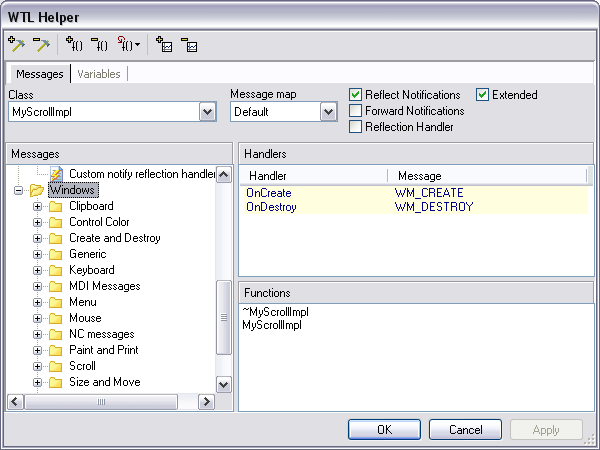
If the add-in is installed properly, the WTL Helper sub-menu appears in the menu Tools. Click on WTL Helper and you will get the dialogue shown above. The structure of the left TreeView panel is described in the WTL files. These WTL files are unpacked into the {installation_path}\Messages directory, if you use the setup file, or they are in the \wtl subdirectory in the source archive. The description of these files is as follows. I've grouped these messages by categories for faster search. If you think that this order is inconvenient, you can change the WTL files to have your own view of the message tree.
DDX Map

On the left panel of the dialogue, you can see the control IDs for the selected dialogue. By default, there are only dialogue classes in the combo box. On the right panel, there are variables that correspond to these ID controls.
Options
Other menu item Options allow you to choose the following options:
Message Options
- The style of the message handler is used by default (new or old)
- Sorting of the message handlers (on/off)
- Function-handlers (inline or in CPP)
- Which
CRect, CPoint, CSize classes will be used: WTL or ATL - Handler colours
DDX Options
- Default protection for the DDX variables
- Show only dialogue classes or all classes on the Variables tab
- Use type prefix for DDX variable
More explanation on these options is given below.
Message Options Discussion
- WTL 3.1 and above have a file called atlcrack.h. In this file, there are many message handlers that unpack (crack)
wParam and lParam. So, the message handler functions become more laconic. However, there are some troubles because crackers must be used with a message map starting not with BEGIN_MSG_MAP, but with BEGIN_MSG_MAP_EX. The BEGIN_MSG_MAP macro and cracked handlers are only possible for ATL 7.0 and above, and only for classes inherited from CWindowIml or CDialogImpl. - You can use sorting of message handlers, which is enabled by default. Sorting means that all the new message handlers in the message map will be inserted in the following order:
- Windows message handlers like
WM_CREATE, WM_DESTROY, etc - Command message handlers: messages that are part of the
WM_COMMAND message - Notify message handlers: messages that are part of the
WM_NOTIFY message - Other message handlers (user-defined messages)
CHAIN_MSG_MAP
- If it's true, the function is inserted into the header file. Otherwise, the function is inserted into the CPP file.
- ATL 7.0 and above have a file atltypes.h. In this file, classes like
CRect, CPoint and CSize are declared. You can also use the WTL classes CRect, CPoint and CSize. If you check this option, you will use the WTL ones. Otherwise, you will use the ATL ones. If you choose the WTL classes, the file <atlmisc.h> will be included for each header file where the message handler that uses CRect, CPoint, CSize is declared. If you choose ATL classes, the file <atltypes.h> will be included in the same way. - Since version 0.9.9.0, you also have the ability to set up highlighting colours for the handlers. Just press the button and you will see a dialog like this:
Select the colours you like the most and the handlers will be highlighted in that way.
DDX Options Discussion
- Protection type of a variable which will be default for a dialogue that asks for parameters of the new DDX entry.
- If this option is checked, then only dialogue-based classes will be shown in the Variables tab. In other cases, all the classes will be shown.
- If this flag is set, every auto-generated variable name will have a type prefix such as
i (m_iVar1) or str (m_strVar2).
Context Menus
Since version 0.9.9.0, I've added a few context menu handlers to make the calling of WTL Helper easy. In Visual Studio 2003, the context menus are MS Office Command Bars. So, I need to know their names to add my menu items. Here are command bar names and where they are called from:
- Class View Item: Class View window
- Resource Editors: all resource editors except the menu editor
- Menu Designer: Menu editor
After loading the add-in, my menu items appear in these context menus.
Class View
I've added two menu items that show the main window of WTL Helper. The only difference is that the first one sets the handler/function page while the second one sets the DDX variable page as default.
Resource Editors
For the accelerator or toolbar button, you can simply add a command handler.
In the above picture, you can see a context menu for a dialogue. The first two items are equal to the Class View ones. To use the last one, you should have WTL Wizards at least version 1.1. WTL Wizards are a set of dialogues for adding WTL classes.
You can simply add a handler or a variable for a control without showing the main window of WTL Helper.
Menu Editor
The same as for accelerator or toolbar buttons, you can simply add a command handler for the menu item.
Dialog Resource View
The same goes for the dialog editor.
Getting Selected Resource Items
I had some troubles when I tried to get the current resource ID and the selected resource item. The Visual Studio add-in framework has no documented ways to get such information. The most difficult was to determine the resource that is currently being edited and its ID. I've done this not in the correct way (I don't know the correct one), but I have found a way out. You can see that the resource editing window has a caption that consists of the resource file name, ID of the currently edited resource and the type of the resource. So, I use this caption to get all that I need.
The next question is how to retrieve the ID of the currently edited resource item (menu item, control on the dialogue and so on). You can get the EnvDTE::SelectionContainer object from the EnvDTE::SelectedItems object and then you can get an object for the selected item. However, for resource items there is no such documentation. These objects are defined in ResEditPKGLib. To use them, you should import TLB with GUID {7365C6FE-4191-476B-A3FE-1CB6A7B1C119} as follows:
#import "libid:7365C6FE-4191-476B-A3FE-1CB6A7B1C119"
    version("7.1") lcid("0") no_implementation
Every resource item object has a property ID, but there is no common interface for the objects. So, I use the Invoke method of the IDispatch interface to retrieve the current resource item ID.
Override Functions
Since version 0.9.9.0, I've added the possibility to override some of the functions of the parent classes. In the picture above, you can see the menu for a child of the CScrollWindowImpl class. The first two functions are available for all of the classes except dialogue classes. The others are available only for the specified classes. For example, DoScroll and DoPaint are available only for the children of CScrollImpl.
Problems while Working with EnvDTE
The problem is that there is no exact definition of the map. I think that in Microsoft, maps are called objects which start from one of the predefined macros, such as BEGIN_MSG_MAP, BEGIN_MESSAGE_MAP and so on. It causes some problems while working with this object of EnvDTE.
The macro BEGIN_MSG_MAP_EX is not recognized as the beginning of the map; it is recognized as a function. All of the macros that are used in the declaration of the classes are recognized as functions, as well. But it isn't the main issue. The main problem is that when you create a message map by the macro BEGIN_MSG_MAP_EX or another map (such as DDX map) and try to insert the function into the source document, it returns an error.
The second problem is the recognition of some of the map entries and the end of the map. For example:
CHAIN_MSG_MAP(CFrameWindowImpl<CMainFrame>)
CHAIN_MSG_MAP(CUpdateUI<CMainFrame>)
CHAIN_MSG_MAP(CMessageFilter)
CHAIN_MSG_MAP(CIdleHandler<CMainFrame>)
...is recognized as:
CHAIN_MSG_MAP(CFrameWindowImpl<CMainFrame>)
CHAIN_MSG_MAP(CMessageFilter)
CHAIN_MSG_MAP(CIdleHandler<CMainFrame>)
When I tried to understand this behavior, I found out that the second CHAIN_MSG_MAP with the parameter templatization class is not recognized (in the example, CUpdateUI<CMainFrame>). However, if the second CHAIN_MSG_MAP is CMessageFilter and the third is CUpdateUI<CMainFrame>, then CMessageFilter is recognized properly, but CUpdateUI<CMainFrame> is not recognized.
When some map entries are not recognized in the map EnvDTE, the end of the map will not be recognized either. There is one more problem with BEGIN_MSG_MAP_EX. If the map starts with BEGIN_MSG_MAP_EX and ends with END_MSG_MAP, then EnvDTE cannot recognize any CodeElement after the map. I've solved this problem in the following way: I've added a macro in stdafx.h.
#define END_MSG_MAP_EX END_MSG_MAP
When I added this macro in the same header as the map, I got the same result as without the macro. However, it works well in stdafx.h.
Using the Code
The main functionality is in the files VSElements.h or VSElements.cpp. It's my superstructure of EnvDTE concerning CodeElement interfaces. There are some classes that wrap functions, variables, maps, classes and parameters of functions.
The most important of these wrappers is the map wrapper, VSMap. I've remade this class to get map entries, since using EnvDTE::CodeElement (with kind of EnvDTE::vsCMElementMap) or VCCodeModelLibrary::VCCodeMap does not give the exact result that we want. These problems have been described above.
I've created a special class, VSMessageMap, for the message map. I am sorry about the Russian comments in the files, but I don't have enough time to add English ones. All the dialogues that you can see while working are in the \dialog subdirectory. Classes for parsing resources are in the \resources subdirectory.
Conclusion
The latest version of WTL Helper is here. You can help me make the WTL Helper better. I need someone who can draw the toolbars and icons for me, as I think they are not very good right now.
History
- 24th November, 2004: 0.6
- 25th November, 2004: 0.6.0.1
- Fixed bug in the installer
- Added WTL files into the setup
- December, 2004
- 0.7.5.0 1
- Replaced pointers to COM interfaces with
_com_ptr objects - Fixed the incorrect name of
CAxDialogImpl in dialogs.dat - Fixed the bug reported by Alex Cherepanov
- Added the possibility to choose which
CString will be included (ATL or WTL) when adding DDX map entry with type CString
- 0.7.5.1 2
- Fixed the bug when the map entry has no parameters
- Put the correct version of add-in in the installer
- 0.7.6.0 9
- Added two small enhancements for DDX
- 21st December, 2004: 0.8.0.0
- Removed adding menu and accelerator IDs to the ComboBox in the dialogue that adds DDX variable when adding command message handler for the control's messages
- Small fixes for DDX
- Added WTL file for
static messages - Added support for nested classes and namespaces
- Rebuilt options dialogue
- 23rd December, 2004: 0.8.1.0
- Added About page on the Options dialogue
- Fixed a small bug in DDX
- 11th January, 2005: 0.8.2.0
- Fixed the bug in sorting messages
- Now shows the version number in the About tab
- Segregates system options from user options
- Added two options:
- Which
CRect, CPoint, CSize classes will be used: WTL or ATL - Shows only the dialogue classes or all classes on the Variables tab
- 7th February, 2005: 0.9.0.0
- A lot of fixes and optimizations
- Added support for
ALT_MSG_MAP - Added support for
REFLECT_NOTIFICATIONS and FORWARD_NOTIFICATIONS - Changed the interface, now the dialogue has resizable borders
- Added support for
XXX_RANGE_XXX handlers - Added support for
MESSAGE_HANDLER_EX for Custom Window Message - Added WTL file for tooltips
- 11th February, 2005: 0.9.0.1
- 24th February, 2005: 0.9.0.2
- Improved stability
- Fixed a small bug
- 25th February, 2005: 0.9.0.3
- Fixed the bugs posted by Ning
- Added the ability to select functions for the handler (only for Notify or Command messages)
- 28th February, 2005: 0.9.0.4
- Fixed a bug when starting WTL Helper in MFC or console project
- 10th March, 2005: 0.9.0.5
- Added the ability to select a function for the handler for Windows messages and improvements for Notify and Command messages
- Fixed a crash when trying to move to the function that was not inserted
- Fixed the Apply button bug
- 16th March, 2005: 0.9.0.6
- Fixed incorrect load of resource files
- Added support for XP themes
- 21st March, 2005: 0.9.0.7
- Fixed the crash when there is no
enum IDD in the dialogue class
- 29th March, 2005: 0.9.1.0
- Fixed bug with incorrect detection type of controls in Add DDX variable dialogue
- Set
UINT as default type for DDX variable for the EDITBOX, which has ES_NUMBER style instead of CString - Added auto generation for the name of DDX variable
- 26th April, 2005: 0.9.1.1
- Added possibility to input very long names for the control IDs and function names
- 23rd May, 2005: 0.9.1.2
- 17th October, 2005: 0.9.9.0
- Added color highlighting for handlers
- Added possibilities to override parent functions (that are not
virtual) - Added menu items into context menus
- Added compatibility with Visual Studio 2005 Beta 2
- Fixed some bugs
- 28th October, 2005: 0.9.9.1
- Added context menu for dialogue items in a resource view
- 10th November, 2005: 1.0
- Changed icons
- Added information for WTL Helper in Help->About
- Fixed some compatibility issues with Visual Studio 2005
- 14th November, 2005: 1.0.2
- Fixed a bug with splitter
- Fixed some bugs for Visual Studio 2005
- 26th January, 2006: 1.1
- Added support of extended macros of message reflection (WTL 7.5 and above)
- Added the option "Save previously shown page"
- Added the possibility of a version of WTL
- Added the option to allow adding
PreTranslateMessage() and OnIdle() for dialogues
- 17nd February, 2006: 1.1.3
- Fixed incorrect handling of file names
- Fixed crash when try to insert functions
PreTranslateMessage() and OnIdle() for dialogues - Fixed issue with Visual studio 2005 toolbars
- Some small fixes and enhancements
- 28th March, 2006: 1.1.4
- Fixed crash at call to WTL Helper when solution is not loaded
- 7th July, 2006: 1.1.5
- Fixed issue with Visual studio 2005 toolbars
- 14th November, 2006: 1.1.6
- Fixed duplicating of toolbars
- 27th April, 2007: 1.1.7
- Fixed again :) issue with toolbars in Visual Studio 2005
- 27th August, 2007: 1.1.8
- Fixed issue with notify handlers for old style
- Added option to save old or new style for handlers for current solution
I am a software developer for 3 years.



 General
  News
News  Suggestion
  Question
  Bug
Bug  Answer
  Joke
Joke  Praise
  Rant
Rant  Admin
Admin 


 Submit an article or tip


 )
)
