Click here to Skip to main content

RIATasks: A Simple Silverlight CRUD Example (using View Model)

By , 16 Jul 2010
 
Prize winner in Competition "Best ASP.NET article of June 2010"

A Simple Silverlight CRUD Example

Live example: http://silverlight.adefwebserver.com/RIATasks/

Also see: Silverlight RIA Tasks 2: Dynamic View Models
img32.jpg

The reason for this tutorial, is that I have noticed my friends are getting stuck when trying to learn Silverlight. They spend a lot of time "learning about Silverlight" but have a hard time actually getting started.

I also wanted to show them how to use View Model Style programming because I believe that using View Model, you will write LESS CODE (you probably didn't expect that one!). Don't believe me? Let me show you...

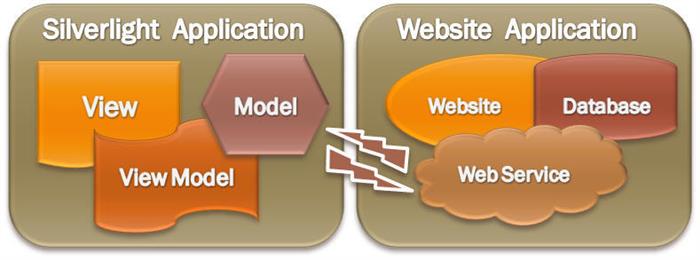
Silverlight is different because it communicates with the website that launches it using asynchronous communication. Learning how to design applications this way can be a bit challenging.

So I created an end-to-end example, that achieves these goals:

  • Creates, Reads, Updates, and Deletes records from the database
  • Implements Forms based security
  • Implements "Granular Security" ("only allow User One to see, edit, and create their own Tasks")
  • Implements View Model Style

View Model Style

View Model Style allows a programmer to create an application that has absolutely no UI (user interface). The programmer only creates a View Model and a Model. A designer with no programming ability at all, is then able to start with a blank page and completely create the View (UI) in Microsoft Expression Blend 4 (or higher). If you are new to View Model Style it is suggested that you read Silverlight View Model Style : An (Overly) Simplified Explanation for an introduction.

The Application

First, let's look at the sample application.

When you first start the application, you are "Logged Out". You can use the drop down to log in as User One or User Two.

Click the Add button to add a new Task.

Clicking the Update button will save the Task.

  • Clicking on the Task in the list box will display the Task.
  • Clicking the Update button will save any changes
  • Clicking the Delete button will delete the Task.

Create The Application

We will now create the Application. You will need:

  • Visual Studio 2010 (or higher)
  • Expression Blend 4 (or higher)
  • SQL Server (2005 or higher)

Setting Up The Database

Create a new database called RIATasks

Create a table called Tasks, using the following script:

SET ANSI_NULLS ON
GO
SET QUOTED_IDENTIFIER ON
GO
IF NOT EXISTS (SELECT * FROM sys.objects WHERE object_id = OBJECT_ID(N'[dbo].[Tasks]') AND type in (N'U'))
BEGIN
CREATE TABLE [dbo].[Tasks](
    [TaskID] [int] IDENTITY(1,1) NOT NULL,
    [TaskName] [nvarchar](50) NOT NULL,
    [TaskDescription] [nvarchar](max) NOT NULL,
    [UserID] [int] NOT NULL,
 CONSTRAINT [PK_Tasks] PRIMARY KEY CLUSTERED 
(
    [TaskID] ASC
)WITH (PAD_INDEX  = OFF, STATISTICS_NORECOMPUTE  = OFF, IGNORE_DUP_KEY = OFF, ALLOW_ROW_LOCKS  = ON, ALLOW_PAGE_LOCKS  = ON) ON [PRIMARY]
) ON [PRIMARY]
END
GO
IF NOT EXISTS (SELECT * FROM sys.indexes WHERE object_id = OBJECT_ID(N'[dbo].[Tasks]') AND name = N'IX_Tasks_UserID')
CREATE NONCLUSTERED INDEX [IX_Tasks_UserID] ON [dbo].[Tasks] 
(
    [UserID] ASC
)WITH (PAD_INDEX  = OFF, STATISTICS_NORECOMPUTE  = OFF, SORT_IN_TEMPDB = OFF, IGNORE_DUP_KEY = OFF, 
DROP_EXISTING = OFF, ONLINE = OFF, ALLOW_ROW_LOCKS  = ON, ALLOW_PAGE_LOCKS  = ON) ON [PRIMARY]
GO

You will also need to set security so that you will be able to connect to the database in the next step.

(If SQL server is too hard for you to set it up, you can cover similar material in: Silverlight View Model Style File Manager and View Model Style: Silverlight Video Player)

Create The Web Application Project

Open Visual Studio and select File then New Project...

Create a Silverlight Application project.

Accept the defaults and click OK.

The project will be created.

Enable Forms Authentication

We need to set-up the web application to use Forms Authentication. When the user logs in, they will create an encrypted authentication 'token' in their web browser, that contains their UserID. This 'token' will be used by the Silverlight application when making web service calls. The web service methods (created in a later step) will check this 'token' to enforce security.

Open the Web.config file.

Add <authentication mode="Forms"/> to the file. Then save and close it.

Create Default Page

Create a Web Form page called Default.aspx in the RIATasks.Web project.

Open the RIATasksTestPage.aspx page and switch to Source view.

Copy everything from <!DOCTYPE to the end of the page...

... and paste it in the source for the Default.aspx page, replacing everything from <!DOCTYPE to the end of the page.

We need to convert the Div tag the Silverlight control is in, to a Panel control so that it can be programmatically hidden if the user is not logged in.

  • Replace: <div id="silverlightControlHost">
    • With: <asp:panel id="silverlightControlHost" runat="server">
  • Replace: </div>
    • With: </asp:panel>

Now, we need to add a drop-down so a user can log in (in a real application you would use a normal Login Form).

Insert the following code in the page under the Form tag:

<asp:DropDownList ID="ddlUser" runat="server" AutoPostBack="True" 
onselectedindexchanged="ddlUser_SelectedIndexChanged">
<asp:ListItem Selected="True" Value="0">Logged Out</asp:ListItem>
<asp:ListItem Value="1">User One</asp:ListItem>
<asp:ListItem Value="2">User Two</asp:ListItem>
</asp:DropDownList>

Open the Default.aspx.cs file and replace ALL the code with the following code:

using System;
using System.Collections.Generic;
using System.Linq;
using System.Web;
using System.Web.UI;
using System.Web.UI.WebControls;
using System.Web.Security;
 
namespace RIATasks.Web
{
    public partial class Default : System.Web.UI.Page
    {
        protected void Page_Load(object sender, EventArgs e)
        {
            if (!Page.IsPostBack)
            {
                LogOut();
            }
        }
 
        #region ddlUser_SelectedIndexChanged
        protected void ddlUser_SelectedIndexChanged(object sender, EventArgs e)
        {
            int intSelectedUser = Convert.ToInt32(ddlUser.SelectedValue);
            if (intSelectedUser > 0)
            {
                LogUserIntoSite(Convert.ToInt32(ddlUser.SelectedValue));
            }
            else
            {
                LogOut();
            }
        }
        #endregion
 
        #region LogUserIn
        private void LogUserIntoSite(int intUser)
        {
            // Log the user into the site
            FormsAuthenticationTicket ticket = new FormsAuthenticationTicket(1,
              intUser.ToString(),
              DateTime.Now,
              DateTime.Now.AddDays(30),
              false,
              "Role One",
              FormsAuthentication.FormsCookiePath);
 
            // Encrypt the ticket.
            string encTicket = FormsAuthentication.Encrypt(ticket);
 
            // Create the cookie.
            Response.Cookies.Add(new HttpCookie(FormsAuthentication.FormsCookieName, encTicket));
 
            // Show the Silverlight control
            silverlightControlHost.Visible = true;
        }
        #endregion
 
        #region LogOut
        protected void LogOut()
        {
            FormsAuthentication.SignOut();
 
            // Hide the Silverlight control
            silverlightControlHost.Visible = false;
        }
        #endregion
    }
}

Right-click on the Default.aspx page and select Set As Start Page...

Hit F5 to run the project.

The project will run and open in the web browser.

You will be able to change the drop down to log in as a user.

Close the web browser.

Create the Data Layer

Add a Linq to SQL class to the RIATaks.Web site called RIATasksDB.dbml.

Note: You could use Entity Framework instead of Linq to SQL (or any other data access technology). We use Linq to SQL only because it is easier to set-up.

Select the Server Explorer.

Create a connection to the RIATasks database, and drag the Tasks table to the Object Relational Designer surface.

The data layer is complete.

Save and close the file.

Create The Web Service

Add a Web Service file to the RIATaks.Web site called Webservice.asmx.

Open the WebService.asmx.cs file that is created and replace ALL the code with the following code:

using System;
using System.Collections.Generic;
using System.Linq;
using System.Web;
using System.Web.Services;
 
namespace RIATasks.Web
{
    [WebService(Namespace = "http://OpenLightGroup.org/")]
    [WebServiceBinding(ConformsTo = WsiProfiles.BasicProfile1_1)]
    [System.ComponentModel.ToolboxItem(false)]
    public class WebService : System.Web.Services.WebService
    {
        #region GetCurrentUserID
        private int GetCurrentUserID()
        {
            int intUserID = -1;
            if (HttpContext.Current.User.Identity.IsAuthenticated)
            {
                // Get the current user
                intUserID = Convert.ToInt32(HttpContext.Current.User.Identity.Name);
            }
            return intUserID;
        }
        #endregion
 
        // Web Methods
 
        #region GetTasks
        [WebMethod]
        public List<Task> GetTasks()
        {
            // Create a collection to hold the results
            List<Task> colResult = new List<Task>();
 
            RIATasksDBDataContext DB = new RIATasksDBDataContext();
 
            var colTasks = from Tasks in DB.Tasks
                           where Tasks.UserID == GetCurrentUserID()
                           select Tasks;
 
            // Loop thru the Tasks
            foreach (var item in colTasks)
            {
                // Create a Task
                Task tmpTask = new Task();
 
                // Set only the TaskID and the Name
                // We do this because Description could be 
                // a large amount of data that will slow down
                // the application and we don't need it now
                tmpTask.TaskID = item.TaskID;
                tmpTask.TaskName = item.TaskName;
 
                // Add to the final results
                colResult.Add(tmpTask);
            }
 
            return colResult;
        }
        #endregion
 
        #region GetTask
        [WebMethod]
        public Task GetTask(int TaskID)
        {
            RIATasksDBDataContext DB = new RIATasksDBDataContext();
 
            var result = (from Tasks in DB.Tasks
                          where Tasks.TaskID == TaskID
                          where Tasks.UserID == GetCurrentUserID()
                          select Tasks).FirstOrDefault();
 
            return result;
        }
        #endregion
 
        #region DeleteTask
        [WebMethod]
        public string DeleteTask(int TaskID)
        {
            string strError = "";
            RIATasksDBDataContext DB = new RIATasksDBDataContext();
 
            try
            {
                var result = (from Tasks in DB.Tasks
                              where Tasks.TaskID == TaskID
                              where Tasks.UserID == GetCurrentUserID()
                              select Tasks).FirstOrDefault();
 
                if (result != null)
                {
                    DB.Tasks.DeleteOnSubmit(result);
                    DB.SubmitChanges();
                }
            }
            catch (Exception ex)
            {
                strError = ex.Message;
            }
 
            return strError;
        }
        #endregion
 
        #region UpdateTask
        [WebMethod]
        public string UpdateTask(Task objTask)
        {
            string strError = "";
            RIATasksDBDataContext DB = new RIATasksDBDataContext();
 
            try
            {
                var result = (from Tasks in DB.Tasks
                              where Tasks.TaskID == objTask.TaskID
                              where Tasks.UserID == GetCurrentUserID()
                              select Tasks).FirstOrDefault();
 
                if (result != null)
                {
                    result.TaskDescription = objTask.TaskDescription;
                    result.TaskName = objTask.TaskName;
 
                    DB.SubmitChanges();
                }
            }
            catch (Exception ex)
            {
                strError = ex.Message;
            }
 
            return strError;
        }
        #endregion
 
        #region InsertTask
        [WebMethod]
        public Task InsertTask(Task objTask)
        {
            RIATasksDBDataContext DB = new RIATasksDBDataContext();
 
            try
            {
                Task InsertTask = new Task();
 
                InsertTask.TaskDescription = objTask.TaskDescription;
                InsertTask.TaskName = objTask.TaskName;
                InsertTask.UserID = GetCurrentUserID();
 
                DB.Tasks.InsertOnSubmit(InsertTask);
                DB.SubmitChanges();
 
                // Set the TaskID 
                objTask.TaskID = InsertTask.TaskID;
            }
            catch (Exception ex)
            {
                // Log the error
                objTask.TaskID = -1;
                objTask.TaskDescription = ex.Message;
            }
 
            return objTask;
        }
        #endregion
    }
}

Note that the web service methods call GetCurrentUserID(), that uses Convert.ToInt32(HttpContext.Current.User.Identity.Name), to get the current user.

The current UserID is set when the user logs in and creates a authentication "token". The user's web browser passes this token on all requests, including the web service requests that will be made by the Silverlight application.

To check that everything is set up correctly, you can right-click on the WebService.asmx file, and select View in Browser.

The web methods will display.

Note: You could use WCF instead. We use .asmx web services because they are easier to deploy.

The Silverlight Project

We will now complete the RIATasks Silverlight project. first, we need to create a reference, from the Silverlight project, to the web service we just created.

Then, we need to make a Model to call the web service we created, and an ICommand support class, that will allow us to easily raise events in the View Model.

Create the Web Service Reference

In the Silverlight Project, Right-click on References and select Add Service Reference...

  • Click the Discover button
  • Enter wsRIATasks for Namespace
  • Click the OK button

The connection between the Silverlight project and the website is complete. We will implement code, in a later step, that will use this reference to call the web service we created.

Add References

Add a Reference to Microsoft.VisualBasic

ICommand Support Class

Add a new folder and call it Classes. and then right-click on it and select New Item...

Create a class called DelegateCommand.cs.

Replace ALL the code with the following code:

using System.Windows.Input;
using System;
 
// From http://johnpapa.net/silverlight/5-simple-steps-to-commanding-in-silverlight/
namespace RIATasks
{
    public class DelegateCommand : ICommand
    {
        Func<object, bool> canExecute;
        Action<object> executeAction;
        bool canExecuteCache;
 
        public DelegateCommand(Action<object> executeAction, Func<object, bool> canExecute)
        {
            this.executeAction = executeAction;
            this.canExecute = canExecute;
        }
 
        #region ICommand Members
 
        public bool CanExecute(object parameter)
        {
            bool temp = canExecute(parameter);
 
            if (canExecuteCache != temp)
            {
                canExecuteCache = temp;
                if (CanExecuteChanged != null)
                {
                    CanExecuteChanged(this, new EventArgs());
                }
            }
 
            return canExecuteCache;
        }
 
        public event EventHandler CanExecuteChanged;
 
        public void Execute(object parameter)
        {
            executeAction(parameter);
        }
 
        #endregion
    }
}

This class allows us to easily invoke ICommands. You can get more information on this class at: http://johnpapa.net/silverlight/5-simple-steps-to-commanding-in-silverlight/

The Model

Create a folder called Models, and a class called TasksModel.cs.

Replace all the code with the following code:

using Microsoft.VisualBasic;
using System.Linq;
using System;
using System.Collections.Generic;
using System.ServiceModel;
using RIATasks.wsRIATasks;

namespace RIATasks
{
    public class TasksModel
    {
        #region GetTask
        public static void GetTask(int TaskID, EventHandler<GetTaskCompletedEventArgs> eh)
        {
            // Set up web service call
            WebServiceSoapClient WS = new WebServiceSoapClient();

            // Set the EndpointAddress
            WS.Endpoint.Address = new EndpointAddress(GetBaseAddress());

            WS.GetTaskCompleted += eh;
            WS.GetTaskAsync(TaskID);
        }
        #endregion

        #region GetTasks
        public static void GetTasks(EventHandler<GetTasksCompletedEventArgs> eh)
        {
            // Set up web service call
            WebServiceSoapClient WS = new WebServiceSoapClient();

            // Set the EndpointAddress
            WS.Endpoint.Address = new EndpointAddress(GetBaseAddress());

            WS.GetTasksCompleted += eh;
            WS.GetTasksAsync();
        }
        #endregion

        #region DeleteTask
        public static void DeleteTask(int TaskID, EventHandler<DeleteTaskCompletedEventArgs> eh)
        {
            // Set up web service call
            WebServiceSoapClient WS = new WebServiceSoapClient();

            // Set the EndpointAddress
            WS.Endpoint.Address = new EndpointAddress(GetBaseAddress());

            WS.DeleteTaskCompleted += eh;
            WS.DeleteTaskAsync(TaskID);
        }
        #endregion

        #region UpdateTask
        public static void UpdateTask(Task objTask, EventHandler<UpdateTaskCompletedEventArgs> eh)
        {
            // Set up web service call
            WebServiceSoapClient WS = new WebServiceSoapClient();

            // Set the EndpointAddress
            WS.Endpoint.Address = new EndpointAddress(GetBaseAddress());

            WS.UpdateTaskCompleted += eh;
            WS.UpdateTaskAsync(objTask);
        }
        #endregion

        #region InsertTask
        public static void InsertTask(Task objTask, EventHandler<InsertTaskCompletedEventArgs> eh)
        {
            // Set up web service call
            WebServiceSoapClient WS = new WebServiceSoapClient();

            // Set the EndpointAddress
            WS.Endpoint.Address = new EndpointAddress(GetBaseAddress());

            WS.InsertTaskCompleted += eh;
            WS.InsertTaskAsync(objTask);
        }
        #endregion

        // Utility

        #region GetBaseAddress
        private static Uri GetBaseAddress()
        {
            // Get the web address of the .xap that launched this application     
            string strBaseWebAddress = App.Current.Host.Source.AbsoluteUri;
            // Find the position of the ClientBin directory        
            int PositionOfClientBin =
                App.Current.Host.Source.AbsoluteUri.ToLower().IndexOf(@"/clientbin");
            // Strip off everything after the ClientBin directory         
            strBaseWebAddress = Strings.Left(strBaseWebAddress, PositionOfClientBin);
            // Create a URI
            Uri UriWebService = new Uri(String.Format(@"{0}/WebService.asmx", strBaseWebAddress));
            // Return the base address          
            return UriWebService;
        }
        #endregion
    }
}

Note: GetBaseAddress() is a method that determines where the user launched the .xap (that the Silverlight application is contained in), and uses that to determine where the WebService.asmx file is at. The Web Service methods use that address to call the Web Service.

We have now created methods in the Model that communicate with the methods created in the Web Service created earlier.

Create a folder called ViewModels, and add class called MainPageModel.cs.

Replace all the code with the following code:

using System;
using System.Collections.ObjectModel;
using System.ComponentModel;
using System.Windows.Input;
using System.Windows;
using RIATasks.wsRIATasks;
 
namespace RIATasks
{
    public class MainPageModel : INotifyPropertyChanged
    {
        public MainPageModel()
        {
            // Set the command property
            GetTasksCommand = new DelegateCommand(GetTasks, CanGetTasks);
            GetTaskCommand = new DelegateCommand(GetTask, CanGetTask);
            DeleteTaskCommand = new DelegateCommand(DeleteTask, CanDeleteTask);
            UpdateTaskCommand = new DelegateCommand(UpdateTask, CanUpdateTask);
            AddNewTaskCommand = new DelegateCommand(AddNewTask, CanAddNewTask);
 
            // The following line prevents Expression Blend
            // from showing an error when in design mode
            if (!DesignerProperties.IsInDesignTool)
            {
                // Get the Tasks for the current user
                GetTasks();
 
                // Set Visibility
                HasCurrentTask = Visibility.Collapsed;
                AddVisibility = Visibility.Visible;
                UpdateVisibility = Visibility.Collapsed;
                DeleteVisibility = Visibility.Collapsed;
            }
        }


        // Utility
 
        #region INotifyPropertyChanged
        public event PropertyChangedEventHandler PropertyChanged;
 
        private void NotifyPropertyChanged(String info)
        {
            if (PropertyChanged != null)
            {
                PropertyChanged(this, new PropertyChangedEventArgs(info));
            }
        }
        #endregion
    }
}

This code implements INotifyPropertyChanged that will be used by Properties (created in a later step), to automatically notify the View when they have been updated.

The constructor, MainPageModel(), sets up some ICommands (that will be fully implemented in a later step). It also calls the GetTasks(), method, that will call the Model (that will then call the web service), and retrieve any Tasks for the logged in user.

Note: You will see wavy red lines underneath most of the lines in the code because it sets properties and commands that have not been created yet.

Add the following code to the class:

// Properties
 
        #region CurrentTask
        private Task _CurrentTask = new Task();
        public Task CurrentTask
        {
            get { return _CurrentTask; }
            private set
            {
                if (CurrentTask == value)
                {
                    return;
                }
                _CurrentTask = value;
                this.NotifyPropertyChanged("CurrentTask");
            }
        }
        #endregion
 
        #region AddVisibility
        private Visibility _AddVisibility = Visibility.Visible;
        public Visibility AddVisibility
        {
            get { return _AddVisibility; }
            private set
            {
                if (AddVisibility == value)
                {
                    return;
                }
                _AddVisibility = value;
                this.NotifyPropertyChanged("AddVisibility");
            }
        }
        #endregion
 
        #region UpdateVisibility
        private Visibility _UpdateVisibility = Visibility.Visible;
        public Visibility UpdateVisibility
        {
            get { return _UpdateVisibility; }
            private set
            {
                if (UpdateVisibility == value)
                {
                    return;
                }
                _UpdateVisibility = value;
                this.NotifyPropertyChanged("UpdateVisibility");
            }
        }
        #endregion
 
        #region DeleteVisibility
        private Visibility _DeleteVisibility = Visibility.Visible;
        public Visibility DeleteVisibility
        {
            get { return _DeleteVisibility; }
            private set
            {
                if (DeleteVisibility == value)
                {
                    return;
                }
                _DeleteVisibility = value;
                this.NotifyPropertyChanged("DeleteVisibility");
            }
        }
        #endregion
 
        #region HasTasks
        private Visibility _HasTasks = Visibility.Collapsed;
        public Visibility HasTasks
        {
            get { return _HasTasks; }
            private set
            {
                if (HasTasks == value)
                {
                    return;
                }
                _HasTasks = value;
                this.NotifyPropertyChanged("HasTasks");
            }
        }
        #endregion
 
        #region HasCurrentTask
        private Visibility _HasCurrentTask = Visibility.Collapsed;
        public Visibility HasCurrentTask
        {
            get { return _HasCurrentTask; }
            private set
            {
                if (HasCurrentTask == value)
                {
                    return;
                }
                _HasCurrentTask = value;
                this.NotifyPropertyChanged("HasCurrentTask");
            }
        }
        #endregion
 
        #region Message
        private string _Message;
        public string Message
        {
            get { return _Message; }
            private set
            {
                if (Message == value)
                {
                    return;
                }
                _Message = value;
                this.NotifyPropertyChanged("Message");
            }
        }
        #endregion
This looks like a lot of code, but it is only Properties that will hold values that will be set and consumed by the View. All of them raise NotifyPropertyChanged when they are changed.

Add the following code to the class:
        // Collections
 
        #region colTasks
        private ObservableCollection<Task> _colTasks
            = new ObservableCollection<Task>();
        public ObservableCollection<Task> colTasks
        {
            get { return _colTasks; }
            private set
            {
                if (colTasks == value)
                {
                    return;
                }
                _colTasks = value;
                this.NotifyPropertyChanged("colTasks");
            }
        }
        #endregion

This is like a Property, but it holds a Collection of Tasks instead of a single value.

Add the following code to the class:
        
        // Operations

        #region GetTasks
        private void GetTasks()
        {
            // Clear the current Tasks
            colTasks.Clear();
            // Call the Model to get the collection of Tasks
            TasksModel.GetTasks((Param, EventArgs) =>
            {
                if (EventArgs.Error == null)
                {
                    // loop thru each item
                    foreach (var Task in EventArgs.Result)
                    {
                        // Add to the colTasks collection
                        colTasks.Add(Task);
                    }

                    // Count the records returned
                    if (colTasks.Count == 0)
                    {
                        // If there are no records, indicate that
                        Message = "No Records Found";

                        // Set HasCurrentTask
                        HasCurrentTask = Visibility.Collapsed;

                        // We have no Tasks so set HasTasks
                        HasTasks = Visibility.Collapsed;
                    }
                    else
                    {
                        // We have Tasks so set HasTasks
                        HasTasks = Visibility.Visible;
                    }
                }
            });
        }
        #endregion

        #region GetTask
        private void GetTask(int intTaskID)
        {
            // Call the Model to get the Task
            TasksModel.GetTask(intTaskID, (Param, EventArgs) =>
            {
                if (EventArgs.Error == null)
                {
                    // Set the CurrentTask Property
                    CurrentTask = EventArgs.Result;

                    // Set Visibility
                    HasCurrentTask = Visibility.Visible;
                    AddVisibility = Visibility.Visible;
                    UpdateVisibility = Visibility.Visible;
                    DeleteVisibility = Visibility.Visible;
                }
            });
        }
        #endregion

        #region DeleteTask
        private void DeleteTask(Task objTask)
        {
            // Call the Model to delete the Task
            TasksModel.DeleteTask(objTask.TaskID, (Param, EventArgs) =>
            {
                if (EventArgs.Error == null)
                {
                    // Set the Error Property
                    Message = EventArgs.Result;

                    // Set current Task to null
                    CurrentTask = null;

                    // Update the Tasks list
                    GetTasks();

                    // Set Visibility
                    HasCurrentTask = Visibility.Collapsed;
                    AddVisibility = Visibility.Visible;
                    UpdateVisibility = Visibility.Collapsed;
                    DeleteVisibility = Visibility.Collapsed;
                }
            });
        }
        #endregion

        #region UpdateTask
        private void UpdateTask(Task objTask)
        {
            // Call the Model to UpdateTask the Task
            TasksModel.UpdateTask(objTask, (Param, EventArgs) =>
            {
                if (EventArgs.Error == null)
                {
                    // Set the Error Property
                    Message = EventArgs.Result;

                    // Update the Tasks list
                    GetTasks();

                    // Set Visibility
                    HasCurrentTask = Visibility.Visible;
                    AddVisibility = Visibility.Visible;
                    UpdateVisibility = Visibility.Visible;
                    DeleteVisibility = Visibility.Visible;
                }
            });
        }
        #endregion

        #region InsertTask
        private void InsertTask(Task objTask)
        {
            // Call the Model to Insert the Task
            TasksModel.InsertTask(objTask, (Param, EventArgs) =>
            {
                if (EventArgs.Error == null)
                {
                    // Set the CurrentTask Property
                    CurrentTask = EventArgs.Result;

                    // Update the Tasks list
                    GetTasks();

                    // Set Visibility
                    HasCurrentTask = Visibility.Visible;
                    AddVisibility = Visibility.Visible;
                    UpdateVisibility = Visibility.Visible;
                    DeleteVisibility = Visibility.Visible;
                }
            });
        }
        #endregion

        #region SetToNewTask
        private void SetToNewTask()
        {
            // Create a empty Task
            // so form will be blank
            Task objTask = new Task();

            // Set TaskID = -1 so we know it's 
            // a new Task
            objTask.TaskID = -1;

            // Set the CurrentTask Property
            CurrentTask = objTask;

            // Set Visibility
            HasCurrentTask = Visibility.Visible;
            AddVisibility = Visibility.Collapsed;
            UpdateVisibility = Visibility.Visible;
            DeleteVisibility = Visibility.Collapsed;
        }
        #endregion

These are the operations that the View Model will perform. These are the methods that do the actual work. Mostly these methods simply call the methods in the Model.

Add the following code to the class:
     // Commands
 
        #region GetTasksCommand
        public ICommand GetTasksCommand { get; set; }
        public void GetTasks(object param)
        {
            GetTasks();
        }
 
        private bool CanGetTasks(object param)
        {
            return true;
        }
        #endregion
 
        #region GetTaskCommand
        public ICommand GetTaskCommand { get; set; }
        public void GetTask(object param)
        {
            // Get the Task that was passed as a parameter
            Task objTask = (Task)param;
 
            // Call GetTask to get and set
            // the CurrentTask property
            GetTask(objTask.TaskID);
        }
 
        private bool CanGetTask(object param)
        {
            // Only allow this ICommand to fire 
            // if a Task was passed as a parameter
            return ((param as Task) != null);
        }
        #endregion
 
        #region DeleteTaskCommand
        public ICommand DeleteTaskCommand { get; set; }
        public void DeleteTask(object param)
        {
            if (CurrentTask.TaskID == -1)
            {
                // This is a new Task
                SetToNewTask();
            }
            else
            {
                // This is an Existing Task
                DeleteTask(CurrentTask);
            }
        }
 
        private bool CanDeleteTask(object param)
        {
            // Do not allow if there is no Current Task
            return (CurrentTask != null);
        }
        #endregion
 
        #region UpdateTaskCommand
        public ICommand UpdateTaskCommand { get; set; }
        public void UpdateTask(object param)
        {
            if (CurrentTask.TaskID == -1)
            {
                // This is a new Task
                InsertTask(CurrentTask);
            }
            else
            {
                // This is an Update
                UpdateTask(CurrentTask);
            }
        }
 
        private bool CanUpdateTask(object param)
        {
            // Do not allow if there is no Current Task
            return (CurrentTask != null);
        }
        #endregion
 
        #region AddNewTaskCommand
        public ICommand AddNewTaskCommand { get; set; }
        public void AddNewTask(object param)
        {
            SetToNewTask();
        }
 
        private bool CanAddNewTask(object param)
        {
            return true;
        }
        #endregion

These are the ICommands. They will be called from the View.

In Visual Studio, select Build, then Build RIATasks.

The project should build without any errors.

Open the MainPage.xaml file in Expression Blend 4 (or higher).

The project will open in Expression Blend.

Click on LayoutRoot in the Objects and Timeline window, and in the Properties window, type DataContext in the Search box.

Next, Click the New button next to DataContext.

Select MainPageModel and click OK.

Click the Data tab and expand MainPageModel (under the Data Context section).

You will all the public Properties, Collections, and ICommands that are in the MainPageModel.

Create Sample Data

It will be easier to design the form if we are also able to see sample data.

In the Data window, Click on the Create sample data icon.

Select Create Sample Data from Class…

Select the MainPageModel and click OK

You will now see the MainPageModelSampleData class.

Build the View

Click on colTasks in the Sample Data section...

...and drop it on the page.

It will create a ListBox with sample data. Note: At run-time the real data will show not the Sample Data.

In the Properties for the ListBox, set the HorizontalAlignment to Left, and the VerticalAlignment to Top

Right-click on the ListBox and select:

Edit additional Templates > Edit Generated Items > Edit Current

Click on the third TextBlock in the Objects and Timeline window

In the Properties for the TextBlock, select Advanced options next to Text

Select Data Binding

We see that this is bound to the TaskName. This is the only TextBlock that we want to show in the ListBox

In the Objects and Timeline window, delete the other three TextBlocks

Click the Return scope icon

The ListBox is now formatted

Now, select the Grid control

Draw a Grid next to the ListBox

Hover the mouse near the edge of the Grid, and click with the left mouse button, to make cells

From the Tools Bar, grab a TextBox

Draw a TextBox on the Grid

From the Data window, grab TaskName

Drag TaskName onto the TextBox

In the Properties for the TextBox:

  • Set the Width and Height to Auto
  • Set Horizontal and Vertical Alignment
  • Set all Margins to 0

Draw another TextBox on the Grid

In the Properties for the TextBox:

  • Set the Width and Height to Auto
  • Set Horizontal and Vertical Alignment
  • Set all Margins to 0

From the Data window, drag TaskDescription onto the TextBox

Drag TextBlocks onto the Grid for Name and Description labels, and set their Text Properties.

Click on Button in the Tools Bar

Draw a Button above the ListBox

Set the Content of the button to Add

Add an Update and Delete button

(we will set the button's Click events in a later step)

Setting Visibility

We now have all the controls on the page, we will now hook up the Visibility for the various controls

Click on the Grid in the Objects and Timeline window

In the Properties for the Grid, select Advanced options for Visibility

Select Data Binding...

Bind to HasCurrentTask and click OK

Hook up the remaining Visibility Properties according to the diagram above.

Note: If binding the Visibility causes some elements to disappear in Design mode, you can edit the sample data file...

...and set them to Visible

Using Behaviors

We will now use the InvokeCommandAction behavior to allow the buttons to raise ICommands in the View Model.

Add Button

Get an InvokeCommandAction Behavior.

Drop it on the Add button in the Objects and Timeline window

In the Properties for the Behavior:

  • Select Click for EventName
  • Click Data bind icon next to Command (under Common Properties)

Select the Data Context tab and then select AddNewTaskCommand and click OK.

Add InvokeCommandAction Behaviors to the Update and Delete buttons according to the diagram above.

Selecting A Task From The ListBox

  • Drop an InvokeCommandAction behavior to the ListBox.
  • Set the EventName to SelectionChanged
  • Click Data bind next to Command

Select GetTaskCommand and click OK

Click Advanced options next to CommandParameter

Select the SelectedItem from the ListBox and click OK

Add Styling

image

See the article at this link to obtain the ResourceDictionary for the style, and the directions on how to apply it.

Build And Run The Project

In the Projects window, right-click on the RIATasks.Web project and select Startup Project

Right-click on the Default.aspx page and select Startup

Hit F5 to Build and Run the project

The project is complete.

Use View Model When You Want To Write Less Code

Bindings combined with INotifyPropertyChanged, can save you from writing a lot of code. Using View Model allows you to leverage a lot of the helpful features in Microsoft Expressions Blend. View Model is also a simple pattern to follow, so you can quickly and easily implement Properties, Collections and ICommands.

The actual "custom code" is contained in the "Operations" section of the View Model. You will see that it is not a lot of code and most of it is simply calling the Model and setting a Property in the View Model. Also note, that when an object such as "Task" is set as the current Task selected, we never need to split out each of the fields in the Task object and process each separately, we just pass the actual "Task" object between the Model, View Model, and View.

It is very helpful that we can expose Properties, such as custom objects like Task and Visibility, to the View as they are, and let the Designer worry about how to actually implement them. Even if we are also the Designer, we can use the drag and drop features of Expression Blend to quickly, and accurately assemble the UI.

The programmer can simply concentrate on getting the data in and out of the View Model, through the Model, and enforcing business rules. This allows the Programmer to focus on a clear easily testable task. The UI issues are abstracted away.

This I believe is where a programmer will discover that they will use LESS CODE than if they did not use View Model. At the very least, many programmers I have worked with, find the experience more enjoyable because they can focus on the procedural logic.

Updated 7/14/2010: Removed Rx Extensions

License

This article, along with any associated source code and files, is licensed under The Code Project Open License (CPOL)

About the Author

defwebserver
Software Developer (Senior) http://ADefWebserver.com
United States United States
Member
Michael Washington is a Microsoft Silverlight MVP. He is a Silverlight developer and an ASP.NET, C#, and Visual Basic programmer.
 
He is a DotNetNuke Core member and has been involved with DotNetNuke for over 4 years. He is the Co-Author of Building Websites with DotNetNuke (4 and 5).
 
He is one of the founding members of The Open Light Group (http://openlightgroup.net).
 
He is the founder of http://LightSwitchHelpWebsite.com
 
He has a son, Zachary and resides in Los Angeles with his wife Valerie.

Sign Up to vote   Poor Excellent
Add a reason or comment to your vote: x
Votes of 3 or less require a comment

Comments and Discussions

 
You must Sign In to use this message board.
Search this forum  
    Spacing  Noise  Layout  Per page   
GeneralMy vote of 5memberFarhan Ghumra27 Aug '12 - 20:54 
Excellent
GeneralMy vote of 5membergreens0074 Mar '12 - 7:39 
simply a million dollar post!! made ma day soo gud! thanx : micheal!!!
GeneralMy vote of 5memberPolly Woodhouse31 Nov '11 - 16:46 
Michael went to a lot of trouble to explain each step with explanations and good diagrams for each step. As not all the controls are intuitive in Blend, this can be a big area where reader can get lost. The principles are just as excellent. Lovely to see a consistently good tutorial from start to finish, quite unusual to find a good one. Well done Michael.
QuestionUnable to download the Silverlight.js file before authentication, why?memberjmoviedo20 Jan '11 - 11:06 
I am unable to download the file silverlight.js when I first open the page, I know it is because I am not authenticated yet but how come your application doesn't have that problem (your source code)? I get a javascript error because the file couldn't be downloaded, where do I specify I can download the file without authenticating first?
 
thanks!
AnswerRe: Unable to download the Silverlight.js file before authentication, why?mvpdefwebserver20 Jan '11 - 11:16 
That sounds like a web server configuration issue. You would not get that problem if you are running the source code in Visual Studio.
 
Or the page is not suppose to try and show the Silverlight app if you are not logged in. My mind is fuzzy after a year Smile | :)
GeneralRe: Unable to download the Silverlight.js file before authentication, why?memberjmoviedo20 Jan '11 - 11:51 
I found the problem, I added:
<authentication mode="Forms">
<forms loginUrl="Default.aspx"></forms>
</authentication>
<authorization>
<deny users="?"/>
</authorization>
 
The line where it says deny users="?" causes not to download the js file, which I'd think is correct.
 
Thanks for your reply!
QuestionHow to retrieve an image for a task?memberEmbryion4242515 Jan '11 - 2:46 
Lets say I want to store a thumbnail image for each task. How should I build the code to enable the designer to create a sample data from my class with an image property?
This is what I tried: I am storing the image as a byte[] in the db. However when I retrieve the image from the db it's a byte array (obviously since I stored it that way) and when the designer creates the data sample from the class I provided he won't be able to bind the thumbnail to his listbox since it's a Byte[] and not an Image. I guess I need to convert the Byte[] to a bitmap or something but I'm not sure where I should place the code. How can I solve this problem?
 
P.S. great job on writing such a great article =)
AnswerRe: How to retrieve an image for a task?mvpdefwebserver15 Jan '11 - 3:43 
sorry, I have no examples using pictures stored in a database or even dynamically loading from the server to a list :(
GeneralMy vote of 5memberEmbryion4242515 Jan '11 - 1:37 
Clean, easy to understand and follow. Bravo!
GeneralRe: My vote of 5mvpdefwebserver15 Jan '11 - 3:28 
Thank You!
Generalwhere do i find events information in triggersmembermeteor6667 Dec '10 - 1:49 
Hi
long time no question. Because i work hard to understand.
I have now a project to go on.
I use a DataForm. I put a trigger on the editended event. But i have to know if it is an editended because of Ok or Cancel. the event answer that. how can the trigger do the same.
larger question : how can a trigger give the events informations?
thank you
GeneralRe: where do i find events information in triggersmemberdefwebserver7 Dec '10 - 2:35 
I am sorry but I do not have any examples using a DataForm.
GeneralMy vote of 5memberOscar N.10 Oct '10 - 14:02 
why use Microsoft.VisualBasic. Only Microsoft.VisualBasic.String?
GeneralRe: My vote of 5memberdefwebserver18 Oct '10 - 10:03 
Thanks for the vote Smile | :)
 
Also, VisualBasic has Strings.Left and C# doesn't.
QuestionNamespace Referencesmemberjmp265 Oct '10 - 6:02 
Am really enjoying working thru this Tutorial but am stumped at the stage where the use of Blend begins. There is a warning that Quote: You will see wavy red lines underneath most of the lines in the code because it sets properties and commands that have not been created yet.
 
I cannot seem to get rid of these lines however with 75 errors in DelegateCommands.cs and similer numbers in TaskModels.cs and MainPageModels.cs. They seem to stem from Windows being red-underlined in the Using System.Windows.Input and Using System.Windows statements; and wsRIATasks being red-underlined in the Using RIATasks.wsRIATasks statement, wherever these statements appear in the various cs pages in VS10.
 
I have been unable able to add References to these Namespaces as they do not appear in the list appearing under Add References.
 
Maybe this will be resolved after moving into the EB stages but I only have version 3 at the mo and noticed that EB4 was a pre-requesite so may have to wait.
 
Any advice most gratefully appreciated ....
 
TIA and regards, John
AnswerRe: Namespace Referencesmemberdefwebserver5 Oct '10 - 6:19 
Please download the code attached to the article and ensure that it will run on your system. Thanks
GeneralRe: Namespace Referencesmemberjmp265 Oct '10 - 6:46 
Hello Michael (?)
 
I have successfully run (http://silverlight.adefwebserver.com/RIATasks/) - the example on your website and am working through the tutorial based on the downloaded project code from (http://www.codeproject.com/KB/silverlight/RIATasks/RIATasks.zip) and following all the steps described in the tutorial.
 
The first build and run was Ok where you see the login page but the red underlines started in the following stages where the copy/pasting was the main activity.
 
John
 
PS am now installing EB 4 so will be able to continue into the Blending ...
GeneralRe: Namespace Referencesmemberdefwebserver5 Oct '10 - 6:52 
I do not doubt that there may be a problem isn the "order the tutorial has you perform the steps". So I just wanted to make sure that it was not a problem with your current set-up. It appears that your set-up on your machine is just fine.
 
If you think you can spot where I may not have you add something that is required please let me know and I will update the tutorial.
 

-Michael
GeneralRe: Namespace Referencesmemberjmp265 Oct '10 - 7:47 
Thanks for the response Michael.
 
Just one question please - should I be expected to have to add any references to the three Using statements containing System.Windows, System.Windows.Input and RIATasks.wsRIATasks?
 
If not, I guess I just need to check it all yet again - I've already completely redone it all once.
 
John
GeneralRe: Namespace Referencesmemberdefwebserver5 Oct '10 - 7:59 
That may be the problem. Perhaps I need to add that. Can you go back to the project that was not working and see if that would fix it? If so, I just need you to tell me what point you got stopped (and what references you added) and I will update the tutorial Smile | :)
Thanks!
GeneralRe: Namespace Referencesmemberjmp265 Oct '10 - 11:37 
Thanks Michael
 
My problem is that I have never been able to build the project successfully. All the errors that show up appear to be related to namespace problems - in particular, the three that I mentioned previously from some of the Using statements-
 
I have not been able to add references to the three specific unreferenced namespaces because I cannot find them in the drop down list that is associated with the Add References option on the References folder under the RIATasks.Web project.
 
Regards, John
 
Here are some of the typical error messages:
 
MainPageModels.cs (54 errors)
 
using System;
using System.Collections.ObjectModel;
using System.ComponentModel;
using System.Windows.Input; (Windows underlined in red in Error List)
using System.Windows; (Windows underlined in red in Error List)
using RIATasks.wsRIATasks; (wsRIATasks underlined in red in Error List)
 
Error 1 The type or namespace name 'Windows' does not exist in the namespace 'System' (are you missing an assembly reference?) M:\Projects\TutorialsSilverlight\RIATasks\RIATasks.Web\ViewModels\MainPageModel.cs 4 14 RIATasks.Web
 

Error 3 The type or namespace name 'wsRIATasks' does not exist in the namespace 'RIATasks' (are you missing an assembly reference?) M:\Projects\TutorialsSilverlight\RIATasks\RIATasks.Web\ViewModels\MainPageModel.cs 6 16 RIATasks.Web
 
DelegateCommands.cs (2 errors)
 
using System.Windows.Input; (Windows was underlined in red in Error List)
using System;
 
Error 76 The type or namespace name 'ICommand' could not be found (are you missing a using directive or an assembly reference?) M:\Projects\TutorialsSilverlight\RIATasks\RIATasks.Web\Classes\DelegateCommand.cs 7 36 RIATasks.Web
 
TaskModels.cs (20 errors)
 
using Microsoft.VisualBasic;
using System.Linq;
using System;
using System.Collections.Generic;
using System.ServiceModel;
using RIATasks.wsRIATasks; (wsRIATasks was underlined in red in Error List)
 
Error 71 The type or namespace name 'WebServiceSoapClient' could not be found (are you missing a using directive or an assembly reference?) M:\Projects\TutorialsSilverlight\RIATasks\RIATasks.Web\Models\TasksModel.cs 72 13 RIATasks.Web
GeneralRe: Namespace References [modified]memberdefwebserver5 Oct '10 - 11:43 
Can you zip up the project that wont work and email it to me? [email removed] Also indicate exactly where you were in the tutorial. Thanks

modified on Tuesday, October 5, 2010 6:30 PM

GeneralRe: Namespace Referencesmemberdefwebserver8 Oct '10 - 15:42 
Ok I found the problem. A lot of files like "DelegateCommand.cs", you added to the web project "RIATasks.Web" not the Silverlight project "RIATasks". Simple mistake but that is the cause.
GeneralRe: Namespace Referencesmemberjmp269 Oct '10 - 0:08 
Thanks for that Michael
 
I guess it will help to drive home for me what the architecture really is! Regards, John
Generalstupid questionsmembermeteor66617 Sep '10 - 0:10 
Hi
Seriously i try to learn Silverlight. And without guys like you it would be impossible. MVVM, MEF, PRISM... I am seriously lost.
Many books show examples where behind the "form" we put a datacontext that is in fact the object (here a task) we work with.
1st question: i don't find where the datacontext is filled.
2nd Question: the object in the books has to implement INotifyPropertyChanged. Here it is the ViewModel that implements. I am lost.
3d Question: why use triggers instead of events?
i am quite sure these questions have blog answers explaining beautifully made. If you know them i thank you in advance very much.
GeneralRe: stupid questionsmemberdefwebserver17 Sep '10 - 2:31 
meteor666 wrote:
i don't find where the datacontext is filled.

 
It is simply any public properties or collections exposed by the ViewModel to the View
 

meteor666 wrote:
the object in the books has to implement INotifyPropertyChanged. Here it is the ViewModel that implements. I am lost.

 
It is always the Property that is being bound to that implements INotifyPropertyChanged. But, the INotifyPropertyChanged method can be anywhere.
 

meteor666 wrote:
why use triggers instead of events?

 
XAML/WPF/Silverlight is a "Binding" framework. Triggers allow you to achieve the objective of events through bindings.
GeneralRe: stupid questionsmembermeteor66618 Sep '10 - 9:55 
thank you very much for you timeThumbs Up | :thumbsup:
i am going to work on that
Big Grin | :-D
GeneralMVVM clean PL layermembersagar123457 Sep '10 - 19:32 
Hi,
 
...this post is very good to learn how MVVM work and how ExBlend help to generate code for ur. here i like to ponder following point:
 
1. Here XAML(PL)is mixed with direct databinding with ViewModel (Text="{Binding CurrentTask.TaskName, Mode=TwoWay}"). So it is not clean and we can not be ensured that redesign of the page (by Designer) after writing codes would be 100% safe.
 
2. In ASP.Net app we us control ID to bind them to data in code bind using BL. so our ASPX page never have any coding kind of things so it is totally safe for redesign. How it can be achieve it in SL and is there will be any performance issue using control name in codebehind or ViewModel to bind them? What is best practice if we are going to use SL to develop big enterprise level appl.
 
3. As per MVVM recommendation we are not advice to use codebind. What are the main issues of using codebehind. Codebehind is also a separate cs file so we can do Unit testing on codebehind cs file also.
 

Thanks
Sagar
GeneralRe: MVVM clean PL layermemberdefwebserver8 Sep '10 - 2:07 
1. I am sorry but I do not understand. I have Designers re-design my applications with no problems. Is there a different way that you do it?
 
3. The problem with code behind is that you create event handlers specifically typed to an event. If a Designer changes the control from a Button to a Slider, the event will no longer work. ICommands do not have that problem.
GeneralRe: MVVM clean PL layermembersagar123458 Sep '10 - 8:41 
Thanks for your reply.
 
1. My confusion is should we write binding code directly in XAML file like (Text="{Binding CurrentTask.TaskName, Mode=TwoWay}") OR we can do the same thing writing codes as we do in ASPNET application like CurrentTask.text=obj.CurrentTask in codebehind? What is my fear is that if we write binding code or whatever codes ExBlend generate in XAML file will might be somehow changed/deleted if DESIGNER redesign the same page later on.
 

Regards
Sagar
GeneralRe: MVVM clean PL layermemberdefwebserver8 Sep '10 - 9:58 
sagar12345 wrote:
What is my fear is that if we write binding code or whatever codes ExBlend generate in XAML file will might be somehow changed/deleted if DESIGNER redesign the same page later on.

 
"CurrentTask.TaskName" is a "object" called "CurrentTask" that has a field called "TaskName". So this is not binding to an event or anything that will "break".
GeneralMy vote of 5membersagar123457 Sep '10 - 18:22 
thanks for ur great effort...ur step by step way of writing help new leaner like a great book..thanks
GeneralMy vote of 5memberEric Xue (brokensnow)5 Sep '10 - 11:56 
Top rated as always! Thanks for sharing.
GeneralMy vote of 5memberOscar N.27 Aug '10 - 16:56 
Great! I learned with this post. Thank you
GeneralMy vote of 5memberljh200326 Aug '10 - 16:43 
Very well done. Thank you.
GeneralMy vote of 5memberMember 37288243 Aug '10 - 3:58 
wow Thank you ㅠ.ㅠ
GeneralRe: My vote of 5memberdefwebserver6 Aug '10 - 18:03 
...and thank you for your vote. It is appreciated.
GeneralLees code? Looks like a whole lot more to mememberMr Yossu1 Aug '10 - 4:03 
Hello Michael,
 
Thanks for posting this article. I am intrigued by your comments that the MVVM pattern requires less code than the "old" way of doing it.
 
You have shown an example of a simple application, that could be done in a fairly small amount of code without the MVVM pattern. However, using your code, the ViewModel class alone has over 350 lines of code! How do you see less code here?
 
Furthermore, a lot of what would otherwise be done in code is now being done in Blend, so you're not really writing less code, you're just using Blend to write it for you.
 
I'd be interested in your comments on this.
 
Thanks again
GeneralRe: Lees code? Looks like a whole lot more to mememberdefwebserver1 Aug '10 - 4:48 
If we assume that the application would be structured the same and we are only considering the code in the View and the View Model I believe that a lot of code is saved (now, if you simply eliminate the Model then of course you will save code, but I could have done that also).
 
1) The parts that "Blend writes for you" is less code for you to write.
 
2) When you Retrieve a Task, Update, or Insert you do not have to explicitly gather each value. When there are only 2 or 3 this is not a big deal, but what if you had 20? Now, yes, you could still code this way (using bindings) using Code Behind, but I am targeting traditional ASP.NET programmers who have never been exposed to the possibility of doing things this way.
 
But, I agree that an experienced Silverlight programmer could use bindings, using code behind, and reduce the lines of code, but it is the binding that we get using XAML allows us to save a lot of code over "traditional ASP.NET style" coding that does not use binding.
 
For example, I coded a File Manager using code behind:
http://silverlightbridge.codeplex.com/[^]
And one using View Model:
Silverlight File Manager[^]
In my opinion, the savings is massive.
 

Now, with RIATasks, the difference may not be a lot, but, I think this one shows a greater difference:
Using The Silverlight DataGrid with View Model / MVVM[^]
 
So I stand behind my statement that you will write less code using View Model.
GeneralCannot find theMainpageModel in DataContextmembererulord26 Jul '10 - 9:17 
Hello,
I was able to do all steps until adding DataContext in Expression blend. When I click New and check "add all assemblies" I can just see the App but not any other model classes. Did I miss any thing important? It compiled successfully in VS 2010. It would be great if some one can reply soon so that I can continue this tutorial.
 
Regards,
Lalith.
GeneralRe: Cannot find theMainpageModel in DataContextmemberdefwebserver26 Jul '10 - 9:50 
I have never heard of that problem before. Can you download the code sample attached and open it in Blend, and see what shows up when you click the DataContext button?
GeneralRe: Cannot find theMainpageModel in DataContextmemberlalithmaddali26 Jul '10 - 10:49 
Thanks for the prompt reply. Yes I downloaded your code and it shows classes from RIATasks and RIATasks.Web.
 
The project I created when opened in shows all relevant files on the left side Projects panel of Expression Blend. But under Datacontext -> new -> Select object it doesnot show any class files. Under RIATasks list view option there is only App available. Also there is no list view option RIATasks.Web.
 
I will try to redo the whole thing agian. Thanks again.
 
- Lalith
GeneralRe: Cannot find theMainpageModel in DataContextmemberlalithmaddali26 Jul '10 - 11:14 
To check if my Expression blend is working fine I followed the instructions in your tutorial in OpenLightGroup.net .
http://openlightgroup.net/Blog/tabid/58/EntryId/82/Blend-4-TreeView-SelectedItemChanged-using-MVVM.aspx[^]
 
Here it is much worse. I was not even able to see App under the DataContext. The Expressionblend Ultimate I am using is a Trial version.
 
Thanks,
Lalith
GeneralRe: Cannot find theMainpageModel in DataContextmemberdefwebserver26 Jul '10 - 12:04 
If you download the most recent version of the Windows Phone Tools, it will give a newer version of Blend:
http://www.microsoft.com/downloads/details.aspx?FamilyID=c8496c2a-54d9-4b11-9491-a1bfaf32f2e3&displaylang=en[^]
GeneralRe: Cannot find theMainpageModel in DataContextmemberlalithmaddali27 Jul '10 - 6:16 
Looks like I need to rebuild the project in Expression blend. That did it. Thanks for prompt responses. Great tutorial !
 
Regards,
Lalith
GeneralMy Vote of 5memberArun Jacob19 Jul '10 - 1:44 
My Vote of 5 for your effort.
 
I think you can avoid that delay/flickering between the CRUD operations. just a suggestion. Smile | :)


Arun Jacob
My Technical Blog : Code.NET


GeneralRe: My Vote of 5memberdefwebserver19 Jul '10 - 3:13 
Thank you for the vote!
 
The design for this example is really bad. It is intended only to show how to perform te operations, but, it is reloading the list of Tasks on each insert, update, and delete, and that is why it "has a delay and flickers".
 
This is a better design in part 2:
 
Silverlight RIA Tasks 2: Dynamic View Models[^]
 
In that one, it moves faster except when you insert a Task (because it reloads the Tasks). I could have removed the reloading of Tasks on an insert, but I wanted to keep the code simple for beginners. In a real application, you would not simply reload everything after each operation.
GeneralMy vote of 5memberLauraHen17 Jul '10 - 3:47 
super cool!
GeneralRe: My vote of 5memberdefwebserver17 Jul '10 - 4:21 
Thank you! I hope this helps you.
GeneralRegarding RXmemberMartynas Dubauskis13 Jul '10 - 8:24 
A very nice article overall!
 
I really doubt the necessity of using RX in this project.
 
You could simply pass a callback:
 
public static void GetTask(int TaskID, EventHandler<GetTaskCompletedEventArgs> callback)
{
   // Set up web service call
   WebServiceSoapClient WS = new WebServiceSoapClient();
 
   // Set the EndpointAddress
   WS.Endpoint.Address = new EndpointAddress(GetBaseAddress());
 
   WS.GetTaskCompleted += callback;
 
   WS.GetTaskAsync(TaskID);
}
 
 
private void GetTask(int intTaskID)
{
    // Call the Model to get the Task
    TasksModel.GetTask(intTaskID, (s, a) =>
    {
        if (a.Error == null)
        {
            // Set the CurrentTask Property
            CurrentTask = a.Result;
 
            // Set Visibility
            HasCurrentTask = Visibility.Visible;
            AddVisibility = Visibility.Visible;
            UpdateVisibility = Visibility.Visible;
            DeleteVisibility = Visibility.Visible;
        }
    });
}

General General    News News    Suggestion Suggestion    Question Question    Bug Bug    Answer Answer    Joke Joke    Rant Rant    Admin Admin   

Permalink | Advertise | Privacy | Mobile
Web02 | 2.6.130516.1 | Last Updated 17 Jul 2010
Article Copyright 2010 by defwebserver
Everything else Copyright © CodeProject, 1999-2013
Terms of Use
Layout: fixed | fluid
