Introduction
This web part displays content from a Content Management Server (MCMS) page placeholder in a Windows SharePoint Services (WSS) site or a SharePoint Portal Server (SPS) site. No actual placeholder content is stored in the web part. If the placeholder is updated with new content in the MCMS site, the web part will automatically show the new content in the WSS site.
Background
There are several ways to pull content from MCMS in a WSS site. Off the shelf so to speak, Microsoft provides the free MCMS Connector for SharePoint Technologies. It comes with a MCMS Page Listing web part that displays a summary list of pages in a particular channel. If your requirements are anything more complicated than that, you will need to write your own custom code.
The simplest approach is to use the Page Viewer web part. It displays any web page content in an IFrame. With the entire web page loaded with its own navigation and everything, it does not provide users an UI experience that the content is part of your WSS site.
If the MCMS site is located in the same box as your WSS site, code your heart out with MCMS API in your web part. As this is the exception rather than the norm in a production environment, you may need to resort to Web Service or custom IFrame development to display just the placeholder content, not the entire MCMS page.
MCMS Web Service is indeed a very good approach though you may run into some authentication issues with a web part calling the web service. Windows Integrated Authentication will not work for the web service as far as I know. If you have a SPS site, I would use SPS' Single Sign-On (SSO) service to authenticate.
Using the IFrame route, this web part calls a custom MCMS page which renders the content of a specific placeholder of your choice into an IFrame. The IFrame automatically adjusts its height based on the length of the content so that no scroll bars will show.
Installation
- Web Part
On the WSS server, run SharePoint Services administration tool Stsadm.exe to install package MCMSWebPartsPackage.cab. Alternatively, you can rebuild the package using the source files included. To install the package, run the following command:
Stsadm.exe -o addwppack -filename c:\MCMSWebPartsPackage.cab
Modify web.config to mark the web part as safe:
<SafeControls>
    .....
    <SafeControl Assembly= "QuestechSystems.MCMSWebParts,
        Version=1.0.0.0, Culture=neutral,
        PublicKeyToken=a877c88baf21ba83"
        Namespace="QuestechSystems.MCMSWebParts" TypeName="*" />
</SafeControls>
The "MCMS Placeholder Content" web part should now appear in the Virtual Server Web Part Gallery.
- MCMS WssIntegration
On the MCMS server, copy directory WssIntegration to the root of your MCMS site. Open Visual Studio. Include directory in your MCMS project. Rebuild project.
Usage
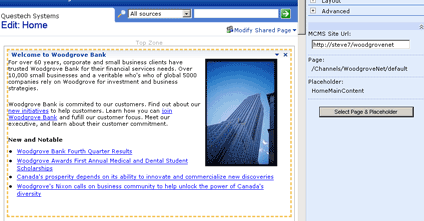
The "MCMS Placeholder Content" comes with its own custom tool pane with the following properties:
- MCMS Site URL - URL to your MCMS site. For example http://woodgrovenet, http://server/woodgrovenet. The server can be a remote server obviously.
- Page - This is the posting display path. It will be automatically populated after you select a placeholder using the Select Placeholder dialog.
- Placeholder - This is the name of the placeholder. It will be automatically populated after you select a Placeholder using the Select Placeholder dialog.
- Select Page & Placeholder - Clicking this button will open a Select Placeholder dialog. This dialog allows you to select a Posting and the Placeholder in it that you want to render the content.

You may also want to change the web part title in the Appearance section to fit the placeholder you selected.
Remarks
- The web part stores the posting path, posting GUID and placeholder name. It uses the posting GUID and placeholder name to retrieve the placeholder content. If the posting is moved to another channel, the web part will still be able to locate the moved posting and renders the placeholder content. However, the posting path displayed in the custom toolpane will not be correct.
- The web part renders the raw content of a placeholder. Placeholders like
XmlPlaceholder will not be rendered properly.
- The web part will render the unpublished view of the placeholder when you are editing or designing a WSS page.
- If you only have one MCMS site to pull content from, you can modify
GetSiteUrlDefaultValue() in RenderMCMSPlaceholderTool.cs to always display the specific MCMS Site URL.
- All hyperlinks in the rendered placeholder content will open up in the main page, not inside the IFrame.
- Scroll bars in the IFrame may appear in non-IE Windows browsers. I only tested it in Windows IE.
- If the placeholder content uses custom CSS styles, it will not be rendered in the web part like it does in the MCMS site. In the web.config file of your MCMS site, add the
appSettings key SiteCssHrefForWss with the HREF of your site stylesheet. For example, if the MCMS site is the WoodgroveNet site:
<add key="QuestechSystems.SiteCssHrefForWss"
            value="/WoodgroveNet/Style/styles.css" />
History
- V1.0 - 2004.12.11 - Base.
- V1.1 - 2005.01.15 - Resolved cross-site security problems when CMS and WSS sites are on different servers.
- V1.2 - 2005.01.22 - Added option to insert stylesheet reference when rendering placeholder content (see remark 7 above).
A Microsoft Certified Professional Developer and Technology Specialist.
Experience and expertise in SharePoint 2016 / 2013 / 2010 / 2007.
Role ranges from a developer in a multi-person team to a solution consultant with expert-level skills, leading a project to completion status.
Proven experience working effectively in a team environment and a self-managed environment.



 General
  News
News  Suggestion
  Question
  Bug
Bug  Answer
  Joke
Joke  Praise
  Rant
Rant  Admin
Admin 


 Submit an article or tip


