Introduction
This article explains debugging and compiling earlier versions of VC++, MFC project in Visual Studio 2008.
Background
It is a pain taking to task for our team of Software Developers to Debug and Compile the MFC VC++ project developed in Microsoft Visual C++ .NET 2003 Edition using MFC libraries v7.0 in VS2008 IDE, which has more advanced features. Here I have few settings which need to be done in order to run the project in VS2008.
Tools -> Options -> Project and Solutions -> VC++ Directories.
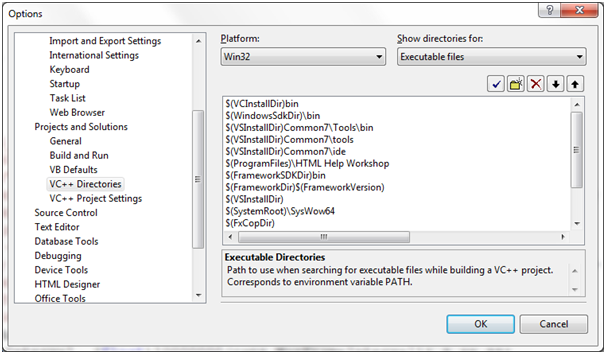
The first four paths refer to folders in VC++ directories, you should find exactly the same like this in include and library files.
If you are using different versions of Directx than the one which is used during development of the project, then you need to set the reference to the Directx manually in executable files, Library files and Include files. Just click on the new folder icon and reference the path you should be able to get like below.
VS 2008 supports more advanced features than VC++ 6.0, so we need to narrow down them to what we need.
Right click the project in the Solution Explorer, and select Properties.
Go to Configuration Properties -> C/C++ -> Advanced -> Error Reporting -> Set to Default.

Unicode Response files to ‘NO’ to create response files in plain ASCII, as the way VC6 compiler would need.
Configuration Properties -> C/C++ -> General -> use Unicode Response files -> NO.
Configuration Properties -> Linker -> General -> use Unicode Response files -> NO.
Configuration Properties -> C/C++ -> Code Generation -> Basic Runtime Checks -> Default.
Configuration Properties -> Linker -> Enable Incremental Linking -> No (/INCREMENTAL: NO).
We also need to manually include this option in command Line:
Configuration Properties -> Linker -> Command Line -> /INCREMENTAL: NO.
Configuration Properties -> Linker -> Manifest File -> Generate Manifest -> No.
Need to set the following properties to Default to work perfectly in VS 2008.
Configuration Properties -> Linker -> Advanced-> Randomized Base Address -> Default.
Data Execution Prevention -> Default.
Error Reporting -> Default.
You will notice that every time the project is rebuilt, we also might get an error missing vc60.pdb. To avoid this, Set Program database file name to default.
Configuration Properties -> C/C++ -> Output Files -> Set Program Database file name -> Default
I hope this information is very useful in compiling and debugging the VC++ project.
Thanks,
Muralekarthick
www.decodedsolutions.co.uk
History
- 3rd July, 2010: Initial post
This member has not yet provided a Biography. Assume it's interesting and varied, and probably something to do with programming.



 General
  News
News  Suggestion
  Question
  Bug
Bug  Answer
  Joke
Joke  Praise
  Rant
Rant  Admin
Admin 


 Submit an article or tip


 I think can make a project update tool, great.
