About
The Directory Mirror is an experimental application that uses and
extends the Microsoft .NET framework
FileSystemWatcher
class. It monitors the files and sub-folders of a specified source
directory and maintains a copy of it in another directory. This
application can help you learn things about the
FileSytemWatcher class
and IO file and directory operations.
Things to know about the
FileSystemWatcher
The first thing to keep in mind when working with the FileSystemWatcher
is that it's not a one for one relationship between the IO
actions in the monitored directory and the events raised by the
FileSystemWatcher. For an application like this one you will
quickly notice that the created event is always
followed by at least one changed event. When a file
is copied into a monitored directory, it is first created (the header
and info is first written) and then the actual data is written.
Depending on the file size (and the time it takes to write it, as well
as system performance and availability), many changed
events may be raised because the file is constantly changing as it is
being written (monitored by the LastWrite and/or Size
NotifyFilters of the FileSystemWatcher) and this may vary greatly from
one system/environment to another.
The internal buffer size is limited to a maximum value of 64KB but for
an application like this one isn't not the bottleneck. A big
batch operation can send a lot of information to the FileSytemWatcher
so fast that it wont be able to keep track, long before the
buffer is full; You will get the to many changes at once
error. For instance if you select a few hundred files in a monitored
directory and then hit delete, it will probably happen. The same thing
can happen if you move a large number of files to the monitored
directory and those files are located on the same partition as
the monitored directory; Being on the same partition, no actual copying
really happens, only the address of the files change and this happens
very fast.
The solution
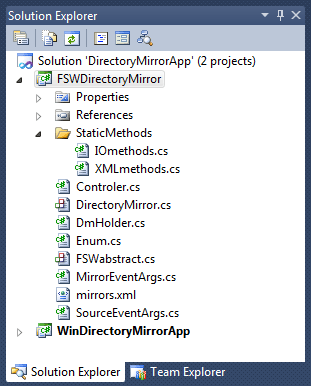
The solution contains two projects, one for the forms and the other for
the Directory Mirror class and things realted to that class. I won't go through the forms here but just explain what's in the
FSWDirectoyMirror project. First there's a folder containing some
static IO and XML methods. The controller sits
between the forms and the directory mirror objects. There's the DirectoryMirror
of course. The DMHolder is used to hold and
help keep track of the configuration information of DirectoryMirror
objects. Enum
contains a few enums of course. FSWabstract
is an
abstract class based on the FileSystemWatcher class and The
DirectoyMirror class is based on this. I could have skipped this and
base The DirectoryMirror class directly on the FileSystemWatcher but I
often like to use an abstract as a starting point because it reminds me
how I thought things at the beginning and helps me keep things
organized. MirrorEventArgs is an entity used to
carry information from
the events raised in the mirror folder. Configurations of the
DirectoryMirror objects are written to the mirrors.xml
file (if the
file is not found the application creates a new one). SourceEventArgs
is an entity used to carry information from the events raised in the
source
folder. The following diagram shows how the application is structured;
there is no direct communication between the DirectoryMirror
objects
and the forms, everything passes through the controller object.

The screens
Main screen
At the top of the form there are 3 buttons, the info button
displays info about the application, the add button
to create a new configuration and the save button
that writes the list of configurations to an XML file. You then have 4
checkboxes for displaying information in the activity tab:
- View source activity: Reports activity
detected in the source directory.
- View source errors: Reports errors
detected in the source directory
- View mirror activity: Reports activity
detected in the mirror directory.
- View mirror errors: Reports errors
detected in the Mirror directory
These checkbox options can be changed while instances of the
DirectoryMirror
are running.
Configurations tab
The configurations tab first shows a list of
DirectoryMirrors
controls, one for each configuration. The
name is
displayed in the upper left corner followed by 3 buttons. The
tool
button opens the edit form to make changes. The
recycle bin
button deletes the configuration and the third one is the
strart/stop
button. Next are displayed the
timer and
buffer
values. Under those values are displays the paths to the
source
directory and
mirror directory.
The bottom part of the control offers various options:
InfoMode: No mirror directory is used
and the application only reports about the activity detected in the
source directory.MirrorMode: In reaction to the changes
detected in the source directory, the contents of the mirror directory
are updated to match.- Monitor changed event: Enables or
disables the tracking of the
FileSystemWatcher's
"changed" event.
Activity tab
The first grid shows the activity in the monitored directory and the
second one is the mirror directory. Another way of saying it would be
that the
first grids shows the FileSystemWatcher's native events and the second
grid pertains to the events we've added to the FileSystemWatcher to
make it a DirectoryMirror.
Edit screen
The timer indicates how much time to wait before
updating the mirror folder.
The buffer is the internal buffer size of the
FileSystemWatcher object. It stores information about the detected
events and the files and directories they pertain to. The buffer can
overflow if it has more information that it can handle. The buffer
comes from non-paged memory and can not be swapped out to disk.
The name textbox let's you set a friendly name to
identify the configuration. The source and mirror
textboxes and buttons are for selecting or typing these paths. For a
remote computer you must use UNC paths (i.e.,:
\\remoteComputer\targetFolder), mapped drives and removable USB
storage will not work.
All fields are required and a validation is performed before you can
confirm changes and return to the list of configurations. There is also
a validation to ensure that the mirror directory isn't contained in the
source directory and vice versa this would start a catastrophic reaction.
However if you are running multiple DirectoryMirrors there is no
validation of that sort between the running DirectoryMirrors; you could
start an instance that has folder A as the source and folder B as the
mirror and another one with folder B as the source and folder A as the
mirror. You don't want to do that so use caution when running multiple
instances.
Rebuild dialog
In order for this application to work, the contents of the source and mirror folders must be identical when the application starts. When starting an instance of
the DirectoryMirror you have three options to rebuild the mirror:
- Hard rebuild deletes the contents of the mirror and copies the contents of the source into it.
- Comparative rebuild compares the contents of the two folders by file name and size and makes the appropriate
changes ( a good option if you don't have a lot of files but some very big ones).
- Delete all deletes the contents of both folders.
How it works
Every time an events is fired in the source folder, the timer is reset
and information about the event is sent to a queue. When the timer
expires, the events from the queue are copied to a list, the contents
of the queue are cleared and the process of updating the mirror folder
begins, using the newly created list. This way new events can be sent
to the queue while the mirror is being updated.
The timer does not guaranty that there is no more activity in the
source folder when it's time to update the mirror but it diminishes
that possibility. If you can anticipate what kind of file activity you
will get you can adjust the timer value accordingly.
You’ll notice there is a checkbox to let you monitor or not the changed event. Because
it only occurs after a created event, it is not necessary to monitor it for this application. The application works pretty good but if you have some intense
file activity (big batch operations involving hundreds of files and/or some very large files). As mentioned earlier
the firing of events by the FileSystemWatcher can differ depending on the system/environment. Try with and without the changed event and using a bigger timer value.
The code
The FSWabstract abstract class
using System;
using System.IO;
namespace DM
{
public abstract class FSWabstract : FileSystemWatcher
{
public delegate void SourceEventDelegate(SourceEventArgs fswEventArgs);
public event SourceEventDelegate SourceEvent;
public delegate void SourceErrorDelegate(SourceEventArgs fswEventArgs);
public event SourceErrorDelegate SourceError;
public string FriendlyName { get; set; }
protected FSWabstract()
{
Changed += FSWcontract_IoActivity;
Created += FSWcontract_IoActivity;
Deleted += FSWcontract_IoActivity;
Renamed += FSWcontract_Renamed;
Error += FSWcontract_Error;
}
public void TrackChangedEvent(bool value)
{
if (value) Changed += FSWcontract_IoActivity;
else Changed -= FSWcontract_IoActivity;
}
private void FSWcontract_Error(object sender, ErrorEventArgs e)
{
SourceEventArgs fswe = new SourceEventArgs();
fswe.FSWname = this.FriendlyName;
fswe.TimeStamp = DateTime.Now;
fswe.Path = e.GetException().Message;
fswe.EventType = "Error";
SourceError(fswe);
}
private void FSWcontract_Renamed(object sender, RenamedEventArgs e)
{
SourceEventArgs fswe = new SourceEventArgs();
fswe.FSWname = this.FriendlyName;
fswe.TimeStamp = DateTime.Now;
fswe.OldPath = e.OldFullPath;
fswe.Path = e.FullPath;
fswe.EventType = e.ChangeType.ToString();
SourceEvent(fswe);
}
private void FSWcontract_IoActivity(object sender, FileSystemEventArgs e)
{
SourceEventArgs fswe = new SourceEventArgs();
fswe.FSWname = this.FriendlyName;
fswe.TimeStamp = DateTime.Now;
fswe.Path = e.FullPath;
fswe.EventType = e.ChangeType.ToString();
SourceEvent(fswe);
}
}
}
The DirectoryMirror class
using System;
using System.IO;
using System.Collections.Generic;
using System.Linq;
using System.Timers;
using DM.StaticMethods;
namespace DM
{
public class DirectoryMirror : FSWabstract
{
string _mirDir = "";
List<sourceeventargs> _IOlist;
double _time;
Timer _timer;
bool _mirrorMode;
public string SourceDirectory
{
get { return this.Path; }
set { this.Path = value; }
}
public string MirrorDirectory
{
get { return _mirDir; }
set { _mirDir = value; }
}
public double Milliseconds
{
get { return _time; }
set { _time = value; }
}
public bool MirrorMode
{
get { return _mirrorMode; }
set { _mirrorMode = value; }
}
public delegate void MirrorActionDelegate(MirrorEventArgs info);
public event MirrorActionDelegate DMinfoEvent;
public delegate void MirrorErrorDelegate(MirrorEventArgs info);
public event MirrorErrorDelegate DMerrorEvent;
public DirectoryMirror()
{
}
public DirectoryMirror(string name, string srcDir, string mirDir)
{
this.FriendlyName = name;
_IOlist = new List<sourceeventargs>();
SourceDirectory = srcDir;
MirrorDirectory = mirDir;
}
public void Start()
{
if (!string.IsNullOrEmpty(SourceDirectory) &&
!string.IsNullOrEmpty(MirrorDirectory))
{
Filter = "";
NotifyFilter = (NotifyFilters.FileName |
NotifyFilters.DirectoryName | NotifyFilters.LastWrite);
IncludeSubdirectories = true;
EnableRaisingEvents = true;
if (_mirrorMode)
{
SourceEvent += DirectoryMirror_FSWevent;
SourceError += DirectoryMirror_FSWerror;
_timer = new Timer();
_timer.Elapsed += timer_Elapsed;
_timer.Interval = _time;
_timer.AutoReset = false;
_IOlist = new List<sourceeventargs>();
}
}
}
void DirectoryMirror_FSWerror(SourceEventArgs fswEventArgs)
{
_timer.Start();
}
void DirectoryMirror_FSWevent(SourceEventArgs fswEventArgs)
{
_timer.Start();
_IOlist.Add(fswEventArgs);
}
private void timer_Elapsed(object sender, ElapsedEventArgs e)
{
MirrorEventArgs args = new MirrorEventArgs();
args.FSWname = this.FriendlyName;
args.TimeStamp = DateTime.Now;
args.Info = "Timer elapsed";
DMinfoEvent(args);
if (_IOlist.Count > 0)
{
List<sourceeventargs> list = new List<sourceeventargs>();
lock (_IOlist)
{
list.AddRange(_IOlist);
_IOlist.Clear();
}
updateMirror(list);
}
}
private void updateMirror(List<sourceeventargs> list)
{
MirrorEventArgs args = new MirrorEventArgs();
args.FSWname = this.FriendlyName;
args.TimeStamp = DateTime.Now;
args.Action = "Begin Mirror Update";
args.Info = list.Count.ToString() + " event(s) to process";
DMinfoEvent(args);
string destination;
List<sourceeventargs> listF = new List<sourceeventargs>();
try
{
listF = list.Where(x => x.EventType == "Created").ToList();
for (int i = 0; i < listF.Count; i++)
{
destination = listF[i].Path.Replace(SourceDirectory, MirrorDirectory);
if (Directory.Exists(listF[i].Path))
{
Directory.CreateDirectory(destination);
IOmethods.CopyDirectoryRecursively(listF[i].Path, destination);
list.Remove(listF[i]);
list = list.Where(s => (s.EventType == "Created" ||
s.EventType == "Changed") && s.Path.Contains(listF[i].Path) == false).ToList();
listF = list.Where(x => x.EventType == "Created").ToList();
i -= 1;
args = new MirrorEventArgs();
args.FSWname = this.FriendlyName;
args.Action = "Create";
args.TimeStamp = DateTime.Now;
args.Info = destination;
DMinfoEvent(args);
}
else
{
File.Copy(listF[i].Path, destination, true);
list = list.Where(s => (s.EventType != "Changed" && s.Path != listF[i].Path)).ToList();
listF = list.Where(x => x.EventType == "Created").ToList();
i -= 1;
args = new MirrorEventArgs();
args.FSWname = this.FriendlyName;
args.Action = "Create";
args.TimeStamp = DateTime.Now;
args.Info = destination;
DMinfoEvent(args);
}
}
}
catch (Exception x)
{
args = new MirrorEventArgs();
args.FSWname = this.FriendlyName;
args.TimeStamp = DateTime.Now;
args.Action = "Error";
args.Info = x.Message;
DMerrorEvent(args);
}
try
{
listF = list.Where(z => z.EventType == "Changed").ToList();
listF = RemoveDuplicates(listF);
foreach (SourceEventArgs f in listF)
{
if (File.Exists(f.Path))
{
destination = f.Path.Replace(SourceDirectory, MirrorDirectory);
File.Copy(f.Path, destination, true);
args = new MirrorEventArgs();
args.FSWname = this.FriendlyName;
args.Action = "Copy";
args.TimeStamp = DateTime.Now;
args.Info = destination;
DMinfoEvent(args);
}
}
}
catch (Exception x)
{
args = new MirrorEventArgs();
args.FSWname = this.FriendlyName;
args.TimeStamp = DateTime.Now;
args.Action = "Error";
args.Info = x.Message;
DMerrorEvent(args);
}
try
{
listF = list.Where(x => x.EventType == "Renamed").ToList();
foreach (SourceEventArgs f in listF)
{
destination = f.Path.Replace(SourceDirectory, MirrorDirectory);
if (System.IO.Directory.Exists(f.OldPath.Replace(SourceDirectory, MirrorDirectory)))
{
string oldFPath = f.OldPath.Replace(SourceDirectory, MirrorDirectory);
string newFPath = f.Path.Replace(SourceDirectory, MirrorDirectory);
System.IO.Directory.Move(oldFPath, newFPath);
}
else
{
string oldFPath = f.OldPath.Replace(SourceDirectory, MirrorDirectory);
string newFPath = f.Path.Replace(SourceDirectory, MirrorDirectory);
System.IO.File.Move(oldFPath, newFPath);
}
args = new MirrorEventArgs();
args.FSWname = this.FriendlyName;
args.Action = "Rename";
args.TimeStamp = DateTime.Now;
args.Info = destination;
DMinfoEvent(args);
}
}
catch (Exception x)
{
args = new MirrorEventArgs();
args.FSWname = this.FriendlyName;
args.TimeStamp = DateTime.Now;
args.Action = "Error";
args.Info = x.Message;
DMerrorEvent(args);
}
try
{
listF = list.Where(x => x.EventType == "Deleted").ToList();
foreach (SourceEventArgs f in listF)
{
destination = f.Path.Replace(SourceDirectory, MirrorDirectory);
if (Directory.Exists(destination))
{
Directory.Delete(destination, true);
}
else
{
File.Delete(destination);
}
args = new MirrorEventArgs();
args.FSWname = this.FriendlyName;
args.Action = "Delete";
args.TimeStamp = DateTime.Now;
args.Info = destination;
DMinfoEvent(args);
}
}
catch (Exception x)
{
args = new MirrorEventArgs();
args.FSWname = this.FriendlyName;
args.TimeStamp = DateTime.Now;
args.Action = "Error";
args.Info = x.Message;
DMerrorEvent(args);
}
args = new MirrorEventArgs();
args.FSWname = this.FriendlyName;
args.TimeStamp = DateTime.Now;
args.Action = "End Mirror update";
DMinfoEvent(args);
}
private List<sourceeventargs> RemoveDuplicates(List<sourceeventargs> list)
{
list = list.OrderBy(z => z.FSWname).OrderBy(z => z.Path).ToList();
List<sourceeventargs> newList = new List<sourceeventargs>();
SourceEventArgs last1 = new SourceEventArgs();
last1.Path = "+";
last1.FSWname = "";
foreach (SourceEventArgs fswa in list)
{
if (fswa.FSWname != last1.FSWname || fswa.Path != last1.Path)
{
newList.Add(fswa);
last1 = fswa;
}
}
return newList;
}
}
}
I have been working with different web technologies (ASP, ASP.NET, ColdFusion, Perl/CGI) for the past 15 years. I live in Montreal, where I work for a little consultant group specializing in Microsoft technologies.



 General
  News
News  Suggestion
  Question
  Bug
Bug  Answer
  Joke
Joke  Praise
  Rant
Rant  Admin
Admin 


 Submit an article or tip


 and more extension