Using EHLLAPI from C#
EHLLAPI (Extended High Level Language Application Programming Interface) is a standard library to build interfaces to AS400 applications. It's distributed with all major emulation vendors (RUMBA, IBM Client Access, ...), and it's installed automatically as DLL.
This article will explain how to interact with AS/400 applications using the library distributed with IBM Client Access emulator: PCSHLL32.DLL. If you use a different emulation software, you can apply the concepts exposed in this article with some minor modifications.
EHLLAPI Concept
In a lot of companies, data integration is not so simple because a lot of programs are very old and databases are not well structured. Even if data can be accessed using ODBC drivers, the real problem is the knowledge of data structures and integration: which tables I must change to insert a new product code? Where are all the data of a customer (in which tables)? These and a lot of other questions have a simple answer: ask to users and learn the commands they type on the screen to insert or read information. You translate the problem: it's not important to know the logic to manipulate data, what's important is to know the "video" command the users type.
The interface used to interact with AS/400 is called "screen scraping": it's based on the fact that emulator software use a char interface to interact with AS/400 programs. Using this interface, you can read from and write to emulation screens. This really simple mechanism reveals all its power if inserted in a high level window program.
DLL Exported Function
PCSHLL32.DLL includes just a function named HLLAPI that receives a parameter (function code): by changing the value of this parameter, we can perform all the operations. There are almost one hundred functions available in the DLL and declared as const inside code. In my experience, I used just five of these functions:
HA_CONNECT_PS: connect to a client session (every session is identified by an ID: "A", "B", and so on).HA_DISCONNECT_PS: disconnect from a client session.HA_SET_CURSOR: set the cursor in the absolute position (rows * 80 (or 132) + cols).HA_SENDKEY: send a string to a client session.HA_COPY_PS_TO_STR: read from video.HA_WAIT: wait for session deblocking.
To import the DLL function, I used this code:
public class EhllapiFunc
{
    [DllImport("PCSHLL32.dll")]
    public static extern UInt32 hllapi(out UInt32 Func,
      StringBuilder Data, out UInt32 Length, out UInt32 RetC);
}
This class contains just a static function referrer to the PCSHLL32 function. This function return 0 if all is OK, otherwise it returns an error code (see inside the code). Parameters are declared without statement because they are used in two directions (to send and receive value). Depending on the Func parameter, Data, Length and RetC parameters have different meanings.
Inside Class Code
I created a class named EhllapiWrapper. This class exposes five static methods. The structure of these methods is very simple: initialize parameter, call HLLAPI function exposed by the EhllapiFunc class, and return value:
public static UInt32 Connect(string sessionID)
{
StringBuilder Data = new StringBuilder(4);
Data.Append(sessionID);
UInt32 rc=0;
UInt32 f=HA_CONNECT_PS;
UInt32 l=4;
return EhllapiFunc.hllapi(out f, Data, out l, out rc);
}
public static UInt32 Disconnect(string sessionID)
{
StringBuilder Data = new StringBuilder(4);
Data.Append(sessionID);
UInt32 rc=0;
UInt32 f=HA_DISCONNECT_PS;
UInt32 l=4;
return EhllapiFunc.hllapi(out f, Data, out l, out rc);
}
public static UInt32 SetCursorPos(int p)
{
StringBuilder Data = new StringBuilder(0);
UInt32 rc=(UInt32) p;
UInt32 f=HA_SET_CURSOR;
UInt32 l=0;
return EhllapiFunc.hllapi(out f, Data, out l, out rc);
}
public static UInt32 GetCursorPos(out int p)
{
StringBuilder Data = new StringBuilder(0);
UInt32 rc=0;
UInt32 f=HA_QUERY_CURSOR_LOC;
UInt32 l=0;
UInt32 r = EhllapiFunc.hllapi(out f, Data, out l, out rc);
p = (int)l;
return r;
}
public static UInt32 SendStr(string cmd)
{
StringBuilder Data = new StringBuilder(cmd.Length);
Data.Append(cmd);
UInt32 rc=0;
UInt32 f=HA_SENDKEY;
UInt32 l=(UInt32)cmd.Length;
return EhllapiFunc.hllapi(out f, Data, out l, out rc);
}
public static UInt32 ReadScreen(int position, int len, out string txt)
{
StringBuilder Data = new StringBuilder(3000);
UInt32 rc=(UInt32)position;
UInt32 f=HA_COPY_PS_TO_STR;
UInt32 l=(UInt32)len;
UInt32 r = EhllapiFunc.hllapi(out f, Data, out l, out rc);
txt=Data.ToString();
return r;
}
public static UInt32 Wait()
{
StringBuilder Data = new StringBuilder(0);
UInt32 rc=0;
UInt32 f=HA_WAIT ;
UInt32 l=0;
UInt32 r = EhllapiFunc.hllapi(out f, Data, out l, out rc);
return r;
}
Using EhllapiWrapper Class
A typical use of the wrapper class is this one:
- Connect to session.
- Set cursor position.
- Send string.
- Read screen.
- Disconnect.
Some Notes
Session ID for Client Access emulator is a char where "A" identifies the first session opened, "B" the second one, and so on. You can send a special key to the session using a particular syntax (see the comment section inside Wrapper class code). For example, ENTER corresponds to @E, F1 key to @1, and so on.
Demo Code
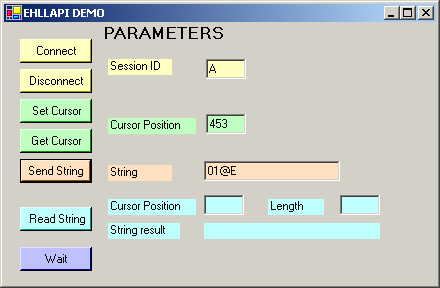
Demo code includes a simple form containing five buttons (one for every method). I used a different color to identify functions and parameters. Form has TopMost = true, so it remains visible when you interact with session. So start a Client Access session, specify ID (typically "A" if it's the first session started), and push Connect. A message box is displayed with return code.
I'm a Delphi programmer since the 1.0 version.
My acual interest concern all modern language and development tools.
I'm a runner (3H:12M) to Pisa Marathon in 2002.



 General
  News
News  Suggestion
  Question
  Bug
Bug  Answer
  Joke
Joke  Praise
  Rant
Rant  Admin
Admin 


 Submit an article or tip


 I assumed the dll effected a pipe into the as400, not simply behaved on a screen already showing on the client. It must be necessary to be able to log in and out (a pop up window) as well as make the AS400 session window the window that has focus for the key buffer etc...