Click here to Skip to main content
Licence 
First Posted 20 Feb 2005
Views 39,635
Bookmarked 36 times

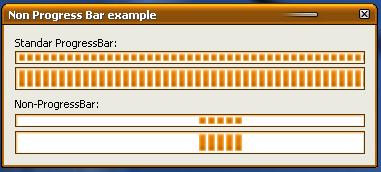
An example of a non progress bar

By | 20 Feb 2005 | Article
This shows how to use a "working" progress bar like Windows XP does.

Sample Image - nonprogressbar.jpg

Introduction

Have you ever wanted to show a working indicator but you can't determinate when you have finished? Well, Windows XP uses a control similar to a Progress, but with an animation instead. Here is the code.

The GSControls.h file

To use this control in your application, you have to include this the file "GSControls.h" and before trying to create the window, call InitializeGSControls to register the class.

To create a control's window you can use the NonProgressBar_Create macro or explicitly call the function CreateWindow, using NONPROGRESS_CLASS for the window class.

The control is very easy to use and I tried to make it most similar to the Common Controls, in Win32, so I think that's all. Checkout the file.

License

This article has no explicit license attached to it but may contain usage terms in the article text or the download files themselves. If in doubt please contact the author via the discussion board below.

A list of licenses authors might use can be found here

About the Author

GMazzo65

Web Developer

Argentina Argentina

Member


Sign Up to vote   Poor Excellent
Add a reason or comment to your vote: x
Votes of 3 or less require a comment

Comments and Discussions

 
You must Sign In to use this message board. (secure sign-in)
 
Search this forum  
 FAQ
    Noise  Layout  Per page   
  Refresh
GeneralVery good Pinmemberxluo14:34 8 Jan '10  
GeneralWell done! PinmemberSergey Podobriy2:03 27 Nov '09  
QuestionHow to do this? Pinmembertrifi23:47 20 Nov '06  
AnswerRe: How to do this? PinmemberGMazzo6512:45 22 Nov '06  
GeneralMissing include file PinmemberGiulio20003:27 2 Nov '06  
GeneralRe: Missing include file PinmemberGMazzo6512:58 3 Nov '06  
GeneralNice job Pinmemberzilog71821:01 29 Oct '06  
GeneralPerfect! PinmemberMike D.13:42 31 Jan '06  

General General    News News    Suggestion Suggestion    Question Question    Bug Bug    Answer Answer    Joke Joke    Rant Rant    Admin Admin   

Use Ctrl+Left/Right to switch messages, Ctrl+Up/Down to switch threads, Ctrl+Shift+Left/Right to switch pages.

Permalink | Advertise | Privacy | Mobile
Web02 | 2.5.120517.1 | Last Updated 21 Feb 2005
Article Copyright 2005 by GMazzo65
Everything else Copyright © CodeProject, 1999-2012
Terms of Use
Layout: fixed | fluid
