Introduction
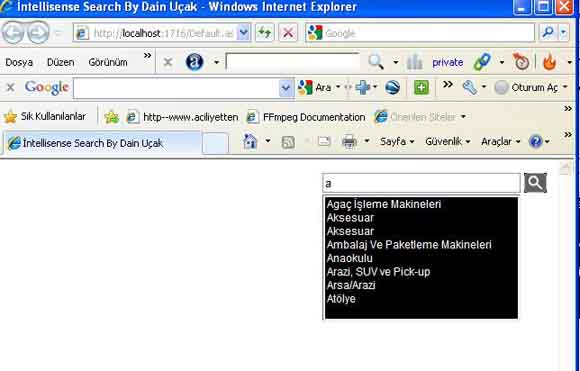
I tried to show a very easy way of how to make an intellisense search textbox without Ajax.
You must open your project with minimum .NET 3.5, because we need scriptmanager and webservice support in Visual Studio.
Now I will try to tell you the steps with my bad English. Sorry about that.
Why We Need an Intellisense Textbox
I can't give you this answer, but if I am a developer I must make users' life easy. Moreover, it is so cool. You can see more examples in ASP.NET Ajax about this. But this is mine and so special for me. It is so easy and helpful for understanding everything. You can download the project and follow my project or you can create a new one. My recommendation is to download and understand the source clearly.
What We Need
Open a Visual Studio ASP.NET Web Application project in Visual Studio 2008 and choose .NET 3.5.
I make a project with master page because we can live with the problem in real life with master page and JavaScript. We don't need master page, but it will help us more if we add a master page, then add a web content form.
Add a webService and a JavaScript file. In the demo project, you can see an Access DB. You can use it or you can create a new one. You don't need more tables for starting. Only one table and one column is enough for seeing how it works. You can see the Access DB in the App_Data folder.
Add your script manager to your master page and don't forget to use ServiceReference Path.
<asp:ScriptManager ID="scriptManager1" runat="server">
        <Services>
            <asp:ServiceReference Path="~/WebService/SearchWS.asmx" />
        </Services>
</asp:ScriptManager>
Your Web Service Source
This is the default of a web service header of class:
[WebService(Namespace = http://tempuri.org/)]
[WebServiceBinding(ConformsTo = WsiProfiles.BasicProfile1_1)]
[System.ComponentModel.ToolboxItem(false)]
But we need to uncomment this line:
[System.Web.Script.Services.ScriptService]
We are using web service for opening a line to server without postback. It is
Asynchronous.
In the HTML page, we call JavaScript functions. JavaScript function calls server-side code from webservice, and your code works without postback clearly.
Now check the JavaScript file. You will see a line which calls webservice methods.
if (val != defText) {
Search.WebService.SearchWS.mSearch(val, getRet);
Search is the namespace name. WebService is my folder name that has the webservice file. SearchWS is my webservice file name. mSearch is a method, val is the parameter of method, and getRet is a JavaScript function and this is webservice succeed parameter.
This is the input text:
<input type="text" id="txtSearch" value='<%= text %>' style="width:220px"
 onfocus="txtFocusla('<%= text %>')" onblur="txtBlurla('<%= text %>')"
   onkeyup="mSearch(event,this.value)" onkeydown="calledOnKeyDown(event)" />
You can see all details in the project.
I changed events calling function...
I used onkeypress event for enter. onkeypress events do not support backspace, up, down and some of the keys on keyboard. Onkeyup events call our web services calling method, but we check on keydown events up and down arrows. Because onkeyup events occur when you start to click a keyboard key, and then when you stop your finger on up or down arrows, your select options selectedindex don't change. But when you make this on keydown event, it doesn't create anything. I didn't use onchange event because it was supported only by Internet Explorer. You can see all functions clearly on the JavaScript page.
And on the master page:
<!DOCTYPE html PUBLIC "-//W3C//DTD XHTML 1.0 Transitional//EN"
"http://www.w3.org/TR/xhtml1/DTD/xhtml1-transitional.dtd">
<html xmlns="http://www.w3.org/1999/xhtml">
You know we are using XHTML and Firefox does not support in XHTML innerHTML property, and this wasted more of my time. But I found a way with DOM. You can see this too in the JavaScript file. I don't know what more I can say. Everything is in the project and it is working clearly.
If you have any questions or see any mistakes, please notify me. You can use, modify and develop this project.
Points of Interest
This is my first article in the world. This means I am a newbie. If anybody reads this article, please consider this.
You can check out how this project works live at http://www.aciliyetten.com/ - this is my web site. You can contact me there anytime.
History
- 7/28/2010 - Added on CodeProject
This member has not yet provided a Biography. Assume it's interesting and varied, and probably something to do with programming.



 General
  News
News  Suggestion
  Question
  Bug
Bug  Answer
  Joke
Joke  Praise
  Rant
Rant  Admin
Admin 


 Submit an article or tip


