Introduction
This article shows how to filter data with the RowFilter property and change the column appearance using C# objects.
I wrote this article after I searched for existing code that enables us to customize the DataGrid object. The demands were to enable the "End User" to filter the data associated with the DataGrid and choose the DataGrid columns which are shown on the grid. I found that .NET objects (DataView, DataGridTableStyle) already supported the filter idea and I needed to make only a few adjustments.
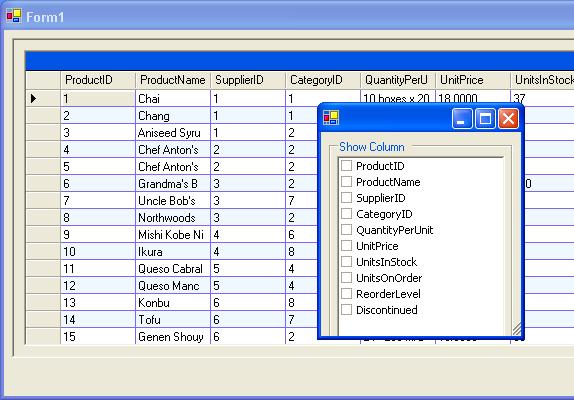
Column Filter
The DataGridTableStyle object enables us to map columns with the MappingName property. A column that does not belong to the DataGrid table style mapping will not be shown on the grid. The "SetTableBySelectedCoulmns" function gets the user's column selection and builds dynamically the "DataGridTableStyle". The DataGrid column style supports two column types: "bool" and "text". If the column data type is "System.Boolean" the function sets new "DataGridBoolColumn" otherwise the default option sets new "DataGridTextBoxColumn".
DataGridTableStyle GridStyle = new DataGridTableStyle();
DataGridColumnStyle TextBoxStyle;
DataGridColumnStyle BoolStyle;
string CoulmnDataType;
try
{
DataGridRecords.TableStyles.Clear();
GridStyle.MappingName = TableMappingName;
foreach (DataColumn Column in TableColumnCollection )
{
CoulmnDataType = Column.DataType.ToString();
if (CheckedColumns.CheckedItems.Contains(Column.ColumnName))
{
switch (CoulmnDataType)
{
case ("System.Boolean"):
{
BoolStyle = new DataGridBoolColumn ();
BoolStyle.HeaderText=Column.ColumnName;
BoolStyle.MappingName=Column.ColumnName;
BoolStyle.Width=100 ;
GridStyle.GridColumnStyles.Add(BoolStyle);
}
break;
default:
{
TextBoxStyle= new DataGridTextBoxColumn();
TextBoxStyle.HeaderText=Column.ColumnName;
TextBoxStyle.MappingName=Column.ColumnName;
TextBoxStyle.Width=100;
TextBoxStyle.NullText = string.Empty ;
GridStyle.GridColumnStyles.Add(TextBoxStyle);
}
break;
}
}
}
GridStyle.AlternatingBackColor=System.Drawing.Color.AliceBlue ;
GridStyle.GridLineColor = System.Drawing.Color.MediumSlateBlue;
DataGridRecords.TableStyles.Add(GridStyle);
Default column
If you want to "remember" the user column selection the next time you use the program, then you can save the "TableColumnCollection" table in XML which can be easily read into the table each time the program is loaded.
Data Filter:

The Data Filter section uses the RowFilter object. The filter function builds the RowFilter statement according to the user restriction. The function uses the table associated with the DataFilter grid. Each row consists of:
- Column Name
- Operation
- Data to compare
The main loop checks if the user adds any restriction to the current column, if so the restriction is added to the Row Filter statement.
ViewRecords = new DataView( DataSetRecords.Tables[0]);
try
{
foreach (DataRow FilterRow in TableFilterData.Rows)
{
if (FilterRow["Operation"].ToString() !=
string.Empty && FilterRow["ColumnData"].ToString() != string.Empty)
{
if (ViewRecords.RowFilter == string.Empty)
{
ViewRecords.RowFilter = FilterRow["ColumnName"].ToString() + " " +
FilterRow["Operation"].ToString() + " '" +
FilterRow["ColumnData"].ToString()+"' ";
}
else
{
ViewRecords.RowFilter += " AND " +
FilterRow["ColumnName"].ToString()+" " +
FilterRow["Operation"].ToString() +" '"+
FilterRow["ColumnData"].ToString()+"'";
}
}
}
DataGridRecords.SetDataBinding(ViewRecords,"");
}
The DataGrid ComboBox was downloaded from Jan Wiggers article (thanks Jan): A ComboBox in a DataGrid
This member has not yet provided a Biography. Assume it's interesting and varied, and probably something to do with programming.



 General
  News
News  Suggestion
  Question
  Bug
Bug  Answer
  Joke
Joke  Praise
  Rant
Rant  Admin
Admin 


 Submit an article or tip


