Download source files - 5 KbDownload demo project - 14 Kb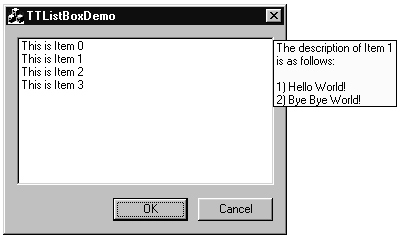
Introduction
This tooltip enabled class lets the user display tooltip text
for individual items. This class uses the tooltip class that
is written by Dhandapani Ammasai.
A multiline tooltip for an individual item is automatically displayed towards the
right of the control and the text is updated as the mouse
is moved over the individual items in the list box.
Follow these steps to add a CTTListBox to a dialog:
- Add TTListBox.cpp and TTListBox.h to your project.
- Add tooltip2.cpp and tooltip2.h to your project.
- Add
include "TTListBox.h" to the
header file of your dialog class.
- Add a list box control to your dialog.
- Use ClassWizard to add a member variable of type
CTTListBox for the list
box you just added. If CTTListBox is not in the Variable Type list, choose CListBox,
and manually change the type to CTTListBox later. - In your dialog class, define a static member function which retrieves the
the text for individual items. This function must be declared as:
static CString TextRetriever(int nIndex);
where
nIndex is the index of the list box item that currently is under the mouse cursor and
wants to have the text retrieved.
- Implement the text retriever function the way you want it.
- In your dialog's class OnInitDialog function include a statment like:
m_listbox.SetTextRetrieverFcn(TextRetriever);
where TextRetriever is the name of your text retriever function that you declared earlier.
I have also implemented the same functionality for a tree control. You can
e-mail me if you wish to look at how I implemented it for a tree control.
This member has not yet provided a Biography. Assume it's interesting and varied, and probably something to do with programming.



 General
  News
News  Suggestion
  Question
  Bug
Bug  Answer
  Joke
Joke  Praise
  Rant
Rant  Admin
Admin 


 Submit an article or tip


 I needed the tooltip to show next to the cursor position, so I made a flag for that. I also changed CTTListBox and CTooltip2 to also allow the user to move the cursor over the tooltip without the tooltip changing or closing.
 item in list box
 ListBox...how can i do that....
