Introduction
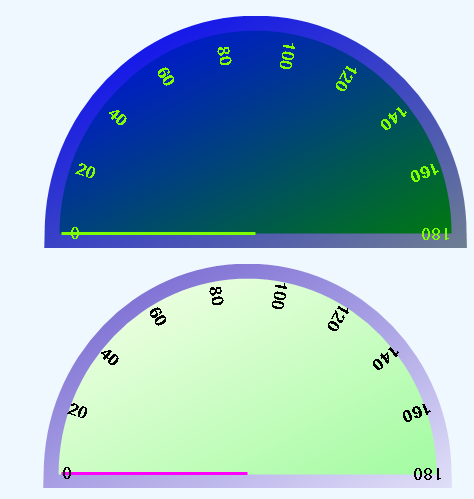
This control class was written to simulate an analog meter or dial and also to learn about creating a custom control. This is an example of a meter. A meter shows the current value of a system. As the value of the system changes the changes get reflected on the meter.
Background
There aren't too many examples of controls that are derived from the Control class. This is understandable because there is no designer support. MSDN has some samples but they are very simple and can be found here. This article contains only the first part of the project which is making the control itself. I have added some designer support so that the colors of the meter face, border, needle, and numbers can be changed using the properties editor in Visual Studio. Creating Custom Controls-Providing Design Time Support 1 by Kodanda Pani was extremely helpful.
Using the code
In order to use the meter control, you must add the MeterControl.dll to the Windows Application Project References and to your toolbox under the Windows Forms Tab. Locate the MeterControl in your toolbox and drag it on to your form. The meter is drawn in the center of the form so you will have to adjust the size to fit the meter. In the case of the demo, I am using a tracker bar to change the value of the meter, like this:
private void trackBar1_Scroll(object sender, System.EventArgs e) {
    meter1.Angle = trackBar1.Value;
}
Angle is the one property the MeterControl uses to redraw the line in the proper location.
Points of Interest
In order to draw the numbers on the face and draw the line on the meter, I had to translate the center of the control and then use a transform. This was tricky at best. Here is the code to draw the line that points to the value of the meter.
private void DrawLine(Graphics g, int angle, int offset)
{
    Matrix m = new Matrix();
    PointF center =
        new PointF(this.ClientRectangle.Width/2 ,this.ClientRectangle.Bottom -15 );
    m.RotateAt( angle+180, center );
    m.Translate( center.X, center.Y );
    g.Transform = m;
    g.DrawLine( meterlinePen, 0, 0, this.ClientRectangle.Width/2 + offset , 0 );

}
Notes
Next I'll be looking to add some flexibility for drawing the numbers on the face of the meter. Any suggestions would be most welcomed.
History
- May 13 2005
- Made changes suggested by Mav.Northwind to fix flicker. Initialized angle to zero in constructor to draw line at resting place. Added
Invalidate to the Angle property instead of using an event to redraw the meter.
- Added regions to make the meter control code easier to read, less cluttered.
- Added designer support to customize the look and feel of the control.
This member has not yet provided a Biography. Assume it's interesting and varied, and probably something to do with programming.



 General
  News
News  Suggestion
  Question
  Bug
Bug  Answer
  Joke
Joke  Praise
  Rant
Rant  Admin
Admin 


 Submit an article or tip


