Click here to Skip to main content

Displaying , Exporting and Printing Crystal Reports in ASP.NET

By , 14 Mar 2005
 

Introduction

The main purpose of this document is to display the report without any error. I was bugged by the "Logon Failed Error" for several days, and now I finally have a code that displays report without any error. The code also Exports the report into .pdf, .xls, .rtf and .doc formats. It also prints the report directly to the printer.

Using the code

Unzip the crCodes.Zip and then run the crCode.vbproj project file.

--- OR ----

Just insert the Webform1.aspx file into your existing project, then copy the crystalreport2.rpt file into your project, and start using the code.

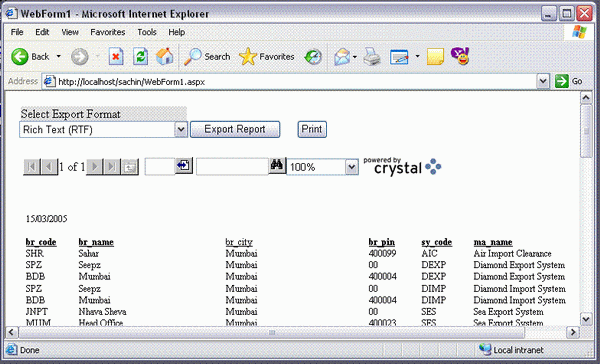
The entire source code of Webform1.aspx.vb is as follows. Simply design the form as shown in the image and place the Crystal Report Viewer control, and leave the name of controls to default:

Imports CrystalDecisions.Shared
Imports System.IO

Public Class WebForm1
    Inherits System.Web.UI.Page

    Dim crReportDocument As CrystalReport2 = New CrystalReport2

    Protected WithEvents DropDownList1 As System.Web.UI.WebControls.DropDownList
    Protected WithEvents Button1 As System.Web.UI.WebControls.Button
    Protected WithEvents Label1 As System.Web.UI.WebControls.Label
    Protected WithEvents CrystalReportViewer1 As _
                             CrystalDecisions.Web.CrystalReportViewer
    Protected WithEvents Button2 As System.Web.UI.WebControls.Button

#Region " Web Form Designer Generated Code "
    'This call is required by the Web Form Designer.
    <System.Diagnostics.DebuggerStepThrough()> 
    Private Sub InitializeComponent()

    End Sub

    'NOTE: The following placeholder declaration is required 
    'by the Web Form Designer.
    'Do not delete or move it.
    Private designerPlaceholderDeclaration As System.Object

    Private Sub Page_Init(ByVal sender As System.Object,_ 
                        ByVal e As System.EventArgs) Handles MyBase.Init
        'CODEGEN: This method call is required by the Web Form Designer
        'Do not modify it using the code editor.
        InitializeComponent()


        ' this is the most IMPORTANT line of code
        ' if this line is not writen the 
        ' " LOGON FAILED" error starts displaying
        crReportDocument.SetDatabaseLogon("username",_ 
                                    "password", "sql-server", "database")

        ' the Above line works even if only username 
        ' and password is supplied as below

        'crReportDocument.SetDatabaseLogon("username",_
                                 "password") ', "sql-server", "database")

        ' this will hide the group tree
        CrystalReportViewer1.DisplayGroupTree = False

        CrystalReportViewer1.ReportSource = crReportDocument

        ' IF REPORT Uses Parameter's
        ' Pass Paramaters As Follows
        crReportDocument.SetParameterValue("city", "Mumbai")


        ' city = Parameter Name
        ' Mumbai = Parameter Value

        ' :-) thats ALL your Report Will Be displayed 
        ' now Without Logon Failed Error

        With DropDownList1.Items
            .Add("Rich Text (RTF)")
            .Add("Portable Document (PDF)")
            .Add("MS Word (DOC)")
            .Add("MS Excel (XLS)")
        End With
    End Sub

#End Region

    Private Sub Page_Load(ByVal sender As System.Object,_ 
                ByVal e As System.EventArgs) Handles MyBase.Load
        'Put user code to initialize the page here
    End Sub

    Sub ExportReport()

        Dim oStream As New MemoryStream ' // using System.IO

        'this contains the value of the selected export format.
        Select Case DropDownList1.SelectedItem.Text 

            Case "Rich Text (RTF)"
                '-----------------------------------------------------------

                oStream = crReportDocument.ExportToStream(_
                    CrystalDecisions.Shared.ExportFormatType.WordForWindows)
                Response.Clear()
                Response.Buffer = True
                Response.ContentType = "application/rtf"
                '------------------------------------------------------------

                '------------------------------------------------------------
            Case "Portable Document (PDF)"

                oStream = crReportDocument.ExportToStream(_
                    CrystalDecisions.Shared.ExportFormatType.PortableDocFormat)
                Response.Clear()
                Response.Buffer = True
                Response.ContentType = "application/pdf"
                '--------------------------------------------------------------

                '--------------------------------------------------------------
            Case "MS Word (DOC)"

                oStream = crReportDocument.ExportToStream(_
                        CrystalDecisions.Shared.ExportFormatType.WordForWindows)
                Response.Clear()
                Response.Buffer = True
                Response.ContentType = "application/doc"
                '---------------------------------------------------------------

                '---------------------------------------------------------------
            Case "MS Excel (XLS)"

                oStream = crReportDocument.ExportToStream(_
                                 CrystalDecisions.Shared.ExportFormatType.Excel)
                Response.Clear()
                Response.Buffer = True
                Response.ContentType = "application/vnd.ms-excel"
                '---------------------------------------------------------------
        End Select 'export format
        Try
            Response.BinaryWrite(oStream.ToArray())
            Response.End()
        Catch err As Exception
            Response.Write("< BR >")
            Response.Write(err.Message.ToString)
        End Try
    End Sub

    Private Sub Button2_Click(ByVal sender As System.Object, _
                          ByVal e As System.EventArgs) Handles Button2.Click
        ExportReport()
    End Sub

    Private Sub Button1_Click(ByVal sender As System.Object, _
                          ByVal e As System.EventArgs) Handles Button1.Click
        crReportDocument.SetDatabaseLogon("USER", _
                                "PASSWORD", "SQL-SERVER", "DATABASE")
        crReportDocument.PrintToPrinter(1, False, 0, 0)
    End Sub
End Class

Why is the "Logon Failed Error" generated

The "Logon Failed" error is generated basically because, when the report is being displayed it tries to log on to the database server. Even though you have selected the server while designing, the report still needs the server name while displaying or exporting or printing.

The code line that removes the error is:

crReportDocument.SetDatabaseLogon("USER", "PASSWORD", "SQL-SERVER", "DATABASE")

Or can also be used as:

crReportDocument.SetDatabaseLogon("USER", "PASSWORD")

License

This article, along with any associated source code and files, is licensed under The Code Project Open License (CPOL)

About the Author

patelsachin
Web Developer
India India
Member
No Biography provided

Sign Up to vote   Poor Excellent
Add a reason or comment to your vote: x
Votes of 3 or less require a comment

Comments and Discussions

 
You must Sign In to use this message board.
Search this forum  
    Spacing  Noise  Layout  Per page   
Questionprint report in c# PinmemberMohammed Abdul Muqeet20 Jan '13 - 0:33 
how can i print my crystal report using c#??
Questionprinttoprinter Error Pinmemberer_ashu18 Jul '12 - 0:40 
GeneralMy vote of 3 Pinmemberparthmehta.indianic17 Mar '12 - 0:02 
QuestionExport excel with password protected Pinmemberselvakumark19 Feb '12 - 16:27 
Questionexport crystal report into pdf from 2nd page [modified] Pinmemberselvakumark16 Feb '12 - 15:58 
GeneralMy vote of 5 Pinmembermanoj kumar choubey9 Feb '12 - 3:06 
GeneralMy vote of 2 PinmemberMember 42938943 Apr '11 - 18:16 
GeneralCrystal Report viewer Pinmemberamitrajahuja11 Dec '10 - 3:25 
GeneralAnother method PinmemberAlexandru Matei12 Oct '09 - 2:55 
GeneralRe: Another method Pinmembermahi159021 Mar '13 - 21:10 
QuestionPrinting using Crystal reports Print Control PinmemberKrutiCh30 Sep '08 - 6:45 
GeneralTroubles with Login PinmemberMember 477445510 Sep '08 - 7:53 
GeneralTrying in c# and gives an error Pinmembermundaves8 Jul '08 - 13:42 
GeneralProblem in export to excel with paramater Pinmembershms3 Mar '08 - 16:06 
Generalstill getting error Pinmemberpatel heena d29 Jun '07 - 13:24 
Questionhow to create an object of crystal file Pinmemberpatel heena d29 Jun '07 - 12:48 
GeneralWeb application doesn't show the report. Pinmemberm3n5413 Mar '07 - 16:30 
Generalgood one PinmemberMember #26788916 Mar '07 - 19:09 
Questioncrystal report Pinmemberkk_upadhyay28 Feb '07 - 22:15 
QuestionI am getting a record per page... Pinmembergrigorythegreat5 Feb '07 - 3:47 
AnswerRe: I am getting a record per page... Pinmembersylvesterg15 Feb '07 - 20:09 
GeneralGood Artical Pinmembersumja17 Jan '07 - 2:20 
Generalprinting error Pinmembercontact_ashishjain15 Nov '06 - 23:57 
GeneralRe: printing error PinmemberbackSlashZero12 Sep '07 - 20:46 
QuestionURGENT : Crystal reports - export to prn programmatically PinmemberNosheenA13 Nov '06 - 1:15 

General General    News News    Suggestion Suggestion    Question Question    Bug Bug    Answer Answer    Joke Joke    Rant Rant    Admin Admin   

Use Ctrl+Left/Right to switch messages, Ctrl+Up/Down to switch threads, Ctrl+Shift+Left/Right to switch pages.

Permalink | Advertise | Privacy | Mobile
Web01 | 2.6.130516.1 | Last Updated 15 Mar 2005
Article Copyright 2005 by patelsachin
Everything else Copyright © CodeProject, 1999-2013
Terms of Use
Layout: fixed | fluid
