Click here to Skip to main content
Licence 
First Posted 3 Mar 2001
Views 102,560
Bookmarked 51 times

Journaling Input Events

By | 3 Mar 2001 | Article
A tool for recording and playback of keyboard and mouse input
  • Download source files - 18 Kb
  • Download demo project - 74 Kb
  • Sample Image - HookManager.jpg

    Introduction

    This is an example for installing an application-defined hook procedures using Win32 SetWindowsHookEx() function. This project implements only WH_JOURNALRECORD and WH_JOURNALPLAYBACK hooks. I was looking for more information and sample programs, but the only sample I'd found was Hooks32, an old Win32 project. Because I didn't find any information about these problems into the developer sites (which I know), I decided to publish this simple tool.

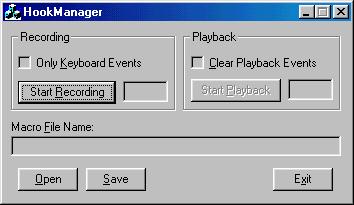
    The application can be used to automate some routine tasks, for example - testing. Start the target application, launch the HookManager, and press the "Start Recording" button. Then HookManager minimizes itself and starts tracking keyboard and mouse events. When the recording is started, pressing CTRL+BREAK can stop it. Windows stops the recording and playback if the user presses CTRL+ALT+DEL or CTRL+ESC, which generates WM_CANCELJOURNAL system message. But, be careful when you are journaling the mouse events! The recorded mouse events are with the current pointer coordinates, and if you close the target application and open it again, it will appear on different position, so the mouse events will go to wrong place.

    This tool can be extended to do some more things. For example: the recorded events can be edited by changing the keystrokes (with different form data, etc.). But this is very precise work, because every pressed button generates 2 messages - WM_KEYDOWN and WM_KEYUP. The generated character depends from the state of other buttons - CTRL, SHIFT, CAPSLOCK, etc.

    I haven't tested the application on Windows NT yet, but with Win98 it works well. I will be glad to receive ideas about extending the functionality.

    Plamen Petrov, Varna, Bulgaria

    License

    This article has no explicit license attached to it but may contain usage terms in the article text or the download files themselves. If in doubt please contact the author via the discussion board below.

    A list of licenses authors might use can be found here

    About the Author

    Plamen Petrov

    Web Developer

    Germany Germany

    Member

    see www.geocities.com/plamen_petrov2000

    Sign Up to vote   Poor Excellent
    Add a reason or comment to your vote: x
    Votes of 3 or less require a comment

    Comments and Discussions

     
    You must Sign In to use this message board. (secure sign-in)
     
    Search this forum  
     FAQ
        Noise  Layout  Per page   
      Refresh
    QuestionMouse cursor disappears PinmemberChris Hills11:54 2 Mar '10  
    GeneralVista PinmemberB4stard16:27 9 Aug '07  
    GeneralThank you Pinmemberjrivero9:57 19 Jan '07  
    Questionedit recorded events....? Pinmemberrm_pkt23:46 7 Nov '06  
    QuestionHow to capture the time user types the keyboard Pinmemberimagica6:44 2 Nov '06  
    QuestionJournalRecord and JournalPlayback on "Windows CE"?? Pinmemberponian0:03 23 Aug '06  
    GeneralRe: JournalRecord and JournalPlayback on "Windows CE"?? Pinmemberponian0:08 23 Aug '06  
    GeneralVS.NET users (VC7.1 +) - Compiler Error C2316 PinmemberIntellex8:18 15 Aug '05  
    GeneralMonitorize mouse global events in WINDOWS-CE; PinmemberXBSANTOS1:45 4 May '05  
    Monitorize mouse global events in WINDOWS-CE;
     
    Hello,
     
    I'm working in VISUAL C++ embedded 3.0. with Windows CE. My goal is to monitorize mouse global events.
    By the moment I'm working with a WH_JOURNALRECORD global hook that catches all input global events of the
     
    operating system, basically keyboard and mouse events. But when I catch a mouse event, it only gives me
    information about the application that receives this event, and the position (x,y) where the user pushes
    in the PDA's screen. I want to know, for example, if the user clicks one option in a menu, so what option
    the user clicks, or if it clicks a desktop icon, so i want to know icon's name, and so on.
     
    I want to make a program for windows CE mobile devices, like Smartphones and PocketPCs, and the goal of the
    program will be monitorize all mouse global events in order to help the user in his navegation in the system. I
     
    want to make a program like "Narrator.exe" of Windows XP, that processes all mouse events and after a speech
     
    voice synthetizer says the option that the user clicks. Is this possible in Windows CE? Microsoft says that NO,
     
    because in windows ce isn't support COM Architecture due to the specific capabilities of the hardware in the
     
    mobile devices because we are speaking of embedded systems.
     
    So, someone can help me, please?
     
    Thank you very much,
     
    SIncerely,
     
    javitobcn

     
    hola
    GeneralRe: Monitorize mouse global events in WINDOWS-CE; PinmemberRahul P. Shukla22:27 28 Jun '07  
    GeneralMacro PinmemberSaiprabhu18:55 28 Jun '04  
    QuestionHow to catch Ctrl-C PinmemberWill24:48 5 Jun '03  
    QuestionKeyboard only - doesn't work? PinmemberWill222:32 4 Jun '03  
    AnswerRe: Keyboard only - doesn't work? PinmemberWill222:48 4 Jun '03  
    QuestionHow to control your event play times.? PinsussAnonymous22:26 12 May '03  
    AnswerRe: How to control your event play times.? PinmemberPlamen Petrov22:48 12 May '03  
    GeneralRe: How to control your event play times.? PinmemberWayne Gibson4:44 16 Sep '03  
    GeneralIt can't work well with win98!!! Pinmembernavy3:51 5 Jan '03  
    GeneralRe: It can't work well with win98!!! Pinmembernavy16:40 5 Jan '03  
    GeneralLast character has been gone PinsussAnonymous7:06 7 Sep '02  
    GeneralThis source code are OK PinmemberRousset de Pina10:00 17 Feb '02  
    GeneralDON'T DO IT PinmemberAnonymous13:15 13 Feb '02  
    GeneralRe: DON'T DO IT PinmemberRousset de Pina9:54 17 Feb '02  
    GeneralRe: DON'T DO IT PinsussAnonymous3:08 3 Oct '02  
    GeneralRe: DON'T DO IT Pinmembertomaszkluska2:29 16 Dec '03  

    General General    News News    Suggestion Suggestion    Question Question    Bug Bug    Answer Answer    Joke Joke    Rant Rant    Admin Admin   

    Use Ctrl+Left/Right to switch messages, Ctrl+Up/Down to switch threads, Ctrl+Shift+Left/Right to switch pages.

    Permalink | Advertise | Privacy | Mobile
    Web03 | 2.5.120528.1 | Last Updated 4 Mar 2001
    Article Copyright 2001 by Plamen Petrov
    Everything else Copyright © CodeProject, 1999-2012
    Terms of Use
    Layout: fixed | fluid