Introduction
While working on a project that needs to check the quality of the network connection, I've found that there is no easy way to ping another computer. I expected there would be something in the framework (somewhere in the System.NET namespace) to do this as it seems like a common thing to want to do, but I could find nothing so my search turned to the web. While I was able to find some c# ping examples, none of them were very well designed. I wanted a ping utility that would let me ping a remote machine any number of times and return the ping statistics in a sensible manner (that is, not something I'd have to parse) so I decided that I'd make my own.
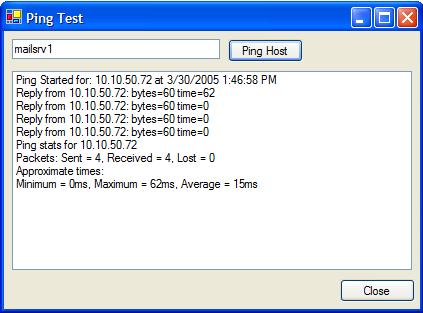
Most of the ping code I saw on the net seemed to be derived from this MSDN article written by Lance Olson which was written way back when for the Beta 1 release of .Net (whether it cited him or not...). I based my ping utility on this code along with this article, written by Peter A. Bromberg, PhD, which updated the Olson's code to work with .NET version 1. Using this code as a starting point I've tried to make it a little more OO by creating a couple more classes and moving the code around, so that they do their own work. I think the code makes a lot more sense now and is much easier to understand and use. I used the Windows command line ping command as a baseline for the information I wanted to return, so I created a PingResponse object that encapsulates all and gets returned instead of an int or string. I'm not going to write up a detailed description of exactly how the code works as it is either self-explanatory or simply works because that's how you have to do it (most of the ICMP class). I've included a very simple client form to show how to use the ping utility asynchronously, which I imagine, how you'd want to use it most of the time.
Using the code
To use this component simply create a Ping object and call the PingHost or BeginPingHost function.
Synchronous Example:
private void Ping(string hostname)
{
Ping netMon = new Ping();
PingResponse response = netMon.PingHost(hostname, 4);
if (response != null)
{
ProcessResponse(response);
}
}
Asynchronous Example:
Ping netMon = new netMon();
private void Load()
{
netMon.PingError += new PingErrorEventHandler(netMon_PingError);
netMon.PingStarted += new PingStartedEventHandler(netMon_PingStarted);
netMon.PingResponse += new PingResponseEventHandler(netMon_PingResponse);
netMon.PingCompleted += new PingCompletedEventHandler(netMon_PingCompleted);
}
private void Ping(string hostname)
{
IAsyncResult result = netMon.BeginPingHost(
new AsyncCallback(EndPing), hostname, 4);
}
private void EndPing(IAsyncResult result)
{
netMon.EndPingHost(result);
}
private void netMon_PingStarted(object sender, PingStartedEventArgs e)
{
}
private void netMon_PingResponse(object sender, PingResponseEventArgs e)
{
}
private void netMon_PingCompleted(object sender, PingCompletedEventArgs e)
{
}
private void netMon_PingError(object sender, PingErrorEventArgs e)
{
}
Known Issues / Further Enhancements
- The first ping is sometimes longer than it should be. I suspect this is because of some extra time taken to create the initial socket connection and could be eliminated by simply dropping that first ping time.
- Currently, you can only cancel when the
PingResponse event is fired. It would be nice to be able to cancel at any time and have it processed immediately.
- I should really keep track of the ping response type per response instead of for the whole set of responses. I simply haven't got around to change the
PingReponse yet.
History
- Version 1.0: Initial release.
This member has not yet provided a Biography. Assume it's interesting and varied, and probably something to do with programming.



 General
  News
News  Suggestion
  Question
  Bug
Bug  Answer
  Joke
Joke  Praise
  Rant
Rant  Admin
Admin 


 Submit an article or tip


