Introduction
Today I was doing some tests on how to properly throw Exception object using this code here
using System;
using System.Collections.Generic;
using System.Linq;
using System.Text;
namespace ConsoleApplication1
{
class Program
{
static void Main(string[] args)
{
Class2 c2 = new Class2();
try
{
c2.Divide();
}
catch (Exception ex)
{
Console.WriteLine("EXCEPTION MESSAGE\r\n" + ex.Message + "\r\n\r\nSTACK TRACE\r\n" + ex.StackTrace);
}
Console.ReadLine();
}
static void ShowFinalException(Exception ex)
{
var exception = ex;
var final_exception = new object();
while (exception != null)
{
if (exception.InnerException == null)
{
final_exception = exception;
}
exception = exception.InnerException;
}
Console.WriteLine("EXCEPTION MESSAGE\r\n" + ((Exception)final_exception).Message + "\r\n\r\nSTACK TRACE\r\n" + ((Exception)final_exception).StackTrace);
}
}
public class Class1
{
public int ThrowError()
{
int x = 1;
int y = 0;
int ans = 0;
try
{
ans = x / y;
}
catch (Exception ex)
{
throw new Exception(ex.Message, ex);
}
return ans;
}
public void ThrowInvalidOperationException()
{
throw new InvalidOperationException("Invalid Operation Exception");
}
}
public class Class2 : Class1
{
public void Divide()
{
try
{
ThrowError();
}
catch (Exception ex)
{
throw ex;
throw new Exception(ex.Message, ex);
}
}
}
}
I made a simple Divide by Zero error test in the Base class (the Class1) and see how the Exception thrown from the base class to main class where we want to show / log the error Message along with the Stack Trace.
In the code, I used three ways of throwing the error:
- throw;
- throw ex; // where ex is the Exception "catch" or caught
- throw new Exception(ex.Message, ex); // where ex is the Exception "catch" or caught.
I will show the results based on the way we throw the error
Using "throw;"
Throwing the error from Class1 -> Class2 -> Program using "throw"
public class Class1
{
public int ThrowError()
{
int x = 1;
int y = 0;
int ans = 0;
try
{
ans = x / y;
}
catch (Exception ex)
{
throw;
}
return ans;
}
public void ThrowInvalidOperationException()
{
throw new InvalidOperationException("Invalid Operation Exception");
}
}
public class Class2 : Class1
{
public void Divide()
{
try
{
ThrowError();
}
catch (Exception ex)
{
throw;
}
}
}
and the result from Console window and the property values
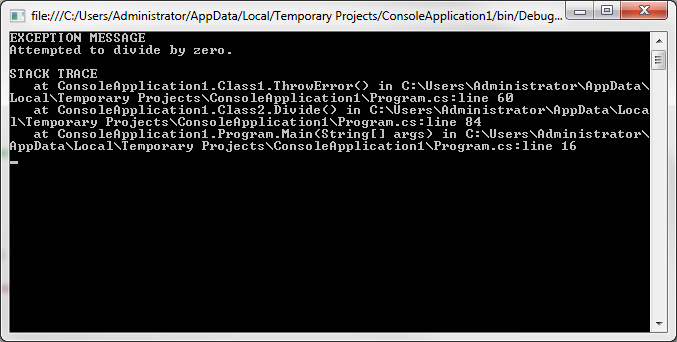
what's interesting here when we show the Stack Trace is that the trace went through the Base Class where line 60 is the "throw;" statement in ThrowError() method.

unfortunately, when we check the properties, InnerException is null and we do not want that because what we're interested is where exactly is the Error. Although, we had a clue when we check the StackTrace but we're still not sure the exact line.
Using "throw ex;"
Going to our next throw statement which is the "throw ex;" from Class1 -> Class2 -> Program
public class Class1
{
public int ThrowError()
{
int x = 1;
int y = 0;
int ans = 0;
try
{
ans = x / y;
}
catch (Exception ex)
{
throw ex;
}
return ans;
}
public void ThrowInvalidOperationException()
{
throw new InvalidOperationException("Invalid Operation Exception");
}
}
public class Class2 : Class1
{
public void Divide()
{
try
{
ThrowError();
}
catch (Exception ex)
{
throw ex;
}
}
}
and the result
In this Console result, it does not look like it's going to help in any way because the trace stopped in line 85 which is just in Class2.Divide() method.
In this result, InnerException is still null. Not really helpful
Using "throw new Exception(ex.Message, ex)"
The next test is using this statement "throw new Exception(ex.Message, ex)" from Class1 -> Class2 -> Program
public class Class1
{
public int ThrowError()
{
int x = 1;
int y = 0;
int ans = 0;
try
{
ans = x / y;
}
catch (Exception ex)
{
throw new Exception(ex.Message, ex);
}
return ans;
}
public void ThrowInvalidOperationException()
{
throw new InvalidOperationException("Invalid Operation Exception");
}
}
public class Class2 : Class1
{
public void Divide()
{
try
{
ThrowError();
}
catch (Exception ex)
{
throw new Exception(ex.Message, ex);
}
}
}
and the result
In the Console window, the result wasn't really that helpful for logging the Exception stack trace.
but here in the Exception property values, the first InnerException has a value which brings up another exception object where it points to the Class1 (our Base class).
Idea
In the production, you will not have any access of the code because the product is already deployed to your clients. The only way of course is to LOG any error and message.
In our example, we only had 1 line inside the TRY block which caused the Divide by Zero error, but in reality, you will have longer. You can trace the error by it's Message and one of the most important information is what Line.
We have seen, using "throw new Exception(ex.Message, ex)" is a way to go because what we're interested in is the InnerException values unlike the "throw" and "throw ex" which is just null.
But we want more isn't it? We like to have the exact Line of the error and not only the Message. In the first code above.
I wrote a method called "ShowFinalException(Exception ex)" method
static void ShowFinalException(Exception ex)
{
	var exception = ex;
	var final_exception = new object();

	while (exception != null)
	{
		if (exception.InnerException == null)
		{
			final_exception = exception;
		}

		exception = exception.InnerException;
	}

	Console.WriteLine("EXCEPTION MESSAGE\r\n" + ((Exception)final_exception).Message + "\r\n\r\nSTACK TRACE\r\n" + ((Exception)final_exception).StackTrace);
}

static void Main(string[] args)
{
	Class2 c2 = new Class2();

	try
	{
		c2.Divide();
	}
	catch (Exception ex)
	{
		ShowFinalException(ex);
	}

	Console.ReadLine();
}
What it does is, it loops through the InnerException until it reaches to the end (null) and show the exact line where the error started
line 56 is the "ans = x / y;" statement where we divide 1 with zero
I am an experienced Applications Developer and had worked professionally for over 6 years. I have been writing codes and building different applications for over 13+ years. My work is mostly for Microsoft technologies such as .NET. Yes I am Microsoft technology enthusiast.
My field of expertise in .NET technology are Desktop and Windows Mobile and Windows Phone. I occasionally write ASP.NET too for clients.
I have wide experience of different programming languages and scripts such as: Turbo Pascal, Batch Scripts, C/C++, Visual Basic Classic, Visual Basic .NET, Java, HTML, CSS, ASP Classic, VB Script, ASP.NET, T-SQL, MySQL, PHP, C#, Javascript, jQuery, HTML5, RegEx, XAML, XML, JSON, and XPath
I am also experienced in different platforms such as: Google Data API, Google Map API, Twitter API, Facebook API, Flickr API, Skydrive API, SVN, GitHub, Drupal, and Orchard.
I am interested in Microsoft technologies, User Experience and User Interfaces, Algorithms, Robotics, Astronomy, Architecture, Electrical, Mechanics, and Extra Therestrial Life on other planets.
I am also offering free coding and application development consultations with students having a problem with their Thesis projects.
View my full Curriculum Vitae here
http://ss.jaysonragasa.net/?mycv




 Submit an article or tip


 News
News  Suggestion
  Question
  Bug
Bug  Answer
  Joke
Joke  Praise
  Rant
Rant  Admin
Admin