Introduction
Cppcheck is a good tool to have in your arsenal. Anything that helps me avoid stupid mistakes is very welcome. The problem is that if you use Visual Studio, you either have to use the separate Cppcheck GUI or pay an arm and a leg for something like Visual Lint. If you want a more convenient way to run Cppcheck on your code, but don't want to shell out $200 for the privilege, there's a fairly easy way to do a simple integration.
This article is a re-post from http://avitebskiy.blogspot.com/2012/10/poor-mans-visual-studio-cppcheck.html.
Getting Started
First things first, download the latest version Cppcheck from http://cppcheck.sourceforge.net/ and install it. This will give you both the command line version and the GUI version of Cppcheck.
Create a Visual Studio External Tool
In Visual Studio, open menu Tools→External Tools...
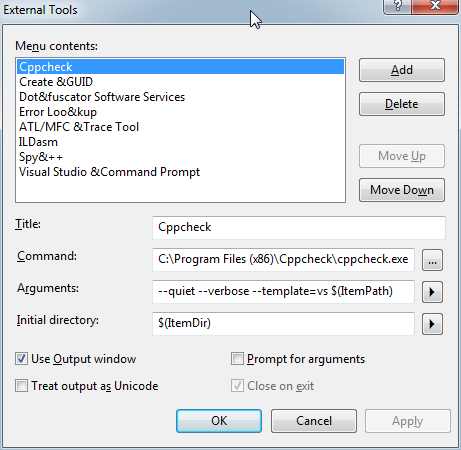
- Click the Add button
- Set the Title, for example Cppcheck
- Set Command to C:\Program Files (x86)\Cppcheck\cppcheck.exe
- Set Arguments to --quiet --verbose --template=vs $(ItemPath)
- Set Initial Directory to $(ItemDir)
- Make sure Use Output window checkbox is enabled
- Click on the Move Up button repeatedly until your entry is at the top of the list, this will make it easier to identify you new command as you can count on it being called Tools.ExternalCommand1
- Click OK.
Voila! You now have a Cppcheck entry in your Tools menu:

Use the Tool
You can now use select the Cppcheck menu entry any time you want to run Cppcheck on a file. The cool thing about the --template=vs switch is that you can click on a Cppcheck error and Visual Studio will automatically take you to that line of code:
Automate Cppcheck to Run on File Save
Now that we have created a command to run Cppcheck, we can have it run automatically after a file save:
- Go to menu Tools→Macros→Macros IDE, this will bring up a the Macros IDE
- On the left hand side there should be a Project Explorer panel
- In the Project Explorer panel, double click on EnvironmentEvents module
- Insert the following code in the module:
Private Sub DocumentEvents_DocumentSaved(ByVal Document As EnvDTE.Document) Handles DocumentEvents.DocumentSaved
    If Document.Language = "C/C++" Then
        DTE.ExecuteCommand("Tools.ExternalCommand1")
        Document.Activate()
    End If
End Sub
- Now save the module, close the Macros IDE, and you're good to go
This member has not yet provided a Biography. Assume it's interesting and varied, and probably something to do with programming.



 General
  News
News  Suggestion
  Question
  Bug
Bug  Answer
  Joke
Joke  Praise
  Rant
Rant  Admin
Admin 


 Submit an article or tip


![Rose | [Rose]](https://codeproject.global.ssl.fastly.net/script/Forums/Images/rose.gif)
