Introduction
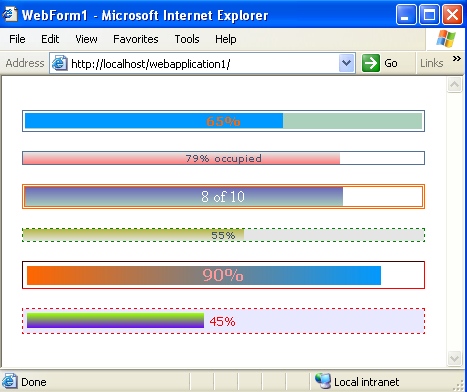
The following C# custom control will create a percentage complete color bar with a custom text in the middle. You can compare this with those of Yahoo/Hotmail, when you log into them, it shows you the percentage of space that is occupied by you out of the space that is allocated to you.
If you provide Count as 40 and FillColor as red, the cell will be 40% filled with red color. Gradient effect has also been used in this so that you can combine more than one color.
Usage
PercentageComplete.Zip has PercentageComplete.cs file. You can include this control in your controls set and then use it in your web page. I recommend you download the complete demo project to understand it better.
<%@ Page language="c#" Codebehind="WebForm1.aspx.cs"
    AutoEventWireup="false" Inherits="WebApplication1.WebForm1" %>

<Controls:PercentageComplete id="PercentageComplete2"
    runat="server" Count="65" FillColor="#0099FF" Gradient="false"
    cellspacing="2" TextFontColor="#FF6600" TextBold="true"
    TextFontSize="2" RemainingColor="#ABD0BC" />

<Controls:PercentageComplete id="PercentageComplete1"
    runat="server" Count="79" />

<Controls:PercentageComplete id="Percentagecomplete4"
    runat="server" Count="80" Text="8 of 10"
    StartColor="#6868B9" EndColor="#ABD0BC"
    BoxBorderColor="#FF6600" CellSpacing="0"
    TextFontFamily="Times New Roman"
    TextFontColor="White" TextFontSize="3"
    BorderType="double" BoxBorderWidth="3" />

<Controls:PercentageComplete id="Percentagecomplete3"
    runat="server" Count="55" StartColor="#B7B748"
    EndColor="#E5E5E5" BoxBorderColor="green"
    BgColor="#E5E5E5" BorderType="dotted" />

<Controls:PercentageComplete id="Percentagecomplete5"
    runat="server" Count="90" StartColor="#FF6600"
    EndColor="#0099FF" BoxBorderColor="Red"
    CellPadding="3" cellspacing="1" TextFontFamily="Verdana"
    TextBold="True" TextFontColor="#FF9999"
    TextFontSize="3" BorderType="inset"
    GradientVertical="True" BoxBorderWidth="1"  />

<Controls:PercentageComplete id="Percentagecomplete6"
    runat="server" Count="45" StartColor="#99FF00"
    EndColor="#6600FF" BoxBorderColor="Red"
    CellPadding="4" BgColor="#E8E8FF"
    BorderType="dashed" TextFontFamily="Tahoma"
    TextFontColor="red" TextFontSize="2" />
Note: Attribute "Count" is mandatory and it can only take numeric values.
It has lots of other attributes. If you download the sample project, you will see the various usages of these attributes.
Attributes
Count
Integer or decimal value, mandatory, which tells you how much percentage is completed.
Text
You can override the default percentage text with this, e.g., if 19% is completed, then it will show "19%" text in the middle, but you can change the text to "2 of 10" something like this.
DisplayText
By default it is true, if set to false, no text will be displayed in the middle.
BgColor
Background color, this can be overwritten by the RemainingColor.
ControlWidth
Box width, default 100%.
Cellpadding
Cellpadding of table, default is 0.
Cellspacing
Cellspacing of table, default is 0.
ControlAlignment
Box alignment in the container, by default center.
BoxBorderColor
Box border color (E.g. red, #c0c0c0).
BorderType
Box border type i.e., (solid, dashed, dotted, ridge, inset, outset).
BoxBorderWidth
Box border width i.e. (0, 1, 2.. ).
FillColor
Percentage completed color.
RemainingColor
If percentage completed is 60%, then the remaining 40% will have this color in the background, no gradient supported for the remaining color.
Gradient
By default, the gradient effect is true, set this to false and the fill color will take preference over StartColor and EndColor.
StartColor
By default gradient effect, and this is the start color of the gradient effect.
EndColor
By default gradient effect, and this is the end color of the gradient effect.
GradientVertical
By default, gradient is true and set to horizontal, but you can set it to vertical instead of horizontal (default is false).
TextFontSize
Font size of the text displayed in the middle.
TextFontFamily
Font family/face of the text displayed in the middle.
TextFontColor
Font color of the text displayed in the middle.
TextBold
Whether the displayed text in the middle should be bold or not (default false).
Output
Here, I am providing you the HTML output of this, so that any non .NET programmer can extract this and use it in his web page. I searched a lot over the internet to get this:
<table cellspacing='2' cellpadding='0'
    style='border:1 solid #547095;background-color:white' width='95%'
    align='center' ID="Table1">
<tr>
 <td width='100%' style='background-color:#ABD0BC'>
  <div style='position:absolute;background-color:#0099FF;width:65%;'
                                                      align='center'>
      <font size='2'> </font></div>
  <div style='position:relative;width:100%' align='center'>
      <font style='font-weight:bold' size='2'
                color='#FF6600' face='verdana'>65%</font>
  </div>
 </td>
</tr>
</table>
Courtesy
Please feel free to change or use this control in any manner you want, but I will appreciate if you let the author email id remain in the control file.
History
- 8th July, 2005: Initial version
License
This article has no explicit license attached to it, but may contain usage terms in the article text or the download files themselves. If in doubt, please contact the author via the discussion board below. A list of licenses authors might use can be found here.
Total 11+ years of experience in Software Development. Expertise in .net (C#, asp.net, controls making, webservice, ado.net, xml/xsl, assemblies, rational XDE etc.) also UML, Design Patterns, ASP, Javascript, VbScript, Dhtml, CSS etc.
Member of Planet-Source-Code.com, www.brainbench.com and many other and have submitted several snippets/sample applications on the web.
Email:tittlejoseph@gmail.com



 General
  News
News  Suggestion
  Question
  Bug
Bug  Answer
  Joke
Joke  Praise
  Rant
Rant  Admin
Admin 


 Submit an article or tip


