Introduction
This article explains to you how to incorporate MAPI into a document view architecture application.
Background
Sometime back I was asked to give training on document view architecture to my colleagues. So that's how I bumped into document view architecture. This got me thinking, since I had to explain to my colleagues about document view architecture in an interesting way.
This meant some cool demo application that demonstrates document view architecture.
How to enable MAPI support
Here is a screenshot of the application wizard, see the one circled in red, just click that checkbox.

Now the question is how to use MAPI. Just go to File menu and click send...
You will get a dialog similar to the following one, this one is provided by Outlook...
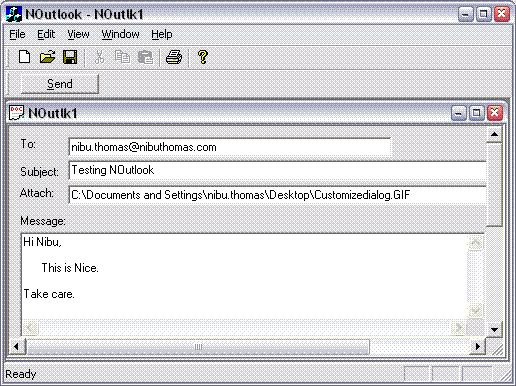
Take a look at the attached file name. It's the name of your document. What MFC does is that it creates a temporary copy of your document (internally calls CYourDocument::Serialize) by saving it to a temporary file, later on this file is deleted.
You will find code for the above process in CDocument::OnFileSendMail.
Behind the scenes
Now let's see what happens when we enable MAPI support for a document view project.
Open up your document class, you will message map macros. See what entries there are:
BEGIN_MESSAGE_MAP( CNOutlookDoc, CDocument )
ON_COMMAND(ID_FILE_SEND_MAIL, OnFileSendMail)
ON_UPDATE_COMMAND_UI(ID_FILE_SEND_MAIL, OnUpdateFileSendMail)
END_MESSAGE_MAP
Now you know how it happens. When you click on File->Send, the code in CDocument::OnFileSendMail gets executed.
You might have got an idea of what's happening. The dialog that you see when you click on File->Send is provided by Outlook.
Now open up Winword, just type in something and click on File->Send To->Mail Recipient (Attachment). You will see a similar window as we have.
Customizing default behavior
I didn't want a dialog to popup when I click on Send, since I had my own dialog and text boxes and other options. So I had to customize this behavior.
Here is the code for customizing this behavior...
void CNOutlookDoc::OnFileSendMail()
{
SetModifiedFlag( TRUE );
HINSTANCE hMail = NULL;
hMail = ::LoadLibrary( _T( "MAPI32.DLL" ));
if (hMail == NULL)
{
AfxMessageBox( AFX_IDP_FAILED_MAPI_LOAD );
return;
}
ASSERT( hMail != NULL );
typedef ULONG ( PASCAL *PFNSENDMAIL )
(ULONG, ULONG, MapiMessage*, FLAGS, ULONG);
PFNSENDMAIL lpfnSendMail = 0;
lpfnSendMail = ( PFNSENDMAIL )GetProcAddress( hMail, "MAPISendMail" );
if( lpfnSendMail == NULL )
{
AfxMessageBox( AFX_IDP_INVALID_MAPI_DLL );
return;
}
USES_CONVERSION;
MapiRecipDesc mapiRecipient;
memset( &mapiRecipient, 0, sizeof( mapiRecipient ));
mapiRecipient.ulRecipClass = MAPI_TO;
mapiRecipient.lpszName = "Nibu thomas"; m_csTo = ( "SMTP:" + m_csTo );
mapiRecipient.lpszAddress = m_csTo.GetBuffer( 0 );
MapiMessage mapiMessage;
memset( &mapiMessage, 0, sizeof( mapiMessage ));
mapiMessage.nRecipCount = 1;
mapiMessage.lpRecips = &mapiRecipient;
m_csSubject = _T( "Subject: " ) + m_csSubject;
mapiMessage.lpszSubject = m_csSubject.GetBuffer( 0 );
mapiMessage.lpszNoteText = m_csMessage.GetBuffer( 0 );
MapiFileDesc mapiFileAttachments;
memset( &mapiFileAttachments, 0, sizeof( mapiFileAttachments ));
if( PathFileExists( m_csAttachFileName ))
{
mapiFileAttachments.nPosition = (ULONG)-1;
mapiFileAttachments.lpszPathName = m_csAttachFileName.GetBuffer( 0 );
mapiFileAttachments.lpszFileName = mapiFileAttachments.lpszPathName;
mapiMessage.nFileCount = 1;
mapiMessage.lpFiles = &mapiFileAttachments;
}
int nError = lpfnSendMail(0, ( ULONG )AfxGetMainWnd()->GetSafeHwnd(),
&mapiMessage, MAPI_LOGON_UI, 0);
m_csTo.ReleaseBuffer();
m_csMessage.ReleaseBuffer();
m_csSubject.ReleaseBuffer();
if (nError != SUCCESS_SUCCESS && nError !=
MAPI_USER_ABORT && nError != MAPI_E_LOGIN_FAILURE)
{
AfxMessageBox(AFX_IDP_FAILED_MAPI_SEND);
}
::FreeLibrary( hMail );
}
MapiFileDesc structure lists the attachments that are to be sent.
MapiMessage structure lists the message that is to be sent.
MapiRecipDesc structure lists the recipients.
MapiSendMail is not the only API that's available. Just look up MAPI.h for more options.
Now you know how simple it is to customize MAPI code in document view architecture.
MAPI in a dialog
It's quite easy to do the same in a dialog. Just fill in the required fields of the above structures and then send the message using MapiSendMail. MAPI. This can be used anywhere.
Interesting ideas
I have some other interesting ideas based on MAPI. One of them is an error reporting tool, i.e. a tool that mails to you any error that occurs in your application much like a Window error reporting dialog.
MAPI provides you with interesting options.
Conclusion
Look up the above structures carefully in the docs to see what you can do. It's fairly easy to do. I will also add more on these structures as I get time.
Hope this helps you.
History
This member has not yet provided a Biography. Assume it's interesting and varied, and probably something to do with programming.



 General
  News
News  Suggestion
  Question
  Bug
Bug  Answer
  Joke
Joke  Praise
  Rant
Rant  Admin
Admin 


 Submit an article or tip


