
Introduction
This is a .NET version of Joshua Heyer's
Balloon Help. Intially, I started with building a .NET wrapper on
Josh's C++ code but soon I realized that there are advantages of rewriting
everything from scratch in C#. The primary advantage was designer support - the
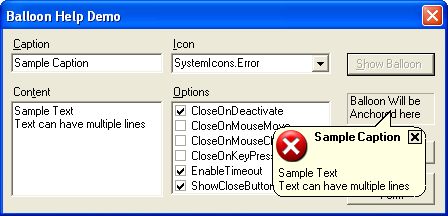
windows form designer actually shows the balloon shape in the window (as seen
in the screen shot below).
In your project you can, either:-
-
Use a form inherted from
BalloonWindow. This is useful if
you want to add your own controls to the balloon window.
-
Use
BalloonHelp class. This provides a balloon with a caption,
content, icon and a close button. This is functionally similar to Josh's
original balloon help
Using BalloonWindow Class
If you want to create your own balloon shaped windows, you can inherit from this
class. In VS.NET you can do it by adding and Inherited Form item to the project
as shown below:-
Next, select BalloonWindow as the base class for your form, in the Inheritance
picker dialog shown by VS.NET.
This will bring up a balloon shaped form in the designer and now you can design
the form as any other form. The windows form designer actually shows the
balloon window. This is something which was never available in any designer -
either the resource dialog editor of VC6 or the VB6 forms designer.
The only important property in BalloonWindow class is the
AnchorPoint
property. This is where the tail of the balloon is anchored to. This
point is always in screen coordinates. This property can be set either at the
design time or at runtime before or after the balloon is displayed. Setting
this property after the balloon is displayed automatically moves the balloon
window to a new anchor point. The following code snippet shows to anchor the
balloon to point (100, 100):-
MyBalloonForm form = new MyBalloonForm();
form.AnchorPoint = new Point(100, 100);
form.Show();
A static method AnchorPointFromControl is provided that calculates
the screen coordinates of the center point of a control. The BalloonWindow
class also provides a a ShowBalloon method that uses
AnchorPointFromControl
internally to display the balloon anchored to a control. Example:-
MyBalloonForm form = new MyBalloonForm();
form.ShowBalloon(textbox1);
Using the BalloonHelp Class
The BalloonHelp class provides functionality of Josh's original C++
balloon help class. This class has following additional properties:-
-
Caption: string
This specifies the text of the balloon caption. This is same as the Text
property of base class System.Windows.Forms.Control.
-
CaptionFont: System.Drawing.Font
Specifies the font of the balloon caption. If this is not specified a bold
variety of the Font
property is used.
-
Content: string
Specifies the text of the balloon contents.
-
Font: System.Drawing.Font
The Font property is inherited from System.Windows.Forms.Control.
It specifes the font to be used for drawing the contents.
-
ShowCloseButton: bool
Indicates whether or not to show a close button on the top right corner of the
balloon. The deafult value is false.
-
CloseOnDeactivate: bool
If this property is set to true the balloon window will close when the user
switches to a different application. The deafult value is true.
-
CloseOnMouseMove: bool
If this property is set to true the balloon window will close when the mouse is
moved. The deafult value is false.
-
CloseOnMouseClick: bool
If this property is set to true the balloon window will close when any mouse
button is clicked. The deafult value is true.
-
CloseOnKeyPress: bool
If property is set to true the balloon window will close when a key is pressed
on the keyboard. The deafult value is true.
-
EnableTimeout: bool
Sometimes, it may be required that the balloon close itself after a particular
interval. It will happen if this property is set to true. The deafult value is
false.
-
Timeout: int
This specifies the interval in milliseconds after which the balloon will close
itself. The deafult value is 5000.
-
Icon: System.Drawing.Icon
This property which inherited from System.Windows.Forms.Form specifies
the icon to use on the top left corner of the balloon.
Here is some sample code that displays the BalloonHelp window.
BalloonHelp baloonHelp = new BalloonHelp();
		balloonHelp.ShowCloseButton = true;
		balloonHelp.Caption = "Sample Caption";
		balloonHelp.Content = "A multiline\r\ncontent";
		balloonHelp.CloseOnMouseClick = false;

balloonHelp.ShowBallon(textbox1);
Conclusion
There are lot of enchancements that could be done. I plan to add some of the
following stuff:-
-
BallonErrorProvider component - something similar to the standard ErrorProvider
component in .NET.
-
BalloonHelpProvider component -something similar to the standard HelpProvider
component in .NET.
-
There are ceratin optimzations that can be done to the rendering code.
-
The balloon flickers a lot during resize in the designer. This needs to be
fixed.
Finally, thanks to Joshua Heyer for his C++ code which laid the foundation for
the code in this article.
This member has not yet provided a Biography. Assume it's interesting and varied, and probably something to do with programming.



 General
  News
News  Suggestion
  Question
  Bug
Bug  Answer
  Joke
Joke  Praise
  Rant
Rant  Admin
Admin 


 Submit an article or tip


