Click here to Skip to main content

Help File Integration in Windows Mobile Pocket PC

By , 8 Jan 2009
 

HelpIntigration

Introduction

This article is helpful for Windows Mobile, Smart Device application developers, regarding how to integrate help files programmatically to a targeted device. To develop help files, we have to follow some steps which I have described below.

The .NET Compact Framework allows users to register custom application Help files in Pocket PC's Help systems. It provides access to the Windows CE Help program using peghelp.exe, to display custom application Help files within Windows Mobile Pocket PC applications.

The Solution

How can we create and integrate a Help files in Windows Mobile Pocket PC applications? To create and integrate a help file in Windows Mobile Pocket PC applications, we will follow the steps given below:

Step 1

First, we will create a help file including the help topics that we want to show in our application. Create an HTML file using some specific tags. For example, we are creating "DEMO-HELP.htm" to be integrated as a Help file in our application.

HelpFileIntegration/html_help_file.PNG

Note: you can find a sample HTML help file to download from the top of this article.

Step 2

We now have to put this (DEMO-HELP.htm) file in our Windows Mobile Pocket PC device/emulator's \windows directory.

Step 3

Step 3 is achieved programmatically.

The Help file needs to be registered in Pocket PC 's Help File System. To install your Help file on the Pocket PC Help Systems, we have to create a shortcut file in the \Windows\Help folder. Create a shortcut to "DEMO-HELP.htm" in the \Windows\Help folder.

How to create a shortcut to "DEMO-HELP.htm"?

Create a text file on you PC and write 16#\windows\DEMO-HELP.htm to it and save this file using the same name as the Help file with a .lnk extension (DEMO-HELP.lnk). Now, you can put it in the \Windows\Help folder.

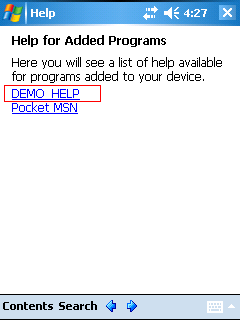
You can now check out the application Help integration successfully with the device help system. Tap Help from the Start menu. If your Help is not already displayed, choose All Installed Help from the View menu. Your Help should be included alphabetically in the list.

Code snippet for step 3

private bool CreateLinkHelpFile()
{
    bool isLinkFileCreated = false;
    try
    {
        if (!System.IO.File.Exists(LINK_HELPFILE_PATH))
        {
            System.IO.StreamWriter sw = 
                    new System.IO.StreamWriter(LINK_HELPFILE_PATH);
            sw.Write("16#" + HELPFILE_PATH);
            sw.Close();
            sw = null;
            isLinkFileCreated = true;
        }
        else
        {
            isLinkFileCreated = true;
        }
    }
    catch (Exception ex)
    {
        MessageBox.Show("Link file does not create.", "CreateLinkHelpFile");
        Close();
    }
    return isLinkFileCreated;
}

LINK_HELPFILE_PATH is a variable which is assigned with the @"\Windows\Help" folder path. And it means insert the name of the Help file by the number of characters in the path and the number sign (#). This should be the only line in the file.

protected override void OnHelpRequested(HelpEventArgs e)
{
   try
   {
       if (System.IO.File.Exists(HELPFILE_PATH))
       {
           Help.ShowHelp(this, HELPFILE_PATH);
           base.OnHelpRequested(e);
       }  
       else
       {
           MessageBox.Show("Help File Not Found", "Help Intigration");
       }
    }
    catch (Exception ex)
    {
       MessageBox.Show(ex.Message, "OnHelpRequested");
    }
}

Here, HELPFILE_PATH is a variable which is assigned with the @"\windows\DEMO-HELP.htm" HTML help file.

Points of interest

After installing the application, you are able to view the application help on your device:

HelpFileIntegration/help_show_000.PNG

HelpFileIntegration/help_show_001.PNG

HelpFileIntegration/help_show_002.PNG

HelpFileIntegration/help_show_003.PNG

Reference

License

This article, along with any associated source code and files, is licensed under The Code Project Open License (CPOL)

About the Author

PavanPareta
Software Developer (Senior)
India India
Member
Pavan is a Senior software developer, and has been in the industry since August 2005. He has experience in Windows Phone 7, Windows Mobile with Compact Framework, Python for S60, C#.NET, VB.NET, Windows Forms, ASP.NET, WCF, Silverlight, JavaScript and HTML.


Sign Up to vote   Poor Excellent
Add a reason or comment to your vote: x
Votes of 3 or less require a comment

Comments and Discussions

 
Hint: For improved responsiveness ensure Javascript is enabled and choose 'Normal' from the Layout dropdown and hit 'Update'.
You must Sign In to use this message board.
Search this forum  
    Spacing  Noise  Layout  Per page   
GeneralWindows CE 5memberjansen842127 Oct '09 - 1:07 
Hi,   I've implemented your help. This works well on Microsoft Windows CE 4.21.1088, but when I run it on Microsoft Windows CE 5 I get an NotSupportedException.   What I've done wrong?   Kind Regards, Jan
GeneralCreating a link to help filememberjansen842126 Oct '09 - 22:03 
Hi,   Thanks for this item! It's perfect for me!   I've got a question about creating the link to the help file. Why is this done by code?   I've created a cab file and I'd like that the installation creates a .lnk file in the \Windows\Help directory? I can only create...
GeneralRe: Creating a link to help filememberjansen84214 Nov '09 - 1:43 
Hi,   Isn't this item updated anymore?   Kind Regards, Jan
QuestionHow to display this help from within the application?memberyoavgur29 Sep '09 - 6:30 
Great article.   After successfully installing my help file with my application, I would like to open / display my help file also when the user chooses the "help" command in my application. Is there any way to do that?   Thanks, Yoav.
AnswerRe: How to display this help from within the application?memberPavanPareta29 Sep '09 - 19:52 
Hi Yoav,   If you are suppose to open help file of the application then you and use "OnHelpRequested" Event which is i have already mention in the article.   Pavan Pareta
GeneralRe: How to display this help from within the application?memberyoavgur29 Sep '09 - 21:43 
What I forgot to mention is that my project is not a C# project. It is a Win32 Smart Device Project, written in C++. I couldn't find a way to get access to the ShowHelp API from my code.   I'm currently trying to workaround through it by running peghelp.exe directly, but a ShowHelp API...
GeneralRe: How to display this help from within the application?memberyoavgur3 Oct '09 - 22:08 
Running peghelp.exe with "#Main_Contents" as parameter worked.
 
My new challenge is to find an equivalent for "OnHelpRequested" in a win32 Smart Device Project (not a .Net project).
Meaning, an option to act (run the peghelp.exe) when the user requests help from the start menu when the active application is my application.
Does such option exist?
 
Many thanks ahead,
Yoav.
GeneralGood stuffmemberDr.Luiji17 Aug '09 - 6:33 
Thanks a lot, very interesting! Have a 5!   Dr.Luiji   Trust and you'll be trusted.   My Blog : The Code Is Art
GeneralRe: Good stuffmemberPavanPareta26 Aug '09 - 8:45 
Hi Dr.Luiji,   Thanks so much to visit my article, Thanks so much   Pavan Pareta
Generalthe number before #memberniktana17 Feb '09 - 20:49 
hi i read that the (number before # )The numeral represents the number of characters after the number sign (#), which is followed by the full path to the file.. If you create this file manually, you must calculate the length yourself. but when i do so for your text in shortcut...
GeneralRe: the number before #memberPavanPareta17 Mar '11 - 19:41 
Hi Niktana,   It's typo, I will amend soon, Thanks for your observation. Pavan Pareta
Generalnice article butmemberRupesh Kumar Swami14 Jan '09 - 1:42 
hi pavan, This is a nice article but i think you created seperate new accounts so you could post favorable comments to yourself and vote your own article up. It looks bad   Rupesh Kumar Swami Software Developer, Integrated Solution, Bikaner (India)   My Company Award: Best...
GeneralRe: nice article butmemberPavanPareta14 Jan '09 - 17:34 
You guyz,   Swami you got wrong information about my article. I appreciate your comments keep it up, Njoy your life " />   Pavan Pareta
GeneralGood one...memberRajesh Ramachandra12 Jan '09 - 23:52 
Hi Pavan,   Nice article....
Generalgood job donememberpramodverma12 Jan '09 - 23:51 
excellent work pavan, keep it up
GeneralEfforts AppreciatedmemberAradhya Agarwal12 Jan '09 - 23:00 
I observed, you have done efforts to first create an application to explain the topic. I liked it, as I have direct reference If I wish to use such thing. Thx a ton!
GeneralRe: Efforts AppreciatedmemberPavanPareta12 Jan '09 - 23:06 
Thanks Aradhya,   for your apprication Njoy   Pavan Pareta
GeneralReally a nice Articlemember~Khatri Mitesh~12 Jan '09 - 19:22 
Nice....... Thanks 4 Really a very nice and new article.......... Mitesh   ~Khatri Mitesh khatrimitesh@hotmail.com Bikaner (Rajasthan) INDIA
GeneralIf I used compact frameworkmvpSacha Barber12 Jan '09 - 1:59 
I would think this would be quite useful.   Sacha Barber Microsoft Visual C# MVP 2008Codeproject MVP 2008Your best friend is you. I'm my best friend too. We share the same views, and hardly ever argue   My Blog : sachabarber.net
GeneralRe: If I used compact frameworkmemberPavanPareta12 Jan '09 - 3:19 
Hi Sacha Barber,   Thanks very much.   Pavan Pareta
GeneralVery interesting article!memberVesko Kolev10 Jan '09 - 3:12 
I am always happy when seeing such good explanation on an interesting topic. Such people like you are the driving force for the development of the community!   Keep up the good work!   Best regards, Vesko Kolev Team Leader, .NET Development http://veskokolev.blogspot.com[^]
GeneralRe: Very interesting article!memberPavanPareta12 Jan '09 - 3:19 
Hi Vesko Kolev,   Thanks very much.   Pavan Pareta
GeneralHelp file integrationmemberyuvraj.raj10 Jan '09 - 0:39 
nice article. it has really helped me.
GeneralRe: Help file integrationmemberPavanPareta12 Jan '09 - 3:54 
Hi yuvraj.raj,   Thanks for your feed back.   Pavan Pareta
GeneralhimemberRavenet10 Jan '09 - 0:20 
nice work, it's was very help to me.   thank you for your effort.   keep on future   Cheers,Earn and Enjoy RRave MCTS,MCPD http://ravesoft.blogspot.com    

General General    News News    Suggestion Suggestion    Question Question    Bug Bug    Answer Answer    Joke Joke    Rant Rant    Admin Admin   

Permalink | Advertise | Privacy | Mobile
Web02 | 2.6.130516.1 | Last Updated 8 Jan 2009
Article Copyright 2009 by PavanPareta
Everything else Copyright © CodeProject, 1999-2013
Terms of Use
Layout: fixed | fluid