|
|
 Prize winner in Competition
"Best VB.NET article of January 2009"
Comments and Discussions
|
|
 |
|

|
Hi,
I tried your program, but 'Display settings' doesn't function.
Are there for Vista other parameters?
I wanted to go to the window control panel-adjustment-display, but when I use the button nothing happened.
regards-
Dietrich
|
|
|
|

|
Add these three lines under Class frmUtilities
Public Declare Function WinExec Lib "kernel32" Alias "WinExec" (ByVal lpCmdLine As String, ByVal nCmdShow As Long) As Long
Public Const SW_NORMAL As Long = 1
Dim strSysPath As String = Environment.GetFolderPath(Environment.SpecialFolder.System)
Then goto the btnDisplaySettings_Click() event and remove the contents inside and replace it with this...
WinExec(strSysPath & "\control.exe desk.cpl,Settings,@Settings", SW_NORMAL)
THNX for pointing this out...
Hope this helps
Regards
rspercy
1 + 1 = 186,440....Depending on the species.
|
|
|
|

|
Oh, thank you very much for the very fast answer!!
It functions now.
Can you tell, what other parameters you can use at:
...desk.cpl,............
And have you any idea, how I can program, that a secondary screen, numbered '2', should be moved from the right side of the desk to the left side?
(this I need, because Vista doesnt hold this setting!)
regards-
Dietrich from Salzburg/Austria
PS. I saw, that you are retired and learn about VB. Great idea! I'm not retired yet but of the good vintage of 1948...
|
|
|
|

|
Give me your e-mail address and I'll send you an extensive list on all the control panel applets
rspercy
1 + 1 = 186,440....Depending on the species.
|
|
|
|

|
Nice article with Windows 7 now in beta. Consider putting filename and arguements in .Tag property of button...
cmButton001.Tag = "rundell.exe|param1, param1"
then you have generic handler like so.
cmButton001_Click (..) Handles cmButton001.Click,cmButton002.Click,cmButton003.Click,cmButton004.Click
dim s() as string
s=sender.tag.tostring.split("|")
p.filename= s(0)
p.arguements=s(1)
Also, try some groupboxes, they are in tool box.
|
|
|
|

|
Have already done that. The article is in the February VB.NET Best Article.
"Access Control panel Apps in 2 clicks". I have also re-did this program with a Lisview and some buttons in a scrolling Panel. I also did it in a system tray utility. I have not put them on CodeProject as of yet. I am currently working on a DirectX AVI Player.
THNX 4 The Comment
Regards, rspercy58
rspercy
1 + 1 = 186,440....Depending on the species.
|
|
|
|

|
Did you code each button click event? You could have used one event to handle all the button click events. The handles clause at the end of a sub caters for this.
i.e
Private Sub btnAddRemove_Click(ByVal sender As System.Object, ByVal e As System.EventArgs) Handles btnAddRemove.Click,Handles btnContAdvisor.Click
if sender.name = "btnAddRemove" then
fileArgs = "shell32.dll,Control_RunDLL appwiz.cpl,,0"
ElseIf sender.name = "btnContAdvisor.Click" Then
fileArgs = "msrating.dll,RatingSetupUI"
...
End if
cmdProcess.StartInfo.Arguments = fileArgs
cmdProcess.StartInfo.WorkingDirectory = path
cmdProcess.StartInfo.FileName = "RunDll32.exe"
cmdProcess.Start()
cmdProcess.WaitForExit()
Me.Focus()
Me.Show()
End Sub
Then in one sub you all you would have to do is change the 'fileArgs' value. sender.name would give you which button was clicked.
|
|
|
|

|
I just tried this, It cuts out a lot of code. Works great. THNX. I am new to VB, only been programming on and off for about 6 - 7 months now and am learning as I go. Once again, A BIG THANK YOU.
rspercy
1 + 1 = 186,440....Depending on the species.
|
|
|
|

|
Didnt know some of these existed. Keep up the good work.
|
|
|
|

|
Good work, keep them coming.
cheers,
Donsw
My Recent Article : Optimistic Concurrency with C# using the IOC and DI Design Patterns
|
|
|
|

|
I just finished a new version of this app with a new UI. It has a MDI Parent form w/ 6 MDIchild forms categorized. The first 5 forms are the most commonly used apps and the CompleteList form Is a complete list of all the control panel apps. I cant upload it as it exceeds the upload limit. It is 8.18 meg in size because of all the jpeg files that are used in picture boxes.
If you would like to examine it, please leave your e-mail and I will upload it to you.
THNX everyone for such a good response to this article, over 4000 views in 4 days.
rspercy
1 + 1 = 186,440....Depending on the species.
|
|
|
|

|
Hi. Nice program. I have one issue though that you may want to address; you have hardcoded the path to the windows system directory. This is ok if the user has indeed installed windows on the C: drive. However, in the case of a dual boot configuration it cannot be guaranteed that the system folder will reside on C:. I have a threeway boot configuration of XP, Vista, and Windows 7beta, all on different partitions.
There is an article at this URL http://vbnet.mvps.org/index.html?code/system/windirs.htm[^] that explains how to obtain the current system folder path. Please do not think that I am trying to insult your intelligence if you already know how to find the system folder.
I was always told that whenever I wrote program code "never assume anything with regard to the users' setup configuration as there will always be one user who has altered their configuration from the norm."
|
|
|
|

|
I think I know what you are talking about. Code would look something like this...WinExec("%windir%\system32\control.exe ........", SW_NORMAL)
rspercy
1 + 1 = 186,440....Depending on the species.
|
|
|
|

|
I do not use VB myself, but it appears to me that the method used in the linked article is for pre-VB.NET versions of the language (it was originally written 12 years ago) while the project in this article is a modern VB.NET project. In VB.NET, I assume Environment.GetFolderPath(Environment.SpecialFolder.System) is the most simple way to retrieve the path to the system folder.
|
|
|
|

|
Yes, you are correct. I have just tried your method and it works fine. I'm relatively new to VB.net and consequently didn't know the environment class existed.
|
|
|
|

|
I am creating a new version with all control panel apps in it. I have the most used categorized and the last one is all the apps. I will have to try this.
THNX for the tip.
rspercy
1 + 1 = 186,440....Depending on the species.
|
|
|
|

|
If you use this code Dim path As String = Environment.GetFolderPath(Environment.SpecialFolder.System) inplace of Dim path As String = "C:\windows\system32\" this will solve the potential hardcoded path problem.
One other thing I noticed in your code that is unnecessary is in your msgbox answer code. You are converting an integer return value to a string ans = CStr(MsgBox("Are you sure you want to delete these files?", MsgBoxStyle.YesNo, "Ready to Delete Files?")) and then converting that string to a double to check the return value; If CDbl(ans) = vbYes Then
This isn't needed. the easiest way to do this is either to declare ans as an integer because that is what the msgbox function returns and compare this to vbYes; see this link http://msdn.microsoft.com/en-us/library/139z2azd(VS.80).aspx[^] Or to do an explicit comparison without declaring the ans variable.
So your code would look like this in the first example
Dim ans As Integer
....
....
....
Private Sub btnDeleteTIF_Click(ByVal sender As System.Object, ByVal e As System.EventArgs) Handles btnDeleteTIF.Click
ans = MsgBox("Are you sure you want to delete these files?", MsgBoxStyle.YesNo, "Ready to Delete Files?"))
If ans = vbYes Then
fileArgs = "InetCpl.cpl,ClearMyTracksByProcess 8"
cmdProcess.StartInfo.Arguments = fileArgs
cmdProcess.StartInfo.WorkingDirectory = path
cmdProcess.StartInfo.FileName = "RunDll32.exe"
cmdProcess.Start()
cmdProcess.WaitForExit()
Me.Show()
Else
MessageBox.Show("Process Cancelled!")
Exit Sub
End If
End Sub
in the second example you can do an explicit comparison using
Private Sub btnDeleteTIF_Click(ByVal sender As System.Object, ByVal e As System.EventArgs) Handles btnDeleteTIF.Click
If MsgBox("Are you sure you want to delete these files?", MsgBoxStyle.YesNo, "Ready to Delete Files?") = vbYes Then
fileArgs = "InetCpl.cpl,ClearMyTracksByProcess 8"
cmdProcess.StartInfo.Arguments = fileArgs
cmdProcess.StartInfo.WorkingDirectory = path
cmdProcess.StartInfo.FileName = "RunDll32.exe"
cmdProcess.Start()
cmdProcess.WaitForExit()
Me.Show()
Else
MessageBox.Show("Process Cancelled!")
Exit Sub
End If
End Sub
There is also no need for the Exit Sub statement in the Else clause. The Sub will be exited after the Messagebox.Show statement anyway. You would only need the Exit Sub if you were doing more processing after the Endif statement and didn't want this to be processed once the logic was inside the else clause.
Regards, Paul
|
|
|
|

|
THNX. I am fairly new to VB. I have been programming for about 6 months now. I am learning by doing as I dont have any books on the subject. I visit this site quite often for info.
I have redone the program and I implimented the Environment.GetFolderPath(...) in the program and it added 3.2 meg to my program. Now, I cannot upload it to the site because it is now to big. The site only allows 6.0 meg and my program is 7.312 megs.
I did a real nice job on it too. I also added ...
(If MsgBox("Are you sure you want to delete these files?", MsgBoxStyle.YesNo, "Ready to Delete Files?") = vbYes Then...) this code you that you left and it works a lot better. The Environment.GetFolderPath(...) is also a lot faster.
Once again, THNX for the Lesson.
rspercy
1 + 1 = 186,440....Depending on the species.
|
|
|
|

|
No problem. If you want to email me your email address I can send you an eBook on VB.net programming which may be useful to you. You can always email me a copy of your new source code as well; I'd be interested in seeing how you've implemented the changes. My email address is paulwilcox@ymail.com. This is my public email address.
|
|
|
|

|
THNX. I'll zip it up and send you the code.
rspercy
1 + 1 = 186,440....Depending on the species.
|
|
|
|

|
something must be wrong.. An with only buttons for an interface should never be 6MB.
I have some very sophisticated apps full of graphics that are only 2MB. Are there other screens besides the one shown for a screenshot or other reasons it is so big?
Shane
|
|
|
|

|
My other app is 9.23 meg in size because of the Environment Class. It added 3.3 meg to the app. This app how ever is only 250+ kb's
rspercy
1 + 1 = 186,440....Depending on the species.
|
|
|
|

|
I gave you a 5 for the concept. Vista can be a pain in the ass when it comes to finding things like utilities in the user interface. There are a whole lot of different approaches one can take in a "launcher" application like this. But guys who see a problem and think of a concept solution get a 5 from me (even if the UI is ugly for now
|
|
|
|

|
THNX for the globes. I am currently designing a new UI with 100+ commands or about 90% of the control panel. All commands are being put into categories using the WinExec() Function. I found this to be more stable.
Once again THNX.
rspercy
1 + 1 = 186,440....Depending on the species.
|
|
|
|

|
Baaaaad interface, totaly ugly
|
|
|
|

|
It is for educational purposes, not for looks.
rspercy
1 + 1 = 186,440....Depending on the species.
|
|
|
|

|
5/5 Useful Stuff
Thanks and Regards,
prasad
|
|
|
|

|
THNX for the globes. I am currently redoing this project. I am putting everything into categories. I am adding dual monitor commands depending on what type video card you have, and alot more. Once again, THNX.
rspercy
1 + 1 = 186,440....Depending on the species.
|
|
|
|

|
It would be more useful to me if the commands were grouped, e.g. Control panel, Internet, security, network, general. Also being able to remove unwanted commands would then give a list of easier to find useful commands. At the moment there's just a bit too many to find the ones I'd like to use.
Jon
|
|
|
|

|
That is an excellent Idea. I will do this and let you know when it's done.
THNX. All comments are appreciated, Ideas especially.
rspercy
1 + 1 = 186,440....Depending on the species.
|
|
|
|

|
This application gives me an idea for something similar in concept, but which might be more useful and versatile: a tray icon with easily-configurable pop-up menu that could hold any desired applications, preferably with support for nesting items. I wouldn't want to steal your thunder by producing such a thing without acknowledging where the idea of building such a mini-utility came from. What do you think?
BTW, while some people might think it old and clunky, I'm a fan of text-file-based configuration. It makes it easy to apply systemic changes to a collection of options, and it's generally easy to implement.
|
|
|
|

|
Thats a fantastic Idea. I am currently giving the program a new face lift. Adding alot more commands, dual monitor commands, you get the idea and along with having it sit in the sys-tray.
rspercy
1 + 1 = 186,440....Depending on the species.
|
|
|
|
|

|
THNX Sam. I redid the program. PLZ redownload it.
rspercy
1 + 1 = 186,440....Depending on the species.
|
|
|
|

|
OK, will do.
A few of the calls did not work on my system (Vista64), but I have not yet investigated to determine why.
Others I was not familiar with, so your program has good educational value in addition to the utility!
|
|
|
|

|
I fixed the Internet Options click event. There was some typo's that had to be taken care of. And there was some message boxes added. And i disabled the Open With Dialog button as it had no use in that type of program. All you get is a message box when you click on it. Once again, THNX Sam.
rspercy
1 + 1 = 186,440....Depending on the species.
|
|
|
|
 |
|
|
General News Suggestion Question Bug Answer Joke Rant Admin
|
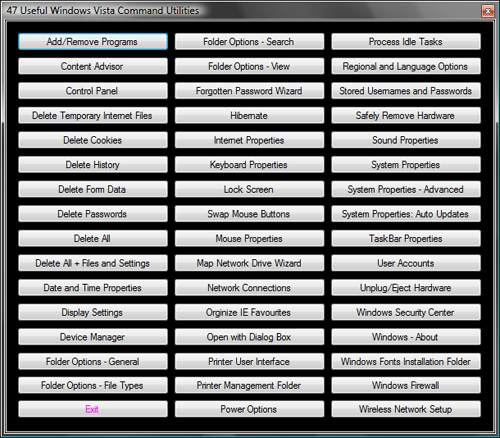
47 of the most used Vista apps are just 1 click away. NOTE: Vista users only.
| Type | Article |
| Licence | CPOL |
| First Posted | 25 Jan 2009 |
| Views | 48,099 |
| Downloads | 403 |
| Bookmarked | 63 times |
|
|
