 |
|
 |
10 seconds seems a bit excessive..? Honestly, I was still learning .NET when I wrote this article over 3 years ago, so I'd recommend using Uwe Keim's code instead of mine. His code is much more up-to-date and easier to use. I'd be curious to know if you are still incurring the latency issue, so let me know. Thanks!
|
|
|
|
 |
|
|
 |
|
 |
Actually it's -- http://www.codeproject.com/csharp/ZetaImpersonator.asp
|
|
|
|
 |
|
|
 |
|
 |
Hi,
Is it possible to contain impersonation to a given AppDomain rather than
impersonation consuming the full process?
I have a service running under the local system account, but need to
impersonate the current user for some functionality (e.g. accessing the
current users network share). However I don't want the full service to
change it's access rights. I can spawn a seperate process (which
impersonates a specifed user) but this therefore consumes more memory.
My service needs to run as the Local System account (not a specified account
particular to the domain).
Any ideas?
Thanks
Chris
|
|
|
|
 |
|
 |
Hi,
Even i have the same query..
I also want to impersonate a user (i'hav his credentials) from inside a service running under local system account so that i can access "Mapped Drives" that are mapped in the context of the user whom i want to impersonate.
I gave several experiments to this.. like trying and get the UNC name from the mapped name using WNet APIs but no results..
FYI: I can easily access network shares (using UNC names) to which i had access to. But couldnot access mapped drives.
Reason i'm aware of, that drives are mapped on a per user basis i.e. i cannot see a drive mapped in some another user's account.
But there must be some workaround.. like impersonating.. (but that too did not help..
If someone has a diffenent vision.. pls let us know..
Love,
TJ
|
|
|
|
 |
|
 |
Here you go...
public class NetworkHelper {
// Used to Map UNC from a Windows Service
#region Constants
//NetResource Scope
private const int RESOURCE_CONNECTED = 0x00000001;
private const int RESOURCE_GLOBALNET = 0x00000002;
private const int RESOURCE_REMEMBERED = 0x00000003;
//NetResource Type
private const int RESOURCETYPE_ANY = 0x00000000;
private const int RESOURCETYPE_DISK = 0x00000001;
private const int RESOURCETYPE_PRINT = 0x00000002;
//NetResource Usage
private const int RESOURCEUSAGE_CONNECTABLE = 0x00000001;
private const int RESOURCEUSAGE_CONTAINER = 0x00000002;
//NetResource Display Type
private const int RESOURCEDISPLAYTYPE_GENERIC = 0x00000000;
private const int RESOURCEDISPLAYTYPE_DOMAIN = 0x00000001;
private const int RESOURCEDISPLAYTYPE_SERVER = 0x00000002;
private const int RESOURCEDISPLAYTYPE_SHARE = 0x00000003;
private const int RESOURCEDISPLAYTYPE_FILE = 0x00000004;
private const int RESOURCEDISPLAYTYPE_GROUP = 0x00000005;
//Flags
private const int CONNECT_UPDATE_PROFILE = 0x00000001;
private const int CONNECT_UPDATE_RECENT = 0x00000002;
private const int CONNECT_TEMPORARY = 0x00000004;
private const int CONNECT_INTERACTIVE = 0x00000008;
private const int CONNECT_PROMPT = 0x00000010;
private const int CONNECT_NEED_DRIVE = 0x00000020;
#endregion
#region NetResource Structure
[StructLayout(LayoutKind.Sequential)]
private struct NetResource {
public int Scope;
public int Type;
public int DisplayType;
public int Usage;
public string LocalName;
public string RemoteName;
public string Comment;
public string Provider;
}
#endregion
#region Win32 Functions
[DllImport("mpr.dll", EntryPoint = "WNetAddConnection2A", CharSet = CharSet.Ansi, SetLastError = true)]
private static extern int WNetAddConnection2A(ref NetResource netresource, string password, string username, int flags);
[DllImport("mpr.dll", EntryPoint = "WNetCancelConnection2", CharSet = CharSet.Ansi, SetLastError = true)]
private static extern int WNetCancelConnection2(string drivename, int flag, bool force);
#endregion
myLib lib = new myLib();
public bool WNetAddConnection(string LocalDrive, string NetworkFolderPath, string User, string Password, bool Force) {
bool success = false;
try {
NetResource netresource = new NetResource();
netresource.Scope = RESOURCE_GLOBALNET;
netresource.Type = RESOURCETYPE_DISK;
netresource.Usage = RESOURCEUSAGE_CONNECTABLE;
netresource.DisplayType = RESOURCEDISPLAYTYPE_SHARE;
netresource.LocalName = LocalDrive;
netresource.RemoteName = NetworkFolderPath;
netresource.Comment = "";
netresource.Provider = "";
int Flag = CONNECT_UPDATE_PROFILE;
if (Force) {
success = WNetCancelConnection(LocalDrive, true);
}
int result = WNetAddConnection2A(ref netresource, Password, User, Flag);
if (result > 0) {
throw new System.ComponentModel.Win32Exception(result);
}
success = true;
}
catch (Exception e) {
lib.Echo("Error: " + e.Message, myLib.MsgType.FAIL);
}
return success;
}
public bool WNetCancelConnection(string LocalDrive, bool Force) {
bool success = false;
try {
int result = WNetCancelConnection2(LocalDrive, CONNECT_UPDATE_PROFILE, Force);
if (result > 0) {
throw new System.ComponentModel.Win32Exception(result);
}
success = true;
}
catch (Exception e) {
lib.Echo("Error:" + e.Message, myLib.MsgType.FAIL);
}
return success;
}
}
|
|
|
|
 |
|
 |
Hi guys,
i need ur help on the impersonation when accessing the network share drive.
here's the scenario:
I have 3 file servers in windows domain which are f1.domain.local, f2.domain.local, f3.domain.local
for user with the PC not joining to the domain, every time they try to access the the file server they'll need to login into each server with the same credential. I found that rather annoying and would like to write a simple app that would do the job.
the above impersonation code works only on user account reside in the local machine, is there anyway i would be able to do impersonation while the user account reside in the domain. also trying to login into three file servers.
Regards,
Godwin
|
|
|
|
 |
|
 |
You might want to review this with an eye to coding style. For example:
IntPtr pExistingTokenHandle = new IntPtr(0);
IntPtr pDuplicateTokenHandle = new IntPtr(0);
pExistingTokenHandle = IntPtr.Zero;
pDuplicateTokenHandle = IntPtr.Zero;
...would be better written as:
IntPtr existingTokenHandle = IntPtr.Zero;
IntPtr duplicateTokenHandle = IntPtr.Zero;
The coding guidelines suggest not using Hungarian notation. It is sometimes a hard call to make when dealing with interop code, but I find it is clearer without the prefixes. In this case, the correct Hungarian prefix would be "h" (as in hExistingToken) anyway - the variable is not a pointer to a handle, it is a handle.
There is no point in initializing the IntPtr only to immediately set it again to the same value.
Some of the conditionals could be written in a clearer way:
if (sDomain == "")
...is correct, but the preferred idiom (for performance reasons) is:
if (domain.Length == 0)
Similarly, comparing against a boolean obscures that is going on:
if (false == bImpersonated)
...is clearer written as:
if (!impersonated)
I'm not sure that the point of the catch clause is - it doesn't appear to have any effect, and would be better to simply remove it:
catch (Exception ex)
{
throw ex;
}
Andy
|
|
|
|
 |
|
 |
Andy Neilson wrote:
I'm not sure that the point of the catch clause is - it doesn't appear to have any effect, and would be better to simply remove it:
catch (Exception ex)
{
throw ex;
}
This has the effect that you are loosing the most important part of the stack trace! So if you need to catch an exception for clean up/rollback purpose only then I highly recommend to rethrow the exception like that:
catch(Exception)
{
throw;
}
That's btw the only way how you can rethrow an exception.
cu
Max
"You can always improve your chances of writing
bug-free code by writing code that doesn't do anything"
Rob Macdonald, Serious ADO
|
|
|
|
 |
|
 |
I understand the difference between the two forms of throw statement, but I don't see why that catch clause is there at all. You aren't handling the exception in the catch clause, and any cleanup is dealt with in the finally clause. Just using a try-finally (i.e., without the catch) is simpler.
Andy
|
|
|
|
 |
|
 |
Andy Neilson wrote:
I understand the difference between the two forms of throw statement
I don't doubt that, Andy! I only wanted to emphasise the difference in the context of the article.
Andy Neilson wrote:
but I don't see why that catch clause is there at all
The only one who knows is probably the author itself...
Max
"You can always improve your chances of writing
bug-free code by writing code that doesn't do anything"
Rob Macdonald, Serious ADO
|
|
|
|
 |
|
|
 |
|
 |
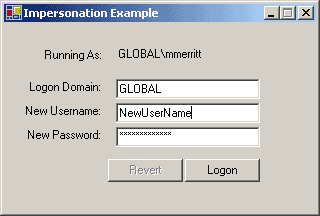
Just curious, but what is your contribution to this topic? First off, it was not copied verbatim - there is an actual Windows Form front-end to the code.
|
|
|
|
 |
|
 |
I'm sorry, Marc, maybe I wasn't clear. Yes, I am aware that your code wasn't copied verbatim. The point of my post was, rather, that the part of your code in question relevant to the other posts on this topic was, indeed, copied verbatim and skimmed down.
See, others were commenting on your poor programming style. I, in your defense, said that it wasn't your style, but rather the fact that you cut stuff out and didn't rewrite the code you left in. I'm terribly sorry for taking the time to speak in your defense on your behalf. Please accept this apology.
-Jahava
|
|
|
|
 |
|
 |
Jahava,
It was silly of me to jump to the conclusion that you were critizing me, sorry. Yes, much of the code I copied from the MS example, then added a front-end to it. I'm going to update the code to give it proper C# style, and maybe another enhancement or two.
-Marc
|
|
|
|
 |
|
 |
I enjoyed your code, and, in fact, used it myself as a basis for some testing on impersonation functionality. Nothing wrong with copying from Microsoft, sometimes they're the only ones who know how to do things
Anyway, I'm sorry if you read my commentary as criticism ... please note that I have nothing but respect and appreciation for people who take their own time to write up articles for the public. Thanks for the article and the reply; I appreciate it.
-Jahava
|
|
|
|
 |
|
 |
That form of try/catch usually helps with debugging...
|
|
|
|
 |
|
 |
Hi,
if you change theses lines
int nErrorCode = Marshal.GetLastWin32Error();
sResult = "LogonUser() failed with error code: " +
nErrorCode + "\r\n";
to something like that:
Win32Exception ex=new Win32Exception();
sResult="LogonUser() failed: " + ex.Message;
then you get a more detailed error description. That's IMHO better than an error code.
cu
Max
"You can always improve your chances of writing
bug-free code by writing code that doesn't do anything"
Rob Macdonald, Serious ADO
|
|
|
|
 |
|
 |
just to complete your point.
when catch the last win32 error, instantiating a new instance of
Win32Exception and pass in the error code to get detailed message.
so the code should be:
Win32Exception ex=new Win32Exception( Marshal.GetLastWin32Error() );
sResult="LogonUser() failed: " + ex.Message;
for more information, visit:
http://msdn.microsoft.com/library/en-us/cpref/html/frlrfSystemComponentModelWin32ExceptionClassTopic.asp?frame=true
|
|
|
|
 |
|
 |
oops, I checked again. you don't need to explicitly pass in the last error code.
new Win32Exception() will automatically do that.
sorry if I misled.
|
|
|
|
 |
|
 |
cu
Max
"You can always improve your chances of writing
bug-free code by writing code that doesn't do anything"
Rob Macdonald, Serious ADO
|
|
|
|
 |
|
 |
Just to complete your article, I found following digged somewhere on msdn server, where they talk about Win Server 2003:
...the ability to impersonate is only granted to accounts with the Service SID (Network Service, Local Service, and Local System) and Administrators.
If an account is not granted this privilege and code running as that account attempts to call an impersonation function, the code will not fail, but rather return an identify token.
For impersonation to work, one or more of the following must be true:
1. The requested impersonation level is less than impersonate (that is anonymous or identify level, which should always succeed).
2. The process token has the SeImpersonatePrivilege privilege.
3. A process (or another process in the same logon session) created the token by calling LogonUser with explicit credentials. Let's be honest, if you know an account's password, then you can impersonate them too.
4. The token is for the expected user. In other words, the code is attempting to impersonate the process identity.
5. Component Object Model (COM) servers that are started by the COM infrastructure and that are configured to run under a specific account also have the Service group added to their access tokens. As a result, these services get this user when they are started. This does not apply if the COM server is marked as Activate as Activator.
The intention is to back-port this privilege to prior versions of Windows if customers feel it important to do so.
|
|
|
|
 |
|
 |
LogonUser API requires SE_TCB_NAME previlege which is not held by regular users. This restriction was removed from Windows XP onwards. But for earlier OS, the only to get impersonation working is by using LowLevel security APIs.
---
Softomatix
http://www.pardesifashions.com/Softomatix/default.aspx
|
|
|
|
 |
|
 |
You are correct, although if the process you are calling LogonUser() from has the "Act as part of the operating system" privilege, then this code should work on NT/2000.
|
|
|
|
 |
