Click here to Skip to main content
Licence 
First Posted 14 Feb 2004
Views 34,368
Bookmarked 17 times

Win Count

By | 14 Feb 2004 | Article
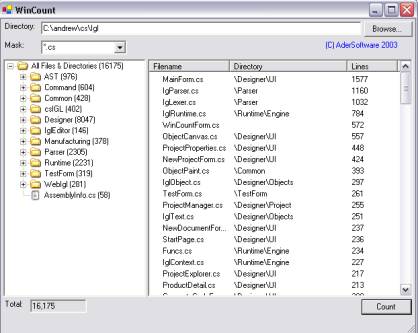
Count number of lines of code in your project.

Sample Image - WinCount.jpg

Introduction

WinCount is a little utility for measuring the number of lines of code in your program (or any number of text files in a directory). Very easy to use and install.

VS.NET setup as external tool:

Installation:

  • Just put the WinCount.exe file somewhere on your hard drive and
  • run the program by double clicking the executable.

To install in VS.NET as external tool:

  1. Go to Tools/External Tools.
  2. Click on Add button.
  3. Fill the fields as follows:
    • Name: WinCount
    • Command: Path to the winCount.exe file
    • Arguments: $(SolutionDir)
    • Initial Directory: blank (nothing at all)
  4. Click OK.
  5. Now, you can run the program by going to Tools and selecting WinCount.

License

This article has no explicit license attached to it but may contain usage terms in the article text or the download files themselves. If in doubt please contact the author via the discussion board below.

A list of licenses authors might use can be found here

About the Author

Werdna

Chief Technology Officer

United States United States

Member


Sign Up to vote   Poor Excellent
Add a reason or comment to your vote: x
Votes of 3 or less require a comment

Comments and Discussions

 
You must Sign In to use this message board. (secure sign-in)
 
Search this forum  
 FAQ
    Noise  Layout  Per page   
  Refresh
GeneralLightweight footprint; fast; 9 out of 10 PinmemberMioTEK6:45 30 May '07  
GeneralAnother issue PinmemberBill Seddon22:04 16 Apr '07  
Generalexception! Pinmembergiddy_guitarist2:55 15 Dec '06  
at line 406 :
 
System.InvalidOperationException was unhandled
Message="Cross-thread operation not valid: Control 'cmdCount' accessed from a thread other than the thread it was created on."
Source="System.Windows.Forms"
StackTrace:
at System.Windows.Forms.Control.get_Handle()
at System.Windows.Forms.Control.set_WindowText(String value)
at System.Windows.Forms.Control.set_Text(String value)
at System.Windows.Forms.ButtonBase.set_Text(String value)
at WinCount.WinCountForm.CountStart() in E:\Gid\Programming\CSharp\WinCount[source code cnt]\WinCountForm.cs:line 406
at System.Threading.ThreadHelper.ThreadStart_Context(Object state)
at System.Threading.ExecutionContext.Run(ExecutionContext executionContext, ContextCallback callback, Object state)
at System.Threading.ThreadHelper.ThreadStart()

Generalnot work PinmemberYilmaz YÖRÜK21:10 19 Jun '06  
Generalanother sample written by C#. PinmemberKingMarine17:25 27 Jan '05  
QuestionHow to count "lines of code"? Pinmemberdavecraft7:14 5 Nov '04  
AnswerRe: How to count "lines of code"? PinmemberWerdna9:36 5 Nov '04  
GeneralAdded code to clear the file list PinsussDrew Berkemeyer6:01 17 Feb '04  
GeneralAdded code to omit blank and comment lines PinsussDrew Berkemeyer5:51 17 Feb '04  
GeneralRe: Added code to omit blank and comment lines PinmemberWerdna8:24 18 Feb '04  

General General    News News    Suggestion Suggestion    Question Question    Bug Bug    Answer Answer    Joke Joke    Rant Rant    Admin Admin   

Use Ctrl+Left/Right to switch messages, Ctrl+Up/Down to switch threads, Ctrl+Shift+Left/Right to switch pages.

Permalink | Advertise | Privacy | Mobile
Web03 | 2.5.120529.1 | Last Updated 15 Feb 2004
Article Copyright 2004 by Werdna
Everything else Copyright © CodeProject, 1999-2012
Terms of Use
Layout: fixed | fluid
