
Using the new ATL CString class to read XML files via MSXML


3.00/5 (2 votes)
Apr 20, 2001
4 min read

100317

1040
A simple application that reads an XML file using MSXML and the new ATL/MFC shared CString class
Background
This project and article started when trying to write a sample
application that used the new _ATL_DEBUG_INTERFACES macro. I ran
into a brick wall though because the _com_ptr_t template does not
currently support the macro in VS.NET Beta1 and does not work on
already compiled interfaces. So I had an almost complete application,
which I didn't want to just throw away. I decided that I would finish
it off and try to use the new CString classes.
What Should I Get From This
It was my goal that you would get some useful information about using
the IXMLDOM* interfaces, some usage of the CString class for ATL, using
ATL Support in a console application, and some exposure to what the
namespaces are in the .NET framework.
.NET Namespaces Sample
The .NET Namespaces application is pretty straightforward. It loads
an XML file called Namespaces.XML into an IXMLDOMDocument smart pointer.
It then gets the document element from the DOMDocument pointer and then
parses the remaining tree. As the application is parsing the tree it is
producing a list of the namespaces as their hierarchy defines in the XML
document. When a Namespace element is encounter it gets the
Name attribute value and appends that to the parent's path
and displays it. If a Namespace node does not contain children
Namespace nodes it will then obtain the text of the node and
display that appended to the parent path, if it has length. This signifies
that the Namespace has more Namespaces contained within but
was not defined in the XML Document.
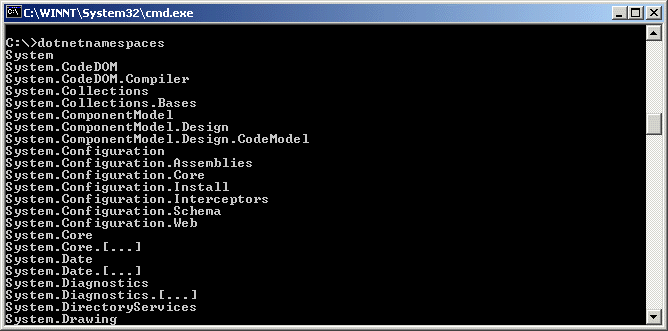
Figure 1: Output from DotNetNamespace.exe
Namespaces.XML
Below is the layout of the Namespaces XML file and from which the application drives it implementation.
<?xml version="1.0"?>
<Namespaces>
    <Namespace Name="System">
        <Namespace Name="CodeDOM">
            <Namespace Name="Compiler"/>
        </Namespace>
        <Namespace Name="Collections">
            <Namespace Name="Bases"/>
        </Namespace>
        <Namespace Name="ComponentModel">
            <Namespace Name="Design">
                <Namespace Name="CodeModel"/>
            </Namespace>
        </Namespace>
        <!-- ... SNIPPED ... -->
        <Namespace Name="Core">[...]</Namespace>
        <!-- ... SNIPPED ... -->
    </Namespace>
</Namespaces>
DotNetNamespace.CPP
I thought I would take a paragraph and describe some of the CString usage
and the problems I encountered with it while trying to develop the application.
Below we can see that we are using the CAtlStringW to define the name of the
xml file we are working with. We then pass it in as an argument to the load
method of the XMLDOMDocument object, which is first wrapped in a <code>_variant_t object.
If it loads we continue else we write to standard out that we were unable to
load the file. One problem that was encountered here when writing to the output
stream was that the PCXSTR operator that exists on the CString object
(according to MSDN
documentation and example) doesn't work. If you try to use it it will compile
with errors saying the identifier is undefined. But if you use GetString which
returns a PCXSTR it works. Hopefully this will be fixed in Beta2. There may be
an include file that is necessary but I didn't take the time to look since
GetString works I figured the PCXSTR should be available and defined.
LoadAndParse().
// build path to tip of the day xml file
CAtlStringW strFileName("Namespaces.xml");
VARIANT_BOOL vbLoaded = VARIANT_FALSE;

// Load the XML file.
hr = ptrNamespacesXML->load(_variant_t(strFileName), &vbLoaded);
if (SUCCEEDED(hr) && vbLoaded == VARIANT_TRUE)
{
    // ... Code Snipped
}
else
{
    wcout << L"Problem: Unable to load, " << strFileName.GetString() << endl;
    // *** PCXSTR is undefined so must use GetString in Beta1
    //wcout << L"Problem: Unable to load, " << (PCXSTR)strFileName << endl;
}
Next we show some of the new methods that you can use to help build strings up more easily.
By using the AppendFormat method you can make your code more readable and let
the template class do the work involved for you while saving on the code you have to generate.
Again, we use the GetString method as for the reason described above in the last segment.
DisplayNamespaces(), taken from just after getting the Name attribute from the Namespace node.
// ... Code Snipped
BSTR bstrName = NULL;
hr = ptrName->get_text(&bstrName);
if (SUCCEEDED(hr) && bstrName)
{
    if (strPath.GetLength() == 0)
    {
        strPath = bstrName;
    }
    else
    {
        strPath.AppendFormat(L".%s", bstrName);
    }
    SysFreeString(bstrName), bstrName = NULL;
    wcout << strPath.GetString() << endl;
}
// ... Code Snipped
If we wanted to we could have used the MakeUpper or MakeLower methods of the
CString class
to convert the namespace to a certain standard just incase if a capital letter was
interjected into the namespace name accidentally in the XML Document. To do this we
would modify the above snippet to look like the following.
// ... Code Snipped
BSTR bstrName = NULL;
hr = ptrName->get_text(&bstrName);
if (SUCCEEDED(hr) && bstrName)
{
    if (strPath.GetLength() == 0)
    {
        strPath = bstrName;
    }
    else
    {
        strPath.AppendFormat(L".%s", bstrName);
    }
    SysFreeString(bstrName), bstrName = NULL;
    strPath.MakeUpper();    // "System.CodeDOM" --> "SYSTEM.CODEDOM"
    wcout << strPath.GetString() << endl;
}
// ... Code Snipped
We could have also gotten tricky and called the MakeReverse method, which would have reversed
the string for us and then wrote the string out and everything would be read backwards from
right to left.
Excercises Left For The Reader
While The Namespaces.xml file is started, it is far from complete.
If you want to take it farther, you could build out the Namespaces.XML
file to include the other additional namespaces and classes contained
within the namespaces. You could also build out the tree to show the
number of children contained within each level of a namespace. Building
this into the existing applicaiton will develop your experience with the
IXMLDOM* Interfaces and the CAtlString (CString) class. The application and
XML file could be even further extended to show descriptions of what each
namespace's purpose is in a UI based application.